Page 2 - Please visit
Need help? Please visit www.philips.com/usasupport where you can access to a full set of supporting materialssuch as user manual, flash tutorial, the latest softwareupgrades and answers to frequently asked questions.Or call our Customer Care Helpline, 1-888-744-5477 where our professional support te...
Page 4 - Contents
i Contents EN Welcome ......................................................... 1 About your new player ..........................................................................................1Accessories ................................................................................................
Page 6 - Welcome; About your new product; Accessories
Welcome About your new product With your newly purchased product, you can enjoy the following: - MP3 and WMA playback - Picture viewing- FM radio*- Recording: Voice, FM*, line-in * For more information on any of the above features, see "Detailed operation" on page 23 of this manual. Accessor...
Page 7 - Optional accessories; Register your product; More information
2 Optional accessories The following accessories are not included with your player, but can be bought separately. You can find themat www.philips.com/GoGearshop (Europe) or www.store.philips.com (US). Docking cradle Dock and connect the player to your stereo system for music sharing GoGear control c...
Page 8 - Transfer; Enjoy; Powering on and off; Reset
4 5. System requirements: - Windows® XP (SP 1 or above) - Pentium Class 300 MHz processor or higher- 128 MB RAM- 500 MB hard disk space- Internet connection- Microsoft Internet Explorer 6.0 or higher- USB port Lost your CD? Don’t worry, you can download the CD contents from www.philips.com/support o...
Page 10 - Using your GoGear player; Overview of controls and connections
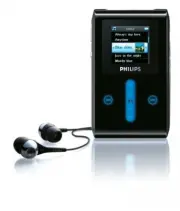
5 Using your GoGear player Overview of controls and connections Press this To y P OWER (about 3 seconds) Power on / off HOLD Lock all touch control keys 2; Play / Pause songs J( Back / Fast rewind § Select / Fast forward + VOLUME - Control volume V ERTICAL TOUCH STRIP Scroll through lists MENU Acces...
Page 13 - Music; Add songs to Windows Media Player Library
8 Organise and synchronise pictures and music with Windows Media Player This chapter describes the basic operations and steps that you need to follow to successfully transfer music andpictures to your player. For more information, please refer to Windows Media Player Help on your computer. Music Add...
Page 15 - Synchronising Windows Media Library contents with
10 6. Select the music tracks you would like to rip and click Rip Music on the top menu bar. 7. The songs are now converted into digital copies and added to Windows Media Player library. Buying songs online If you want to buy music online, you need to select a music store. 1. Click the little triang...
Page 20 - Windows Media Player Playlist
15 Windows Media Player Playlist Creating a Playlist 1. Start Windows Media Player . 2. Select Library tab. 3. Click to highlight a track. 4. Right click on the track and select Add to > Additional Playlist... 5. In the Add to Playlist dialog box, select an existing playlist or click New to add a...
Page 21 - Managing your tracks and playlists in Windows Media Player; Pictures; Enable picture support
Managing your tracks and playlists in Windows Media Player Delete Tracks from Windows Media Player library 1 . Click to highlight an item. 2 . Right click and select Delete to delete the item. Delete tracks from your player through Windows Media Player 1. Connect your player to the computer. 2. Sele...
Page 22 - Add pictures to Windows Media Player Library
17 Add pictures to Windows Media Player Library 1. Start Windows Media Player . 2. Select Library tab to access media library. 3. Click Add to Library on the bottom left corner of the screen. 4. Choose Add Folder... . 5. Select the folder in which you have kept your pictures and press OK .
Page 23 - Transfer pictures to your player
18 Transfer pictures to your player 1. Connect the player to your computer.2. Start Windows Media Player . 3. Select Sync tab. 4. In the pull-down menu on the right pane, select Philips or Philips GoGear as the destination. 5. If they are not in the list, click F5 to refresh and try again. IMPORTANT...
Page 27 - Detailed operation; Music mode; Finding your music
22 Detailed operation Music mode Your player is preloaded with some music tracks. You can transfer your digital music and picture collectionfrom your computer to your player using Windows Media Player . More information on music transfer can be found on page 8. Finding your music 1. From the main me...
Page 29 - Sound settings; Playlist on the go
24 Sound settings You can set your player to play music tracks with different EQ (equalizers) settings.1. From the main menu, select Settings > Sound Settings . 2. Use the VERTICAL TOUCH STRIP to scroll through the list of options: SRS WOW , Rock , Funk , Techno , HipHop , Classical , Jazz , Spok...
Page 32 - Rating your tracks; Now Playing; Transferring pictures to your player
27 Rating your tracks You can rate a track with 1 to 5 stars. If you want to rate the track currently playing, press MENU and select Rate . Then rate the track from 1 star to 5 stars. You can also rate a song that is not currently playing. 1. Select the song from the music library. 2. Press MENU and...
Page 33 - Finding pictures on your player
28 Finding pictures on your player Pictures on your player are organised in albums which are similar to the way they are organised in Windows Media Player . 1. When you select Pictures from the main menu you will see a list of all picture albums. 2. Select the picture album you wish to view. You wil...
Page 34 - Slideshow
29 Slideshow A slideshow will display all pictures inside an album in full view. It will automatically go to the next picture at aspecified interval. Background music can be played from a specified playlist during a slideshow. Start a slideshow 1. From the main menu, select Pictures . 2. Select the ...
Page 35 - Auto tune
30 Radio* Connect the headphone The headphone serves as a radio antenna. Make sure it is properly connected to ensure optimal reception. Select your FM region From the main menu, select Settings > Radio settings . Auto tune From the main menu, select Radio to enter radio mode. The radio will star...
Page 36 - Playing a preset radio station; Manual tuning; Saving a station as preset
31 Playing a preset radio station 1. From the main menu, select Radio to enter radio mode. 2. Press J( or § to browse your preset stations. For quick access to a certain preset station, press MENU , select Select preset and select your desired station from the list. Manual tuning 1. Tap on the botto...
Page 37 - Making MIC recordings
32 Recordings You can make voice or radio* recordings using your player. Making MIC recordings 1. From the main menu, select Recordings . 2. Select Start MIC recording to start a voice recording. 3. Your player will display the following recording screen. 4. Press J( to stop and save the voice recor...
Page 38 - Making FM recordings; Play your recording; Delete your recording
33 Making FM recordings * 1. While listening to the radio, press MENU . 2. Choose Start FM recording . 3. Press J( to stop and save the FM recording. 4. Your FM recording will be saved on your player as a PCM file (.wav extension). You can find this file under Recordings > Recordings library >...
Page 39 - Upload your recordings to the computer
34 Upload your recordings to the computer 1. Connect your player to your computer.2. Your player will be identified as Philips GoGear in Windows Explorer . 3. Go to Media > Recordings . You will find FM recordings and Voice recordings folders. 4. Drag and drop your files to any desired location o...
Page 41 - Using your player to store and carry data files
36 Using your player to store and carry data files You can use your player to store and carry data files by copying data files into the Data folder of your player via Windows Explorer . Music library settings Reset play count Reset play count for “My most played” playlist to zero Radio settings Euro...
Page 42 - Updating your player
37 Updating your player ;QWT RNC[GT KU EQPVTQNNGF D[ CP KPVGTPCN RTQITCO ECNNGF HKTOYCTG 0GY XGTUKQPU QH VJG HKTOYCTG OC[ DG TGNGCUGFCHVGT[QWJCXGRWTEJCUGF[QWTRNC[GT#UQHVYCTGRTQITCOECNNGF Philips Device Manager YKNNOQPKVQTVJGHKTOYCTGUVCVWUQH[QWTRNC[GTCPFPQVKH[ [QWKHCPGYHKTOYCTGKUCXCKNCDNG;QWPGGFCPKPV...
Page 44 - Troubleshooting; My player skips tracks; My Player is not recognised by Windows
39 Troubleshooting My player skips tracks 6JG UMKRRGF VTCEM OC[ DG RTQVGEVGF ;QW OC[ PQV JCXG UWHHKEKGPV TKIJVU VQ RNC[ VJG UMKRRGF VTCEM QP [QWT RNC[GT%JGEMVJGOWUKETKIJVUYKVJVJGUQPIRTQXKFGT My Player is not recognised by Windows /CMGUWTG[QWT2%KUTWPPKPI9KPFQYU:2 My player cannot power ON ;QWTFGXKEGD...
Page 46 - There is no Music on my player after transfer
41 7. After the repair process is completed, click OK and disconnect your player. 8. A message Updating firmware will be displayed. 9. Your player is ready for use again after restart. There is no Music on my player after transfer If you cannot find the songs that you have transferred to your player...
Page 47 - My GoGear player hangs; Poor radio reception
42 3. You may have disconnected your device too soon after the picture transfer in Windows Media Player was finished. Always wait for the Philips pop-up message to show and disappear before you disconnectyour device. 4. Are your pictures in JPEG format? Pictures in other formats cannot be transferre...
Page 48 - Safety and Maintenance; General maintenance; Hearing safety
Safety and Maintenance General maintenance To avoid damage or malfunction: - Handle your hard disk Digital Audio Player with care. Please use the protective pouch for optimal shock protection. - Do not expose the player to excessive heat caused by heating equipment or direct sunlight.- Do not drop y...
Page 51 - Technical data
46 Technical data * Battery life varies according to usage.** Note that some operating systems display capacity in units of “GB” where 1.0 GB = 2 30 = 1,073,741,824 bytes. The resulting “GB” capacity displayed by the OS will be smaller because of using this base-2 defiinition for “Gigabyte”.*** FM r...


 Philips HD9960/00 User Manual
 Philips HDA150/60 User Manual
 Philips HDD075/17 User Manual
 Philips HDD077/17 User Manual
 Philips HDD100 Manual
 Philips HDD120 Manual
 Philips HDD6320 Manual
 Philips HDD6320, HD6630, HDD6335 Manual
 Philips HDR1000 Manual
 Philips HDRW720 Manual
 Philips HDRW720/69 Manual
 Philips HeartStart MRx Manual