Philips BTM2360/12 - User Manual
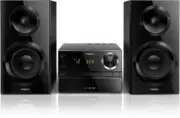
Philips BTM2360/12 – User Manual, read for free online in PDF format. We hope this helps you resolve any issues you may have. If you have further questions, please contact us through the contact form.


Table of Contents:
- Page 3 – Contents
- Page 4 – Important; Safety; Notice; Compliance
- Page 5 – Care of the environment; Care for your product
- Page 6 – Introduction; Overview of the main unit; d e
- Page 9 – Get started; Connect speakers; Connect power; Prepare the remote control
- Page 10 – Switch to standby mode; Switch to ECO power standby mode; Set the clock
- Page 11 – Select a source
- Page 12 – Play from disc; Play from USB; Control play
- Page 13 – Skip tracks; Program tracks; Play from Bluetooth-enabled
- Page 14 – Enter Bluetooth pairing mode; Clear Bluetooth pairing history
- Page 16 – Adjust sound; Select a preset sound effect; Adjust volume level
- Page 17 – Other features; Set the alarm timer; Activate/deactivate alarm timer; Set the sleep timer
- Page 18 – Charge your devices
- Page 19 – Amplifier; Speakers; Bluetooth; General information
- Page 20 – USB playability information; Supported MP3 disc formats
- Page 21 – Troubleshooting
www.philips.com/support
BTM2360
User manual
Always there to help you
Register your product and get support at
Question?
Contact
Philips
"Loading the manual" means you need to wait until the file loads and becomes available for online reading. Some manuals are very large, and the time they take to appear depends on your internet speed.
Was this manual helpful?
About this manual
- Brand
- Philips
- Model
- BTM2360/12
- Document type
- User Manual
- Language(s)
- English
- Pages
- 24
- File size
- 871 KB
- Format
Summary
1 EN Contents 1 Important 2 Safety 2 Notice 2 2 Your Micro Music System 4 Introduction 4 What's in the box 4 Over view of the main unit 4 Over view of the remote control 5 3 Get started 7 Connect speakers 7 Connect power 7 Prepare the remote control 7 Demonstrate the features 8 Power on 8 Set the cl...
2 EN 1 Important Safety Read and understand all instructions before you use this micro music system. If damage is caused by failure to follow the instructions, the warranty does not apply. This 'bolt of lightning' indicates uninsulated material within the device may cause an electrical shock. For th...
3 EN This apparatus includes this label: Care of the environment Disposal of your old product and battery Your product is designed and manufactured with high quality materials and components, which can be recycled and reused. This symbol on a product means that the product is covered by European Dir...
Ask a question
Related manuals
Popular Philips Other


More Philips Other models
 Philips BTB7150/10 User Manual
 Philips BTB8000/12 User Manual
 Philips BTD5210/12 User Manual
 Philips BTM630 Manual
 Philips BTM2180/37 User Manual
 Philips BTM2280/12 Quick Guide
 Philips BTM2460/12 User Manual
 Philips BTM2660W/12 User Manual
 Philips BTM3360/12 User Manual
 Philips C50 Manual
 Philips C242 Manual
 Philips C380 Manual