Page 6 - introduction; Note: You can find the type number on the back of the; English
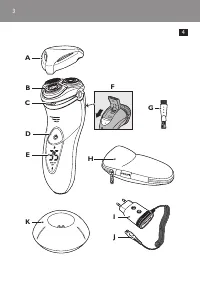
6 introduction Congratulations on your purchase and welcome to Philips! To fully benefit from the suppor t that Philips offers, register your product at www.philips.com/welcome. Please read this user manual, as it contains information about the wonderful features of this shaver as well as some tips ...
Page 9 - Charging; Note: The shaver cannot be used directly from the; Charge indications
Charging Note: The shaver cannot be used directly from the mains. AT940/AT893/AT890 only: It takes approx. 1 hour to fully charge the shaver. AT753/AT752/AT750: It takes approx. 8 hours to fully charge the shaver. When you charge the shaver for the first time or after a long period of disuse, let it...
Page 10 - goes out to save energy.
Quick charging (AT940/AT893/AT890 only) - AT940: When you star t charging the empty batter y, both the white batter y symbol and the plug symbol flash. After approx. 3 minutes, the orange plug symbol goes out, while the batter y symbol continues to flash. The shaver now contains enough energy for a ...
Page 11 - batter y is fully charged, the charging light lights up; Charging with the adapter; Note: This shaver can be used in the bath or shower. It
- AT893/AT890/AT753/AT752/AT750: When the batter y is fully charged, the charging light lights up green continuously. Note: After approx. 30 minutes, the charging light goes out to save energy. Charging with the adapter 1 Put the small plug in the shaver. 2 Put the adapter in the wall socket. , The ...
Page 12 - Wet shaving; Note: Rinse the shaver under the tap regularly to
Note: We advise you to use the shaver with shaving gel or foam when you use it for a wet shave. Do not use thick shaving cream or shaving oil with this shaver. - For optimal shaving results, make circular movements during use. - The shaver is waterproof and can be used in the bath or shower. - Your ...
Page 13 - Cleaning and maintenance
Note: Make sure you rinse all foam or shaving gel off the shaver. dry shaving 1 Press the on/off button once to switch on the shaver. 2 Move the shaving heads in circular movements over your skin. 3 After shaving, press the on/off button once to switch off the shaver. 4 Clean the shaver (see chapter...
Page 15 - - Rinse the outside of the shaving unit.; Cleaning the shaving unit with the cleaning
- Rinse the outside of the shaving unit. 4 Close the shaving unit and shake off excess water. Be careful not to hit the shaving unit against anything while shaking off excess water.Never dry the shaving unit and the hair chamber with a towel or tissue, as this may damage the shaving unit. 5 Open the...
Page 17 - Cleaning the trimmer with the cleaning; Switch off the shaver.; storage
Cleaning the trimmer with the cleaning brush (AT940/AT893/AT890 only) Clean the trimmer ever y time you have used it. 1 Switch off the shaver. 2 Push the trimmer slide downwards to open the trimmer. 3 Clean the trimmer with the short-bristled side of the cleaning brush. Brush up and down along the t...
Page 18 - Accessories; To retain the top performance of your shaver, make
Only replace the shaving heads with original HQ9 Philips Shaving Heads (for AT940) or HQ8 Philips Shaving Heads (for AT893/AT890/AT753/AT752/ AT750). 1 Switch off the shaver. Disconnect the shaver from the mains or remove it from the charging stand (AT940 only). 2 Press the release button to open th...
Page 19 - Only remove the rechargeable battery when you
shaving heads - We advise you to replace your shaving heads ever y year. Always replace with HQ9 Philips Shaving Heads (for AT940) or HQ8 Philips Shaving Heads (for AT893/AT890/AT753/AT752/ AT750). Cleaning - Use Cleaning spray (HQ110) to clean the shaving heads thoroughly. Environment - Do not thro...
Page 21 - Troubleshooting; Problem
Troubleshooting This chapter summarises the most common problems you could encounter with the appliance. If you are unable to solve the problem with the information below, contact the Consumer Care Centre in your countr y. Problem Possible cause Solution The shaver does not shave as well as it used ...
Page 23 - Remarque : Le numéro de modèle est indiqué à
23 introduction Félicitations pour votre achat et bienvenue dans l’univers Philips! Pour profiter pleinement du soutien de Philips, enregistrez votre produit à l’adresse : www.philips.com/welcome. Veuillez lire ce manuel contenant des renseignements sur les caractéristiques fantastiques de ce rasoir...
Page 25 - Conformité aux normes
- Il est possible que de l’eau s’écoule de la prise au bas du rasoir au cours du rinçage. C’est normal et sans danger car tous les composants électroniques sont regroupés dans un boîtier hermétique à l’intérieur du rasoir. - Pour éviter tout accident, n’utilisez pas le rasoir, l’adaptateur ou le soc...
Page 26 - Remarque : Le rasoir ne peut en aucun cas être
généralités - L’appareil est équipé d’un sélecteur de tension automatique. Il accepte les tensions secteur variant de 100 à 240 volts. - L’adaptateur transforme la tension de 100-240 V en une tension de sécurité de moins de 24 V. recharge Remarque : Le rasoir ne peut en aucun cas être branché direct...
Page 28 - pendant la charge, le témoin de charge clignote; Pile complètement chargée; - Modèle AT940 : lorsque la pile est complètement; recharge sur le socle de recharge
- Modèles AT893, AT890, AT753, AT752 et AT750 : pendant la charge, le témoin de charge clignote en ver t. Pile complètement chargée - Modèle AT940 : lorsque la pile est complètement chargée, le symbole de pile reste allumé en blanc de façon continue. Remarque : Le symbole de pile s’éteint au bout d’...
Page 29 - Utilisation du rasoir; Remarque : Ce rasoir est utilisable dans le bain ou sous
3 Posez le rasoir sur le socle de recharge. , Le témoin de charge indique l’état de chargement du rasoir (voir la section «Informations relatives à la charge» de ce chapitre). Utilisation du rasoir Remarque : Ce rasoir est utilisable dans le bain ou sous la douche et ne peut donc pas être utilisé lo...
Page 30 - rasage humide; Remarque : Rincez fréquemment l’unité de rasage
rasage humide 1 Mouillez votre visage avec de l’eau. 2 Appliquez ensuite la mousse ou le gel à raser. 3 Rincez l’unité de rasage sous l’eau du robinet pour vous assurer qu’il glisse facilement sur votre visage. 4 Mettez l’appareil en marche en appuyant une fois sur le bouton marche/arrêt. 5 Faites g...
Page 31 - nettoyage et entretien
2 Faites glisser les têtes de rasage sur votre visage en effectuant des mouvements circulaires. 3 Après le rasage, éteignez le rasoir en appuyant une fois sur le bouton marche/arrêt. 4 Nettoyer le rasoir (voir section «Nettoyage et entretien»). Tonte (modèles AT940, AT893 et AT890 seulement) Vous po...
Page 32 - robinet
Toujours débrancher le rasoir avant de le nettoyer sous le robinet. - Nettoyez votre rasoir après chaque rasage pour un rasage optimal. - Nettoyer le rasoir régulièrement assure un rasage optimal. - Pour un résultat optimal, nous vous recommandons d’utiliser le spray nettoyant Philips (HQ110). - Att...
Page 33 - nettoyage de l’unité de rasage avec la
- Rincez le compar timent de récupération des poils et l’intérieur de l’unité de rasage. - Rincez l’extérieur de l’unité de rasage. 4 Fermez l’unité de rasage et secouez-la pour en retirer l’eau qui reste. Veillez à ne pas heurter l’unité de rasage et secouez-la pour en retirer l’eau qui reste.Ne sé...
Page 36 - rangement; Éteignez le rasoir et débranchez-le de la prise
Conseil : Pour des performances optimales, lubrifiez les lames de la tondeuse avec une goutte d’huile pour machine à coudre tous les six mois. rangement Plusieurs options s’offrent à vous pour ranger le rasoir ou pour l’empor ter en voyage : - Toujours transpor ter le rasoir avec son capuchon de pro...
Page 37 - Accessoires; Pour préser ver les performances optimales de votre
2 Appuyez sur le bouton de libération pour ouvrir l’unité de rasage. 3 Détachez l’unité de rasage du rasoir. 4 Tournez le verrou dans le sens anti-horaire (1) et retirez le système de fixation (2). 5 Retirez les têtes du rasoir et insérez les nouvelles têtes dans l’unité de rasage. Veillez à ce que ...
Page 38 - Retirez la pile rechargeable uniquement lorsque
Têtes de rasage - Nous vous recommandons de remplacer les têtes de votre rasoir tous les ans et toujours par des têtes Philips HQ9 (modèle AT940) ou Philips HQ8 (modèles AT893, AT890, AT753, AT752 et AT750). nettoyage - Pour bien nettoyer les têtes de votre rasoir, ser vez-vous du spray nettoyant (H...
Page 40 - résolution de problèmes; Problème
résolution de problèmes Ce chapitre présente les problèmes les plus courants que vous pouvez éprouver avec votre appareil. Si vous ne par venez pas à résoudre le problème à l’aide des informations ci-dessous, communiquez avec le Ser vice à la clientèle Philips de votre pays. Problème Cause possible ...