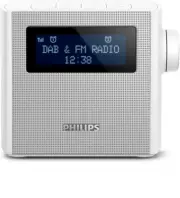
Page 3 - Contents
1 EN Contents 1 Important 2 Safety 2 2 Your FM/DAB+ clock radio 3 Introduction 3 What's in the box 3 Over view of the clock radio 4 3 Get started 5 Prepare FM/DAB+ antenna 5 Connect power 5 Set clock 5 Turn on 6 4 Listen to DAB+ radio 7 Tune to DAB+ radio stations 7 Store DAB+ radio stations automat...
Page 4 - Important; Safety
2 EN 1 Important Safety Warning • Never remove the casing of this clock radio. • Never lubricate any par t of this clock radio. • Never place this clock radio on other electrical equipment. • Keep this clock radio away from direct sunlight, naked flames or heat. • Make sure that you always have easy...
Page 5 - clock radio; Introduction
3 EN 2 Your FM/DAB+ clock radio Congratulations on your purchase, and welcome to Philips! To fully benefit from the suppor t that Philips offers, register your product at www.philips.com/welcome. Introduction With this clock radio, you can: • listen to FM and Digital Audio Broadcasting (DAB+) radio;...
Page 6 - Overview of the clock radio
4 EN Overview of the clock radio a / • Set Alarm 1 or Alarm 2. • View alarm settings. • Activate or deactivate alarm timer. b SOURCE • Select a source: DAB Mode , FM Mode , or AUDIO IN . c • Turn on the radio. • Switch to standby mode. d SNOOZE/BRIGHTNESS • Snooze the alarm. • Adjust display brightn...
Page 7 - Get started; Connect power; Set clock
5 EN 3 Get started Always follow the instructions in this chapter in sequence. Prepare FM/DAB+ antenna For better reception, fully extend and adjust the position of the FM/DAB+ antenna. Note • To prevent interference, position the antenna as far as possible from any other radiation sources. Connect ...
Page 8 - Turn on; Switch to standby mode
6 EN Turn on • Press to turn on the radio. » The clock radio switches to the last selected source. » For first-time use, the radio shows a welcome message and switches to DAB mode to star t automatic scanning for available DAB+ stations. Switch to standby mode • Press again. » [Standby] (standby) is...
Page 9 - radio
7 EN 4 Listen to DAB+ radio Tune to DAB+ radio stations Tip • Position the antenna as far as possible from any electrical appliances. • For better reception, fully extend and adjust the position of the antenna. 1 Press SOURCE repeatedly to select DAB mode. » [Scanning] (scanning) is displayed. » The...
Page 10 - Show DAB+ information
8 EN 2 Press + TUNING/ HR - to scroll through the menu options: • [Full scan] (full scan): scan and store all the available DAB+ radio stations. • [Manual tune] (manual tune): tune to a specific channel/frequency manually and add it to the station list. • [DRC] (Dynamic Range Compression): compress ...
Page 12 - Show RDS information
10 EN Show RDS information RDS (Radio Data System) is a ser vice that allows FM stations to show additional information. If you listen to an FM station with RDS signal, an RDS icon and the station name are displayed. 1 Tune to an RDS station. 2 Press INFO repeatedly to scroll through the following i...
Page 13 - Set time and sync time
11 EN 6 Use system menu Use the system menus to • set time and hour format; • set time synchronization; • check the software version of this radio; • update software if necessar y; and • reset the radio to factor y default status. Set time and sync time 1 In DAB/FM mode, press and hold MENU for two ...
Page 14 - Other features; Set alarm timer; Set alarm; Activate/deactivate alarm timer; Set sleep timer
12 EN 7 Other features Set alarm timer Set alarm You can set two alarms to ring at different time. Note • Make sure that the clock is set correctly. 1 In standby mode, press and hold / for two seconds to activate alarm setting mode. » The hour and minute digits and / begin to blink. 2 Press + TUNING...
Page 15 - Listen to an external device; Charge your device; Adjust volume; Adjust display brightness
13 EN Listen to an external device With this product, you can also listen to an external audio device such as an MP3 player. 1 Connect an audio input cable (not supplied) with a 3.5 mm connector on both ends to • the AUDIO IN socket on this radio, and • the headphone socket on the external device. 2...
Page 16 - Specifications; Amplifier
14 EN 8 Product information Note • Product information is subject to change without prior notice. Specifications Amplifier Total Output Power 2 W Tuner Tuning Range (FM) 87.5 - 108 MHz Tuning Range (DAB+) 174.928 - 239.200 MHz Tuning Grid 50 KHz - Mono, 26dB S/N Ratio <22 dBf - Stereo, 46dB S/N R...
Page 17 - Troubleshooting
15 EN 9 Troubleshooting Warning • Never remove the casing of this device. To keep the warranty valid, never tr y to repair the system yourself. If you encounter problems when using this device, check the following points before requesting ser vice. If the problem remains unsolved, go to the Philips ...