Philips 34M2C5501A/00 - User Manual
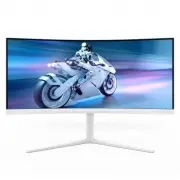
Philips 34M2C5501A/00 – User Manual, read for free online in PDF format. We hope this helps you resolve any issues you may have. If you have further questions, please contact us through the contact form.


Table of Contents:
- Page 2 – Table of Contents; Safety precautions and; Designs to prevent computer; Philips’ Panel Monitors Pixel
- Page 5 – Notational Descriptions
- Page 7 – monitor; Package contents; *Different according to region
- Page 9 – Operating the monitor
- Page 10 – Description of the On-Screen Display
- Page 12 – Firmware
- Page 13 – Swivel; Height adjustment; Remove the Base Assembly
- Page 14 – Toggle to the right to enter OSD
- Page 17 – Image Optimization
- Page 20 – Premium; Operating system
- Page 21 – How to enable Ambiglow
- Page 22 – Lighting
- Page 24 – Rearrange your displays.
- Page 25 – Ideal working posture
- Page 26 – Technical Specifications; VESA Certified DisplayHDRTM 400
- Page 29 – Note
- Page 30 – Display Input Format
- Page 31 – Power Management; Power Management Definition; Off mode
- Page 32 – Philips’ Panel Monitors; Sub pixels; Pixels and Sub pixels
- Page 36 – FAQs; Troubleshooting; Common Problems
34M2C5501A
Register your product and get support at www.philips.com/welcome
EN
User manual
1
Customer care and warranty
Troubleshooting and FAQs
"Loading the manual" means you need to wait until the file loads and becomes available for online reading. Some manuals are very large, and the time they take to appear depends on your internet speed.
Was this manual helpful?
About this manual
- Brand
- Philips
- Model
- 34M2C5501A/00
- Document type
- User Manual
- Language(s)
- English
- Pages
- 41
- File size
- 4.9 MB
- Format
Other Manuals for Philips 34M2C5501A/00
Summary
Table of Contents 1. Important ...................................... 1 1.1 Safety precautions and maintenance ..................................1 1.2 Notational Descriptions ..............3 1.3 Disposal of product and packing material ............................................4 2. Setting up the ...
3 technology. In most cases, the “burn-in”, “after-imaging” or “ghost imaging” will disappear gradually over some time after the power has been switched off. Warning It is highly recommended that you always turn on Pixel Orbiting function from On Screen Display (OSD) menu in order to best protect th...
5 2. Setting up the monitor 2.1 Installation 1 Package contents *DP *HDMI *USB A-B Power Quick Start 34M2C5501A Register your product and get support at www.philips.com/welcome *Different according to region 2 Install the base 1. To well protect this monitor and avoid scratching or damaging of the m...
Ask a question
Related manuals
Popular Philips Other


More Philips Other models
 Philips 34B2U6603CH/00 User Manual
 Philips 34E1C5600HE/00 User Manual
 Philips 34E1C5600HE/01 User Manual
 Philips 34M1C5500VA/00 User Manual
 Philips 34M2C3500L/00 User Manual
 Philips 34M2C3500L/01 Installation Manual
 Philips 34M2C6500/00 User Manual
 Philips 34M2C8600/00 User Manual
 Philips 34PT9421/69R Manual
 Philips 37PF9631D/37 User Manual
 Philips 37PF9731D/10 User Manual
 Philips 37PF9986/12 User Manual