Page 2 - TQB4GCXXXX; Operating Instructions; LCD Television
TQB4GCXXXX Operating Instructions LCD Television Thank you for purchasing this Panasonic product.Please read these instructions carefully before operating this product and retain them for future reference.Please carefully read the “Safety Precautions” of this manual before use.The images shown in th...
Page 3 - Contents; Be Sure to Read
2 English ● For the information of the trademarks, refer to [eHELP] (Support > Licence). Contents Be Sure to Read Important Notice··················································· 3Safety Precautions ··············································· 3 Quick Start Guide Accessories ···············...
Page 4 - Safety Precautions; Important Notice
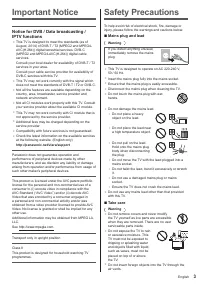
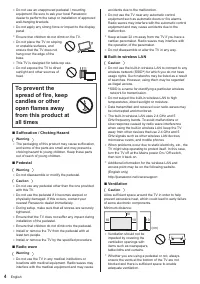
3 English Safety Precautions To help avoid risk of electrical shock, fire, damage or injury, please follow the warnings and cautions below: ■ Mains plug and lead Warning If you detect anything unusual, immediately remove the mains plug. ● This TV is designed to operate on AC 220-240 V, 50 / 60 Hz. ●...
Page 6 - Accessories
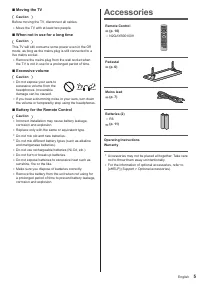
5 English Accessories Remote Control (p. 10) ● N2QAYB001009 Pedestal (p. 6) Mains lead (p. 7) Batteries (2) ● R6 (p. 11) Operating InstructionsWarranty ● Accessories may not be placed all together. Take care not to throw them away unintentionally. ● For the information of optional accessories, refer...
Page 7 - Assembling / Removing the pedestal
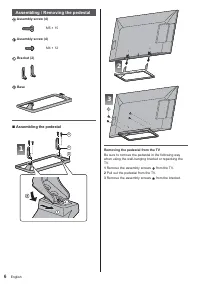
6 English B 3 2 Removing the pedestal from the TV Be sure to remove the pedestal in the following way when using the wall-hanging bracket or repacking the TV. 1 Remove the assembly screws from the TV. 2 Pull out the pedestal from the TV. 3 Remove the assembly screws from the bracket. Assembling / Re...
Page 8 - Basic connections; Connections; Terminals
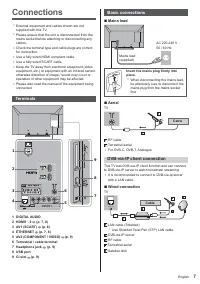
7 English Basic connections ■ Mains lead AC 220-240 V50 / 60 Hz Mains lead (supplied) Insert the mains plug firmly into place. ● When disconnecting the mains lead, be absolutely sure to disconnect the mains plug from the mains socket first. ■ Aerial TV Cable RF cable Terrestrial aerial ● For DVB-C, ...
Page 9 - Network; AV devices
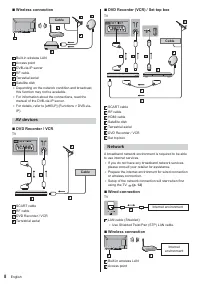
8 English ■ DVD Recorder (VCR) / Set top box TV Cable SCART cable RF cable HDMI cable Satellite dish Terrestrial aerial DVD Recorder / VCR Set top box Network A broadband network environment is required to be able to use internet services. ● If you do not have any broadband network services, please ...
Page 10 - Other connections
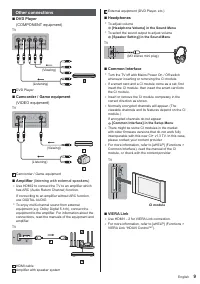
9 English Other connections ■ DVD Player (COMPONENT equipment) TV (Listening) (Viewing) DVD Player ■ Camcorder / Game equipment (VIDEO equipment) TV (Listening) (Viewing) Camcorder / Game equipment ■ Amplifier (listening with external speakers) ● Use HDMI2 to connect the TV to an amplifier which has...
Page 11 - Identifying Controls; Remote Control
10 English ● Displays channel list. 8 [Option Menu] ● Easy optional setting for viewing, sound, etc. 9 Coloured buttons (red-green-yellow-blue) ● Used for the selection, navigation and operation of various functions. 10 Volume Up / Down11 Numeric buttons ● Changes channel and teletext pages. ● Sets ...
Page 12 - Indicator / Control panel
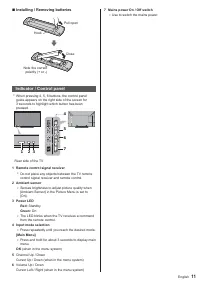
11 English 7 Mains power On / Off switch ● Use to switch the mains power. ■ Installing / Removing batteries Pull open Hook Note the correct polarity (+ or -) Close Indicator / Control panel ● When pressing 4, 5, 6 buttons, the control panel guide appears on the right side of the screen for 3 seconds...
Page 13 - First time Auto Setup; Plug the TV into a live mains socket
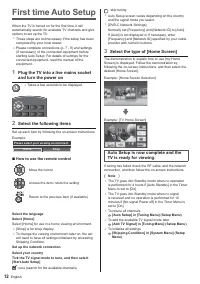
12 English : skip tuning ● Auto Setup screen varies depending on the country and the signal mode you select. ● [DVB-C Network Settings]Normally set [Frequency] and [Network ID] to [Auto].If [Auto] is not displayed or if necessary, enter [Frequency] and [Network ID] specified by your cable provider w...
Page 14 - Operation; Turn power on
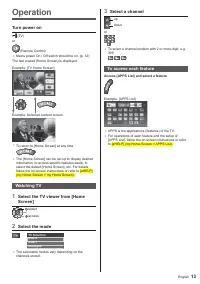
13 English 3 Select a channel up down or ● To select a channel position with 2 or more-digit, e.g. 399 To access each feature Access [APPS List] and select a feature Example: [APPS List] ● APPS is the applications (features) of the TV. ● For operations of each feature and the setup of [APPS List], f...
Page 15 - How to Use eHELP; Select the category and item
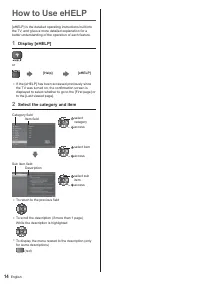
14 English How to Use eHELP [eHELP] is the detailed operating instructions built into the TV, and gives a more detailed explanation for a better understanding of the operation of each feature. 1 Display [eHELP] or [Help] [eHELP] ● If the [eHELP] has been accessed previously since the TV was turned o...
Page 16 - FAQs
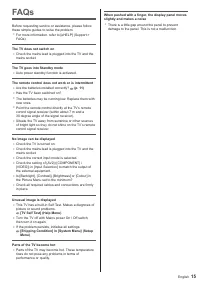
15 English When pushed with a finger, the display panel moves slightly and makes a noise ● There is a little gap around the panel to prevent damage to the panel. This is not a malfunction. FAQs Before requesting service or assistance, please follow these simple guides to solve the problem. ● For mor...
Page 17 - Specifications; Maintenance; Mains plug
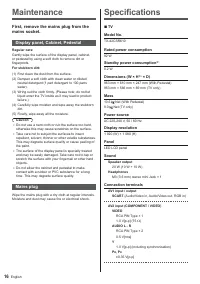
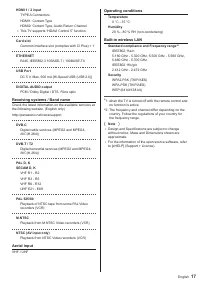
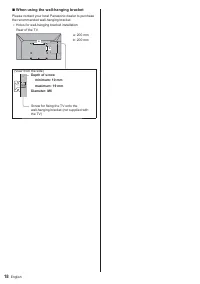
16 English Specifications ■ TV Model No. TX-42CSR610 Rated power consumption 92 W Standby power consumption * 1 0.2 W Dimensions (W × H * 2 × D) 963 mm × 610 mm × 247 mm (With Pedestal)963 mm × 566 mm × 69 mm (TV only) Mass 10.5 Net (With Pedestal)9.0 Net (TV only) Power source AC 220-240 V, 50 / 60...
Page 21 - Customer’s Record
Information on Disposal in other Countries outside the European Union This symbol is only valid in the European Union.If you wish to discard this product, please contact your local authorities or dealer and ask for the correct method of disposal. Declaration of Conformity with the requirements of Te...