Panasonic TH-32E400A - User Manual
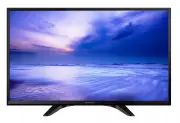
Panasonic TH-32E400A TV – User Manual, read for free online in PDF format. We hope this helps you resolve any issues you may have. If you have further questions, please contact us through the contact form.


Table of Contents:
- Page 2 – Contents
- Page 3 – Safety Precautions
- Page 4 – Setting Up the TV; Supplied accessories; Remote Control; Preparation
- Page 5 – Attaching the pedestal; Removing the pedestal from the TV; Inserting remote’s batteries; Rear of the TV
- Page 6 – Connecting the TV; When using an HDMI cable, use the fully wired one.; Terminals; Connections; Aerial and mains lead; RF cable
- Page 7 – Set top box; Initial Setup; Select State/Territory; Access
- Page 8 – This function searches and stores TV channels.; Confirm; Note; Operating the TV; Using the TV controls; Indicators on the TV; Makes selections in the menu system.; Mains power On / Off switch; Use to switch the mains power.; Remote control signal receiver
- Page 9 – Using the remote control; About operation guide
- Page 10 – Display the TV Guide.; Display the Freeview Guide.
- Page 11 – Connect the external equipment.; Using Media Player; Starting Media Player; Switching between modes; Photo mode
- Page 12 – Music mode; Movie mode; To playback the selected file only; ASPECT
- Page 13 – Picture
- Page 14 – Sound
- Page 15 – Timer
- Page 16 – Enter the frequency to start scanning.; Select a channel position, then start tuning.; Select a channel to add or remove from the list.
- Page 17 – Edit the channel settings.; To lock channels or inputs; To change the PIN number
- Page 18 – To update automatically; Auto power standby function; Meaning; Aspect
- Page 19 – Input signal that can be displayed; Signal name; Supported file format in Media Player
- Page 20 – Troubleshooting; Check the HDMI cable is connected properly.
- Page 21 – Maintenance; LED backlight Liquid Crystal Display
- Page 22 – TV broadcast reception; Aerial input; (2) open sourced software other than the software
- Page 23 – SHOULD BE RETAINED BY THE CUSTOMER AT ALL TIMES; Panasonic Australia; Panasonic Australia Pty. Limited; Innovation Road, Macquarie Park NSW 2113; Warranty
- Page 24 – Printed in Malaysia; Customer’s Record; Model Number; WARRANTY - New Zealand only; Distributed in New Zealand by Panasonic New Zealand Limited; Customer Care Center; NEW ZEALAND
Model No.
Australia
New Zealand
TH-32E400A TH-32E400Z
English
Thank you for purchasing this Panasonic product.
Please read these instructions carefully before operating
this product and retain them for future reference.
The images shown in this manual are for illustrative
purposes only.
Some illustrations are presented as conceptual images
and may be different from the actual products.
Illustrations shown may be different between models
and countries.
Transport only in upright position
TQB4GC1695
Operating Instructions
LED TV
"Loading the manual" means you need to wait until the file loads and becomes available for online reading. Some manuals are very large, and the time they take to appear depends on your internet speed.
Was this manual helpful?
About this manual
- Brand
- Panasonic
- Model
- TH-32E400A
- Document type
- User Manual
- Category
- TV
- Language(s)
- English
- Pages
- 24
- File size
- 1.4 MB
- Format
Summary
2 Manufactured under license from Dolby Laboratories. Dolby, Dolby Audio and the double-D symbol are trademarks of Dolby Laboratories. The terms HDMI and HDMI High-Definition Multimedia Interface, and the HDMI Logo are trademarks or registered trademarks of HDMI Licensing, LLC in the United States a...
Safety Precautions 3 Safety Precautions To help avoid risk of electrical shock, fire, damage or injury, please follow the warnings and cautions below: ■ Mains plug and lead Warning If you detect anything unusual, immediately remove the mains plug. ● This TV is designed to operate on AC 220 - 240 V, ...
Safety Precautions | Setting Up the TV 4 ● Do not use the pedestal if it becomes warped or physically damaged. If this occurs, contact your nearest Panasonic dealer immediately. ● During setup, make sure that all screws are securely tightened. ● Ensure that the TV does not suffer any impact during i...
Ask a question
Related manuals
Popular Panasonic TVs


More Panasonic TVs models
 Panasonic TX-PR42UT50, TX-PR50UT50 Manual
 Panasonic TX-PR50VT60, TX-PR55VT60, TX-PR65VT60 Manual
 Panasonic TX-R32LX85, TX-R37LX85 Manual
 Panasonic TX-R32LX86, TX-R37LX86 Manual
 Panasonic TX-R32LZ80, TX-R37LZ80 Manual
 Panasonic 32J330E User Manual
 Panasonic TH-40C400A User Manual
 Panasonic TH-49D400A User Manual
 Panasonic TH-55CS610A User Manual
 Panasonic TH-55EZ950U User Manual
 Panasonic TH-65EZ950U User Manual
 Panasonic TX-26LX50P, TX-32LX50P Manual
 Panasonic TX-40CXR800, TX-50CXR800, TX-55CXR800, TX-65CXR800 Manual
 Panasonic TX-LR32C10, TX-LR32C11, TX-LR32C12 Manual
 Panasonic TX-LR32D25, TX-LR37D25, TX-LR42D25 Manual