Panamax VT1512-IP - User Manual
Panamax VT1512-IP Surge Protector – User Manual, read for free online in PDF format. We hope this helps you resolve any issues you may have. If you have further questions, please contact us through the contact form.




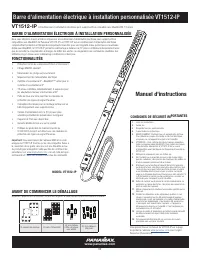



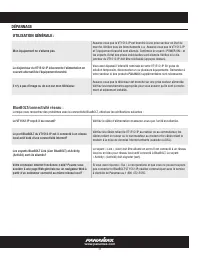
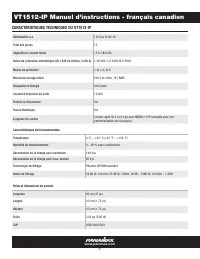
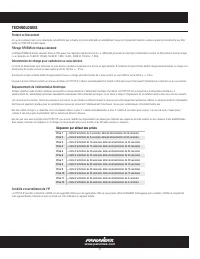

Table of Contents:
- Page 2 – MOUNTING; BlueBOLT®
- Page 3 – Outlet Indicators; PRODUCT FEATURES; Network Reset Button:
- Page 4 – Instruction Manual - English; ADVANCED OPERATIONS; VT1512-IP Advanced Operation; Power Condition States; Controls
- Page 5 – Example Action Command Message - switch outlet 2 to OFF:; Message Types; Example Query Command Message – send information
- Page 6 – Example Event Message - outlet 3 switched to ON:; Outlet
- Page 7 – Common Attributes; Send Information Query; Sample Response –; Element Description; Send Status Query
- Page 8 – Send Settings Query
- Page 9 – Action Commands
- Page 12 – PASSWORD PROTECTION
- Page 13 – TROUBLESHOOTING; My equipment doesn’t turn on.
- Page 14 – Standard RFI/EMI Filtration
- Page 15 – TECHNOLOGIES; Standard Level RFI/EMI Filtration; Outlet Sequence Default
- Page 16 – Customers outside of the United States; WARRANTY INFORMATION; CAUTION! WARRANTY LIMITATION FOR INTERNET PURCHASERS; Limited Three Year Warranty; Customers in the United States; FCC NOTICE
- Page 17 – Instalación personalizada del administrador de energía; INSTALACIÓN PERSONALIZADA DEL ADMINISTRADOR DE ENERGÍA; Manual de instrucciones; ANTES DE COMENZAR EL DESEMBALAJE
- Page 18 – Registro en línea; MONTAJE; BlueBolt®; VT1512-IP Manual de instrucciones-Español
- Page 19 – CARACTERÍSTICAS DEL PRODUCTO
- Page 20 – VT1512-IP Manual de instrucciones - Español; BlueBOLT Interfaz de configuración; OPERACIONES AVANZADAS; Operación avanzada del VT1512-IP; Estados de condición de energía; Controles
- Page 21 – Mensajes de comando; Ejemplo de mensaje de comando de acción: cambie la salida 2 a OFF:; Mensajes de respuesta; Tipos de mensaje; Ejemplo de mensaje de comando de consulta: enviar información
- Page 22 – Mensajes de evento; Ejemplo de mensaje de evento - salida 3 encendida:; Salida
- Page 23 – Atributos Comunes; Enviar consulta de información; Respuesta de muestra -; Enviar consulta de estado
- Page 24 – Enviar consulta de configuración; Descripción del elemento
- Page 25 – Comandos de acción
- Page 28 – PROTECCIÓN DE CONTRASEÑA
- Page 29 – SOLUCIÓN DE PROBLEMAS; Mi equipo no se enciende.
- Page 30 – Peso y dimensiones del producto; filtración estándar RFI / EMI; ESPECIFICACIONES DEL VT1512-IP
- Page 31 – TECNOLOGÍAS; Proteger o desconectar; Secuencia de salida predeterminada
- Page 32 – Clientes fuera de los Estados Unidos; INFORMACIÓN DE GARANTÍA; Garantía limitada de tres años; Clientes en los Estados Unidos; AVISO FCC
- Page 33 – BARRE D'ALIMENTATION ÉLECTRIQUE À INSTALLATION PERSONNALISÉE; CONSIGNES DE SÉCURITÉ IMPORTANTES; Manuel d'instructions; AVANT DE COMMENCER LE DÉBALLAGE
- Page 34 – Enregistrement en ligne; FIXATION
- Page 35 – Indicateurs de prise; CARACTÉRISTIQUES DU PRODUIT; Bouton de réinitialisation du réseau :
- Page 36 – État; États de la condition d'alimentation; OPÉRATIONS AVANCÉES; Opérations avancées du VT1512-IP
- Page 37 – Messages de commande; Exemple de message de commande d'action – Éteindre la prise 2 :; Messages de réponse; Types de message; Exemple de message de commande de requête – envoi d'informations
- Page 38 – Exemple de message d'événement – la prise 3 est allumée :; Sortie
- Page 39 – Requête Envoyer de l'information; Exemple de réponse –; Requête Envoyer un état
- Page 40 – Requête Envoi de paramètres; Description de l'élément
- Page 44 – PROTECTION PAR MOT DE PASSE; BlueBOLT Interface de configuration
- Page 46 – – 90 % sans condensation; CARACTÉRISTIQUES TECHNIQUES DU VT1512-IP
- Page 47 – Filtrage RFI/EMI de niveau standard; Séquence par défaut des prises
- Page 48 – Clients hors des États-Unis; INFORMATION SUR LA GARANTIE; MISE EN GARDE! LIMITATION DE GARANTIE POUR LES ACHETEURS INTERNET; Garantie limitée de trois ans; Clients aux États-Unis; AVIS DE LA FCC
1
www.panamax.com
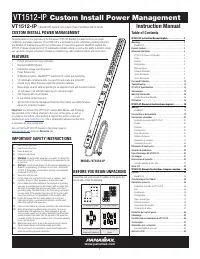
VT1512-IP
Custom Install Power Management
You can find the VT1512-IP manual on the product page at
under the
Resource
tab.
MODEL: VT1512-IP
VT1512-IP
A BlueBOLT® Enabled Vertical Rack Power Conditioner with12 Outlets
Congratulations on your purchase of the Panamax VT1512-IP BlueBOLT enabled vertical rack power
conditioner and power sequencer. The VT1512-IP is a full featured power conditioner providing protection
and filtration for maximum longevity and performance of connected equipment. BlueBOLT enabled, the
VT1512-IP allows remote reboot of 12 individually controlled outlets, as well as the ability to monitor energy
use, set alerts, program scheduled commands, network pings with conditional reboot and much more.
Important:
You will need the VT1512-IP’s unique MAC Address and Challenge
Key (provided on the 2 labels attached to the cover of this guide, as well as
on a label on the bottom of the product) to register the unit for control and
monitoring at
. One is permanently adhered and the other
is removable for your convenience.
•
Protect-or-Disconnect surge protection
•
Standard EMI/RFI Filtration
•
Over/Under voltage load disconnect
•
Power Sequencing
•
IP Monitor & Control - BlueBOLT™ enabled for IP control and monitoring
•
12 individually controlled outlets, 3 spaced for wall-warts & 6 turned 90°
•
Ground lug to attach Panamax signal-line protection modules
•
Sleek design ideal for vertical mounting to an equipment rack with included brackets
•
10 foot power cord with removable plug to customize length
•
15A Capacity with circuit breaker
•
3 year limited product warranty
•
$5,000,000 Connected Equipment Protection Policy when used with Panamax
signal-line protection modules.
CUSTOM INSTALL POWER MANAGEMENT
1.
Read these instructions.
2.
Keep these instructions.
3.
Heed all warnings.
4.
Follow all instructions.
5. WARNING:
Do not use this apparatus near water. To reduce the
risk of fire or electric shock, do not expose this apparatus to rain
or moisture.
6. CAUTION
- Could Contain Always On Receptacles (depending on
BlueBOLT programming). To reduce risk of shock - Disconnect
VT1512-IP from power source before servicing any equipment
connected to VT1512-IP.
7.
Clean only with dry cloth.
8.
Do not install near any heat sources such as radiators, heat
registers, stoves, or other apparatuses that produce heat.
9.
Do not defeat the safety purpose of the polarized or grounding
type plug. A polarized plug has two blades, with one wider than
the other. A grounding type plug has two blades and a third
grounding prong. The wide blade or the third prong is provided
for your safety. If the provided plug does not fit into your outlet,
consult an electrician for replacement of the obsolete outlet.
10.
Protect the power cord from being walked on or pinched,
particularly at plugs, convenience receptacles, and the point
where they exit from the apparatus.
11.
Only use attachments/accessories specified by the manufacturer.
12.
Refer all servicing to qualified service personnel. Servicing is
required when the apparatus has been damaged in any way,
such as power-supply cord or plug is damaged, liquid has been
spilled or objects have fallen into the apparatus, the apparatus
has been exposed to rain or moisture, does not operate normally,
or has been dropped.
13.
Where the power cord is used as the main disconnect device,
the disconnect device shall remain readily accessible.
14.
This device must be connected to a main socket outlet with a
protective earthing (ground) connection.
IMPORTANT SAFETY INSTRUCTIONS
BEFORE YOU BEGIN UNPACKING
Inspect the unit upon receipt. In addition to this guide, the
box should contain the following:
FEATURES
(2) Mounting Brackets
(2) Insulation Gaskets
(4) Pan Head Machine
Screws with Grommets
(8) Flat Head Machine
Screws
Table of Contents
VT1512-IP Instruction Manual-English . . . . . . . . . . . . . 2
Mounting. . . . . . . . . . . . . . . . . . . . . . . . . . . . . . . . . . . . . . . . 2
BlueBOLT®. . . . . . . . . . . . . . . . . . . . . . . . . . . . . . . . . . . . 2
Product Features . . . . . . . . . . . . . . . . . . . . . . . . . . . . . . . . . 3
Advanced Operations . . . . . . . . . . . . . . . . . . . . . . . . . . . . . . 4
VT1512-IP Advanced Operation . . . . . . . . . . . . . . . . . . . . . 4
Status . . . . . . . . . . . . . . . . . . . . . . . . . . . . . . . . . . . . . . . . 4
Controls . . . . . . . . . . . . . . . . . . . . . . . . . . . . . . . . . . . . . . 4
Configuration. . . . . . . . . . . . . . . . . . . . . . . . . . . . . . . . . . . 4
Message Types . . . . . . . . . . . . . . . . . . . . . . . . . . . . . . . . . 5
Common Attributes . . . . . . . . . . . . . . . . . . . . . . . . . . . . . . 7
Query Commands . . . . . . . . . . . . . . . . . . . . . . . . . . . . . . . 7
Action Commands . . . . . . . . . . . . . . . . . . . . . . . . . . . . . . . 9
Password Protection. . . . . . . . . . . . . . . . . . . . . . . . . . . . . . . 12
Troubleshooting . . . . . . . . . . . . . . . . . . . . . . . . . . . . . . . . . . 13
VT1512-IP Specifications . . . . . . . . . . . . . . . . . . . . . . . . . . . 14
Technologies. . . . . . . . . . . . . . . . . . . . . . . . . . . . . . . . . . . . . 15
Warranty Information . . . . . . . . . . . . . . . . . . . . . . . . . . . . . . 16
Limited Three Year Warranty . . . . . . . . . . . . . . . . . . . . . . . . 16
FCC Notice . . . . . . . . . . . . . . . . . . . . . . . . . . . . . . . . . . . . . . 16
VT1512-IP Manual de instrucciones-Español . . . . . . . . 18
Montaje. . . . . . . . . . . . . . . . . . . . . . . . . . . . . . . . . . . . . . . . . 18
BlueBolt®. . . . . . . . . . . . . . . . . . . . . . . . . . . . . . . . . . . . . 18
Características del producto. . . . . . . . . . . . . . . . . . . . . . . . . 19
Operaciones avanzadas . . . . . . . . . . . . . . . . . . . . . . . . . . . . 20
Operación avanzada del VT1512-IP . . . . . . . . . . . . . . . . . . 20
Estado . . . . . . . . . . . . . . . . . . . . . . . . . . . . . . . . . . . . . . . 20
Controles . . . . . . . . . . . . . . . . . . . . . . . . . . . . . . . . . . . . . 20
Configuración . . . . . . . . . . . . . . . . . . . . . . . . . . . . . . . . . . 20
Tipos de mensaje . . . . . . . . . . . . . . . . . . . . . . . . . . . . . . . 21
Atributos Comunes . . . . . . . . . . . . . . . . . . . . . . . . . . . . . . 23
Comandos de consulta. . . . . . . . . . . . . . . . . . . . . . . . . . . . 23
Comandos de acción . . . . . . . . . . . . . . . . . . . . . . . . . . . . . 25
Protección de contraseña . . . . . . . . . . . . . . . . . . . . . . . . . . . 28
Solución de problemas . . . . . . . . . . . . . . . . . . . . . . . . . . . . . 29
Especificaciones del VT1512-IP . . . . . . . . . . . . . . . . . . . . . . 30
Tecnologías. . . . . . . . . . . . . . . . . . . . . . . . . . . . . . . . . . . . . . 31
Información de garantía . . . . . . . . . . . . . . . . . . . . . . . . . . . . 32
Garantía limitada de tres años . . . . . . . . . . . . . . . . . . . . . . 32
Aviso FCC . . . . . . . . . . . . . . . . . . . . . . . . . . . . . . . . . . . . . . . 32
VT1512-IP Manuel d'instructions-français canadien . . 34
Fixation . . . . . . . . . . . . . . . . . . . . . . . . . . . . . . . . . . . . . . . . . 34
BlueBOLT®. . . . . . . . . . . . . . . . . . . . . . . . . . . . . . . . . . . . 34
Caractéristiques Du Produit . . . . . . . . . . . . . . . . . . . . . . . . . 35
Opérations avancées . . . . . . . . . . . . . . . . . . . . . . . . . . . . . . 36
Opérations avancées du VT1512-IP . . . . . . . . . . . . . . . . . . 36
État. . . . . . . . . . . . . . . . . . . . . . . . . . . . . . . . . . . . . . . . . . 36
Commandes . . . . . . . . . . . . . . . . . . . . . . . . . . . . . . . . . . . 36
Configuration. . . . . . . . . . . . . . . . . . . . . . . . . . . . . . . . . . . 36
Types de message . . . . . . . . . . . . . . . . . . . . . . . . . . . . . . . 37
Attributs communs . . . . . . . . . . . . . . . . . . . . . . . . . . . . . . 39
Commandes de requête . . . . . . . . . . . . . . . . . . . . . . . . . . . 39
Commandes d'action . . . . . . . . . . . . . . . . . . . . . . . . . . . . . 41
Protection par mot de passe. . . . . . . . . . . . . . . . . . . . . . . . . 44
Dépannage . . . . . . . . . . . . . . . . . . . . . . . . . . . . . . . . . . . . . . 45
Caractéristiques techniques du VT1512-IP. . . . . . . . . . . . . . 46
Technologies. . . . . . . . . . . . . . . . . . . . . . . . . . . . . . . . . . . . . 47
Information Sur La Garantie . . . . . . . . . . . . . . . . . . . . . . . . . 48
Garantie limitée de trois ans . . . . . . . . . . . . . . . . . . . . . . . . 48
Avis De La FCC . . . . . . . . . . . . . . . . . . . . . . . . . . . . . . . . . . . 48
Instruction Manual
"Loading the manual" means you need to wait until the file loads and becomes available for online reading. Some manuals are very large, and the time they take to appear depends on your internet speed.
Summary
2 Your VT1512-IP can be controlled and monitored from anywhere in the world using theBlueBOLT cloud interface. On-Line Registration – The VT1512-IP is completely plug-and-play and does not require any software installation. The online BlueBOLT control interface is operated through an Internet web br...
3 V T1 5 1 2 -I P ENABLED 15A GROUND NETWORK Outlet 1 1 2 3 4 5 6 7 8 9 10 11 12 Outlet 2 Outlet 3 Outlet 4 Outlet 5 Outlet 6 Outlet 7 Outlet 8 Outlet 9 Outlet 10 Outlet 11 Outlet 12 POWER PROTECTION BlueBOL T 10 Ft. Power Cord with NEMA 15A Straight Plug Outlet Indicators The VT1512-IP features 12 ...
4 www.panamax.com VT1512-IP Instruction Manual - English ADVANCED OPERATIONS VT1512-IP Advanced Operation The VT1512-IP has an embedded web page for users that wish to use the VT1512-IP on a LAN. The embedded webpage displays the units’ serial number, ethernet address (MAC ID), firmware version, boo...


