Page 2 - Contents
1 Thank you for purchasing the MSI® motherboard. This User Guide gives information about board layout, component overview, BIOS setup and software installation. Contents Safety Information ........................................................................................................ 3Speci...
Page 4 - Safety Information
3 Safety Information ∙ The components included in this package are prone to damage from electrostatic discharge (ESD). Please adhere to the following instructions to ensure successful computer assembly. ∙ Ensure that all components are securely connected. Loose connections may cause the computer to ...
Page 5 - Specifications
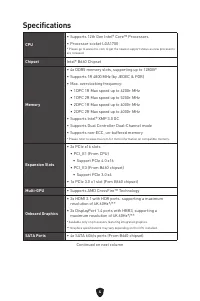
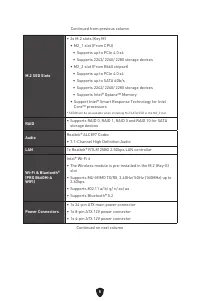
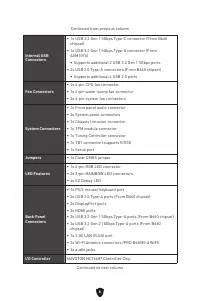
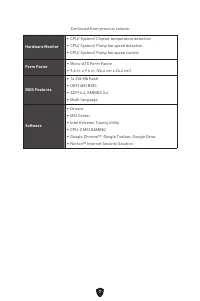
4 Specifications CPU ∙ Supports 12th Gen Intel® Core™ Processors ∙ Processor socket LGA1700 * Please go to www.msi.com to get the newest support status as new processors are released. Chipset Intel® B660 Chipset Memory ∙ 4x DDR5 memory slots, supporting up to 128GB* ∙ Supports 1R 4800 MHz (by JEDEC ...
Page 9 - Special Features
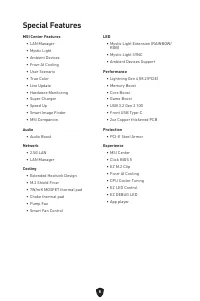
8 Special Features MSI Center Features • LAN Manager• Mystic Light• Ambient Devices• Frozr AI Cooling• User Scenario• True Color• Live Update• Hardware Monitoring• Super Charger• Speed Up• Smart Image Finder• MSI Companion Audio • Audio Boost Network • 2.5G LAN• LAN Manager Cooling • Extended Heatsi...
Page 10 - Back Panel Connectors
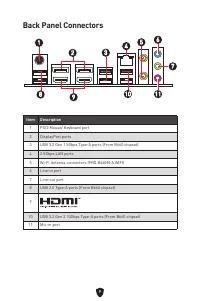
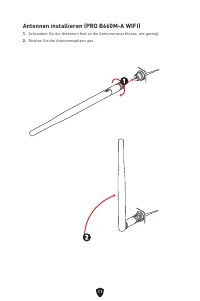
9 Back Panel Connectors 1 6 2 3 4 Item Description 1 PS/2 Mouse/ Keyboard port 2 DisplayPort ports 3 USB 3.2 Gen 1 5Gbps Type-A ports (From B660 chipset) 4 2.5Gbps LAN ports 5 Wi-Fi Antenna connectors (PRO B660M-A WIFI) 6 Line-in port 7 Line-out port 8 USB 2.0 Type-A ports (From B660 chipset) 9 10 U...
Page 11 - LAN Port LED Status Table
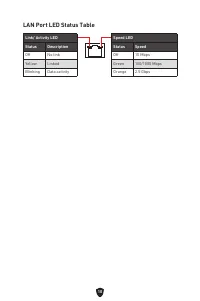
10 LAN Port LED Status Table Link/ Activity LEDStatus Description Off No link Yellow Linked Blinking Data activity Speed LEDStatus Speed Off 10 Mbps Green 100/1000 Mbps Orange 2.5 Gbps
Page 13 - Overview of Components
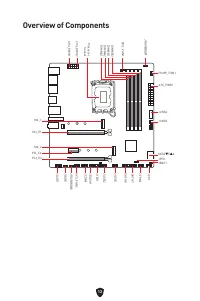
12 SATA▼5▲6 JUSB3 JUSB4 ATX_PWR1 JRAINBOW1 PUMP_FAN1 CPU_FAN1 DIMMB2 Processor Socket CPU_PWR1 CPU_PWR2 JFP1 JTPM1 JDASH1 JUSB2 JUSB1 JCOM1 JTBT1 SATA8 JRGB1 JAUD1 PCI_E3 PCI_E2 M2_2 PCI_E1 SYS_FAN2 M2_1 DIMMB1 DIMMA2 DIMMA1 Overview of Components JBAT1 JFP2 JRAINBOW2 SATA7
Page 14 - Important; CPU Socket
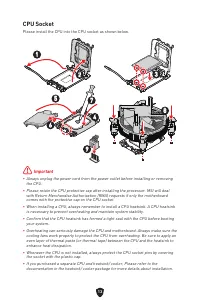
13 ⚠ Important ∙ Always unplug the power cord from the power outlet before installing or removing the CPU. ∙ Please retain the CPU protective cap after installing the processor. MSI will deal with Return Merchandise Authorization (RMA) requests if only the motherboard comes with the protective cap o...
Page 15 - DIMM Slots; Memory module installation recommendation
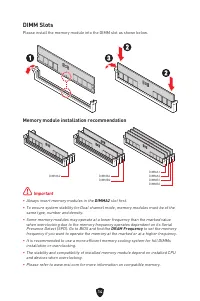
14 DIMM Slots Please install the memory module into the DIMM slot as shown below. Memory module installation recommendation ⚠ Important ∙ Always insert memory modules in the DIMMA2 slot first. ∙ To ensure system stability for Dual channel mode, memory modules must be of the same type, number and den...
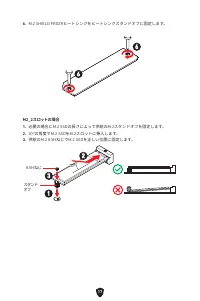
Page 17 - Installing M.2 module
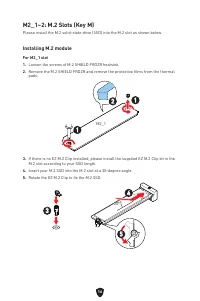
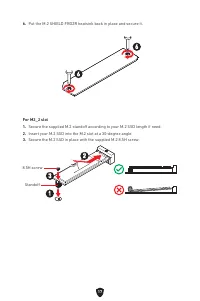
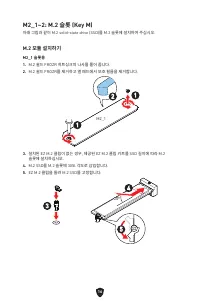
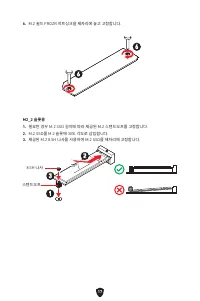
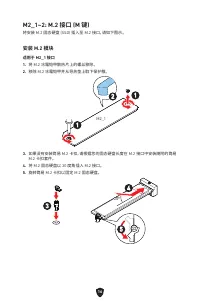
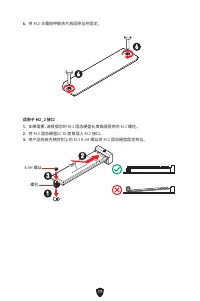
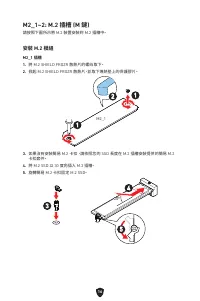
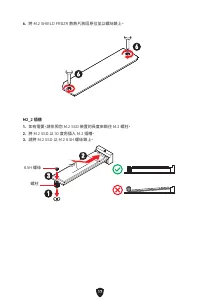
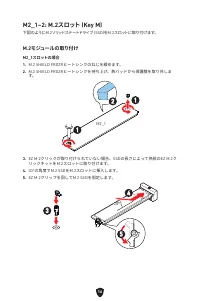
16 M2_1~2: M.2 Slots (Key M) Please install the M.2 solid-state drive (SSD) into the M.2 slot as shown below. Installing M.2 module For M2_1 slot1. Loosen the screws of M.2 SHIELD FROZR heatsink. 2. Remove the M.2 SHIELD FROZR and remove the protective films from the thermal pads. 2 1 1 M2_1 3. If t...
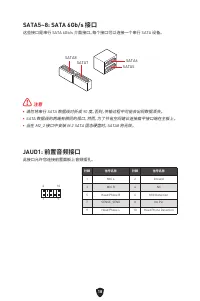
Page 19 - JAUD1: Front Audio Connector
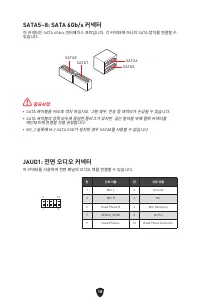
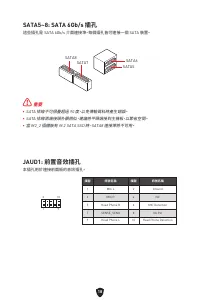
18 SATA5~8: SATA 6Gb/s Connectors These connectors are SATA 6Gb/s interface ports. Each connector can connect to one SATA device. ⚠ Important ∙ Please do not fold the SATA cable at a 90-degree angle. Data loss may result during transmission otherwise. ∙ SATA cables have identical plugs on either sid...
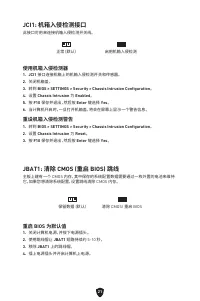
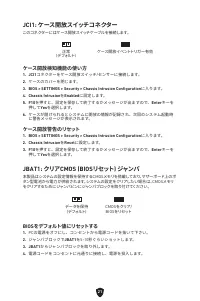
Page 22 - JCI1: Chassis Intrusion Connector; Resetting BIOS to default values
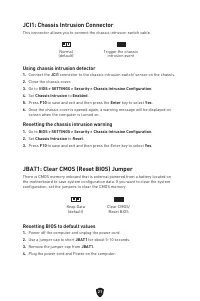
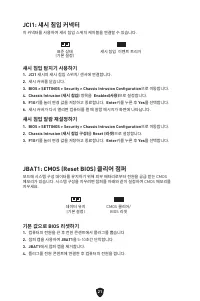
21 JCI1: Chassis Intrusion Connector This connector allows you to connect the chassis intrusion switch cable. JBAT1: Clear CMOS (Reset BIOS) Jumper There is CMOS memory onboard that is external powered from a battery located on the motherboard to save system configuration data. If you want to clear ...
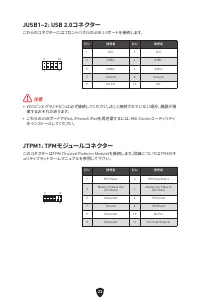
Page 24 - JTPM1: TPM Module Connector
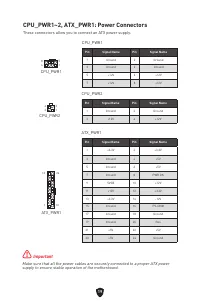
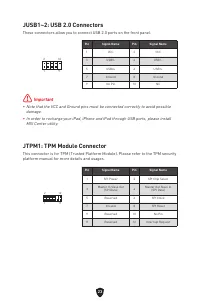
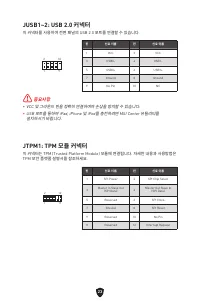
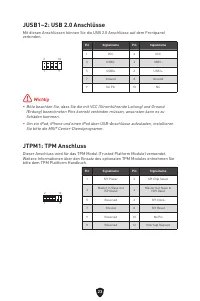
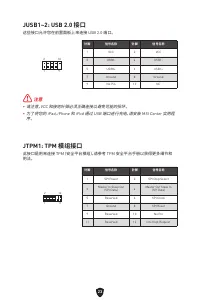
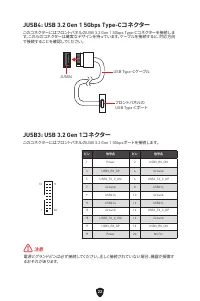
23 JUSB1~2: USB 2.0 Connectors These connectors allow you to connect USB 2.0 ports on the front panel. ⚠ Important ∙ Note that the VCC and Ground pins must be connected correctly to avoid possible damage. ∙ In order to recharge your iPad, iPhone and iPod through USB ports, please install MSI Center ...
Page 25 - JCOM1: Serial Port Connector
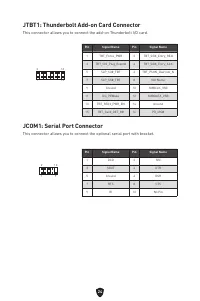
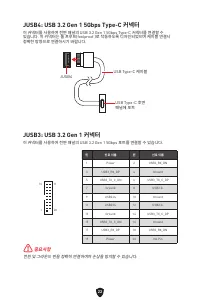
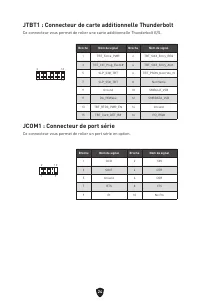
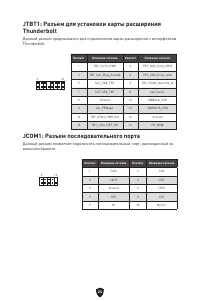
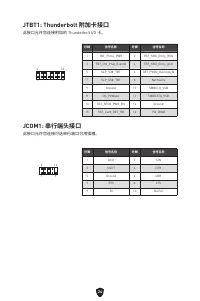
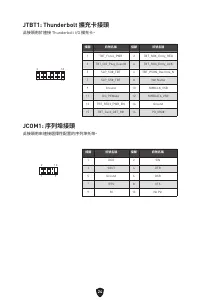
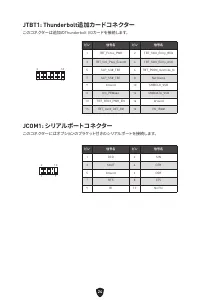
24 JTBT1: Thunderbolt Add-on Card Connector This connector allows you to connect the add-on Thunderbolt I/O card. 1 2 16 15 Pin Signal Name Pin Signal Name 1 TBT_Force_PWR 2 TBT_S0IX_Entry_REQ 3 TBT_CIO_Plug_Event# 4 TBT_S0IX_Entry_ACK 5 SLP_S3#_TBT 6 TBT_PSON_Override_N 7 SLP_S5#_TBT 8 Net Name 9 G...
Page 26 - JDASH1: Tuning controller Connector; EZ Debug LED
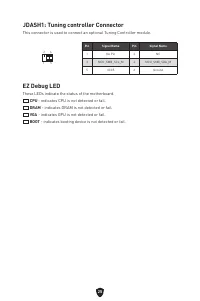
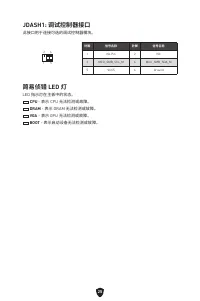
25 JDASH1: Tuning controller Connector This connector is used to connect an optional Tuning Controller module. 1 2 6 5 Pin Signal Name Pin Signal Name 1 No Pin 2 NC 3 MCU_SMB_SCL_M 4 MCU_SMB_SDA_M 5 VCC5 6 Ground EZ Debug LED These LEDs indicate the status of the motherboard. CPU - indicates CPU is ...
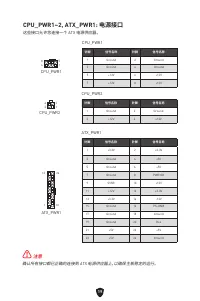
Page 27 - JRGB1: RGB LED connector; CAUTION; JRAINBOW1~2: Addressable RGB LED connectors
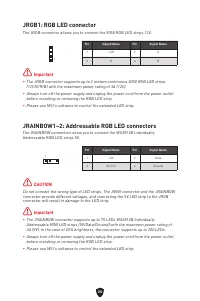
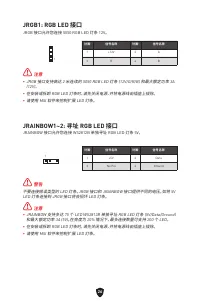
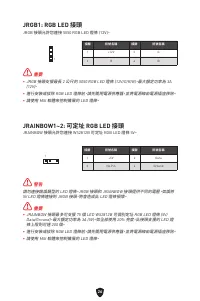
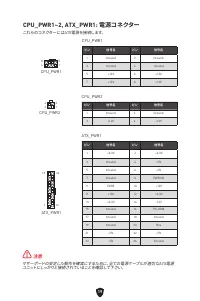
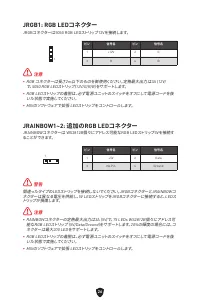
26 ⚠ Important ∙ The JRGB connector supports up to 2 meters continuous 5050 RGB LED strips (12V/G/R/B) with the maximum power rating of 3A (12V). ∙ Always turn off the power supply and unplug the power cord from the power outlet before installing or removing the RGB LED strip. ∙ Please use MSI’s sof...
Page 28 - Installing Windows 10/ Windows 11; Installing Drivers; MSI Center; MSI Center User Guide
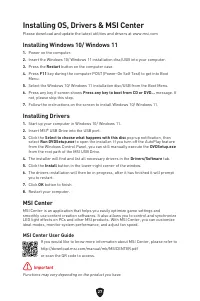
27 Installing OS, Drivers & MSI Center Please download and update the latest utilities and drivers at www.msi.com Installing Windows 10/ Windows 11 1. Power on the computer. 2. Insert the Windows 10/ Windows 11 installation disc/USB into your computer. 3. Press the Restart button on the computer...
Page 29 - UEFI BIOS; UEFI advantages; How to check the BIOS mode?
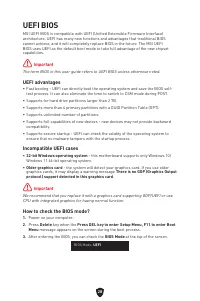
28 UEFI BIOS MSI UEFI BIOS is compatible with UEFI (Unified Extensible Firmware Interface) architecture. UEFI has many new functions and advantages that traditional BIOS cannot achieve, and it will completely replace BIOS in the future. The MSI UEFI BIOS uses UEFI as the default boot mode to take fu...
Page 30 - BIOS Setup; Entering BIOS Setup; BIOS User Guide
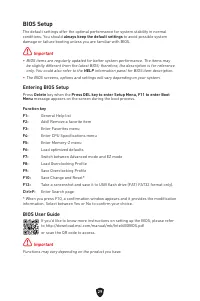
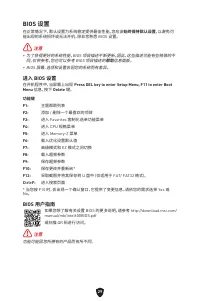
29 BIOS Setup The default settings offer the optimal performance for system stability in normal conditions. You should always keep the default settings to avoid possible system damage or failure booting unless you are familiar with BIOS. ⚠ Important ∙ BIOS items are regularly updated for better syst...
Page 31 - Resetting BIOS; Updating BIOS; Updating BIOS with M-FLASH
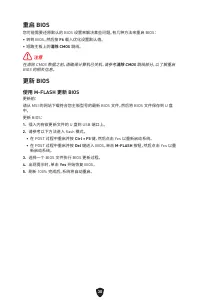
30 Resetting BIOS You might need to restore the default BIOS settings to solve certain problems. There are several ways to reset BIOS: ∙ Go to BIOS and press F6 to load optimized defaults. ∙ Short the Clear CMOS jumper on the motherboard. ⚠ Important Be sure the computer is off before clearing CMOS ...
Page 32 - Updating the BIOS with MSI Center
31 Updating the BIOS with MSI Center Before updating: ∙ Make sure the LAN driver is already installed and the internet connection is set up properly. ∙ Please close all other application softwares before updating the BIOS. To update BIOS: 1. Install and launch MSI Center and go to Support page. 2. S...
Page 33 - 안전 지침
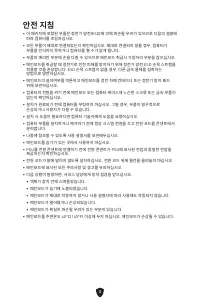
1 MSI® 메인보드를 구입해주셔서 감사합니다. 이 사용 설명서는 메인보드 레이아웃, 부품 개요, BIOS 설정 및 소프트웨어 설치에 대한 상세 내역을 제공하고 있습니다. Contents 안전 지침 .............................................................................................................3 사양 ..............................................................................
Page 36 - 사양
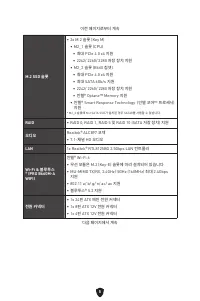
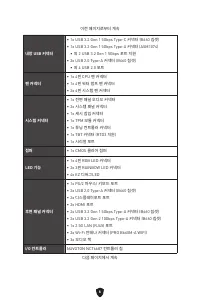
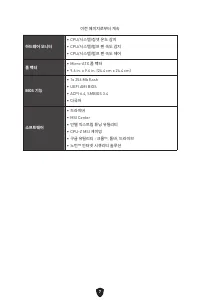
4 사양 CPU ∙ 12세대 인텔® 코어™ 프로세서 지원 ∙ 소켓 LGA1700 프로세서 * 출시된 새 프로세서의 최신 지원 상태를 확인하려면 www.msi.com을 방문하십시오. 칩셋 인텔® B660 칩셋 메모리 ∙ 4x DDR5 메모리 슬롯, 최대 128GB* 지원 ∙ 1R 4800 MHz (by JEDEC & POR) 지원 ∙ 최대 오버클로킹 빈도수: • 1DPC 1R 최대 속도 6200+ MHz • 1DPC 2R 최대 속도 5200+ MHz • 2DPC 1R 최대 속도 4000+ MHz • 2DPC 2R 최대 속도 4...
Page 40 - 특수 기능
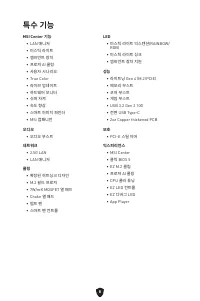
8 특수 기능 MSI Center 기능 • LAN 매니저 • 미스틱 라이트 • 엠비언트 장치 • 프로져 AI 쿨링 • 사용자 시나리오 • True Color• 라이브 업데이트 • 하드웨어 모니터 • 슈퍼 차져 • 속도 향상 • 스마트 이미지 파인더 • MSI 컴패니언 오디오 • 오디오 부스트 네트워크 • 2.5G LAN• LAN 매니저 쿨링 • 확장된 히트싱크 디자인 • M.2 쉴드 프로져 • 7W/mK MOSFET 열 패드 • Choke 열 패드 • 펌프 팬 • 스마트 팬 컨트롤 LED • 미스틱 라이트 익스텐션(RAINBOW/ ...
Page 41 - 후면 패널 커넥터
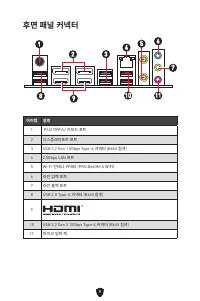
9 후면 패널 커넥터 아이템 설명 1 PS/2 마우스/ 키보드 포트 2 디스플레이포트 포트 3 USB 3.2 Gen 1 5Gbps Type-A 커넥터 (B660 칩셋) 4 2.5Gbps LAN 포트 5 Wi-Fi 안테나 커넥터 (PRO B660M-A WIFI) 6 라인 입력 포트 7 라인 출력 포트 8 USB 2.0 Type-A 커넥터 (B660 칩셋) 9 10 USB 3.2 Gen 2 10Gbps Type-A 커넥터 (B660 칩셋) 11 마이크 입력 잭 1 6 2 3 4 5 7 8 9 10 11
Page 42 - LAN 포트 LED 상태 표시
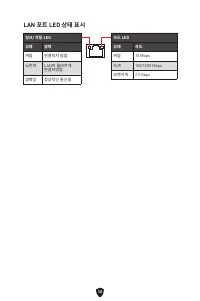
10 LAN 포트 LED 상태 표시 링크/ 작동 LED 상태 설명 꺼짐 연결되지 않음. 노란색 LAN이 올바르게 연결되었음. 깜빡임 정상적인 통신중. 속도 LED 상태 속도 꺼짐 10 Mbps 녹색 100/1000 Mbps 오렌지색 2.5 Gbps
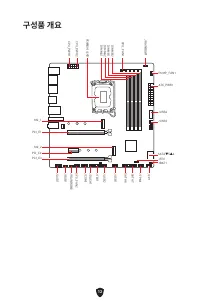
Page 44 - 구성품 개요
12 SATA▼5▲6 JUSB3 JUSB4 ATX_PWR1 JRAINBOW1 PUMP_FAN1 CPU_FAN1 DIMMB2 프로세서 소켓 CPU_PWR1 CPU_PWR2 JFP1 JTPM1 JDASH1 JUSB2 JUSB1 JCOM1 JTBT1 SATA8 JRGB1 JAUD1 PCI_E3 PCI_E2 M2_2 PCI_E1 SYS_FAN2 M2_1 DIMMB1 DIMMA2 DIMMA1 구성품 개요 JBAT1 JFP2 JRAINBOW2 SATA7
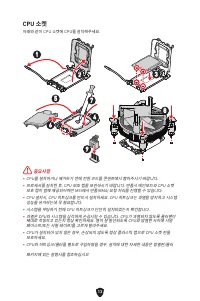
Page 45 - 중요사항; CPU 소켓
13 ⚠ 중요사항 ∙ CPU를 설치하거나 제거하기 전에 전원 코드를 콘센트에서 뽑아주시기 바랍니다. ∙ 프로세서를 설치한 후, CPU 보호 캡을 보관하시기 바랍니다. 반품시 메인보드와 CPU 소켓 보호 캡이 함께 제공되어야만 MSI에서 반품(RMA) 요청 처리를 진행할 수 있습니다. ∙ CPU 설치시, CPU 히트싱크를 반드시 설치하세요. CPU 히트싱크는 과열을 방지하고 시스템 성능을 유지하는데 꼭 필요합니다. ∙ 시스템을 부팅하기 전에 CPU 히트싱크가 단단히 설치되었는지 확인합니다. ∙ 과열은 CPU와 시스템을 심각하게 손상시...
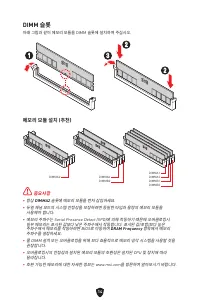
Page 46 - DIMM 슬롯
14 DIMM 슬롯 아래 그림과 같이 메모리 모듈을 DIMM 슬롯에 설치하여 주십시오. 메모리 모듈 설치 (추천) ⚠ 중요사항 ∙ 항상 DIMMA2 슬롯에 메모리 모듈을 먼저 삽입하세요. ∙ 듀얼 채널 모드의 시스템 안정성을 보장하려면 동일한 타입과 용량의 메모리 모듈을 사용해야 합니다. ∙ 메모리 주파수는 Serial Presence Detect (SPD)에 의해 작동하기 때문에 오버클로킹시 일부 메모리는 표시된 값보다 낮은 주파수에서 작동합니다. 표시된 값(포함)보다 높은 주파수에서 메모리를 작동하려면 BIOS로 이동하여 DRA...
Page 53 - 섀시 침입 알람 재설정하기
21 JCI1: 섀시 침입 커넥터 이 커넥터를 사용하여 섀시 침입 스위치 케이블을 연결할 수 있습니다. JBAT1: CMOS (Reset BIOS) 클리어 점퍼 보드에 시스템 구성 데이터를 유지하기 위해 외부 배터리로부터 전원을 공급 받는 CMOS 메모리가 있습니다. 시스템 구성을 지우려면 점퍼를 아래와 같이 설정하여 CMOS 메모리를 지우세요. 데이터 유지 (기본 설정) CMOS 클리어/ BIOS 리셋 기본 값으로 BIOS 리셋하기 1. 컴퓨터의 전원을 끈 후 전원 콘센트에서 플러그를 뽑습니다 2. 점퍼 캡을 사용하여 JBAT1 ...
Page 56 - JTBT1: 썬더볼트 추가 카드 커넥터
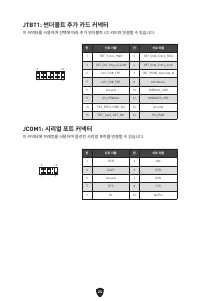
24 JTBT1: 썬더볼트 추가 카드 커넥터 이 커넥터를 사용하여 선택에 따라 추가 썬더볼트 I/O 카드와 연결할 수 있습니다. 1 2 16 15 핀 신호 이름 핀 신호 이름 1 TBT_Force_PWR 2 TBT_S0IX_Entry_REQ 3 TBT_CIO_Plug_Event# 4 TBT_S0IX_Entry_ACK 5 SLP_S3#_TBT 6 TBT_PSON_Override_N 7 SLP_S5#_TBT 8 Net Name 9 Ground 10 SMBCLK_VSB 11 DG_PEWake 12 SMBDATA_VSB 13 TBT_RTD...
Page 57 - EZ 디버그 LED
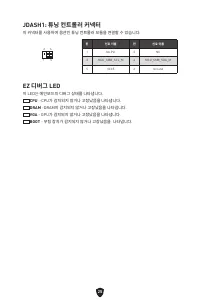
25 JDASH1: 튜닝 컨트롤러 커넥터 이 커넥터를 사용하여 옵션인 튜닝 컨트롤러 모듈을 연결할 수 있습니다. 1 2 6 5 핀 신호 이름 핀 신호 이름 1 No Pin 2 NC 3 MCU_SMB_SCL_M 4 MCU_SMB_SDA_M 5 VCC5 6 Ground EZ 디버그 LED 이 LED는 메인보드의 디버그 상태를 나타냅니다. CPU -CPU가 감지되지 않거나 고장났음을 나타냅니다. DRAM -DRAM이 감지되지 않거나 고장났음을 나타냅니다. VGA - GPU가 감지되지 않거나 고장났음을 나타냅니다. BOOT - 부팅 장치가...
Page 58 - 주의
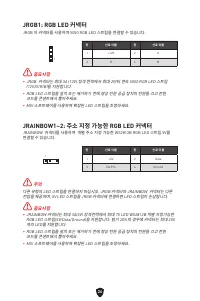
26 ⚠ 중요사항 ∙ JRGB 커넥터는 최대 3A (12V) 정격 전력에서 최대 2미터 연속 5050 RGB LED 스트립 (12V/G/R/B)을 지원합니다. ∙ RGB LED 스트립을 설치 또는 제거하기 전에 항상 전원 공급 장치의 전원을 끄고 전원 코드를 콘센트에서 뽑아주세요. ∙ MSI 소프트웨어를 사용하여 확장된 LED 스트립을 조정하세요. JRGB1: RGB LED 커넥터 JRGB 이 커넥터를 사용하여 5050 RGB LED 스트립을 연결할 수 있습니다. 핀 신호 이름 핀 신호 이름 1 +12V 2 G 3 R 4 B 1 ⚠...
Page 59 - Windows 10/ Windows 11 설치하기; 드라이버 설치하기; MSI Center 사용자 가이드
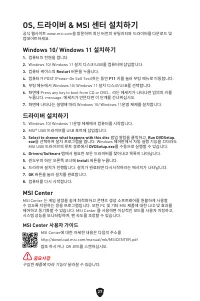
27 OS, 드라이버 & MSI 센터 설치하기 공식 웹사이트 www.msi.com을 방문하여 최신 버전의 유틸리티와 드라이버를 다운로드 및 업데이트하세요. Windows 10/ Windows 11 설치하기 1. 컴퓨터의 전원을 켭니다. 2. Windows 10/ Windows 11 설치 디스크/USB를 컴퓨터에 삽입합니다. 3. 컴퓨터 케이스의 Restart 버튼을 누릅니다. 4. 컴퓨터가 POST (Power-On Self Test)하는 동안 F11 키를 눌러 부팅 메뉴로 이동합니다. 5. 부팅 메뉴에서 Windows 10...
Page 60 - UEFI 이점
28 UEFI BIOS MSI UEFI BIOS는 UEFI(Unified Extensible Firmware Interface) 구성과 호환 가능 합니다. UEFI는 기존 BIOS가 달성 할 수없는 많은 새로운 기능과 장점을 가지고 있으며 향후 BIOS를 완전히 대체 할 것입니다. MSI의 UEFI BIOS는 새로운 칩셋의 기능을 최대한 활용하기 위해 기본 부팅 모드로 UEFI를 사용합니다. ⚠ 중요사항 본 사용자 매뉴얼상 ‘BIOS’ 용어는 별도 표기가 없는 한 ‘UEFI BIOS’를 뜻합니다. UEFI 이점 ∙ 빠른 부팅 - U...
Page 61 - BIOS 설정; BIOS 사용자 가이드
29 BIOS (바이오스) 설정 기본 설정은 일반적인 조건에서 시스템의 안정성을 위해 최적의 성능을 제공합니다. BIOS에 익숙하지 않을 경우, 시스템 손상 또는 부팅 실패를 방지하기 위해 항상 기본 설정을 유지 하기 바랍니다. ⚠ 중요사항 ∙ BIOS 항목은 시스템 성능 향상을 위해 지속적으로 업데이트됩니다. 따라서 여기에 제공된 설명은 최신 BIOS와 조금 상이할 수 있으므로 참조용으로만 사용하십시오. 또한 BIOS 항목에 대해서는 HELP(도움말) 의 설명을 참고할 수 있습니다. ∙ BIOS 화면, 옵션 및 설정은 사용자의 시...
Page 62 - BIOS 리셋; BIOS 업데이트
30 BIOS 리셋 문제 해결을 위해 BIOS 기본 설정을 복원해야할 경우가 나타날 수 있습니다. BIOS를 리셋하는 방법에는 다음과 같은 몇가지가 있습니다. ∙ BIOS로 이동한 후 F6 를 눌러 최적화된 기본 값을 로드합니다. ∙ 메인보드의 CMOS 클리어 점퍼를 단락시킵니다. ⚠ 중요사항 CMOS 데이터를 삭제하기 전에 컴퓨터 전원이 꺼져 있는지 확인해야 합니다. BIOS를 재설정하려면 CMOS 클리어 점퍼 섹션을 참조하세요. BIOS 업데이트 M-FLASH로 BIOS 업데이트 업데이트 하기전:구입한 모듈에 맞는 최신 BIOS...
Page 63 - MSI Center로 BIOS 업데이트
31 MSI Center로 BIOS 업데이트 업데이트 하기 전: ∙ LAN 드라이버가 이미 설치되어 있고 인터넷이 제대로 연결되었는지 확인하세요. ∙ BIOS 업데이트 하기 전, 모든 다른 응용 프로그램을 끄십시오. BIOS 업데이트: 1. MSI 센터를 설치 및 시작하고 Support 페이지로 이동합니다. 2. Live Update 를 선택하고 Advance 버튼을 클릭합니다. 3. BIOS 파일을 선택하고 Install 버튼을 클릭합니다. 4. 설치 알림이 나타나면 Install 버튼을 누릅니다. 5. BIOS를 업데이트하기 위...
Page 66 - Informations de sécurité
3 Informations de sécurité ∙ Les composants dans l’emballage peuvent être endommagés par des décharges électrostatiques (ESD). Pour vous assurer de correctement monter votre ordinateur, veuillez vous référer aux instructions ci-dessous. ∙ Assurez-vous de bien connecter tous les composants. En cas de...
Page 67 - Spécifications
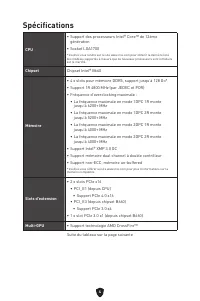
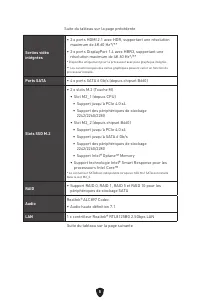
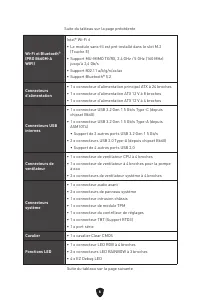
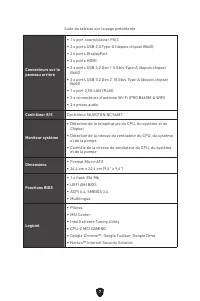
4 Spécifications CPU ∙ Support des processeurs Intel® Core™ de 12ème génération ∙ Socket LGA1700 * Veuillez vous rendre sur le site www.msi.com pour obtenir la dernière liste des modèles supportés à mesure que de nouveaux processeurs sont introduits sur le marché. Chipset Chipset Intel® B660 Mémoire...
Page 71 - Fonctions spéciales
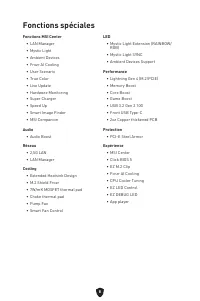
8 Fonctions spéciales Fonctions MSI Center • LAN Manager• Mystic Light• Ambient Devices• Frozr AI Cooling• User Scenario• True Color• Live Update• Hardware Monitoring• Super Charger• Speed Up• Smart Image Finder• MSI Companion Audio • Audio Boost Réseau • 2,5G LAN• LAN Manager Cooling • Extended Hea...
Page 72 - Connecteurs de panneau arrière
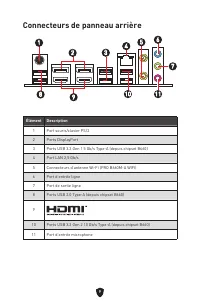
9 Connecteurs de panneau arrière Élément Description 1 Port souris/clavier PS/2 2 Ports DisplayPort 3 Ports USB 3.2 Gen 1 5 Gb/s Type-A (depuis chipset B660) 4 Port LAN 2,5 Gb/s 5 Connecteurs d’antenne Wi-Fi (PRO B660M-A WIFI) 6 Port d’entrée ligne 7 Port de sortie ligne 8 Ports USB 2.0 Type-A (depu...
Page 73 - Tableau explicatif de l’état de la LED du port LAN
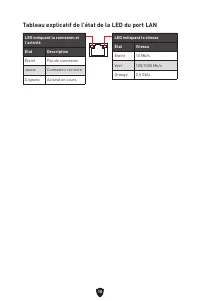
10 Tableau explicatif de l’état de la LED du port LAN LED indiquant la connexion et l’activité État Description Éteint Pas de connexion Jaune Connexion correcte Clignote Activité en cours LED indiquant la vitesse État Vitesse Éteint 10 Mb/s Vert 100/1000 Mb/s Orange 2,5 Gb/s
Page 75 - Vue d’ensemble des composants
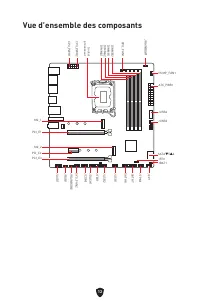
12 SATA▼5▲6 JUSB3 JUSB4 ATX_PWR1 JRAINBOW1 PUMP_FAN1 CPU_FAN1 DIMMB2 Socket processeur CPU_PWR1 CPU_PWR2 JFP1 JTPM1 JDASH1 JUSB2 JUSB1 JCOM1 JTBT1 SATA8 JRGB1 JAUD1 PCI_E3 PCI_E2 M2_2 PCI_E1 SYS_FAN2 M2_1 DIMMB1 DIMMA2 DIMMA1 Vue d’ensemble des composants JBAT1 JFP2 JRAINBOW2 SATA7
Page 76 - Socket CPU
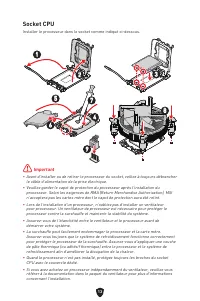
13 ⚠ Important ∙ Avant d’installer ou de retirer le processeur du socket, veillez à toujours débrancher le câble d’alimentation de la prise électrique. ∙ Veuillez garder le capot de protection du processeur après l’installation du processeur. Selon les exigences de RMA (Return Merchandise Authorizat...
Page 77 - Slots DIMM; Installation recommandée de module mémoire
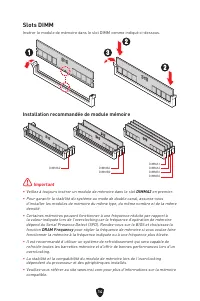
14 Slots DIMM Insérer le module de mémoire dans le slot DIMM comme indiqué ci-dessous. Installation recommandée de module mémoire ⚠ Important ∙ Veillez à toujours insérer un module de mémoire dans le slot DIMMA2 en premier. ∙ Pour garantir la stabilité du système au mode de double canal, assurez-vou...
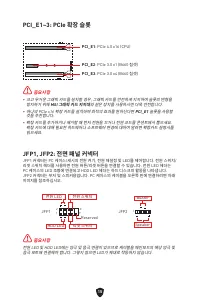
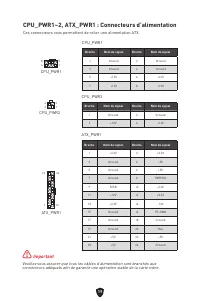
Page 78 - JFP1, JFP2 : Connecteurs de panneau avant
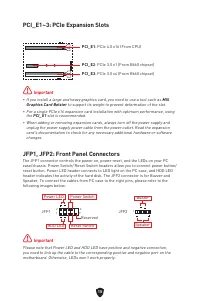
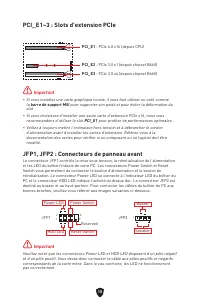
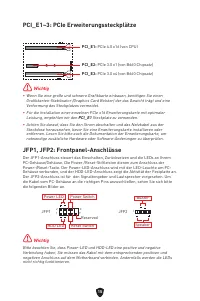
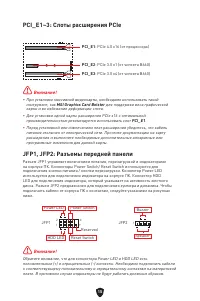
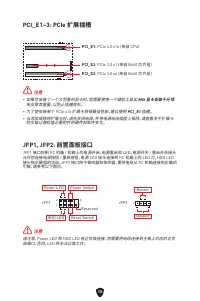
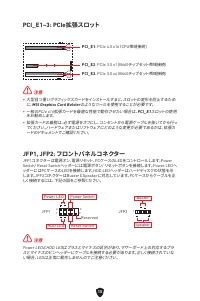
15 PCI_E1~3 : Slots d’extension PCIe PCI_E1 : PCIe 4.0 x16 (depuis CPU) PCI_E2 : PCIe 3.0 x1 (depuis chipset B660) PCI_E3 : PCIe 3.0 x4 (depuis chipset B660) ⚠ Important ∙ Si vous installez une carte graphique lourde, il vous faut utiliser un outil comme la barre de support MSI pour supporter son po...
Page 79 - Installation du module M.2
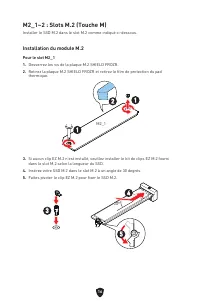
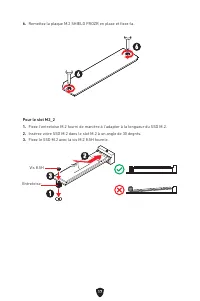
16 M2_1~2 : Slots M.2 (Touche M) Installer le SSD M.2 dans le slot M.2 comme indiqué ci-dessous. Installation du module M.2 Pour le slot M2_11. Desserrez les vis de la plaque M.2 SHIELD FROZR. 2. Retirez la plaque M.2 SHIELD FROZR et retirez le film de protection du pad thermique. 2 1 1 M2_1 3. Si a...
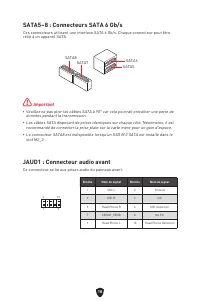
Page 81 - JAUD1 : Connecteur audio avant
18 SATA5~8 : Connecteurs SATA 6 Gb/s Ces connecteurs utilisent une interface SATA 6 Gb/s. Chaque connecteur peut être relié à un appareil SATA. ⚠ Important ∙ Veuillez ne pas plier les câbles SATA à 90° car cela pourrait entraîner une perte de données pendant la transmission. ∙ Les câbles SATA dispos...
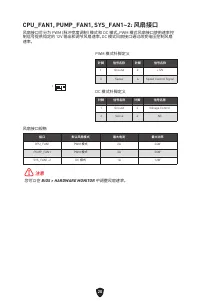
Page 83 - de ventilateur
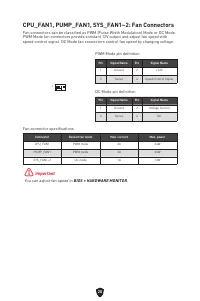
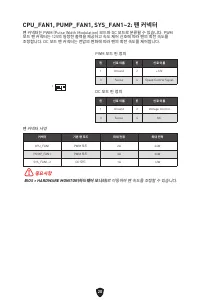
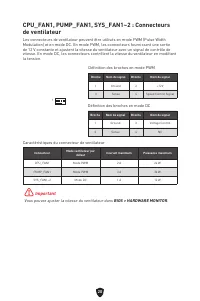
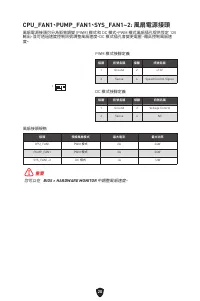
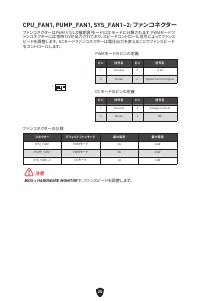
20 CPU_FAN1, PUMP_FAN1, SYS_FAN1~2 : Connecteurs de ventilateur Les connecteurs de ventilateur peuvent être utilisés en mode PWM (Pulse Width Modulation) et en mode DC. En mode PWM, les connecteurs fournissent une sortie de 12 V constante et ajustent la vitesse du ventilateur avec un signal de contr...
Page 84 - JCI1 : Connecteur intrusion châssis; Réinitialiser le BIOS aux valeurs par défaut; Réinitialisation de l’avertissement d’intrusion châssis
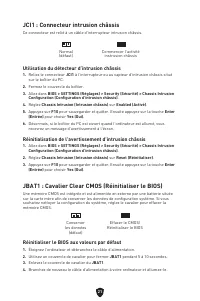
21 JCI1 : Connecteur intrusion châssis Ce connecteur est relié à un câble d’interrupteur intrusion châssis. JBAT1 : Cavalier Clear CMOS (Réinitialiser le BIOS) Une mémoire CMOS est intégrée et est alimentée en externe par une batterie située sur la carte mère afin de conserver les données de configu...
Page 86 - JTPM1 : Connecteur de module TPM
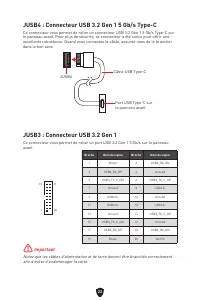
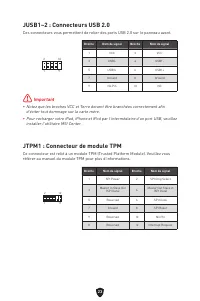
23 JUSB1~2 : Connecteurs USB 2.0 Ces connecteurs vous permettent de relier des ports USB 2.0 sur le panneau avant. ⚠ Important ∙ Notez que les broches VCC et Terre doivent être branchées correctement afin d’éviter tout dommage sur la carte mère. ∙ Pour recharger votre iPad, iPhone et iPod par l’inte...
Page 88 - JDASH1 : Connecteur du contrôleur de réglages
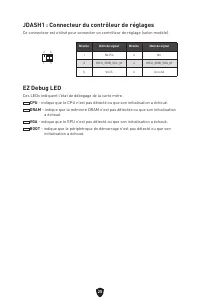
25 JDASH1 : Connecteur du contrôleur de réglages Ce connecteur est utilisé pour connecter un contrôleur de réglage (selon modèle). 1 2 6 5 Broche Nom de signal Broche Nom de signal 1 No Pin 2 NC 3 MCU_SMB_SCL_M 4 MCU_SMB_SDA_M 5 VCC5 6 Ground EZ Debug LED Ces LEDs indiquent l’état de débogage de la ...
Page 89 - JRGB1 : Connecteur LED RGB; Attention; JRAINBOW1~2 : Connecteurs LED RGB adressables
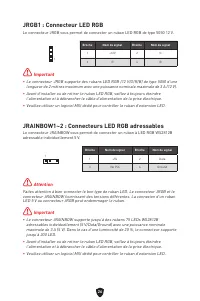
26 ⚠ Important ∙ Le connecteur JRGB supporte des rubans LED RGB (12 V/G/R/B) de type 5050 d’une longueur de 2 mètres maximum avec une puissance nominale maximale de 3 A (12 V). ∙ Avant d’installer ou de retirer le ruban LED RGB, veillez à toujours éteindre l’alimentation et à débrancher le câble d’a...
Page 90 - Installer OS, Pilotes et MSI Center; Installer Windows 10/Windows 11
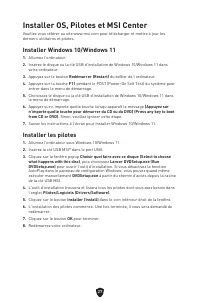
27 Installer OS, Pilotes et MSI Center Veuillez vous référer au site www.msi.com pour télécharger et mettre à jour les derniers utilitaires et pilotes. Installer Windows 10/Windows 11 1. Allumez l’ordinateur. 2. Insérez le disque ou la clé USB d’installation de Windows 10/Windows 11 dans votre ordin...
Page 91 - Guide d’utilisation de MSI Center
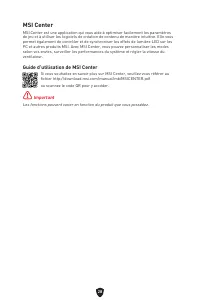
28 MSI Center MSI Center est une application qui vous aide à optimiser facilement les paramètres de jeu et à utiliser les logiciels de création de contenu de manière intuitive. Elle vous permet également de contrôler et de synchroniser les effets de lumière LED sur les PC et autres produits MSI. Ave...
Page 92 - Avantages de l’UEFI; Comment vérifier le mode BIOS ?
29 UEFI BIOS Le BIOS UEFI de MSI est compatible avec l’architecture UEFI (Unified Extensible Firmware Interface). Le BIOS UEFI présente de nombreuses nouvelles fonctionnalités et avantages qui ne sont pas proposés par le BIOS traditionnel. Le BIOS UEFI est ainsi voué à totalement remplacer le BIOS t...
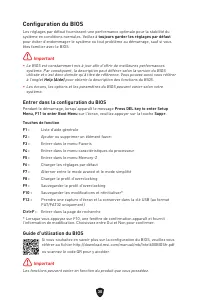
Page 93 - Configuration du BIOS; Entrer dans la configuration du BIOS; Guide d’utilisation du BIOS
30 Configuration du BIOS Les réglages par défaut fournissent une performance optimale pour la stabilité du système en conditions normales. Veillez à toujours garder les réglages par défaut pour éviter d’endommager le système ou tout problème au démarrage, sauf si vous êtes familier avec le BIOS. ⚠ I...
Page 94 - Réinitialiser le BIOS; Mettre le BIOS à jour; Mettre le BIOS à jour avec M-FLASH
31 Réinitialiser le BIOS Il se peut que vous ayez besoin de récupérer les réglages BIOS par défaut pour résoudre des problèmes. Pour réinitialiser les réglages du BIOS, veuillez suivre l’une des méthodes suivantes : ∙ Allez dans le BIOS et appuyez sur F6 pour charger les réglages par défaut. ∙ Court...
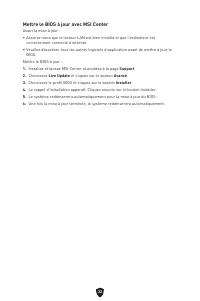
Page 95 - Mettre le BIOS à jour avec MSI Center
32 Mettre le BIOS à jour avec MSI Center Avant la mise à jour : ∙ Assurez-vous que le lecteur LAN est bien installé et que l’ordinateur est correctement connecté à internet. ∙ Veuillez désactiver tous les autres logiciels d’application avant de mettre à jour le BIOS. Mettre le BIOS à jour : 1. Insta...
Page 96 - Inhalt
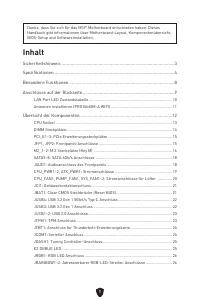
1 Danke, dass Sie sich für das MSI® Motherboard entschieden haben. Dieses Handbuch gibt informationen über Motherboard-Layout, Komponentenübersicht, BIOS-Setup und Softwareinstallation. Inhalt Sicherheitshinweis ...........................................................................................
Page 98 - Sicherheitshinweis
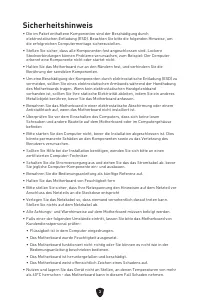
3 Sicherheitshinweis ∙ Die im Paket enthaltene Komponenten sind der Beschädigung durch elektrostatischen Entladung (ESD). Beachten Sie bitte die folgenden Hinweise, um die erfolgreichen Computermontage sicherzustellen. ∙ Stellen Sie sicher, dass alle Komponenten fest angeschlossen sind. Lockere Stec...
Page 99 - Spezifikationen
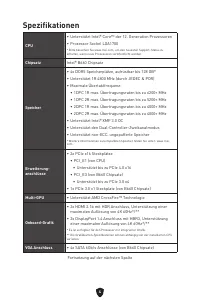
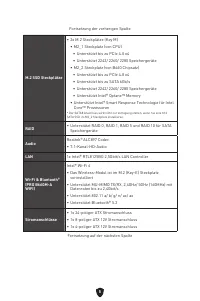
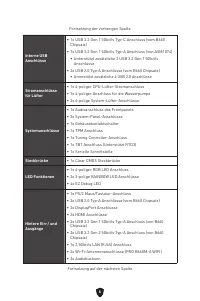
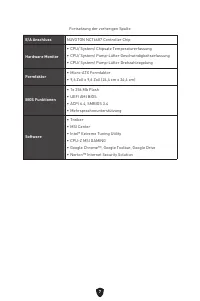
4 Spezifikationen CPU ∙ Unterstützt Intel® Core™ der 12. Generation Prozessoren ∙ Prozessor Sockel LGA1700 * Bitte besuchen Sie www.msi.com, um den neuesten Support-Status zu erhalten, wenn neue Prozessoren veröffentlicht werden. Chipsatz Intel® B660 Chipsatz Speicher ∙ 4x DDR5 Speicherplätze, aufrü...
Page 103 - Besondere Funktionen
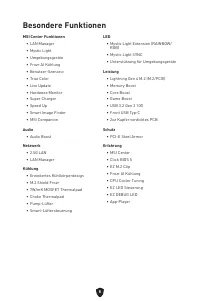
8 Besondere Funktionen MSI Center Funktionen • LAN Manager• Mystic Light• Umgebungsgeräte• Frozr AI Kühlung• Benutzer-Szenario• True Color• Live Update• Hardware Monitor• Super Charger• Speed Up• Smart Image Finder• MSI Companion Audio • Audio Boost Netzwerk • 2.5G LAN• LAN Manager Kühlung • Erweite...
Page 104 - Anschlüsse auf der Rückseite
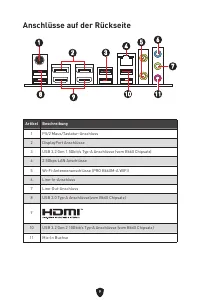
9 Anschlüsse auf der Rückseite Artikel Beschreibung 1 PS/2 Maus/Tastatur-Anschluss 2 DisplayPort Anschlüsse 3 USB 3.2 Gen 1 5Gbit/s Typ-A Anschlüsse (vom B660 Chipsatz) 4 2.5Gbps LAN Anschlüsse 5 Wi-Fi-Antennenanschlüsse (PRO B660M-A WIFI) 6 Line-In-Anschluss 7 Line-Out-Anschluss 8 USB 2.0 Typ-A Ans...
Page 105 - LAN Port LED Zustandstabelle
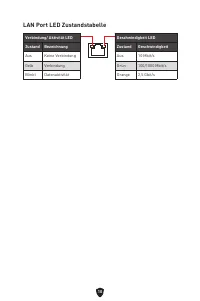
10 LAN Port LED Zustandstabelle Verbindung/ Aktivität LED Zustand Bezeichnung Aus Keine Verbindung Gelb Verbindung Blinkt Datenaktivität Geschwindigkeit LED Zustand Geschwindigkeit Aus 10 Mbit/s Grün 100/1000 Mbit/s Orange 2,5 Gbit/s
Page 107 - Übersicht der Komponenten
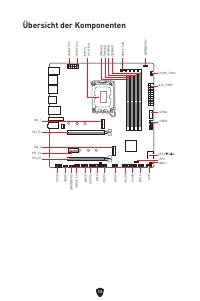
12 SATA▼5▲6 JUSB3 JUSB4 ATX_PWR1 JRAINBOW1 PUMP_FAN1 CPU_FAN1 DIMMB2 Prozessor Sockel CPU_PWR1 CPU_PWR2 JFP1 JTPM1 JDASH1 JUSB2 JUSB1 JCOM1 JTBT1 SATA8 JRGB1 JAUD1 PCI_E3 PCI_E2 M2_2 PCI_E1 SYS_FAN2 M2_1 DIMMB1 DIMMA2 DIMMA1 Übersicht der Komponenten JBAT1 JFP2 JRAINBOW2 SATA7
Page 108 - Wichtig; CPU Sockel
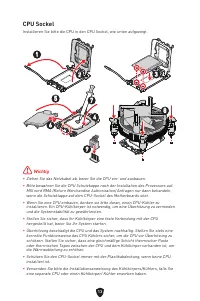
13 ⚠ Wichtig ∙ Ziehen Sie das Netzkabel ab, bevor Sie die CPU ein- und ausbauen. ∙ Bitte bewahren Sie die CPU Schutzkappe nach der Installation des Prozessors auf. MSI wird RMA (Return Merchandise Authorization) Anfragen nur dann behandeln, wenn die Schutzklappe auf dem CPU-Sockel des Motherboards s...
Page 109 - DIMM Steckplätze; Speichermodul-Installationsempfehlung
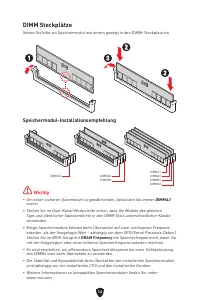
14 DIMM Steckplätze Setzen Sie bitte ein Speichermodul wie untern gezeigt in den DIMM-Steckplatz ein. Speichermodul-Installationsempfehlung ⚠ Wichtig ∙ Um einen sicheren Systemstart zu gewährleisten, bestücken Sie immer DIMMA2 zuerst. ∙ Stellen Sie im Dual-Kanal-Modus bitte sicher, dass Sie Module d...
Page 111 - Installation eines M.2 Moduls
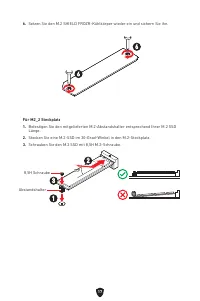
16 M2_1~2: M.2 Steckplätze (Key M) Bitte installieren Sie das M.2 Solid-State-Laufwerke (SSD) in den M.2 Steckplatz (siehe unten). Installation eines M.2 Moduls Für M2_1 Steckplatz1. Lösen Sie die Schraube des M.2-SHIELD FROZR-Kühlkörpers. 2. Entfernen den M.2-SHIELD FROZR und entfernen Sie die Schu...
Page 113 - JAUD1: Audioanschluss des Frontpanels
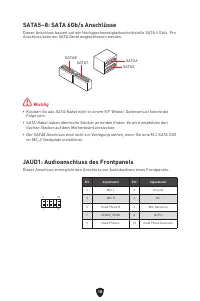
18 SATA5~8: SATA 6Gb/s Anschlüsse Dieser Anschluss basiert auf der Hochgeschwindigkeitsschnittstelle SATA 6 Gb/s. Pro Anschluss kann ein SATA Gerät angeschlossen werden. ⚠ Wichtig ∙ Knicken Sie das SATA-Kabel nicht in einem 90° Winkel. Datenverlust könnte die Folge sein. ∙ SATA-Kabel haben identisch...
Page 115 - Stromanschlüsse für Lüfter
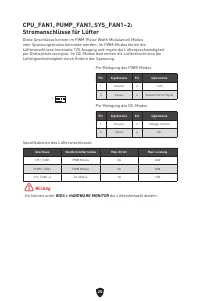
20 CPU_FAN1, PUMP_FAN1, SYS_FAN1~2: Stromanschlüsse für Lüfter Diese Anschlüsse können im PWM (Pulse Width Modulation) Modus oder Spannungsmodus betrieben werden. Im PWM-Modus bieten die Lüfteranschlüsse konstante 12V Ausgang und regeln die Lüftergeschwindigkeit per Drehzahlsteuersignal. Im DC-Modus...
Page 116 - JCI1: Gehäusekontaktanschluss; Rücksetzen des BIOS auf Standardwerte
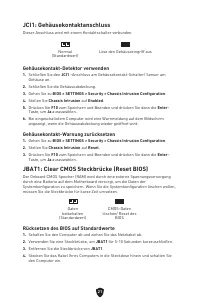
21 JCI1: Gehäusekontaktanschluss Dieser Anschluss wird mit einem Kontaktschalter verbunden JBAT1: Clear CMOS Steckbrücke (Reset BIOS) Der Onboard CMOS Speicher (RAM) wird durch eine externe Spannungsversorgung durch eine Batterie auf dem Motherboard versorgt, um die Daten der Systemkonfiguration zu ...
Page 119 - JTBT1: Anschluss für Thunderbolt-Erweiterungskarte; JCOM1: Serieller Anschluss
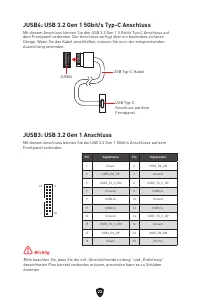
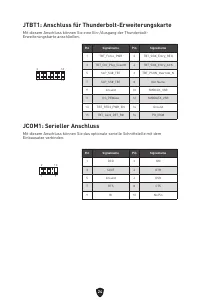
24 JTBT1: Anschluss für Thunderbolt-Erweiterungskarte Mit diesem Anschluss können Sie eine Ein-/Ausgang der Thunderbolt- Erweiterungskarte anschließen. 1 2 16 15 Pin Signalname Pin Signalname 1 TBT_Force_PWR 2 TBT_S0IX_Entry_REQ 3 TBT_CIO_Plug_Event# 4 TBT_S0IX_Entry_ACK 5 SLP_S3#_TBT 6 TBT_PSON_Ove...
Page 120 - EZ DEBUG LED
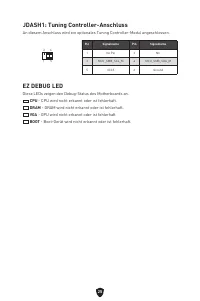
25 JDASH1: Tuning Controller-Anschluss An diesem Anschluss wird ein optionales Tuning Controller-Modul angeschlossen. 1 2 6 5 Pin Signalname Pin Signalname 1 No Pin 2 NC 3 MCU_SMB_SCL_M 4 MCU_SMB_SDA_M 5 VCC5 6 Ground EZ DEBUG LED Diese LEDs zeigen den Debug-Status des Motherboards an. CPU - CPU wir...
Page 121 - JRGB1: RGB LED Anschluss; ACHTUNG; Anschlüsse
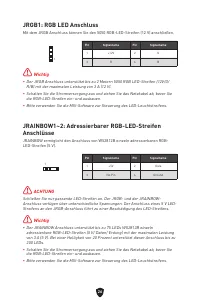
26 ⚠ Wichtig ∙ Der JRGB Anschluss unterstützt bis zu 2 Metern 5050 RGB LED-Streifen (12V/G/ R/B) mit der maximalen Leistung von 3 A (12 V). ∙ Schalten Sie die Stromversorgung aus und ziehen Sie das Netzkabel ab, bevor Sie die RGB-LED-Streifen ein- und ausbauen. ∙ Bitte verwenden Sie die MSI-Software...
Page 122 - Center; Installation von Windows 10/ Windows 11
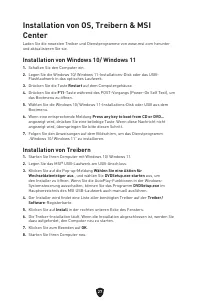
27 Installation von OS, Treibern & MSI Center Laden Sie die neuesten Treiber und Dienstprogramme von www.msi.com herunter und aktualisieren Sie sie. Installation von Windows 10/ Windows 11 1. Schalten Sie den Computer ein. 2. Legen Sie die Windows 10/ Windows 11-Installations-Disk oder das USB- ...
Page 123 - MSI Center Benutzerhandbuch
28 MSI Center MSI Center ist eine Anwendung, mit der Sie die Spieleinstellungen einfach optimieren und die Software zur Erstellung von Inhalten einstellen können. Außerdem können Sie LED-Lichteffekte in PCs und anderen MSI-Produkten steuern und synchronisieren. Mit MSI Center können Sie ideale Modi ...
Page 124 - Vorteile von UEFI
29 UEFI BIOS Das MSI UEFI-BIOS ist mit der UEFI-Architektur (Unified Extensible Firmware Interface) kompatibel. Das UEFI-BIOS hat viele neue Funktionen und besitzt Vorteile, die das traditionelle BIOS nicht bieten kann. Es wird zukünftige PCs und Geräte, die der UEFI-Firmware-Architektur entsprechen...
Page 125 - Öffnen des BIOS Setups
30 BIOS Setup Die Standardeinstellungen bieten die optimale Leistung für die Systemstabilität unter Normalbedingungen. Sie sollten immer die Standardeinstellungen behalten , um mögliche Schäden des Systems oder Boot-Fehler zu vermeiden, außer Sie besitzen ausreichende BIOS Kenntnisse. ⚠ Wichtig ∙ BI...
Page 126 - Reset des BIOS; Aktualisierung des BIOS; Aktualisierung des BIOS mit dem M-FLASH-Programm
31 Reset des BIOS Sie können die Werkseinstellung wieder herstellen, um bestimmte Probleme zu lösen. Es gibt verschiedene Möglichkeiten, um das BIOS zurückzusetzen: ∙ Öffnen Sie das BIOS und drücken Sie F6 , um optimierten Einstellungen zu laden. ∙ Schließen Sie die Clear CMOS Steckbrücke an das Mot...
Page 127 - Aktualisierung des BIOS mit MSI Center
32 Aktualisierung des BIOS mit MSI Center Vorbereitung: ∙ Stellen Sie sicher, dass zuvor die LAN-Treiber installiert wurden und eine Internetverbindung eingerichtet ist. ∙ Bitte schließen Sie jegliche andere Anwendungssoftware, bevor Sie das BIOS aktualisieren. Schritte zur Aktualisierung des BIOS: ...
Page 128 - Содержание; Безопасное использование продукции
1 Благодарим Вас за покупку материнской MSI®. Данное руководство пользователя содержит информацию о схеме платы, компонентах. материнской платы, настройке BIOS и описании программного обеспечения. Содержание Безопасное использование продукции ............................................................
Page 129 - Установка ОС, драйверов и MSI Center
2 Установка ОС, драйверов и MSI Center ................................................................. 27 UEFI BIOS .................................................................................................................... 28 Настройка BIOS ..................................................
Page 131 - Технические характеристики
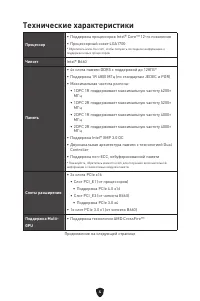
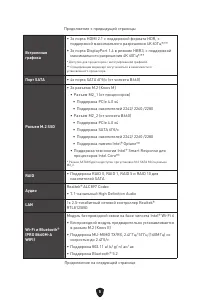
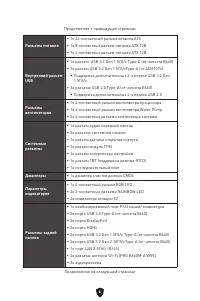
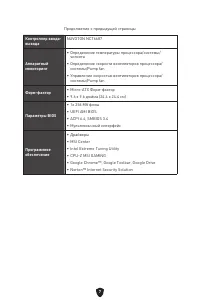
4 Технические характеристики Процессор ∙ Поддержка процессоров Intel® Core™ 12-го поколения ∙ Процессорный сокет LGA1700 * Обратитесь www.msi.com, чтобы получить последнюю информацию о поддержке новых процессоров. Чипсет Intel® B660 Память ∙ 4x слота памяти DDR5 с поддержкой до 128ГБ* ∙ Поддержка 1R...
Page 135 - Эксклюзивные функции
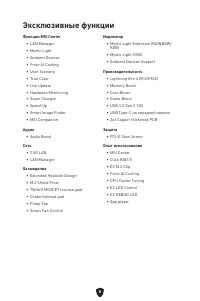
8 Эксклюзивные функции Функции MSI Center • LAN Manager• Mystic Light• Ambient Devices• Frozr AI Cooling• User Scenario• True Color• Live Update• Hardware Monitoring• Super Charger• Speed Up• Smart Image Finder• MSI Companion Аудио • Audio Boost Сеть • 2.5G LAN• LAN Manager Охлаждение • Extended Hea...
Page 136 - Разъемы задней панели
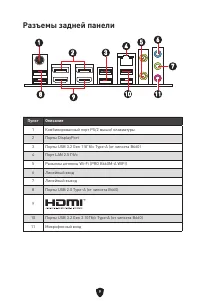
9 Разъемы задней панели Пункт Описание 1 Комбинированный порт PS/2 мыши/ клавиатуры 2 Порты DisplayPort 3 Порты USB 3.2 Gen 1 5Гб/с Type-A (от чипсета B660) 4 Порт LAN 2.5 Гб/с 5 Разъемы антенны Wi-Fi (PRO B660M-A WIFI) 6 Линейный вход 7 Линейный выход 8 Порты USB 2.0 Type-A (от чипсета B660) 9 10 П...
Page 137 - Таблица состояний индикатора порта LAN
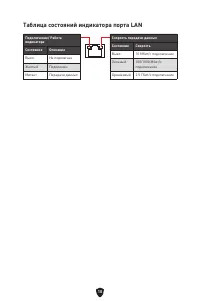
10 Таблица состояний индикатора порта LAN Подключение/ Работа индикатора Состояние Описание Выкл. Не подключен Желтый Подключен Мигает Передача данных Скорость передачи данных Состояние Скорость Выкл. 10 Мбит/с подключение Зеленый 100/1000 Мбит/с подключение Оранжевый 2.5 Гбит/с подключение
Page 139 - Компоненты материнской платы
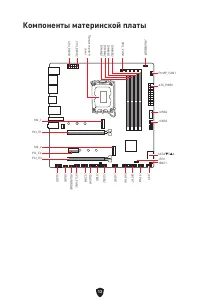
12 SATA▼5▲6 JUSB3 JUSB4 ATX_PWR1 JRAINBOW1 PUMP_FAN1 CPU_FAN1 DIMMB2 Процессорный сокет CPU_PWR1 CPU_PWR2 JFP1 JTPM1 JDASH1 JUSB2 JUSB1 JCOM1 JTBT1 SATA8 JRGB1 JAUD1 PCI_E3 PCI_E2 M2_2 PCI_E1 SYS_FAN2 M2_1 DIMMB1 DIMMA2 DIMMA1 Компоненты материнской платы JBAT1 JFP2 JRAINBOW2 SATA7
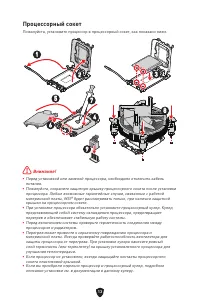
Page 140 - Процессорный сокет
13 ⚠ Внимание! ∙ Перед установкой или заменой процессора, необходимо отключить кабель питания. ∙ Пожалуйста, сохраните защитную крышку процессорного сокета после установки процессора. Любые возможные гарантийные случаи, связанные с работой материнской платы, MSI® будет рассматривать только, при нали...
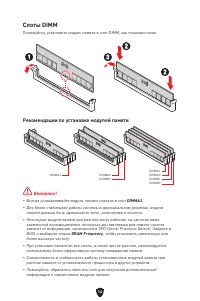
Page 141 - Слоты DIMM; Рекомендации по установке модулей памяти
14 Слоты DIMM Пожалуйста, установите модуль памяти в слот DIMM, как показано ниже. Рекомендации по установке модулей памяти ⚠ Внимание! ∙ Всегда устанавливайте модуль памяти сначала в слот DIMMA2 . ∙ Для более стабильной работы системы в двухканальном режимах, модули памяти должны быть одинакового т...
Page 145 - JAUD1: Разъем аудио передней панели
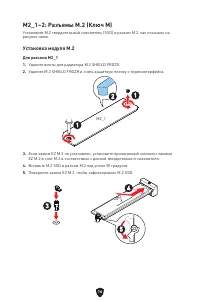
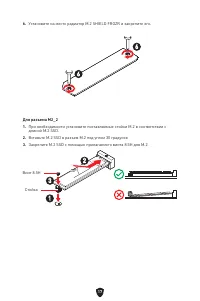
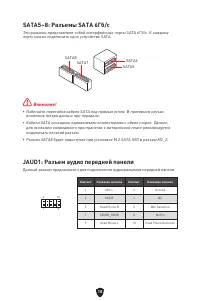
18 SATA5~8: Разъемы SATA 6Гб/с Эти разъемы представляют собой интерфейсные порты SATA 6Гб/с. К каждому порту можно подключить одно устройство SATA. ⚠ Внимание! ∙ Избегайте перегибов кабеля SATA под прямым углом. В противном случае, возможна потеря данных при передаче. ∙ Кабели SATA оснащены одинаков...
Page 147 - вентиляторов
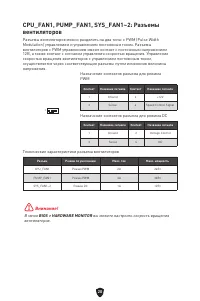
20 CPU_FAN1, PUMP_FAN1, SYS_FAN1~2: Разъемы вентиляторов Разъемы вентиляторов можно разделить на два типа: с PWM (Pulse Width Modulation) управлением и управлением постоянным током. Разъемы вентиляторов с PWM управлением имеют контакт с постоянным напряжением 12В, а также контакт с сигналом управлен...
Page 148 - JCI1: Разъем датчика открытия корпуса; Сброс настроек BIOS до значений по умолчанию
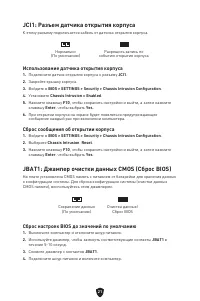
21 JCI1: Разъем датчика открытия корпуса К этому разъему подключается кабель от датчика открытия корпуса. JBAT1: Джампер очистки данных CMOS (Сброс BIOS) На плате установлена CMOS память с питанием от батарейки для хранения данных о конфигурации системы. Для сброса конфигурации системы (очистки данн...
Page 150 - JTPM1: Разъем модуля ТРМ
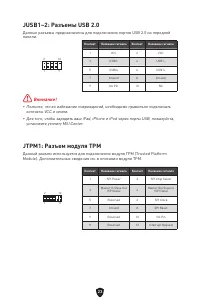
23 JUSB1~2: Разъемы USB 2.0 Данные разъемы предназначены для подключения портов USB 2.0 на передней панели. ⚠ Внимание! ∙ Помните, что во избежание повреждений, необходимо правильно подключать контакты VCC и земли. ∙ Для того, чтобы зарядить ваш iPad, iPhone и iPod через порты USB, пожалуйста, устан...
Page 152 - JDASH1: Разъем контроллера настройки; Индикаторы отладки EZ
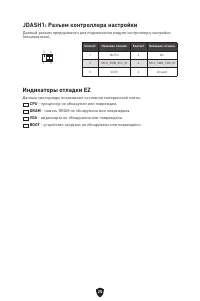
25 JDASH1: Разъем контроллера настройки Данный разъем предназначен для подключения модуля контроллера настройки (опционально). 1 2 6 5 Контакт Название сигнала Контакт Название сигнала 1 No Pin 2 NC 3 MCU_SMB_SCL_M 4 MCU_SMB_SDA_M 5 VCC5 6 Ground Индикаторы отладки EZ Данные светодиоды показывают со...
Page 153 - JRGB1: Разъем RGB LED
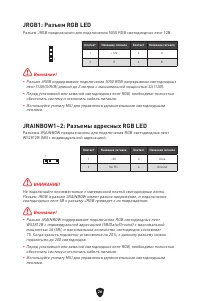
26 ⚠ Внимание! ∙ Разъем JRGB поддерживает подключение 5050 RGB непрерывных светодиодных лент (12В/G/R/B) длиной до 2 метров с максимальной мощностью 3А (12В). ∙ Перед установкой или заменой светодиодных лент RGB, необходимо полностью обесточить систему и отключить кабель питания. ∙ Используйте утили...
Page 154 - Установка Windows 10/ Windows 11; Установка драйверов; Инструкции по использованию MSI Center
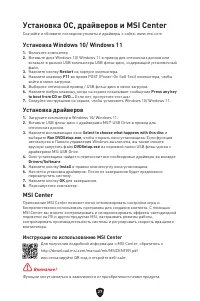
27 Установка ОС, драйверов и MSI Center Скачайте и обновите последние утилиты и драйверы с сайта: www.msi.com Установка Windows 10/ Windows 11 1. Включите компьютер. 2. Вставьте диск Windows 10/ Windows 11 в привод для оптических дисков или вставьте в разъем USB компьютера USB флэш-диск, содержащий ...
Page 155 - Преимущества UEFI; Как проверить режим BIOS?
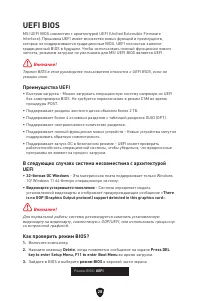
28 UEFI BIOS MSI UEFI BIOS совместим с архитектурой UEFI (Unified Extensible Firmware Interface). Прошивка UEFI имеет множество новых функций и преимуществ, которые не поддерживаются традиционным BIOS. UEFI полностью заменит традиционный BIOS в будущем. Чтобы использовать полный функционал нового чи...
Page 156 - Вход в настройки BIOS; Инструкции по настройке BIOS
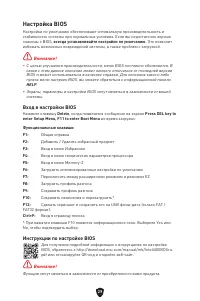
29 Настройка BIOS Настройки по умолчанию обеспечивают оптимальную производительность и стабильность системы при нормальных условиях. Если вы недостаточно хорошо знакомы с BIOS, всегда устанавливайте настройки по умолчанию . Это позволит избежать возможных повреждений системы, а также проблем с загру...
Page 157 - Сброс BIOS; Обновление BIOS; Обновление BIOS при помощи M-FLASH
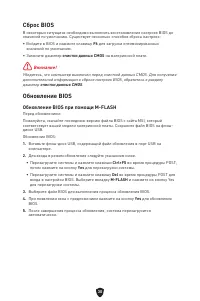
30 Сброс BIOS В некоторых ситуациях необходимо выполнить восстановление настроек BIOS до значений по умолчанию. Существует несколько способов сброса настроек: ∙ Войдите в BIOS и нажмите клавишу F6 для загрузки оптимизированных значений по умолчанию. ∙ Замкните джампер очистки данных CMOS на материнс...
Page 158 - Обновление BIOS при помощи MSI Center
31 Обновление BIOS при помощи MSI Center Перед обновлением: ∙ Убедитесь, что драйвер локальной сети установлен и есть подключение к сети Интернет. ∙ Перед обновлением BIOS закройте все остальные приложения. Обновление BIOS: 1. Установите и запустите MSI Center, и затем перейдите на страницу Support ...
Page 159 - 目录; 安全信息
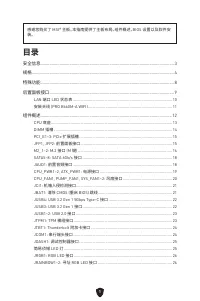
1 感谢您购买了 MSI® 主板。本指南提供了主板布局,组件概述,BIOS 设置以及软件安 装。 目录 安全信息 ........................................................................................................................ 3 规格 ........................................................................................................................
Page 160 - 安装操作系统,驱动程序和 MSI Center
2 安装操作系统,驱动程序和 MSI Center .................................................................... 27 UEFI BIOS .................................................................................................................... 28 BIOS 设置 ...................................................................
Page 162 - 规格
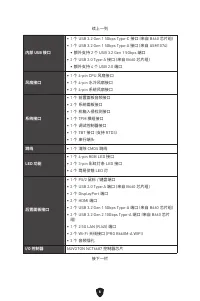
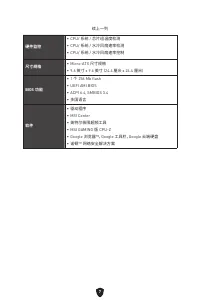
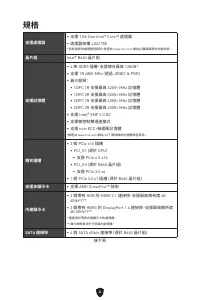
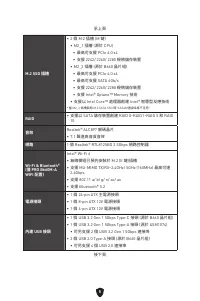
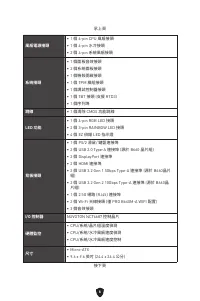
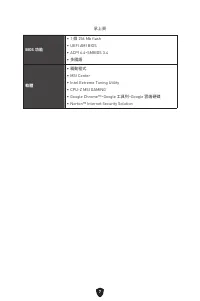
4 规格 CPU ∙ 支持第十二代 Intel® Core™ 处理器 ∙ LGA1700 针脚处理器 * 随着新处理器的发布,请访问 www.msi.com 以获取最新的支持状态。 芯片组 Intel® B660 芯片组 内存 ∙ 4 个 DDR5 内存插槽,支持高达 128GB* ∙ 支持 1R 4800 MHz (通过 JEDEC 和 POR) ∙ 支持最高超频频率: • 1DPC 1R 支持最高 6200+ MHz 内存 • 1DPC 2R 支持最高 5200+ MHz 内存 • 2DPC 1R 支持最高 4000+ MHz 内存 • 2DPC 2R 支持最高 4000+ MHz 内存 ...
Page 166 - 特殊功能
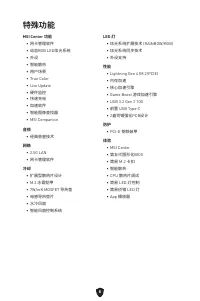
8 特殊功能 MSI Center 功能 • 网卡管理软件 • 动态RGB LED炫光系统 • 外设 • 智能散热 • 用户场景 • True Color• Live Update• 硬件监控 • 快速充电 • 加速软件 • 智能图像查找器 • MSI Companion 音频 • 经典音皇技术 网络 • 2.5G LAN• 网卡管理软件 冷却 • 扩展型散热片设计 • M.2 冰霜铠甲 • 7W/mK MOSFET 导热垫 • 电感导热垫片 • 水冷风扇 • 智能风扇控制系统 LED 灯 • 炫光系统扩展技术 (RAINBOW/RGB) • 炫光系统同步技术 • 外设支持 性能 • Ligh...
Page 167 - 后置面板接口
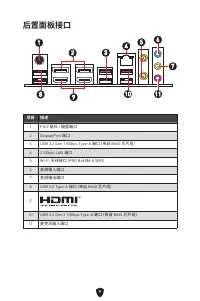
9 后置面板接口 项目 描述 1 PS/2 鼠标 / 键盘端口 2 DisplayPort 端口 3 USB 3.2 Gen 1 5Gbps Type-A 端口 (来自 B660 芯片组) 4 2.5Gbps LAN 端口 5 Wi-Fi 天线接口 (PRO B660M-A WIFI) 6 音频输入端口 7 音频输出端口 8 USB 2.0 Type-A 端口 (来自 B660 芯片组) 9 10 USB 3.2 Gen 2 10Gbps Type-A 端口 (来自 B660 芯片组) 11 麦克风输入端口 1 6 2 3 4 5 7 8 9 10 11
Page 168 - LAN 端口 LED 状态表
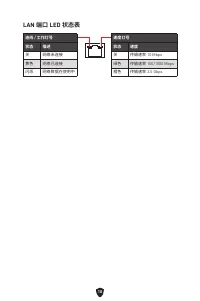
10 LAN 端口 LED 状态表 连线 / 工作灯号状态 描述 关 网络未连接 黄色 网络已连接 闪烁 网络数据在使用中 速度灯号状态 速度 关 传输速率 10 Mbps 绿色 传输速率 100/1000 Mbps 橙色 传输速率 2.5 Gbps
Page 170 - 组件概述
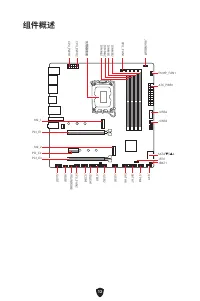
12 SATA▼5▲6 JUSB3 JUSB4 ATX_PWR1 JRAINBOW1 PUMP_FAN1 CPU_FAN1 DIMMB2 处理器底座 CPU_PWR1 CPU_PWR2 JFP1 JTPM1 JDASH1 JUSB2 JUSB1 JCOM1 JTBT1 SATA8 JRGB1 JAUD1 PCI_E3 PCI_E2 M2_2 PCI_E1 SYS_FAN2 M2_1 DIMMB1 DIMMA2 DIMMA1 组件概述 JBAT1 JFP2 JRAINBOW2 SATA7
Page 171 - 注意; CPU 底座
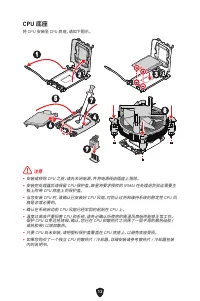
13 ⚠ 注意 ∙ 安装或移除 CPU 之前,请先关闭电源,并将电源线由插座上拔除。 ∙ 安装完处理器后请保留 CPU 保护盖。微星将要求授权的 (RMA) 在处理退货验证需要主 板上附带 CPU 底座上的保护盖。 ∙ 当您安装 CPU 时,请确认已安装好 CPU 风扇。对防止过热和维持系统的稳定性 CPU 风 扇是非常必要的。 ∙ 确认在系统启动前 CPU 风扇已经牢固的粘贴在 CPU 上。 ∙ 温度过高会严重损害 CPU 和系统,请务必确认所使用的降温风扇始终能够正常工作, 保护 CPU 以免过热烧毁。确认,您已在 CPU 和散热片之间抹了一层平滑的散热硅胶 ( 或热胶带) 以增加散热。 ...
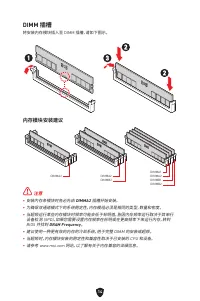
Page 172 - DIMM 插槽; 内存模块安装建议
14 DIMM 插槽 将安装内存模块插入至 DIMM 插槽,请如下图示。 内存模块安装建议 ⚠ 注意 ∙ 安装内存条模块时务必先由 DIMMA2 插槽开始安装。 ∙ 为确保双通道模式下的系统稳定性,内存模组必须是相同的类型,数量和密度。 ∙ 当超频运行某些内存模块时频率可能会低于标明值,皆因内存频率运行取决于其串行 设备检测 (SPD)。如果您需要设置内存频率在标明或在更高频率下来运行内存,转到 BIOS 并找到 DRAM Frequency 。 ∙ 建议使用一种更有效的内存的冷却系统,用于完整 DIMM 的安装或超频。 ∙ 当超频时,内存模块安装的稳定性和兼容性取决于已安装的 CPU 和设备...
Page 182 - JTBT1: Thunderbolt 附加卡接口
24 JTBT1: Thunderbolt 附加卡接口 此接口允许您连接附加的 Thunderbolt I/O 卡。 1 2 16 15 针脚 信号名称 针脚 信号名称 1 TBT_Force_PWR 2 TBT_S0IX_Entry_REQ 3 TBT_CIO_Plug_Event# 4 TBT_S0IX_Entry_ACK 5 SLP_S3#_TBT 6 TBT_PSON_Override_N 7 SLP_S5#_TBT 8 Net Name 9 Ground 10 SMBCLK_VSB 11 DG_PEWake 12 SMBDATA_VSB 13 TBT_RTD3_PWR_EN 14 G...
Page 183 - 简易侦错 LED 灯
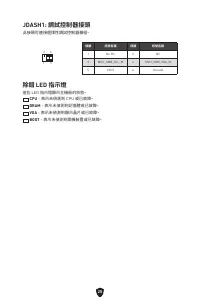
25 JDASH1: 调试控制器接口 此接口用于连接可选的调试控制器模块。 1 2 6 5 针脚 信号名称 针脚 信号名称 1 No Pin 2 NC 3 MCU_SMB_SCL_M 4 MCU_SMB_SDA_M 5 VCC5 6 Ground 简易侦错 LED 灯 LED 指示灯在主板中的状态。 CPU - 表示 CPU 无法检测或故障。 DRAM - 表示 DRAM 无法检测或故障。 VGA - 表示 GPU 无法检测或故障。 BOOT - 表示启动设备无法检测或故障。
Page 185 - 安装驱动; MSI Center 用户指南
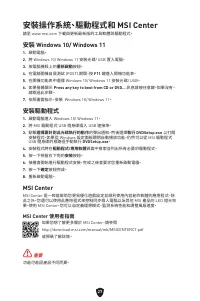
27 安装操作系统,驱动程序和 MSI Center 请通过 www.msi.com下载并更新最新的工具程序和驱动程序 安装 Windows 10/ Windows 11 1. 启动计算机电源。 2. 将 Windows 10/ Windows 11 安装光盘 / U 盘插入计算机。 3. 按下计算机上的 Restart 按钮。 4. 计算机 POST (开机自我测试) 过程中按 F11 键进入启动菜单。 5. 从引导菜单中选择 Windows 10/ Windows 11 安装光盘 / U 盘。 6. 如果屏幕显示 Press any key to boot from CD or DVD.....
Page 186 - UEFI 优势
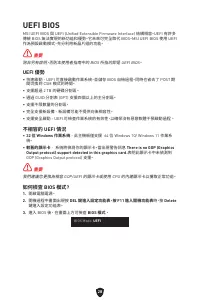
28 UEFI BIOS MSI UEFI BIOS 与 UEFI (Unified Extensible Firmware Interface) 体系结构兼容。UEFI 具 有传统 BIOS 无法实现的许多新功能和优势,未来将完全取代 BIOS。MSI UEFI BIOS 使用 UEFI 作为默认引导模式,充分利用新芯片组的功能。 ⚠ 注意 除非另有说明,否则本用户指南中的术语 BIOS 指 UEFI BIOS。 UEFI 优势 ∙ 快速启动 - UEFI 可直接启动操作系统,并保存 BIOS 自检过程。同时还消除了在 POST 期间切换到 CSM 模式的时间。 ∙ 支持大于 2 TB 的硬...
Page 187 - 进入 BIOS 设置; BIOS 用户指南
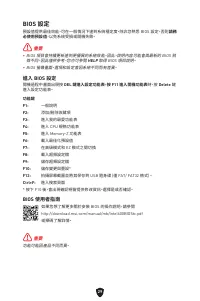
29 BIOS 设置 在正常情况下,默认设置为系统稳定提供最佳性能。您应该 始终保持默认设置 ,以避免可 能出现的系统损坏或无法开机,除非您熟悉 BIOS 设置。 ⚠ 注意 ∙ 为了获得更好的系统性能,BIOS 项目描述不断更新。因此,这些描述可能有些稍微的不 同,仅供参考。您也可以参考 BIOS 项目描述的 帮助 信息面板。 ∙ BIOS 屏幕,选项和设置会因您的系统而有差异。 进入 BIOS 设置 在开机程序中,当屏幕上出现 Press DEL key to enter Setup Menu, F11 to enter Boot Menu 信息,按下 Delete 键。 功能键 F1: 主...
Page 188 - 重启 BIOS; 更新 BIOS
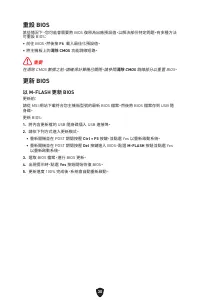
30 重启 BIOS 您可能需要还原默认的 BIOS 设置来解决某些问题。有几种方法来重启 BIOS: ∙ 转到 BIOS,然后按 F6 载入优化设置默认值。 ∙ 短路主板上的 清除 CMOS 跳线。 ⚠ 注意 在清除 CMOS 数据之前,请确保计算机已关机。请参考 清除 CMOS 跳线部分,以了解重启 BIOS 的相关信息。 更新 BIOS 使用 M-FLASH 更新 BIOS 更新前:请从 MSI 的网站下载符合您主板型号的最新 BIOS 文件。然后将 BIOS 文件保存到 U 盘 中。更新 BIOS: 1. 插入内有欲更新文件的 U 盘到 USB 端口上。 2. 请参考以下方法进入 fl...
Page 189 - 使用 MSI Center 更新 BIOS
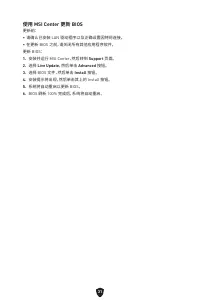
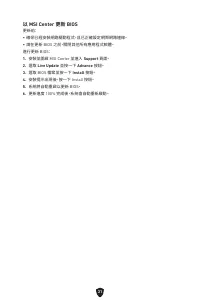
31 使用 MSI Center 更新 BIOS 更新前: ∙ 请确认已安装 LAN 驱动程序以及正确设置因特网连接。 ∙ 在更新 BIOS 之前,请关闭所有其他应用程序软件。 更新 BIOS: 1. 安装并运行 MSI Center,然后转到 Support 页面。 2. 选择 Live Update ,然后单击 Advanced 按钮。 3. 选择 BIOS 文件,然后单击 Install 按钮。 4. 安装提示将出现,然后单击其上的 Install 按钮。 5. 系统将自动重启以更新 BIOS。 6. BIOS 刷新 100% 完成后,系统将自动重启。
Page 190 - 目錄; 安全說明
1 感謝您購買 MSI® 主機板。本用戶指南提供有關電路板佈局,元件總覽,BIOS 設定和 軟體安裝的資訊。 目錄 安全說明 ........................................................................................................................ 3 規格 ..................................................................................................................
Page 191 - 安裝操作系統、驅動程式和 MSI Center
2 安裝操作系統、驅動程式和 MSI Center .................................................................... 27 UEFI BIOS .................................................................................................................... 28 BIOS 設定 ...................................................................
Page 193 - 規格
4 規格 支援處理器 ∙ 支援 12th Gen Intel® Core™ 處理器 ∙ 處理器架構 LGA1700 * 如有更新的處理器發表時,請造訪 www.msi.com 網站以獲取最新的支援狀態。 晶片組 Intel® B660 晶片組 支援記憶體 ∙ 4 條 DDR5 插槽,支援總合最高 128GB* ∙ 支援 1R 4800 MHz (透過 JEDEC & POR) ∙ 最大超頻: • 1DPC 1R 支援最高 6200+ MHz 記憶體 • 1DPC 2R 支援最高 5200+ MHz 記憶體 • 2DPC 1R 支援最高 4000+ MHz 記憶體 • 2DPC 2R 支...
Page 197 - 專屬特色
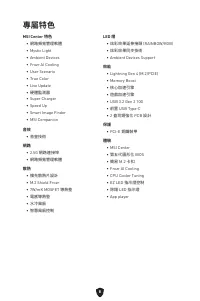
8 專屬特色 MSI Center 特色 • 網路頻寬管理軟體 • Mystic Light• Ambient Devices• Frozr AI Cooling• User Scenario• True Color• Live Update• 硬體監測器 • Super Charger• Speed Up• Smart Image Finder• MSI Companion 音效 • 音皇技術 網路 • 2.5G 網路連接埠 • 網路頻寬管理軟體 散熱 • 擴充散熱片設計 • M.2 Shield Frozr• 7W/mK MOSFET 導熱墊 • 電感導熱墊 • 水冷風扇 • 智慧風扇控制...
Page 198 - 後側面板接頭
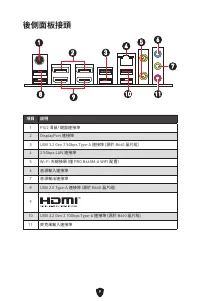
9 後側面板接頭 項目 說明 1 PS/2 滑鼠/ 鍵盤連接埠 2 DisplayPort 連接埠 3 USB 3.2 Gen 2 5Gbps Type-A 連接埠 (源於 B660 晶片組) 4 2.5Gbps LAN 連接埠 5 Wi-Fi 天線接頭 (僅 PRO B660M-A WIFI 配置) 6 音源輸入連接埠 7 音源輸出連接埠 8 USB 2.0 Type-A 連接埠 (源於 B660 晶片組) 9 10 USB 3.2 Gen 2 10Gbps Type-A 連接埠 (源於 B660 晶片組) 11 麥克風輸入連接埠 1 6 2 3 4 5 7 8 9 10 11
Page 199 - 網路連接埠 LED 燈狀態表
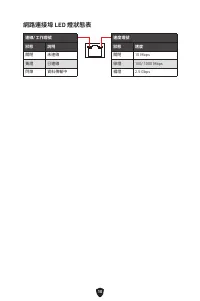
10 網路連接埠 LED 燈狀態表 連線/ 工作燈號狀態 說明 關閉 未連線 黃燈 已連線 閃爍 資料傳輸中 速度燈號狀態 速度 關閉 10 Mbps 綠燈 100/ 1000 Mbps 橘燈 2.5 Gbps
Page 201 - 元件總覽
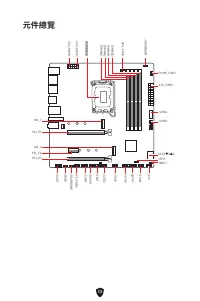
12 SATA▼5▲6 JUSB3 JUSB4 ATX_PWR1 JRAINBOW1 PUMP_FAN1 CPU_FAN1 DIMMB2 處理器腳座 CPU_PWR1 CPU_PWR2 JFP1 JTPM1 JDASH1 JUSB2 JUSB1 JCOM1 JTBT1 SATA8 JRGB1 JAUD1 PCI_E3 PCI_E2 M2_2 PCI_E1 SYS_FAN2 M2_1 DIMMB1 DIMMA2 DIMMA1 元件總覽 JBAT1 JFP2 JRAINBOW2 SATA7
Page 202 - 重要; CPU 腳座
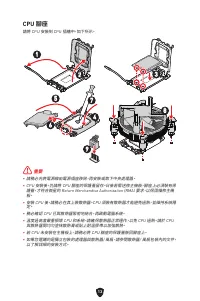
13 ⚠ 重要 ∙ 請務必先將電源線由電源插座移除,再安裝或取下中央處理器。 ∙ CPU 安裝後,仍請將 CPU 腳座的保護蓋留存。日後若需送修主機板,腳座上必須裝有保 護蓋,才符合微星的 Return Merchandise Authorization (RMA) 要求,以保固維修主機 板。 ∙ 安裝 CPU 後,請務必在其上裝散熱器。CPU 須裝有散熱器才能避免過熱,並維持系統穩 定。 ∙ 務必確認 CPU 已與散熱器緊密地結合,再啟動電腦系統。 ∙ 溫度過高會嚴重損壞 CPU 和系統。請確保散熱器正常運作,以免 CPU 過熱。請於 CPU 與散熱器間均勻塗抹散熱膏或貼上耐溫膠帶以加強散熱...
Page 203 - 記憶體插槽; 記憶體模組安裝建議
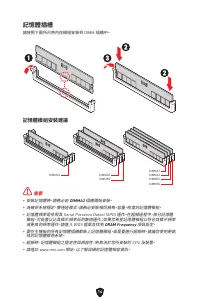
14 記憶體插槽 請按照下圖所示將內存模組安裝到 DIMM 插槽中。 記憶體模組安裝建議 ⚠ 重要 ∙ 安裝記憶體時,請務必由 DIMMA2 插槽開始安裝。 ∙ 為確保系統穩定,雙通道模式,請務必安裝相同規格、容量、密度的記憶體模組。 ∙ 記憶體頻率是依照其 Serial Presence Detect (SPD) 運作。在超頻過程中,部分記憶體 模組,可能會以比其標示頻率低的數值運作;如果您希望記憶體模組以符合其標示頻率 或更高的頻率運作,請進入 BIOS 選單並找到 DRAM Frequency 項目設定。 ∙ 要在主機板的所有記憶體插槽都裝上記憶體模組,或是要進行超頻時,建議您使用更高 ...
Page 210 - 重設機殼開啟警告
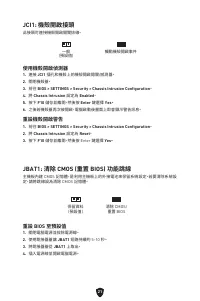
21 JCI1: 機殼開啟接頭 此接頭可連接機殼開啟開關排線。 JBAT1: 清除 CMOS (重置 BIOS) 功能跳線 主機板內建 CMOS 記憶體,是利用主機板上的外接電池來保留系統設定。若要清除系統設 定,請將跳線設為清除 CMOS 記憶體。 保留資料 (預設值) 清除 CMOS/ 重置 BIOS 重設 BIOS 至預設值 1. 關閉電腦電源並拔除電源線。 2. 使用跳接器蓋讓 JBAT1 短路持續約 5-10 秒。 3. 將跳接器蓋從 JBAT1 上取出。 4. 插入電源線並開啟電腦電源。 一般 (預設值) 觸動機殼開啟事件 使用機殼開啟偵測器 1. 連接 JCI1 插孔和機殼上的機...
Page 213 - JTBT1: Thunderbolt 擴充卡接頭
24 JTBT1: Thunderbolt 擴充卡接頭 此接頭用於連接 Thunderbolt I/O 擴充卡。 1 2 16 15 接腳 訊號名稱 接腳 訊號名稱 1 TBT_Force_PWR 2 TBT_S0IX_Entry_REQ 3 TBT_CIO_Plug_Event# 4 TBT_S0IX_Entry_ACK 5 SLP_S3#_TBT 6 TBT_PSON_Override_N 7 SLP_S5#_TBT 8 Net Name 9 Ground 10 SMBCLK_VSB 11 DG_PEWake 12 SMBDATA_VSB 13 TBT_RTD3_PWR_EN 14 Gro...
Page 214 - 除錯 LED 指示燈
25 JDASH1: 調試控制器接頭 此接頭可連接選擇性調試控制器模組。 1 2 6 5 接腳 訊號名稱 接腳 訊號名稱 1 No Pin 2 NC 3 MCU_SMB_SCL_M 4 MCU_SMB_SDA_M 5 VCC5 6 Ground 除錯 LED 指示燈 這些 LED 指示燈顯示主機板的狀態。 CPU - 表示未偵測到 CPU 或已故障。 DRAM - 表示未偵測到記憶體或已故障。 VGA - 表示未偵測到顯示晶片或已故障。 BOOT - 表示未偵測到開機裝置或已故障。
Page 216 - 安裝驅動程式; MSI Center 使用者指南
27 安裝操作系統、驅動程式和 MSI Center 請至 www.msi.com 下載與更新最新版的工具軟體與驅動程式。 安裝 Windows 10/ Windows 11 1. 啟動電腦。 2. 將 Windows 10/ Windows 11 安裝光碟/ USB 置入電腦。 3. 按電腦機殼上的 重新啟動 按鈕。 4. 在電腦開機自我測試 (POST) 期間,按 F11 鍵進入開機功能表。 5. 在開機功能表中選擇 Windows 10/ Windows 11 安裝光碟/ USB。 6. 如果螢幕顯示 Press any key to boot from CD or DVD... 訊息請...
Page 217 - UEFI 優勢
28 UEFI BIOS MSI UEFI BIOS 與 UEFI (Unified Extensible Firmware Interface) 結構相容。UEFI 有許多 傳統 BIOS 無法實現的新功能和優勢。它未來可完全取代 BIOS。MSI UEFI BIOS 使用 UEFI 作為預設啟動模式,充分利用新晶片組的功能。 ⚠ 重要 除非另有說明,否則本使用者指南中的 BIOS 所指的即是 UEFI BIOS。 UEFI 優勢 ∙ 快速啟動 - UEFI 可直接啟動作業系統,並儲存 BIOS 自檢過程。同時也省去了 POST 期 間切換到 CSM 模式的時間。 ∙ 支援超過 2 TB 的...
Page 218 - 進入 BIOS 設定; BIOS 使用者指南
29 BIOS 設定 預設值提供最佳效能,可在一般情況下達到系統穩定度。除非您熟悉 BIOS 設定,否則 請務 必使用預設值 ,以免系統受損或開機失敗。 ⚠ 重要 ∙ BIOS 項目會持續更新達到更優異的系統效能。因此,說明內容可能會與最新的 BIOS 稍 微不同,因此僅供參考。您亦可參閱 HELP 取得 BIOS 項目說明。 ∙ BIOS 螢幕畫面、選項和設定會因系統不同而有差異。 進入 BIOS 設定 開機過程中畫面出現按 DEL 鍵進入設定功能表,按 F11 進入開機功能表 時,按 Delete 鍵 進入設定功能表。 功能鍵 F1: 一般說明 F2: 添加/刪除收藏項 F3: 進入我的最...
Page 219 - 重設 BIOS
30 重設 BIOS 某些情況下,您可能會需要將 BIOS 復原為出廠預設值,以解決部份特定問題。有多種方法 可重設 BIOS: ∙ 前往 BIOS,然後按 F6 載入最佳化預設值。 ∙ 將主機板上的 清除 CMOS 功能跳線短路。 ⚠ 重要 在清除 CMOS 數據之前,請確保計算機已關閉。請參閱 清除 CMOS 跳線部分以重置 BIOS。 更新 BIOS 以 M-FLASH 更新 BIOS 更新前:請從 MSI 網站下載符合您主機板型號的最新 BIOS 檔案。然後將 BIOS 檔案存到 USB 隨 身碟。更新 BIOS: 1. 將內含更新檔的 USB 隨身碟插入 USB 連接埠。 2. 請依...
Page 220 - 以 MSI Center 更新 BIOS
31 以 MSI Center 更新 BIOS 更新前: ∙ 確保已經安裝網路驅動程式,且已正確設定網際網路連線。 ∙ 請在更新 BIOS 之前,關閉其他所有應用程式軟體。 進行更新 BIOS: 1. 安裝並開啟 MSI Center 並進入 Support 頁面。 2. 選取 Live Update 並按一下 Advance 按鈕。 3. 選取 BIOS 檔案並按一下 Install 按鈕。 4. 安裝提示出現後,按一下 Install 按鈕。 5. 系統將自動重啟以更新 BIOS。 6. 更新進度 100% 完成後,系統會自動重新啟動。
Page 221 - 目次; 安全に関する注意事項
1 この度はMSI®マザーボードをお買い上げいただき、誠にありがとうございます。このユ ーザーズガイドはボードレイアウト、コンポーネントの概要、およびBIOSの設定につい ての情報を掲載しています。 目次 安全に関する注意事項 ................................................................................................. 3 仕様 ......................................................................................
Page 222 - OS、ドライバーおよびMSI Centerのインストール
2 OS、ドライバーおよびMSI Centerのインストール ...................................................... 27 UEFI BIOS .................................................................................................................... 28 BIOSの設定 ............................................................................
Page 224 - 仕様
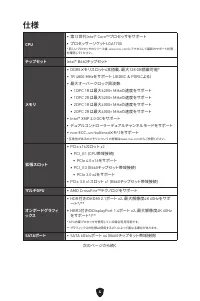
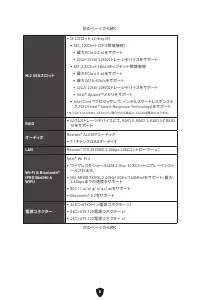
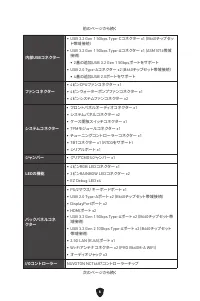
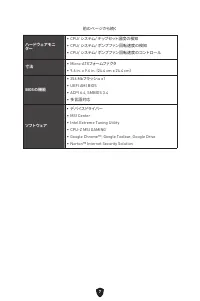
4 仕様 CPU ∙ 第12世代Intel® Core™プロセッサをサポート ∙ プロセッサーソケットLGA1700 * 新しいプロセッサのリリース後、www.msi.comにアクセスして最新のサポート状態 を確認してください。 チップセット Intel® B660チップセット メモリ ∙ DDR5メモリスロット4本搭載、最大128 GB搭載可能* ∙ 1R 4800 MHzをサポート (JEDEC & PORによる) ∙ 最大オーバークロック周波数: • 1DPC 1Rは最大6200+ MHzの速度をサポート • 1DPC 2Rは最大5200+ MHzの速度をサポート • 2DPC ...
Page 228 - MSI独自の機能
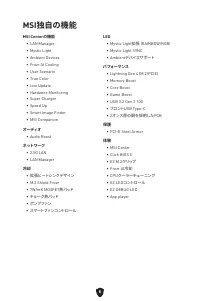
8 MSI独自の機能 MSI Centerの機能 • LAN Manager• Mystic Light• Ambient Devices• Frozr AI Cooling• User Scenario• True Color• Live Update• Hardware Monitoring• Super Charger• Speed Up• Smart Image Finder• MSI Companion オーディオ • Audio Boost ネットワーク • 2.5G LAN• LAN Manager 冷却 • 拡張ヒートシンクデザイン • M.2 Shield Frozr• 7W...
Page 229 - バックパネルコネクター
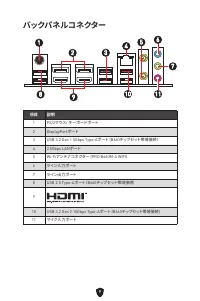
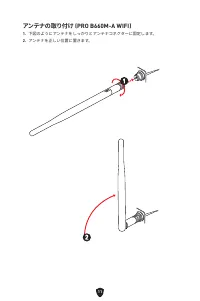
9 バックパネルコネクター 項目 説明 1 PS/2マウス/ キーボードポート 2 DisplayPortポート 3 USB 3.2 Gen 1 5Gbps Type-Aポート (B660チップセット帯域接続) 4 2.5Gbps LANポート 5 Wi-Fiアンテナコネクター (PRO B660M-A WIFI) 6 ライン入力ポート 7 ライン出力ポート 8 USB 2.0 Type-Aポート (B660チップセット帯域接続) 9 10 USB 3.2 Gen 2 10Gbps Type-Aポート (B660チップセット帯域接続) 11 マイク入力ポート 1 6 2 3 4 5 7 8 9...
Page 230 - LANポートLED状態表
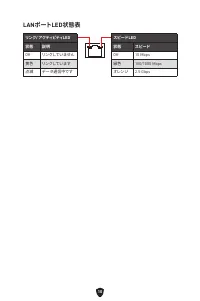
10 LANポートLED状態表 リンク/ アクティビティLED 状態 説明 Off リンクしていません 黄色 リンクしています 点滅 データ通信中です スピードLED 状態 スピード Off 10 Mbps 緑色 100/1000 Mbps オレンジ 2.5 Gbps
Page 232 - コンポーネントの概要
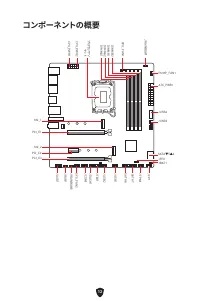
12 SATA▼5▲6 JUSB3 JUSB4 ATX_PWR1 JRAINBOW1 PUMP_FAN1 CPU_FAN1 DIMMB2 プ ロ セッサ ソ ケ ット CPU_PWR1 CPU_PWR2 JFP1 JTPM1 JDASH1 JUSB2 JUSB1 JCOM1 JTBT1 SATA8 JRGB1 JAUD1 PCI_E3 PCI_E2 M2_2 PCI_E1 SYS_FAN2 M2_1 DIMMB1 DIMMA2 DIMMA1 コンポーネントの概要 JBAT1 JFP2 JRAINBOW2 SATA7
Page 233 - CPUソケット
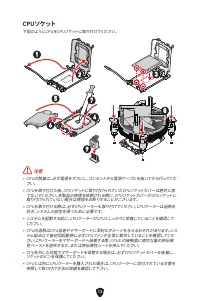
13 ⚠ 注意 ∙ CPUの脱着は、必ず電源をオフにし、コンセントから電源ケーブルを抜いてから行ってくだ さい。 ∙ CPUを取り付けた後、CPUソケットに取り付けられていたCPUソケットカバーは絶対に捨 てないでください。本製品の修理を依頼される際に、CPUソケットカバーがCPUソケットに 取り付けられていない場合は修理をお断りすることがございます。 ∙ CPUを取り付ける際は、必ずCPUクーラーも取り付けてください。CPUクーラーは過熱を 防ぎ、システムの安定を保つために必要です。 ∙ システムを起動する前に、CPUクーラーがCPUとしっかりと密着していることを確認して ください。 ∙ C...
Page 234 - DIMMスロット; メモリモジュールの推奨取付順序
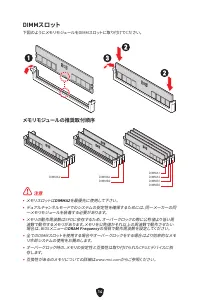
14 DIMMスロット 下図のようにメモリモジュールをDIMMスロットに取り付けてください。 メモリモジュールの推奨取付順序 ⚠ 注意 ∙ メモリスロットは DIMMA2 を最優先に使用して下さい。 ∙ デュアルチャンネルモードでのシステムの安定性を確保するためには、同一メーカーの同 一メモリモジュールを装着する必要があります。 ∙ メモリの動作周波数はSPDに依存するため、オーバークロックの際に公称値より低い周 波数で動作するメモリがあります。メモリを公称値かそれ以上の周波数で動作させたい 場合は、BIOSメニューの DRAM Frequency の項目で動作周波数を設定してください。 ∙ ...
Page 238 - JAUD1: フロントオーディオコネクター
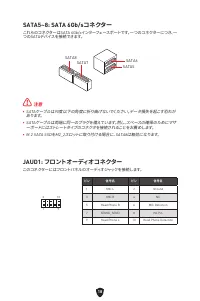
18 SATA5~8: SATA 6Gb/sコネクター これらのコネクターはSATA 6Gb/sインターフェースポートです。一つのコネクターにつき、一 つのSATAデバイスを接続できます。 ⚠ 注意 ∙ SATAケーブルは90度以下の角度に折り曲げないでください。データ損失を起こす恐れが あります。 ∙ SATAケーブルは両端に同一のプラグを備えています。然し、スペースの確保のためにマザ ーボードにはストレートタイプのコネクタを接続されることをお薦めします。 ∙ M.2 SATA SSDをM2_2スロットに取り付ける場合に、SATA8は無効になります。 SATA5 SATA7 SATA8 SA...
Page 244 - JTBT1: Thunderbolt追加カードコネクター
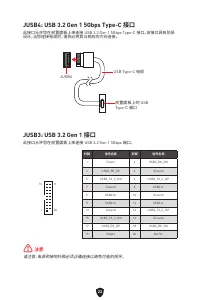
24 JTBT1: Thunderbolt追加カードコネクター このコネクターは追加のThunderbolt I/Oカードを接続します。 1 2 16 15 ピン 信号名 ピン 信号名 1 TBT_Force_PWR 2 TBT_S0IX_Entry_REQ 3 TBT_CIO_Plug_Event# 4 TBT_S0IX_Entry_ACK 5 SLP_S3#_TBT 6 TBT_PSON_Override_N 7 SLP_S5#_TBT 8 Net Name 9 Ground 10 SMBCLK_VSB 11 DG_PEWake 12 SMBDATA_VSB 13 TBT_RTD3_PWR...
Page 245 - JDASH1: チューニングコントローラーコネクター
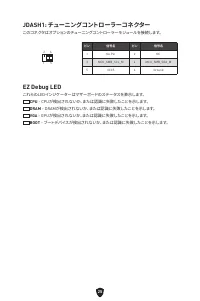
25 JDASH1: チューニングコントローラーコネクター このコネクタはオプションのチューニングコントローラーモジュールを接続します。 1 2 6 5 ピン 信号名 ピン 信号名 1 No Pin 2 NC 3 MCU_SMB_SCL_M 4 MCU_SMB_SDA_M 5 VCC5 6 Ground EZ Debug LED これらのLEDインジケーターはマザーボードのステータスを表示します。 CPU - CPUが検出されないか、または認識に失敗したことを示します。 DRAM - DRAMが検出されないか、または認識に失敗したことを示します。 VGA - GPUが検出されないか、または認識...
Page 247 - Windows 10/ Windows 11のインストール; ドライバーのインストール; MSI Centerユーザーズガイド
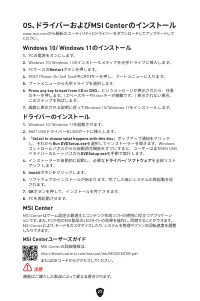
27 OS、ドライバーおよびMSI Centerのインストール www.msi.comから最新のユーティリティとドライバーをダウンロードしてアップデートして ください。 Windows 10/ Windows 11のインストール 1. PCの電源をオンにします。 2. Windows 10/ Windows 11のインストールメディアを光学ドライブに挿入します。 3. PCケースの Restart ボタンを押します。 4. POST (Power-On Self Test)中に F11 キーを押し、ブートメニューに入ります。 5. ブートメニューから光学ドライブを選択します。 6. Press...
Page 248 - UEFIの利点; BIOSモードを確認する方法
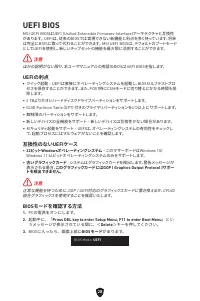
28 UEFI BIOS MSI UEFI BIOSはUEFI (Unified Extensible Firmware Interface)アーキテクチャと互換性 があります。 UEFIは、従来のBIOSでは実現できない新機能と利点を多く持っています、将来 は完全にBIOSに取って代わることができます。 MSI UEFI BIOSは、デフォルトのブートモード としてUEFIを使用し、新しいチップセットの機能を最大限に活用することができます。 ⚠ 注意 ほかの説明がない限り、本ユーザマニュアルの用語のBIOSはUEFI BIOSを指します。 UEFIの利点 ∙ クイック起動 - UEFIは直接...
Page 249 - BIOSセットアップ画面の起動; BIOSユーザーズガイド
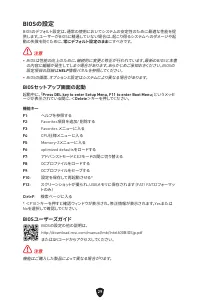
29 BIOSの設定 BIOSのデフォルト設定は、通常の使用においてシステムの安定性のために最適な性能を提 供します。ユーザーがBIOSに精通していない場合は、起こり得るシステムへのダメージや起 動の失敗を防ぐために、 常にデフォルト設定のまま にすべきです。 ⚠ 注意 ∙ BIOSは性能の向上のために、継続的に変更と修正が行われています。最新のBIOSと本書 の内容に齟齬が発生してしまう場合があります。あらかじめご承知おきください。BIOSの 設定項目の詳細は HELP 情報パネルを参照してください。 ∙ BIOSの画面、オプションと設定はシステムにより異なる場合があります。 BIOSセット...
Page 250 - BIOSのリセット; BIOSのアップデート方法
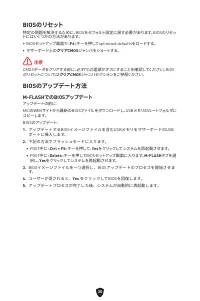
30 BIOSのリセット 特定の問題を解決するために、BIOSをセフォルト設定に戻す必要があります。BIOSのリセッ トにはいくつかの方法があります。 ∙ BIOSセットアップ画面で< F6 >キーを押してoptimized defaultsをロードする。 ∙ マザーボード上の クリアCMOS ジャンパをショートする。 ⚠ 注意 CMOSデータをクリアする前に、必ずPCの電源がオフにすることを確認してください。BIOS のリセットについては クリアCMOS ジャンパセクションをご参照ください。 BIOSのアップデート方法 M-FLASHでのBIOSアップデート アップデートの前に:...
Page 251 - MSI CenterでのBIOSアップデート
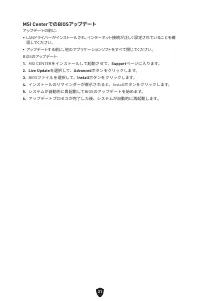
31 MSI CenterでのBIOSアップデート アップデートの前に: ∙ LANドライバーがインストールされ、インターネット接続が正しく設定されていることを確 認してください。 ∙ アップデートする前に、他のアプリケーションソフトをすべて閉じてください。 BIOSのアップデート: 1. MSI CENTERをインストールして起動させて、 Support ページに入ります。 2. Live Update を選択して、 Advanced ボタンをクリックします。 3. BIOSファイルを選択して、 Install ボタンをクリックします。 4. インストールのリマインダーが表示されると、Ins...
Page 252 - Regulatory Notices; FCC-B Radio Frequency Interference Statement; FCC Conditions
i Regulatory Notices FCC-B Radio Frequency Interference Statement This equipment has been tested and found to comply with the limits for a Class B digital device, pursuant to part 15 of the FCC rules. These limits are designed to provide reasonable protection against harmful interference in a reside...
Page 253 - CE Conformity; Restrictions for Products with Radio Functionality
ii CE Conformity Products bearing the CE marking comply with one or more of the following EU Directives as may be applicable: ∙ RED 2014/53/EU ∙ Low Voltage Directive 2014/35/EU ∙ EMC Directive 2014/30/EU ∙ RoHS Directive 2011/65/EU ∙ ErP Directive 2009/125/EC Compliance with these directives is ass...
Page 254 - Wireless Radio Use; Compliance Statement of Innovation, Science and; クラスB情報技術装置
iii Wireless Radio Use This device is restricted to indoor use when operating in the 2.4GHz, 5GHz, 6GHz frequency band.Cet appareil doit être utilisé à l’intérieur. 당해 무선설비는 운용중 전파혼신 가능성이 있음. この製品は、周波数帯域 2.4GHz, 5GHz, 6GHz で動作しているときは、屋内においてのみ使 用可能です。 NCC無線設備警告聲明 工作頻率2.4GHz, 5GHz, 6GHz該頻段限於室內使用。經型式認證...
Page 255 - KC인증서; Chemical Substances Information
iv KC인증서 PRO B660M-A WIFI 상호: (주)엠에스아이코리아 제품명: 메인보드 모델명: 20-7D43 제조년월: 2022년 제조자 및 제조국가: MSI/중국 R-R-MSI-20-7D43 KC인증서 PRO B660M-A 상호: (주)엠에스아이코리아 제품명: 메인보드 모델명: B660MA 제조년월: 2022년 제조자 및 제조국가: MSI/중국 R-R-MSI-B660MA Battery Information European Union: Batteries, battery packs, and accumulators should ...
Page 256 - Environmental Policy; WEEE (Waste Electrical and Electronic Equipment)
v Environmental Policy ∙ The product has been designed to enable proper reuse of parts and recycling and should not be thrown away at its end of life. ∙ Users should contact the local authorized point of collection for recycling and disposing of their end-of-life products. ∙ Visit the MSI website an...
Page 259 - India RoHS; Україна обмеження на наявність небезпечних речовин
viii ITALIANO Per proteggere l’ambiente, MSI, da sempre amica della natura, ti ricorda che….In base alla Direttiva dell’Unione Europea (EU) sullo Smaltimento dei Materiali Elettrici ed Elettronici, Direttiva 2002/96/EC in vigore dal 13 Agosto 2005, prodotti appartenenti alla categoria dei Materiali ...
Page 260 - MS-7D43主板产品中有害物质的名称及含量
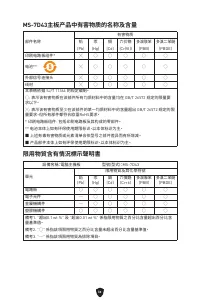
ix MS-7D43主板产品中有害物质的名称及含量 部件名称 有害物质 铅 (Pb) 汞 (Hg) 镉 (Cd) 六价铬 (Cr(VI)) 多溴联苯 (PBB) 多溴二苯醚 (PBDE) 印刷电路板组件* ╳ ○ ○ ○ ○ ○ 电池** ╳ ○ ○ ○ ○ ○ 外部信号连接头 ╳ ○ ○ ○ ○ ○ 线材 ╳ ○ ○ ○ ○ ○ 本表格依据 SJ/T 11364 的规定编制。○: 表示该有害物质在该部件所有均质材料中的含量均在 GB/T 26572 规定的限量要 求以下。╳: 表示该有害物质至少在该部件的某一均质材料中的含量超出 GB/T 26572 规定的限 量要求,但所有部件都符合欧盟R...
Page 261 - Copyright and Trademarks Notice; Technical Support; Revision History
x Copyright and Trademarks Notice Copyright © Micro-Star Int’l Co., Ltd. All rights reserved. The MSI logo used is a registered trademark of Micro-Star Int’l Co., Ltd. All other marks and names mentioned may be trademarks of their respective owners. No warranty as to accuracy or completeness is expr...
















 MSI B560 User Manual
 MSI B560M BOMBER User Manual
 MSI B560M PRO-E User Manual
 MSI B660M User Manual
 MSI H510 User Manual
 MSI H510M-A PRO User Manual
 MSI H610 User Manual
 MSI MAG B550 User Manual
 MSI MAG B550M User Manual
 MSI MAG B650M User Manual
 MSI MAG Z690 User Manual
 MSI MEG X570 User Manual
 MSI MPG B550 User Manual