Mikrotik RBMQS 802.11n, 1xFE (RBMQS) - User Manual
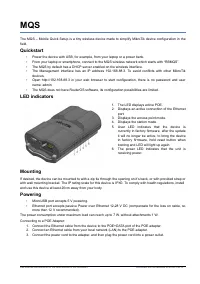
A user manual for the MikroTik MQS (Mobile Quick Setup) router device outlines its essential features and setup procedures. The document covers key aspects such as quickstart configuration, physical design elements like LED indicators and mounting options, power supply methods (including USB and POE adapters), and technical specifications. It also includes regulatory compliance details for radio frequency operation, ensuring adherence to interference limits and safety standards while providing guidance on proper usage and maintenance.
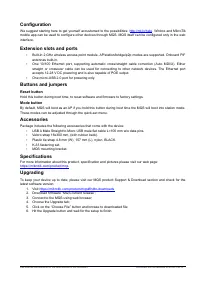
Table of Contents:
- Page 1 – MikroTik MQS Device Setup and Powering
- Page 2 – Device Configuration and Hardware Specifications
- Page 3 – Regulatory Compliance and RF Safety Information
- Page 4 – EU Conformity and Radio Equipment Specifications
- Page 5 – Multilingual Web Interface Configuration Instructions
MQS
The MQS – Mobile Quick Setup is a tiny wireless device made to simplify MikroTik device configuration in the
field.
Quickstart
•
Power the device with USB, for example, from your laptop or a power bank.
•
From your laptop or smartphone, connect to the MQS wireless network which starts with “RBMQS”.
•
The MQS by default has a DHCP server enabled on the wireless interface.
•
The Management interface has an IP address 192.168.88.3. To avoid conflicts with other MikroTik
devices.
•
Open http://192.168.88.3 in your web browser to start configuration, there is no password and user
name: admin.
•
The MQS does not have RouterOS software, its configuration possibilities are limited.
LED indicators
1. The LED displays active POE.
2. Displays an active connection of the Ethernet
port.
3. Displays the access point mode.
4. Displays the station mode.
5. User LED indicates that the device is
currently in factory firmware, after the update
it will no longer be active, to bring the device
in factory firmware, hold reset button when
booting and LED will light up again.
6. The power LED indicates that the unit is
receiving power.
Mounting
If desired, the device can be mounted to with a zip tie through the opening on it’s back, or with provided strap or
with wall mounting bracket. The IP rating scale for this device is IPX0. To comply with health regulations, install
and use this device at least 20cm away from your body.
Powering
•
MicroUSB port accepts 5 V powering.
•
Ethernet port accepts passive Power over Ethernet 12-28 V DC (compensate for the loss on cable, so
more than 12 V recommended).
The power consumption under maximum load can reach up to 7 W, without attachments 1 W.
Connecting to a POE Adapter:
1. Connect the Ethernet cable from the device to the POE+DATA port of the POE adapter.
2. Connect an Ethernet cable from your local network (LAN) to the POE adapter.
3. Connect the power cord to the adapter, and then plug the power cord into a power outlet.
See mikrotik.com/products for the latest version of this document. Document #52799 Modified on:23.OCT.2019
"Loading the manual" means you need to wait until the file loads and becomes available for online reading. Some manuals are very large, and the time they take to appear depends on your internet speed.
Was this manual helpful?
About this manual
- Brand
- Mikrotik
- Model
- RBMQS 802.11n, 1xFE (RBMQS)
- Document type
- User Manual
- Category
- Wi-Fi Adapter
- Language(s)
- German, English, Spanish, French, Italian, Dutch, Polish, Russian, Swedish
- Pages
- 5
- File size
- 293 KB
- Format
Summary
Quickstart setup procedures, meaning of LED indicators, mounting options, and powering methods including USB and POE adapter connections for the device.
Details on configuration options, physical ports, buttons, included accessories, technical specifications, web interface/mobile app configuration, Ethernet and USB port descriptions, and firmware upgrade instructions.
FCC and Industry Canada regulatory compliance statements for the Class B digital device, interference mitigation instructions, safety warnings regarding radio frequency radiation exposure, and device identification numbers (FCC ID and Industry Canada ID).
Ask a question
Related manuals
Other Mikrotik appliances
 Mikrotik cAP User Manual
 Mikrotik cAP ac (RBCAPGI-5ACD2ND) User Manual
 Mikrotik Chateau LTE6 ax (S53UG+5HaxD2HaxD-TC) User Manual
 Mikrotik Cloud Core Router 1036-12G-4S-EM 12xGE User Manual
 Mikrotik Cloud Core Router CCR1036-12G-4S User Manual
 Mikrotik hAP ac (RB962UiGS-5HacT2HnT) User Manual
 Mikrotik hAP ac2 (RBD52G-5HACD2HND-TC) User Manual
 Mikrotik hAP ac lite (RB952UI-5AC2ND) User Manual
 Mikrotik hAP mini (RB931-2ND) User Manual
 Mikrotik hEX 5xGE, 1xUSB, RouterOS L4 (RB750GR3) User Manual
 Mikrotik hEX S 5xGE (1xPoE), 1xSFP User Manual
 Mikrotik LHG XL 2 User Manual
 Mikrotik mAP lite (RBMAPL-2ND) User Manual
 Mikrotik RBwAPG-60adkit Wire (RBWAPG-60ADKIT) User Manual
 Mikrotik RouterBOARD 1100AHx4 13xGE, 1xSFP User Manual
 Mikrotik RouterBOARD RB951Ui-2HnD User Manual
 Mikrotik RouterBOARD RB4011iGS+5HacQ2HnD-IN User Manual
 Mikrotik SXT LTE6 User Manual