Page 2 - Contents
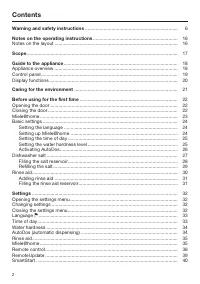
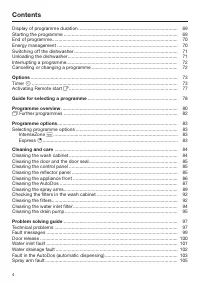
Contents 2 Warning and safety instructions ...................................................................... 6 Notes on the operating instructions ................................................................ 16 Notes on the layout ...............................................................
Page 3 - Caring for the environment
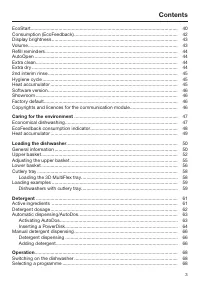
Contents 3 EcoStart............................................................................................................... 40Consumption (EcoFeedback) .............................................................................. 42Display brightness ............................................
Page 4 - Timer
Contents 4 Display of programme duration ........................................................................... 69Starting the programme ...................................................................................... 69End of programme........................................................
Page 5 - Service
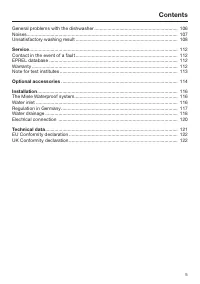
Contents 5 General problems with the dishwasher ............................................................... 106Noises.................................................................................................................. 107Unsatisfactory washing result ..................................
Page 6 - Warning and safety instructions
Warning and safety instructions 6 This dishwasher conforms to current safety requirements. Inappro-priate use can, however, lead to personal injury and material dam-age. Please observe the installation sheet and read the operating in-structions carefully before setting up the dishwasher and using it...
Page 7 - Appropriate use
Warning and safety instructions 7 Appropriate use This dishwasher is intended for use in domestic households and similar working and residential environments. This dishwasher is not intended for outdoor use. This dishwasher is intended for use at altitudes of up to 4000 m above sea level. Th...
Page 8 - Safety with children
Warning and safety instructions 8 Safety with children Children under 8 years of age must be kept away from the dish- washer unless they are constantly supervised. Children aged 8 and older may only use the dishwasher without supervision if they have been shown how to use it in a safe manner.Chi...
Page 9 - Technical safety; Unauthorised installation, maintenance and repairs can cause
Warning and safety instructions 9 Technical safety Unauthorised installation, maintenance and repairs can cause considerable danger for the user. Installation, maintenance and re-pairs must only be carried out by a qualified technician. Damage to the dishwasher can compromise your safety. Before...
Page 12 - Correct installation
Warning and safety instructions 12 We recommend replacing defective components with original spare parts. If original Miele spare parts are installed correctly, Mieleensures full compliance with safety requirements and the warrantyremains valid. During installation, maintenance and repair work, ...
Page 13 - Correct use
Warning and safety instructions 13 A sink in the adjacent cabinet of the dishwasher must be carefully sealed. Regularly check for leaks to avoid damage to the dish-washer. The dishwasher must only be built into a tall unit if additional safety precautions are taken. In order to safely install th...
Page 15 - Accessories and spare parts
Warning and safety instructions 15 Please observe the information given in the “Technical data” chapter regarding the capacity of the dishwasher. Accessories and spare parts Only use original Miele accessories. If other parts are used, war- ranty, performance and, if applicable, product liabilit...
Page 16 - Notes on the operating instructions; Notes on the layout; Warnings
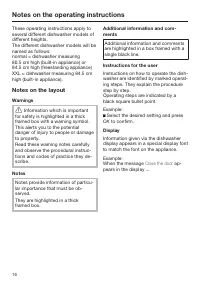
Notes on the operating instructions 16 These operating instructions apply toseveral different dishwasher models ofdifferent heights. The different dishwasher models will benamed as follows: normal = dishwasher measuring80.5 cm high (built-in appliance) or84.5 cm high (freestanding appliance) XXL = d...
Page 17 - Scope
Scope 17 The appliance is supplied with: - Dishwasher - Operating instructions for operating the dishwasher - Installation sheet for installing the dishwasher - Other installation accessories for in- stalling the dishwasher (see installa-tion sheet) - Funnel for filling the dishwasher salt - Additio...
Page 18 - Guide to the appliance; Appliance overview
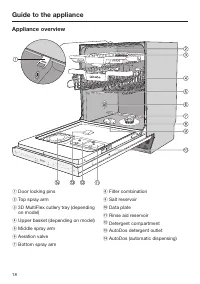
Guide to the appliance 18 Appliance overview a Door locking pins b Top spray arm c 3D MultiFlex cutlery tray (dependingon model) d Upper basket (depending on model) e Middle spray arm f Aeration valve g Bottom spray arm h Filter combination i Salt reservoir j Data plate k Rinse aid reservoir l Deter...
Page 19 - Control panel
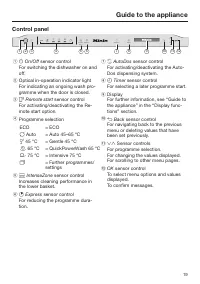
Guide to the appliance 19 Control panel AutoDos Express Intense Zone Auto Timer ECO 1 2 3 4 5 6 7 8 9 10 11 12 a On/Off sensor control For switching the dishwasher on andoff. b Optical in-operation indicator lightFor indicating an ongoing wash pro-gramme when the door is closed. c Remote st...
Page 20 - Display functions; OK
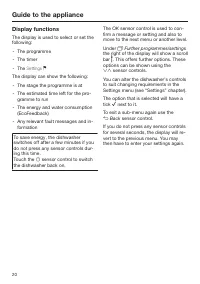
Guide to the appliance 20 Display functions The display is used to select or set thefollowing: - The programme - The timer - The Settings The display can show the following: - The stage the programme is at - The estimated time left for the pro- gramme to run - The energy and water consumption (Eco...
Page 22 - Before using for the first time; Opening the door; Pull the handle to open the door.; Closing the door; Push the baskets right in.
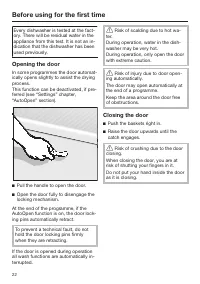
Before using for the first time 22 Every dishwasher is tested at the fact-ory. There will be residual water in theappliance from this test. It is not an in-dication that the dishwasher has beenused previously. Opening the door In some programmes the door automat-ically opens slightly to assist the d...
Page 23 - In order to use it you will need:
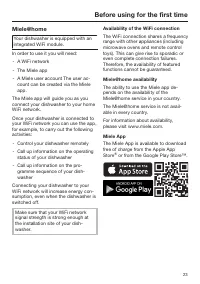
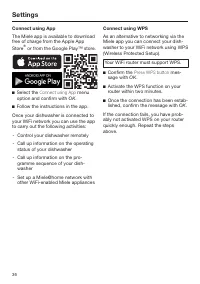
Before using for the first time 23 Miele@home Your dishwasher is equipped with anintegrated WiFi module. In order to use it you will need: - A WiFi network - The Miele app - A Miele user account The user ac- count can be created via the Mieleapp. The Miele app will guide you as youconnect your dishw...
Page 24 - Basic settings; Switching on the dishwasher
Before using for the first time 24 Basic settings Switching on the dishwasher Open the door. Switch the dishwasher on using the sensor control. The welcome screen will appear whenthe dishwasher is switched on and thewelcome melody will sound. For further information about the dis-play functio...
Page 25 - Setting the time of day
Before using for the first time 25 Setting the time of day The time of day is set automatically ifa connection is established with theWiFi network. The display will then change to thescreen for setting the time of day. The current time of day must be set be-fore you can use the timer option. Use t...
Page 26 - Activating AutoDos; and; Select
Before using for the first time 26 Activating AutoDos The display changes to the settingsscreen for AutoDos (see the “Detergent”chapter, “Automatic dispensing/Auto-Dos” section). Even if you do not wish to use Auto-Dos, you must remove the transportlocking device from the PowerDiskcompartment before...
Page 27 - Dishwasher salt; not
Before using for the first time 27 Dishwasher salt In order to achieve good cleaning res-ults, the dishwasher needs to operatewith soft water. Hard water results inthe build-up of calcium deposits oncrockery and on the wash cabinet walls. Mains water with a water hardness levelhigher than 0.9 mmol/l...
Page 28 - Filling the salt reservoir
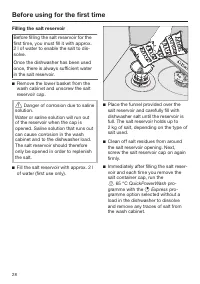
Before using for the first time 28 Filling the salt reservoir Before filling the salt reservoir for thefirst time, you must fill it with approx.2 l of water to enable the salt to dis-solve. Once the dishwasher has been usedonce, there is always sufficient waterin the salt reservoir. Remove the low...
Page 29 - Refilling the salt; Confirm with
Before using for the first time 29 Refilling the salt When Refill salt appears in the dis- play, wait until the end of the pro-gramme and then refill the salt reser-voir. Confirm with OK . The salt refill indicator will go out. Risk of corrosion due to saline solution.Saline solution that ...
Page 30 - Rinse aid; Washing-up liquid or detergent
Before using for the first time 30 Rinse aid Rinse aid is necessary to ensure thatwater does not cling and leave markson crockery during the drying phase,and helps crockery dry faster after ithas been washed. Rinse aid is poured into the containerand the amount set is dispensed auto-matically. Was...
Page 31 - Adding rinse aid
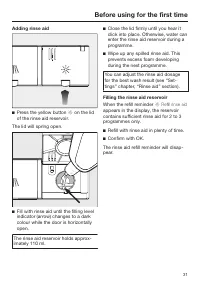
Before using for the first time 31 Adding rinse aid Press the yellow button on the lid of the rinse aid reservoir. The lid will spring open. Fill with rinse aid until the filling levelindicator (arrow) changes to a darkcolour while the door is horizontallyopen. The rinse aid reservoir holds a...
Page 32 - Settings; Opening the settings menu; Changing settings; Closing the settings menu
Settings 32 You can alter the dishwasher’s con-trols to suit changing requirements byadjusting the settings. The settings can be altered at anytime. Opening the settings menu Switch the dishwasher on with the sensor control if it is switched off. Touch the sensor control “Further programme...
Page 33 - Language; Time of day; Setting the clock format
Settings 33 Language The display can be set to appear in oneof several different languages. You can change the language used inthe display and also the country via the Language sub-menu. The flag after the word Language serves as a guide if a language thatyou do not understand has been set....
Page 34 - Water hardness; - Your local water authority will be able; tion and confirm with
Settings 34 Water hardness Your dishwasher is fitted with a watersoftener. - You should programme the dish- washer to the correct water hardnessfor your area. - Your local water authority will be able to advise you of the water hardnesslevel in your area. - Where the water hardness fluctuates e.g. b...
Page 38 - Remote control
Settings 38 Reset This menu option only appears if youhave already connected your dish-washer to your WiFi network. You can use this menu option to resetall WiFi module settings to the factorydefault settings. The network configuration should be re-set whenever a dishwasher is being dis-posed of or ...
Page 39 - RemoteUpdate; Activating/deactivating
Settings 39 RemoteUpdate The RemoteUpdate menu option isonly displayed and can only be selec-ted if the requirements for usingMiele@home have been met (see “Be-fore using for the first time” chapter,“Miele@home” section). The RemoteUpdate function is used forupdating the software in your dish-washer...
Page 40 - SmartStart
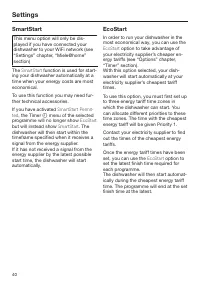
Settings 40 SmartStart This menu option will only be dis-played if you have connected yourdishwasher to your WiFi network (see“Settings” chapter, “Miele@home”section) The SmartStart function is used for start- ing your dishwasher automatically at atime when your energy costs are mosteconomical. To ...
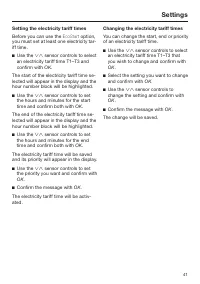
Page 41 - Setting the electricity tariff times; Changing the electricity tariff times
Settings 41 Setting the electricity tariff times Before you can use the EcoStart option, you must set at least one electricity tar-iff time. Use the sensor controls to select an electricity tariff time T1–T3 andconfirm with OK . The start of the electricity tariff time se-lected will appear i...
Page 42 - Deleting the electricity tariff times
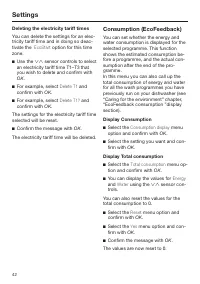
Settings 42 Deleting the electricity tariff times You can delete the settings for an elec-tricity tariff time and in doing so deac-tivate the EcoStart option for this time zone. Use the sensor controls to select an electricity tariff time T1–T3 thatyou wish to delete and confirm with OK . F...
Page 43 - Display brightness; Buzzer in the event of a fault
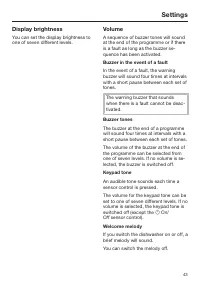
Settings 43 Display brightness You can set the display brightness toone of seven different levels. Volume A sequence of buzzer tones will soundat the end of the programme or if thereis a fault as long as the buzzer se-quence has been activated. Buzzer in the event of a fault In the event of a fault,...
Page 44 - Refill reminders; Risk of damage due to steam.; Extra clean; Extra dry; ECO
Settings 44 Refill reminders If you only ever use combination deter-gent products or automatic dispensingusing Miele PowerDisks (if available),you can switch off the refill remindersfor dishwasher salt and rinse aid if youwish. Please make sure that if you stop us-ing combination detergents, you ref...
Page 45 - nd interim rinse; Hygiene cycle; Select State; The process starts straight away.
Settings 45 2nd interim rinse You can choose this function to in-crease the cleaning performance of theprogrammes with a second interimrinse. When this function is activated, waterconsumption may increase. If this function is switched on, it will beapplied to all programmes until it isswitched off a...
Page 46 - Software version; For demonstration purposes only.; Factory default; and confirm with
Settings 46 Software version You can call up the electronic softwareversion of your dishwasher for technicalsupport purposes. Showroom For demonstration purposes only. The dishwasher is equipped with ademo mode for showroom use. Factory default You can reset all dishwasher settings tothe factory def...
Page 47 - Economical dishwashing
Caring for the environment 47 Economical dishwashing This dishwasher is exceptionally eco-nomical in its use of water and electri-city. You can make the most of your appli-ance by following these tips: - Washing in a dishwasher generally uses less water and energy thanwashing by hand. - There is no ...
Page 48 - Consumption estimate
Caring for the environment 48 EcoFeedback consumption in-dicator The Consumption function is used forcalling up information about the energyand water consumption of your dish-washer (see “Settings” chapter, “Con-sumption” section). The following information can be shownon the display: - An estimate ...
Page 49 - Heat accumulator; sensor control, the display; . Other functions will be unavailable
Caring for the environment 49 Heat accumulator This dishwasher is equipped with a heataccumulator, in which fresh water forthe programme is pre-heated andstored in order to save energy. The heataccumulator is refilled with fresh watertowards the end of each rinse cycle.The water is held here ready f...
Page 50 - Loading the dishwasher; General information; Damage can be caused by ash,
Loading the dishwasher 50 General information Remove coarse food residues fromcrockery. There is no need to pre-rinse items un-der running water. Damage can be caused by ash, sand, wax, lubricating grease orpaint.These substances will contaminatethe dishwasher and can then nolonger be removed.Do n...
Page 51 - Items not suitable for dishwashers:
Loading the dishwasher 51 Items not suitable for dishwashers: - Wooden cutlery and crockery or items with wooden parts: these maydiscolour and fade. The glue used inthese items is not dishwasher-proofand wooden handles may comeloose after being washed in a dish-washer. - Craft items, antiques, valua...
Page 52 - Upper basket; Loading the upper basket; Loading the FlexCare cup rack
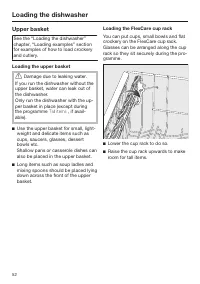
Loading the dishwasher 52 Upper basket See the “Loading the dishwasher”chapter, “Loading examples” sectionfor examples of how to load crockeryand cutlery. Loading the upper basket Damage due to leaking water. If you run the dishwasher without theupper basket, water can leak out ofthe dishwasher.On...
Page 53 - Adjusting the FlexCare cup rack
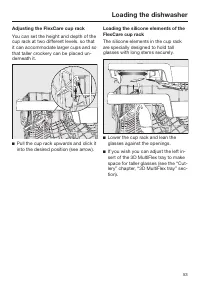
Loading the dishwasher 53 Adjusting the FlexCare cup rack You can set the height and depth of thecup rack at two different levels. so thatit can accommodate larger cups and sothat taller crockery can be placed un-derneath it. Pull the cup rack upwards and click itinto the desired position (see arr...
Page 54 - Lowering the spikes
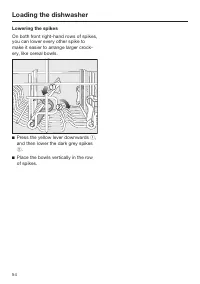
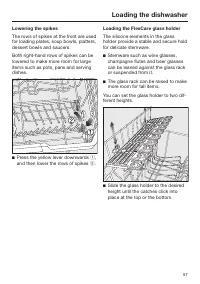
Loading the dishwasher 54 Lowering the spikes On both front right-hand rows of spikes,you can lower every other spike tomake it easier to arrange larger crock-ery, like cereal bowls. Press the yellow lever downwards , and then lower the dark grey spikes . Place the bowls vertically in the ro...
Page 55 - Adjusting the upper basket; Pull out the upper basket.
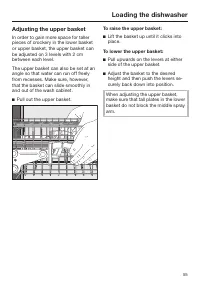
Loading the dishwasher 55 Adjusting the upper basket In order to gain more space for tallerpieces of crockery in the lower basketor upper basket, the upper basket canbe adjusted on 3 levels with 2 cmbetween each level. The upper basket can also be set at anangle so that water can run off freelyfrom ...
Page 56 - Lower basket; Loading the lower basket
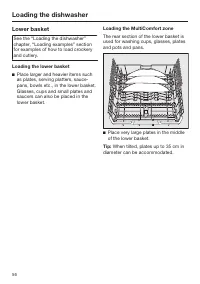
Loading the dishwasher 56 Lower basket See the “Loading the dishwasher”chapter, “Loading examples” sectionfor examples of how to load crockeryand cutlery. Loading the lower basket Place larger and heavier items suchas plates, serving platters, sauce-pans, bowls etc., in the lower basket. Glasses, ...
Page 58 - Cutlery tray; Loading the 3D MultiFlex tray
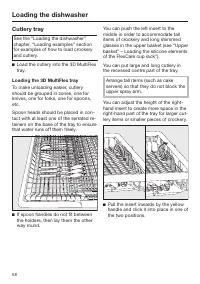
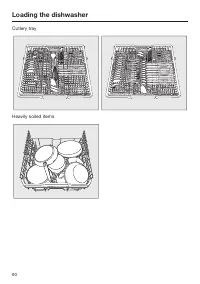
Loading the dishwasher 58 Cutlery tray See the “Loading the dishwasher”chapter, “Loading examples” sectionfor examples of how to load crockeryand cutlery. Load the cutlery into the 3D MultiFlextray. Loading the 3D MultiFlex tray To make unloading easier, cutleryshould be grouped in zones, one fork...
Page 59 - Loading examples; Dishwashers with cutlery tray
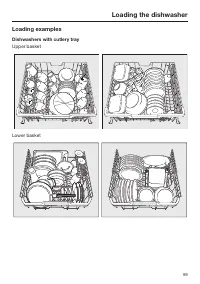
Loading the dishwasher 59 Loading examples Dishwashers with cutlery tray Upper basket Lower basket
Page 61 - Detergent; Active ingredients
Detergent 61 Active ingredients Damage caused by using unsuit- able detergents.Detergents that are not suitable fordomestic dishwashers can causedamage to the dishwasher or to theload.Only use detergents formulated fordomestic dishwashers. Modern detergents contain various act-ive ingredients, the...
Page 62 - Risk of chemical burns from de-; Detergent dosage
Detergent 62 Risk of chemical burns from de- tergent.Dishwasher detergents can causeburning on the skin and in the eyes,nose, mouth and throat.Avoid contact with detergents. Do not inhale powder detergents. Donot swallow dishwasher detergents.Seek medical attention immediately ifdetergent has been...
Page 63 - Automatic dispensing/AutoDos; Risk of chemical burns from re-; AutoDos
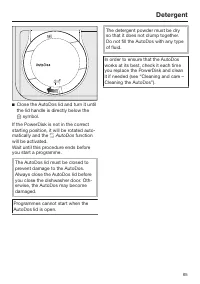
Detergent 63 Automatic dispensing/AutoDos Before you can use AutoDos, you mustinsert a PowerDisk containing powderdetergent into the PowerDisk compart-ment. One PowerDisk contains enough deter-gent for approx. 20 cycles, dependingon the chosen programme. PowerDisks are available to order dir-ectly f...
Page 64 - Inserting a PowerDisk; Turn the AutoDos lid to; Remove the empty PowerDisk.
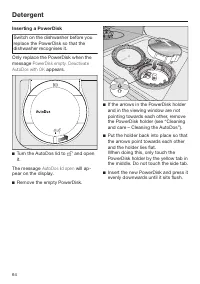
Detergent 64 Inserting a PowerDisk Switch on the dishwasher before youreplace the PowerDisk so that thedishwasher recognises it. Only replace the PowerDisk when themessage PowerDisk empty. Deactivate AutoDos with OK appears. Turn the AutoDos lid to and open it. The message AutoDos lid open will...
Page 66 - Manual detergent dispensing
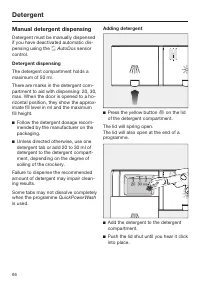
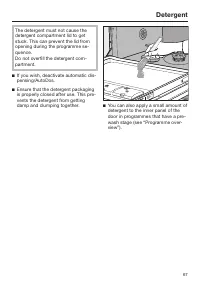
Detergent 66 Manual detergent dispensing Detergent must be manually dispensedif you have deactivated automatic dis-pensing using the AutoDos sensor control. Detergent dispensing The detergent compartment holds amaximum of 50 ml. There are marks in the detergent com-partment to aid with dispensi...
Page 68 - Operation; Touch the; Selecting a programme; “Programme
Operation 68 Switching on the dishwasher Open the stopcock, if it is closed. Open the door. Make sure the spray arms can rotatefreely. Touch the sensor control. If the dishwasher has been switchedoff for longer than 1 minute, you willneed to hold the sensor control for a bit longer (wi...
Page 69 - Display of programme duration
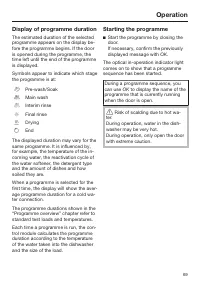
Operation 69 Display of programme duration The estimated duration of the selectedprogramme appears on the display be-fore the programme begins. If the dooris opened during the programme, thetime left until the end of the programmeis displayed. Symbols appear to indicate which stagethe programme is a...
Page 70 - End of programme; If the; Energy management; sensor control for a bit
Operation 70 End of programme At the end of a programme, the opticalin-operation indicator light will flashslowly with the door shut. The buzzermight also sound. The optical in-operation indicator lightwill go out 10 minutes after the end ofthe programme if the door is closed. The programme has ende...
Page 71 - Switching off the dishwasher; Confirm the query; with; Unloading the dishwasher
Operation 71 Switching off the dishwasher Open the door. The dishwasher can be switched offat any time using the sensor con- trol. Confirm the query Switch appliance off with OK . Switching the dishwasher off during aprogramme stops the programme. You can also do this to stop an ongoingtime...
Page 72 - Interrupting a programme; Risk of scalding due to hot wa-
Operation 72 Interrupting a programme A programme will be interrupted assoon as the door is opened. If the door is closed again, the pro-gramme will continue from the point itwas at before the door was opened. Risk of scalding due to hot wa- ter.During operation, water in the dish-washer may be ve...
Page 73 - Options; Activating the timer
Options 73 Timer The timer gives you several options for starting a programme at a later time.You can set the start time or the finishtime of a programme. You can also usethe EcoStart or SmartStart functions to benefit from cheaper energy tariffs atnight. With manual detergent dispensingthe d...
Page 74 - Setting “Start at”
Options 74 Setting “Start at” With the Start at function, you set the exact time you want the programme tostart at. Use the sensor controls to enter the hour and confirm your entry bytouching OK . The hour will be saved and the minutenumber block will be highlighted. Use the sensor cont...
Page 75 - Setting EcoStart
Options 75 Setting EcoStart You can use the EcoStart function to be- nefit from cheaper energy tariffs atnight. Before you can use this option,you need to set up to three electricaltariff time zones (see “Settings”chapter, “EcoStart” section). Then set the latest time by which theselected programme...
Page 76 - Changing or deleting set times
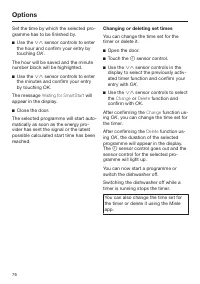
Options 76 Set the time by which the selected pro-gramme has to be finished by. Use the sensor controls to enter the hour and confirm your entry bytouching OK . The hour will be saved and the minutenumber block will be highlighted. Use the sensor controls to enter the minutes and confirm...
Page 77 - Activating Remote start
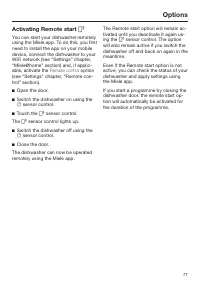
Options 77 Activating Remote start You can start your dishwasher remotelyusing the Miele app. To do this, you firstneed to install the app on your mobiledevice, connect the dishwasher to yourWiFi network (see “Settings” chapter,“Miele@home” section) and, if applic-able, activate the Remote contro...
Page 78 - Guide for selecting a programme; Crockery
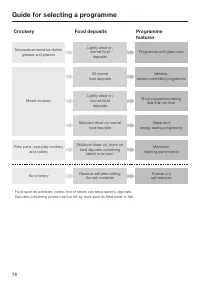
Guide for selecting a programme 78 Pots, pans, everyday crockery and cutlery Standard dried-on normal food deposits Stubborn dried-on, burnt-on food deposits containing starch or protein 1 Water and energy saving programme Maximum cleaning performance Crockery Food deposits Programme features Temper...
Page 79 - QuickPowerWash 65 °C
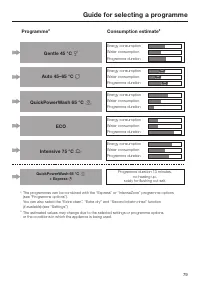
Guide for selecting a programme 79 Gentle 45 °C Auto 45–65 °C QuickPowerWash 65 °C ECO Intensive 75 °C Programme 2 Consumption estimate 3 QuickPowerWash 65 °C + Express 2 The programmes can be combined with the “Express” or “IntenseZone” programme options (see “Programme options”). You c...
Page 80 - Programme overview; Programme
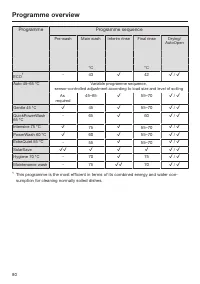
Programme overview 80 Programme Programme sequence Pre-wash Main wash Interim rinse Final rinse Drying/ AutoOpen °C °C ECO 1 - 43 42 / Auto 45–65 °C Variable programme sequence, sensor-controlled adjustment according to load size and level of soiling As required 45–65 55–70 / Gentle 45 °...
Page 81 - Values for the
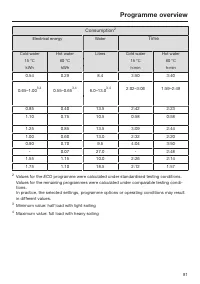
Programme overview 81 Consumption 2 Electrical energy Water Time Cold water Hot water Litres Cold water Hot water 15 °C 60 °C 15 °C 60 °C kWh kWh h:min h:min 0.54 0.29 8.4 3:50 3:40 0.65–1.00 3,4 0.55–0.65 3,4 6.0–13.0 3,4 2:02–3:06 1:59–2:49 0.85 0.40 13.5 2:42 2:23 1.10 0.75 10.5 0:58 0:58 1.25 0....
Page 82 - Further programmes; PowerWash 60 °C
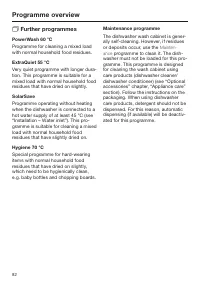
Programme overview 82 Further programmes PowerWash 60 °C Programme for cleaning a mixed loadwith normal household food residues. ExtraQuiet 55 °C Very quiet programme with longer dura-tion. This programme is suitable for amixed load with normal household foodresidues that have dried on slightly. ...
Page 83 - Programme options; Selecting programme options; IntenseZone
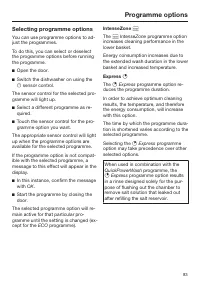
Programme options 83 Selecting programme options You can use programme options to ad-just the programmes. To do this, you can select or deselectthe programme options before runningthe programme. Open the door. Switch the dishwasher on using the sensor control. The sensor control for the selec...
Page 84 - Cleaning and care; Damage due to unsuitable clean-; Cleaning the wash cabinet; programme once per month; programme to clean the
Cleaning and care 84 Check the condition of your dish-washer regularly (approx. every 4–6months). In this way, faults and prob-lems can be avoided. Damage due to unsuitable clean- ing agents.All surfaces are susceptible toscratching. Contact with unsuitablecleaning agents can alter or discol-our t...
Page 85 - Intensive 75 °C; Cleaning the control panel; The control panel should; Cleaning the reflector panel
Cleaning and care 85 Hygiene cycle If you mainly use low temperature pro-grammes, there is a risk of bacteria andunpleasant odours building up in thewash cabinet. If you repeatedly use lowtemperature programmes, you shouldregularly run a high temperature pro-gramme. This is to prevent the build-upof...
Page 86 - Cleaning the appliance front
Cleaning and care 86 Cleaning the appliance front Damage due to soiling. Soiling that is left too long might be-come impossible to remove andcould cause the external surfaces toalter or discolour.It is therefore best to remove anysoiling immediately. Clean the appliance front with a cleansoft sp...
Page 87 - Cleaning the AutoDos
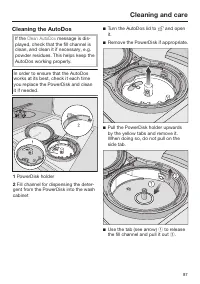
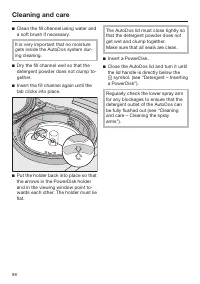
Cleaning and care 87 Cleaning the AutoDos If the Clean AutoDos message is dis- played, check that the fill channel isclean, and clean it if necessary, e.g.powder residues. This helps keep theAutoDos working properly. In order to ensure that the AutoDosworks at its best, check it each timeyou replace...
Page 89 - Cleaning the spray arms; Damage due to soiling entering
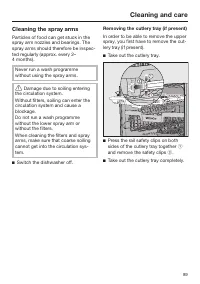
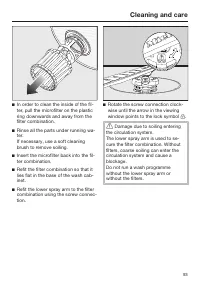
Cleaning and care 89 Cleaning the spray arms Particles of food can get stuck in thespray arm nozzles and bearings. Thespray arms should therefore be inspec-ted regularly (approx. every 2–4 months). Never run a wash programmewithout using the spray arms. Damage due to soiling entering the circulati...
Page 90 - Removing the top spray arm
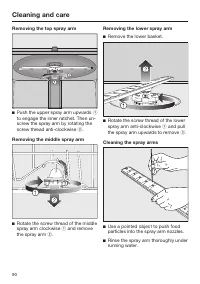
Cleaning and care 90 Removing the top spray arm Push the upper spray arm upwards to engage the inner ratchet. Then un-screw the spray arm by rotating thescrew thread anti-clockwise . Removing the middle spray arm Rotate the screw thread of the middlespray arm clockwise and remove the sp...
Page 91 - Inserting the upper spray arm
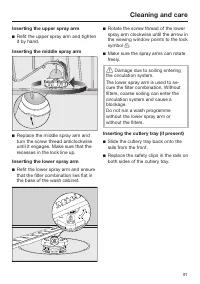
Cleaning and care 91 Inserting the upper spray arm Refit the upper spray arm and tightenit by hand. Inserting the middle spray arm Replace the middle spray arm andturn the screw thread anticlockwiseuntil it engages. Make sure that therecesses in the lock line up. Inserting the lower spray arm ...
Page 92 - Cleaning the filters
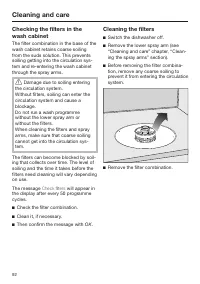
Cleaning and care 92 Checking the filters in thewash cabinet The filter combination in the base of thewash cabinet retains coarse soilingfrom the suds solution. This preventssoiling getting into the circulation sys-tem and re-entering the wash cabinetthrough the spray arms. Damage due to soiling e...
Page 94 - Cleaning the water inlet filter; Never
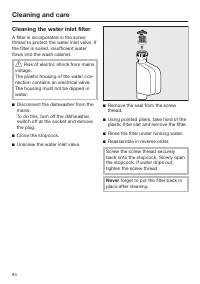
Cleaning and care 94 Cleaning the water inlet filter A filter is incorporated in the screwthread to protect the water inlet valve. Ifthe filter is soiled, insufficient waterflows into the wash cabinet. Risk of electric shock from mains voltage.The plastic housing of the water con-nection contains ...
Page 95 - Cleaning the drain pump
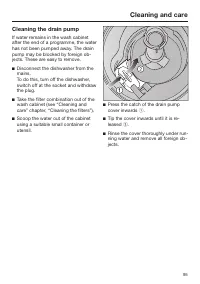
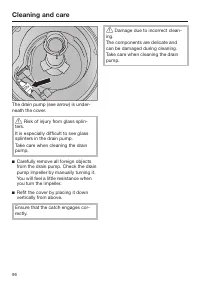
Cleaning and care 95 Cleaning the drain pump If water remains in the wash cabinetafter the end of a programme, the waterhas not been pumped away. The drainpump may be blocked by foreign ob-jects. These are easy to remove. Disconnect the dishwasher from themains. To do this, turn off the dishwasher...
Page 96 - Risk of injury from glass splin-
Cleaning and care 96 The drain pump (see arrow) is under-neath the cover. Risk of injury from glass splin- ters.It is especially difficult to see glasssplinters in the drain pump.Take care when cleaning the drainpump. Carefully remove all foreign objectsfrom the drain pump. Check the drainpump i...
Page 97 - Problem solving guide; Technical problems; Problem
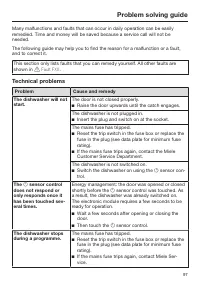
Problem solving guide 97 Many malfunctions and faults that can occur in daily operation can be easilyremedied. Time and money will be saved because a service call will not beneeded. The following guide may help you to find the reason for a malfunction or a fault,and to correct it. This section only ...
Page 99 - Fault messages
Problem solving guide 99 Fault messages Problem Cause and remedy The optical in-operationindicator light is flash-ing quickly. The alarm tone issounding. One of the followingfaults appears in thedisplay: Before rectifying the problem: Switch the dishwasher off. Fault FXX There may be a technic...
Page 100 - Door release; Switch the dishwasher back on.
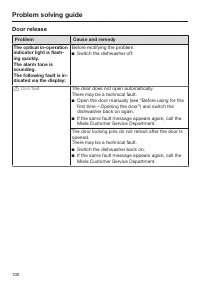
Problem solving guide 100 Door release Problem Cause and remedy The optical in-operationindicator light is flash-ing quickly. The alarm tone issounding. The following fault is in-dicated via the display: Before rectifying the problem: Switch the dishwasher off. Door fault The door does not ope...
Page 101 - Water inlet fault
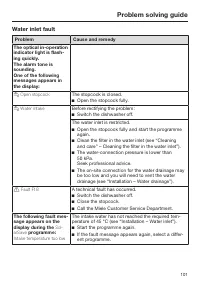
Problem solving guide 101 Water inlet fault Problem Cause and remedy The optical in-operationindicator light is flash-ing quickly. The alarm tone issounding. One of the followingmessages appears inthe display: Open stopcock The stopcock is closed. Open the stopcock fully. Water intake Befo...
Page 102 - Water drainage fault; appears in the display
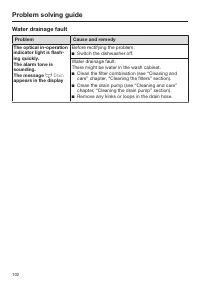
Problem solving guide 102 Water drainage fault Problem Cause and remedy The optical in-operationindicator light is flash-ing quickly. The alarm tone issounding. The message Drain appears in the display Before rectifying the problem: Switch the dishwasher off. Water drainage fault.There might ...
Page 103 - Fault in the AutoDos (automatic dispensing)
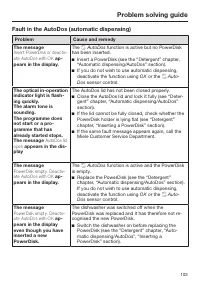
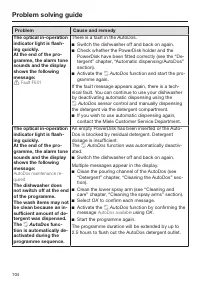
Problem solving guide 103 Fault in the AutoDos (automatic dispensing) Problem Cause and remedy The message Insert PowerDisk or deactiv-ate AutoDos with OK ap- pears in the display. The AutoDos function is active but no PowerDisk has been inserted. Insert a PowerDisk (see the “Detergent” chap...
Page 105 - Spray arm fault; Dos
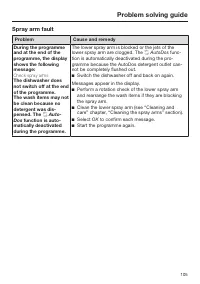
Problem solving guide 105 Spray arm fault Problem Cause and remedy During the programmeand at the end of theprogramme, the displayshows the followingmessage: Check spray arms The dishwasher doesnot switch off at the endof the programme. The wash items may notbe clean because nodetergent was dis-pens...
Page 106 - General problems with the dishwasher
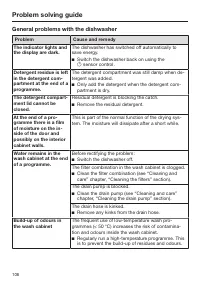
Problem solving guide 106 General problems with the dishwasher Problem Cause and remedy The indicator lights andthe display are dark. The dishwasher has switched off automatically tosave energy. Switch the dishwasher back on using the sensor control. Detergent residue is leftin the detergent co...
Page 107 - Noises
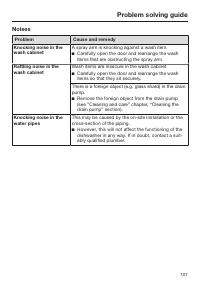
Problem solving guide 107 Noises Problem Cause and remedy Knocking noise in thewash cabinet A spray arm is knocking against a wash item. Carefully open the door and rearrange the washitems that are obstructing the spray arm. Rattling noise in thewash cabinet Wash items are insecure in the wash cab...
Page 108 - Unsatisfactory washing result
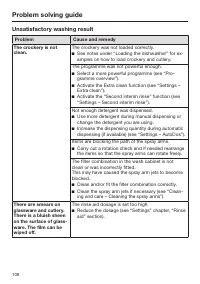
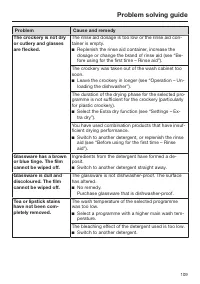
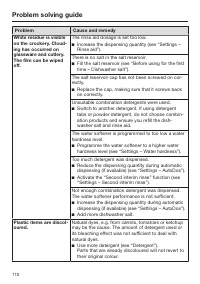
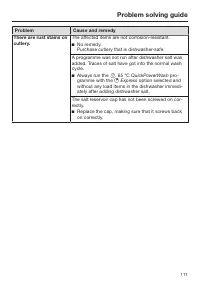
Problem solving guide 108 Unsatisfactory washing result Problem Cause and remedy The crockery is notclean. The crockery was not loaded correctly. See notes under “Loading the dishwasher” for ex-amples on how to load crockery and cutlery. The programme was not powerful enough. Select a more power...
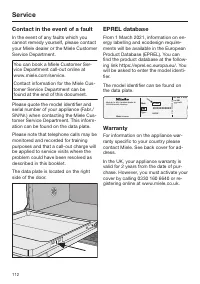
Page 112 - Contact in the event of a fault; Warranty
Service 112 Contact in the event of a fault In the event of any faults which youcannot remedy yourself, please contactyour Miele dealer or the Miele CustomerService Department. You can book a Miele Customer Ser-vice Department call-out online atwww.miele.com/service. Contact information for the Miel...
Page 113 - Note for test institutes; “Comparison
Service 113 Note for test institutes All relevant information for comparisontesting is provided in the “Comparison tests” booklet. You can download this booklet from theMiele website. You will find the bookletunder “Downloads” on the page for therelevant dishwasher model.
Page 114 - Optional accessories; PowerDisk
Optional accessories 114 Dishwasher detergent, rinse aid andcleaning and care products are avail-able for this dishwasher, as are optionalaccessories. All the products have been designed forMiele appliances. These and many other products can beordered from the Miele webshop, theMiele Customer Servic...
Page 115 - Appliance care; Dishwasher cleaner; Descaling agent
Optional accessories 115 Appliance care Miele cleaning and care productsprovide optimum care for your Mieledishwasher. Dishwasher cleaner - For use with the Maintenance pro- gramme without detergent dispens-ing - Cleans the dishwasher effectively and thoroughly - Removes grease, bacteria, and asso-...
Page 116 - Installation; The Miele Waterproof system; Health risk due to wash water.
Installation *INSTALLATION* 116 The Miele Waterproof system Provided that your dishwasher hasbeen installed correctly, the Miele Wa-terproof system will protect you fromwater damage throughout its lifetime. Water inlet Health risk due to wash water. Water in the dishwasher is not drink-ing water.D...
Page 117 - Risk of damage from leaking wa-; Regulation in Germany; Risk of damage due to excessive
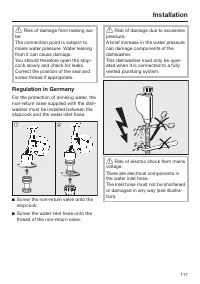
Installation *INSTALLATION* 117 Risk of damage from leaking wa- ter.The connection point is subject tomains water pressure. Water leakingfrom it can cause damage.You should therefore open the stop-cock slowly and check for leaks.Correct the position of the seal andscrew thread if appropriate. Regu...
Page 118 - Water drainage; The drain hose must not be shortened.
Installation *INSTALLATION* 118 Water drainage The dishwasher’s drainage system is fit-ted with a non-return valve, which pre-vents dirty water from flowing back intothe appliance via the drain hose. The dishwasher is supplied with ap-prox. 1.5 m of flexible drain hose withan internal diameter of 22...
Page 119 - Venting the water drain
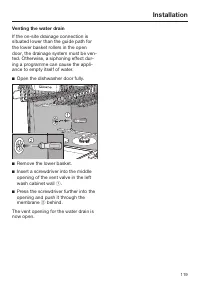
Installation *INSTALLATION* 119 Venting the water drain If the on-site drainage connection issituated lower than the guide path forthe lower basket rollers in the opendoor, the drainage system must be ven-ted. Otherwise, a siphoning effect dur-ing a programme can cause the appli-ance to empty itself...
Page 120 - Electrical connection; Risk of fire from overheating.
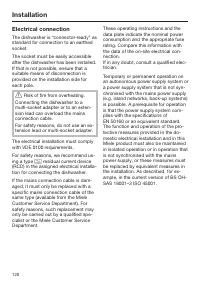
Installation *INSTALLATION* 120 Electrical connection The dishwasher is “connector-ready” asstandard for connection to an earthedsocket. The socket must be easily accessibleafter the dishwasher has been installed.If that is not possible, ensure that asuitable means of disconnection isprovided on the...
Page 121 - Technical data; Dishwasher model
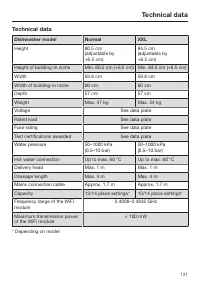
Technical data 121 Technical data Dishwasher model Normal XXL Height 80.5 cm(adjustable by+6.5 cm) 84.5 cm(adjustable by+6.5 cm) Height of building-in niche Min. 80.5 cm (+6.5 cm) Min. 84.5 cm (+6.5 cm) Width 59.8 cm 59.8 cm Width of building-in niche 60 cm 60 cm Depth 57 cm 57 cm Weight Max. 47 kg ...
Page 122 - EU Conformity declaration; enter the name of the product or the serial number
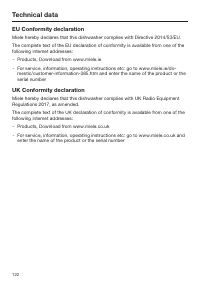
Technical data 122 EU Conformity declaration Miele hereby declares that this dishwasher complies with Directive 2014/53/EU. The complete text of the EU declaration of conformity is available from one of thefollowing internet addresses: - Products, Download from www.miele.ie - For service, informatio...
Page 123 - United Kingdom
United Kingdom Miele Co. Ltd., Fairacres, Marcham Road, Abingdon, Oxon, OX14 1TWTel: 0330 160 6600, Internet: www.miele.co.uk/service, E-mail: [email protected] Australia Miele Australia Pty. Ltd.ACN 005 635 398ABN 96 005 635 398Level 4, 141 Camberwell RoadHawthorn East, VIC 3123Tel: 1300 464 353Int...

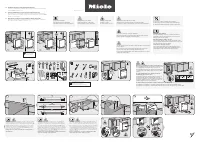 Miele 11695330 User Manual
 Miele G5000SCCLST User Manual
 Miele G5000SCUCLST User Manual
 Miele G 5008 SCU User Manual
 Miele G 5058 SCVI SFP User Manual
 Miele G5210SCCLST User Manual
 Miele G5210SCUCLST User Manual
 Miele G6060 SCVi User Manual
 Miele G7164SCVI User Manual
 Miele G 7176 SCVI SF User Manual
 Miele G 7660 SCVi User Manual
 Miele G 7855 Manual


