Page 3 - CONTENTS
01 / English 03 / Bahasa Indonesia 05 / Български 07 / Čeština 09 / Eesti 11 / Español 13 / Español (Latinoamérica) 15 / Italiano 17 / Hrvatski 19 / Latviešu 21 / Lietuvių 23 / Magyar 25 / Polski 27 / Português Brasil 29 / Русский язык 31 / Română 33 / Slovenčina 35 / Srpski jezik/Српски језик 37 / ...
Page 4 - Hardware Connection
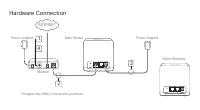
Hardware Connection Modem Main Router More Router(s) Power Adapter 1 4 2 Power Adapter 3 INTERNET *Images may differ from acutal products.
Page 5 - English; Connect the Hardware; SSID
English 01 Connect the Hardware Connect the hardware according to the diagram in the opening chapter of this guide. If you have multiple mesh routers, choose one to be the main router first. If your internet connection is through an Ethernet cable from the wall instead of through a DSL/Cable/Satelli...
Page 7 - Bahasa Indonesia; Hubungkan Perangkat Keras
03 Bahasa Indonesia Hubungkan Perangkat Keras Hubungkan perangkat keras sesuai dengan diagram di bagian pembukaan panduan ini. Jika Anda memiliki beberapa router mesh, pilih satu untuk dijadikan router utama terlebih dahulu. Jika koneksi internet Anda melalui kabel Ethernet dari dinding dan bukan me...
Page 8 - Nikmati koneksi internet!
Bahasa Indonesia 04 Untuk solusi masalah, unboxing video, dan informasi lebih lanjut, kunjungi http://www.mercusys.com/en/faq-241 , atau cukup scan kode QR. login di kemudian hari. 3. Ikuti petunjuk langkah demi langkah dari Quick Setup untuk mengonfigurasi koneksi internet Anda dan jaringan nirkabe...
Page 9 - Български; Свързване на хардуера
05 Български Свързване на хардуера Свържете хардуера съгласно показаната схема в началото на това ръководство. Ако имате няколко mesh рутери, първо изберете един от тях за главен рутер. Ако вашата интернет връзка е по Ethernet кабел от стената вместо с DSL/кабелен/ спътников модем, свържете кабела д...
Page 10 - Наслаждавайте се на работата в интернет!
06 Български За да получите информация относно отстраняване на повреди, за да гледате видео с разопаковане и научите още за вашия продукт, моля, посетете http://www.mercusys.com/en/faq-241 , или просто сканирайте QR кода. парола за бъдещи влизания в мрежата. 3. Следвайте стъпка по стъпка инструкциит...
Page 11 - Čeština; Připojte hardware
07 Čeština Připojte hardware Připojte hardware podle diagramu v úvodní kapitole tohoto průvodce. Jestliže máte několik routerů, zvolte nejdříve jeden jako hlavní router. Jestliže máte internet připojen ethernet kabelem ze zdi místo pomocí DSL/Kabelového/ Satelitního modemu, připojte kabel přímo do e...
Page 12 - Užívejte si internetu!
Čeština 08 Pro řešení konkrétních problémů, videa a více informací navštivte http://www.mercusys.com/en/faq-241 nebo jednoduše načtěte QR kód. pro budoucí přihlášení. 3. Postupujte krok za krokem podle pokynů v Quick Setup pro konfiguraci vašeho připojení k internetu a bezdrátové sítě. Volitelné: Je...
Page 13 - Eesti; Ühendage riistvara
Eesti 09 Ühendage riistvara Ühendage riistvara vastavalt joonisele selle juhise esimeses peatükis. Kui teil on mitu silmusvõrgu ruuterit, valige esmalt üks pearuuteriks. Kui teie internetiühendus on DSL/kaabel/satelliit-modemi asemel seinast tuleva Etherneti kaabli kaudu, ühendage kaabel otse ruuter...
Page 15 - Español; Conecte el hardware; Apague el módem y retire la batería de backup si tiene una.; Configurar la red
Español 11 Conecte el hardware Conecte el hardware de acuerdo con el diagrama en el capítulo inicial de esta guía. Si tiene varios routers mesh, elija uno para ser el router principal primero. Si su conexión a Internet es a través de un cable Ethernet desde la pared en lugar de a través de un módem ...
Page 16 - Disfrute de internet!
Español 12 Para resolución de problemas, vídeos de unboxing y más información, visite http://www.mercusys.com/en/faq-241 o simplemente escanee el código QR. una contraseña para inicios de sesión futuros. 3. Sigua las instruciones paso a paso del Quick Setup para configurar su conexión a internet y s...
Page 17 - Conectar el Hardware; routers mesh, elija uno para ser el principal.
Español (Latinoamérica) 13 Conectar el Hardware Conecte el hardware de acuerdo al diagrama del capítulo inicial de esta guía. Si tiene varios routers mesh, elija uno para ser el principal. Si su conexión a Internet es a través de un cable Ethernet en lugar de un módem DSL / Cable / Satélite / GPON, ...
Page 18 - ¡Disfruta de tu conexión a internet!
Español (Latinoamérica) 14 Para solución de problemas, videos de unboxing y más información, visite http://www.mercusys.com/en/faq-241 o simplemente escanee el código QR. contraseña para iniciar sesión en el futuro. 3. Siga las instrucciones paso a paso del Quick Setup para configurar su conexión a ...
Page 19 - Italiano; Connessione Hardware; router mesh, individuate quello che sarà il router principale.; Configurazione Rete
Italiano 15 Connessione Hardware Connettete l’hardware secondo il diagramma presente all’inizio di questa guida. Se avete più router mesh, individuate quello che sarà il router principale. Se la vostra connessione Internet arriva da un cavo Ethernet invece che da un modem DSL/ Fibra/Satellitare, col...
Page 20 - Navigate in Internet!
16 Italiano Per risoluzione problemi, video di unboxing e altre informazioni, visitate http://www.mercusys.com/en/faq-241 , o scansionate il codice QR. una password per gli accessi futuri. 3. Seguite passo passo le istruzioni del Quick Setup per configurare connessione Internet e rete wireless. Opzi...
Page 21 - Hrvatski; SPAJANJE UREĐAJA
17 Hrvatski SPAJANJE UREĐAJA Spojite uređaje prema dijagramu u uvodnom poglavlju ovog priručnika. Ako imate više mrežnih usmjerivača, odaberite onaj koji će biti glavni. Ako je vaša internetska veza preko mrežnog kabela umjesto putem DSL / kabelskog / satelitskog modema, spojite kabel izravno na bil...
Page 22 - UŽIVAJTE U INTERNETU
18 Hrvatski Za rješavanje problema, videozapisa i više informacija posjetite http://www.mercusys.com/en/faq-241 ili jednostavno skenirajte QR kod. 3. Slijedite korak po korak instrukcije iz Quick Setup da bi ste konfigurirali internet vezu i bežičnu mrežu Neobavezno: ako imate više usmjerivača, slij...
Page 23 - Latviešu; Aparatūras pievienošana
19 Latviešu Aparatūras pievienošana Pievienojiet apparatūru atbilstoši diagrammai augstāk. Ja jums ir vairāki režģtīkla maršrutētāji, vispirms nokunfigurējiet vienu kā galveno maršrutētāju. Ja jūsu interneta pieslēgums ir pa tiešo caur ethernet tī klu nevis DSL /kabeli/satel īta modemu, savienojiet ...
Page 24 - Izbaudiet interneta pieslēgumu!
20 Latviešu Problēmu novēršanai, izsaiņošanas video un vairāk informācijai apmeklējiet http://www.mercusys.com/en/faq-241 vai noskanējiet QR kodu. pieteikšanās reizēm. 3. Lai iestatītu interneta pieslēgumu un bezvadu tīklu sekojiet Quick Setup soli pa solim norādēm. Papildus: ja jums ir vairāki marš...
Page 25 - Lietuvių; Prijunkite įrenginius
21 Lietuvių Prijunkite įrenginius Prijunkite įrangą pagal diegimo schemą, pateiktą ankstesniame puslapyje. Jei turite kelis mesh maršrutizatorius, pirmiausia pradėkite nuo pagrindinio maršrutizatoriaus. Jei prisijungiate prie interneto per Ethernet kabelį, išeinantį iš sienos, o ne per DSL/kabelinį/...
Page 26 - Mėgaukitės internetu!
22 Lietuvių Sprendimus bendroms problemoms, unboxing įrenginiai ir daug daugiau informacijos rasite adresu http://www.mercusys.com/en/faq-241 arba skenuojant QR kodą. būsimam prisijungimui. 3. Atlikite visus Quick Setup veiksmus, kad nustatytumėte interneto ryšį ir belaidį tinklą. Papildomai: Jei tu...
Page 27 - Magyar; Csatlakoztassa az eszközöket
23 Magyar Csatlakoztassa az eszközöket Csatlakoztassa a hardvert az útmutató nyitó fejezetében található ábra szerint. Ha több egységből álló mesh hálózata van, válasszon egyet fő routernek. Ha az internetkapcsolat egy Ethernet-kábelen keresztül érkezik a falból és nem DSL / kábel / műholdas modembő...
Page 28 - Élvezze az internetezést!
24 Magyar Hibaelhárításért, unboxing videókért és további információkért látogasson el a http://www.mercusys.com/en/faq-241 webhelyre, vagy egyszerűen szkennelje be a QR-kódot. létre jelszót a jövőbeli bejelentkezésekhez. 3. Kövesse a Quick Setup vonatkozó utasításait lépésről-lépésre az internetkap...
Page 29 - Polski; Podłącz urządzenia; Podłącz modem do jednego z portów Ethernet routera.; Skonfiguruj sieć
25 Polski Podłącz urządzenia Podłącz sprzęt, postępując zgodnie ze schematem instalacji przedstawionym w pierwszej części instrukcji. Jeżeli posiadasz wiele routerów mesh, zacznij od wybrania routera głównego. Jeżeli łączysz się z Internetem przez kabel Ethernet wychodzący ze ściany, a nie za pomocą...
Page 30 - Korzystaj z Internetu!
26 Polski Rozwiązania typowych problemów, unboxing urządzenia i wiele więcej informacji znajdziesz pod adresem http://www.mercusys.com/en/faq-241 lub po zeskanowaniu kodu QR. 2. Uruchom przeglądarkę i wpisz http://mwlogin.net w pasku adresu. Utwórz hasło do przyszłego logowania. 3. Wykonaj wszystkie...
Page 31 - Português Brasil; Conectando o Hardware; siga a Etapa 3 apenas para concluir a conexão de hardware.; Configurar a rede; Conecte-se ao roteador principal sem fio usando o
27 Português Brasil Conectando o Hardware Conecte o hardware de acordo com o diagrama no capítulo de abertura deste guia. Se você tiver vários roteadores Mesh, escolha um para ser o roteador principal primeiro. Se a sua conexão com a Internet for através de um cabo Ethernet da parede, em vez de um m...
Page 32 - Aproveite a internet!
28 Português Brasil Para solucionar problemas, descarregar vídeos e obter mais informações, visite http://www.mercusys.com/en/faq-241 ou simplesmente digitalize o código QR. senha para futuros logins. 3. Siga o passo-a-passo de instruções do Quick Setup para configurar sua conexão de internet e rede...
Page 33 - Русский язык; Подключение устройства
29 Русский язык Подключение устройства Подключите устройство согласно указанной схеме. Если у вас несколько mesh- роутеров, сначала назначьте основной роутер. Если вы используете подключение напрямую через кабель Ethernet и не используете DSL/кабельный/спутниковый модем, то подключите кабель сразу к...
Page 34 - Интернет готов к использованию!
30 Русский язык Для технической поддержки, просмотра видео по распаковке устройства и прочей информации посетите страницу http://www.mercusys.com/en/faq-241 или просто отсканируйте QR-код. последующего входа в систему. 3. Следуйте пошаговым инструкциям Quick Setup для настройки вашего Интернет соеди...
Page 35 - Română; Conectarea fizică
31 Română Conectarea fizică Conectează produsul conform diagramei din prima parte a acestui ghid. Dacă ai mai multe routere cu tehnologia mesh, alege unul pentru a fi router principal. În eventualitatea în care conexiunea la internet nu necesită un modem DSL / cablu / satelit, conectează cablul în o...
Page 37 - Slovenčina; Pripojenie hardvéru
33 Slovenčina Pripojenie hardvéru Podľa schémy v úvodnej kapitole tejto príručky pripojte hardvér. Ak máte viacero sieťových smerovačov, najprv z nich vyberte jeden, ktorý bude hlavným smerovačom. Ak máte pripojenie na internet prostredníct vom ethernetového kábla (z nástennej prípojky) namiesto pri...
Page 39 - Srpski jezik/Српски језик; Povezivanje uređaja
35 Srpski jezik/Српски језик Povezivanje uređaja Povežite uređaje prema dijagramu u uvodnom odeljku ovog uputstva. Ako imate više mesh rutera, odaberite prvo jedan koji će biti glavni. Ukoliko dobijate internet putem LAN RJ 45 mrežnog kabla direktno iz zida umesto preko DSL / kablovskog / satelitsko...
Page 40 - Uživajte u internetu!
36 Srpski jezik/Српски језик Za rešavanje problema, gledanje videa sa otvaranjem kutija (unboxing) i više informacija, posetite http://www.mercusys.com/en/faq-241 , ili jednostavno skenirajte QR kod. 3. Pratite korak-po-korak instrukcije Quick Setup-a , da bi ste konfigurisali vašu internet konekcij...
Page 41 - Tiếng Việt; Kết Nối Phần Cứng
37 Tiếng Việt Kết Nối Phần Cứng Kết nối phần cứng theo sơ đồ trong phần mở đầu của hướng dẫn này. Nếu bạn có nhiều router mesh, trước tiên hãy chọn một router chính. Nếu kết nối internet của bạn thông qua cáp Ethernet từ tường thay vì thông qua modem DSL/Cáp/Vệ tinh, kết nối cáp trực tiếp với cổng E...
Page 43 - Türkçe; Donanımı Bağlayın
39 Türkçe Donanımı Bağlayın Donanımı bu kılavuzun açılış bölümündeki şemaya göre bağlayın. Birden fazla mesh yönlendiriciniz varsa, önce ana Router olarak birini seçin. İnternet bağlantınız DSL / Kablo / Uydu modem yerine duvardan bir Ethernet kablosuyla bağlıysa, kabloyu doğrudan yönlendiricinizdek...
Page 44 - İnternetin Keyfini Çıkarın
40 Türkçe Sorun giderme, kutu açılış videosu ve daha fazla bilgi için http://www.mercusys.com/en/faq-241 , adresini ziyaret edin veya yalnızca QR kodunu tarayın. 3. İnternet bağlantınızı ve kablosuz ağınızı yapılandırmak için adım adım Quick Setup talimatlarını izleyin. Opsiyonel: Daha fazla router ...
Page 45 - Українська мова; Підключіть пристрій; підключення обладнання.; Налаштування мережі; стандартний ідентифікатора
41 Українська мова Підключіть пристрій Підключіть пристрої за схемою, з першої глави цього посібника. Якщо у вас є кілька мережевих маршрутизаторів, спочатку оберіть який з них буде основним. Якщо підключення до Інтернету здійснюється безпосередньо через Ethernet кабель, а не через DSL / Cable / суп...
Page 46 - Насолоджуйтесь доступом до Інтернету!
42 Українська мова Для усунення несправностей, перегляду відео з розпакуванням та отримання додаткової інформації, будь ласка, відвідайте веб-сайт http://www.mercusys.com/en/faq-241 або просто зіскануйте QR-код. 2. Запустіть веб-браузер і введіть http://mwlogin.net в адресному рядку. Створіть пароль...
Page 47 - ةيبرعلا; Quick Setup; تنرتنلإاب عتمتسا
43 ةيبرعلا ةرايز ىجري ،تامولعملا نم ديزملا و ،زاهجلا قودنص حتف ويديف ،اهحلاصإو ءاطخلأا فاشكتسلإ . ةعيرسلا ةباجتسلاا زمر حسمإ ةطاسبب وأ ، http://www.mercusys.com/en/faq-241 . نيوانعلا طيرش يف http://mwlogin.net لخدأو )تنرتنإ( بيو حفصتم ليغشتب مق .2 . لبقتسملا يف لوخدلا ليجست نم نكمتتل رورم ةملك ءاشنإ...
Page 48 - ةزهجلأا ليصوتب مق; DSL; ةكبشلا دادعإ
44 ةيبرعلا ةزهجلأا ليصوتب مق ةدحاولا ةكبشلا رتوار ةزهجأ نم ديدعلا كيدل ناك اذإ .ليلدلا اذه نم لولأا ءزجلا يف حضوملا ططخملل اقفو ةزهجلأا ليصوتب مق . ًلاوأ يسيئرلا رتوارلا نوكيل اًدحاو رتخإف ، / يكلسلا لاصتلاا / DSL مدوم نم ًلادب طئاحلاب دوجوملا تنرثيلإا لبيك قيرط نع كب صاخلا تنرتنلإا لاصتا ردصم ناك ا...
Page 57 - EU declaration of conformity
rischio. Garanzia Esclusivamente per prodotti marchiati MERCUSYS. L A PRESENTE GARANZIA CONFERISCE SPECIFICI DIRIT TI LEGALI, IN AGGIUNTA AI DIRIT TI PREVISTI DALL A LOCALE LEGISLAZIONE. NEI LIMITI CONSENTITI DALLA LEGGE, LA PRESENTE GARANZIA ED I RIMEDI INDICATI SONO ESCLUSIVI ED IN LUOGO A TUTTE L...

 Mercusys AC12G User Manual
 Mercusys AC1200G User Manual
 Mercusys Halo H30 User Manual
 Mercusys Halo H30G User Manual
 Mercusys Halo H30G AC1200 10/100/1000BASE-TX (2-Pack) User Manual
 Mercusys Halo H30G AC1300 10/100/1000BASE-TX (3-Pack) User Manual
 Mercusys HALO H50 2PK AC1900 3xGE LAN/WAN User Manual
 Mercusys Halo H50G User Manual
 Mercusys Halo H50G AC1900 10/100/1000BASE-TX (2-Pack) User Manual
 Mercusys Halo H70X User Manual
 Mercusys Halo H80X User Manual
 Mercusys Halo H90X User Manual
 Mercusys MR50G User Manual
 Mercusys MW300RE User Manual
 Mercusys MW301R User Manual
 Mercusys MW302R N300 10/100BASE-TX User Manual
 Mercusys MW306R N300 3xFE LAN 1xFE WAN User Manual