Maytag MVW7230HW - User Manual
A user manual for Maytag top-loading washing machines covers essential operational topics like cycle selection, detergent use, and safety warnings. The guide highlights key features such as cycle modifiers (spin speed, temperature, soil level), remote control options, and water-saving settings–including deep fill and extra rinse modes. It also includes a detailed programming reference for different fabric types, explaining optimal wash cycles, temperatures, and spin speeds to preserve garment quality. Additionally, it addresses connectivity through the Maytag app, detailing remote monitoring and control via WiFi, alongside visual icons that indicate feature statuses like door lock, delay start, or water faucet operation. Safety is emphasized with warnings about flammable substances and proper loading techniques.


Table of Contents:
- Page 1 – Control Panel Functions and Features Overview
- Page 2 – Washing Machine Operation and Safety
- Page 3 – Recommended Washing Settings Guide
- Page 4 – Cycle Recommendations for Specific Fabrics and App Connection
- Page 5 – Control Panel Icon Status Reference
- Page 6 – Service and Customer Support Information
- Page 7 – Detailed Control Panel Layout and Functions
- Page 8 – Safety Warnings and Loading Procedures
- Page 9 – Water Faucet Operation and Power Enhancement
- Page 10 – Program Recommendations for Clothing Types
- Page 11 – Washing Program Settings Guide
- Page 12 – Mobile Application Connectivity and Status Indicators
- Page 13 – Support Information and Contact Details
- Page 14 – Cycle Modifiers and Optional Features
- Page 15 – Safety Instructions for Operation and Water Usage
- Page 16 – Extra Power and Faucet Safety Mechanisms
- Page 17 – Cycle Guide for Fabric Types
- Page 18 – Detailed Cycle Parameters Table
- Page 19 – Remote Control Setup and Display Indicators
- Page 20 – Control Panel Icons and Technical Support
QUICK REFERENCE GUIDE
QUICK REFERENCE GUIDE
MAYTAG
MAYTAG
®
TOP LOADING WASHING MACHINE
TOP LOADING WASHING MACHINE
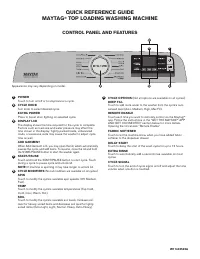
CONTROL PANEL AND FEATURES
POWER
Touch to turn on/off or to stop/cancel a cycle.
CYCLE KNOB
Turn knob to select desired cycle.
EXTRA POWER
Press to boost stain fighting on selected cycle.
DISPLAY LCD
The display shows the time required for the cycle to complete.
Factors such as load size and water pressure may affect the
time shown in the display. Tightly packed loads, unbalanced
loads, or excessive suds may cause the washer to adjust cycle
time as well.
ADD GARMENT
When Add Garment is lit, you may open the lid, which automatically
pauses the cycle, and add items. To resume, close the lid and hold
the START/PAUSE button to start the washer again.
START/PAUSE
Touch and hold the START/PAUSE button to start cycle. Touch
during a cycle to pause cycle and unlock lid.
NOTE:
If machine is spinning it may take longer to unlock lid.
CYCLE MODIFIERS
(Not all modifiers are available on all cycles)
SPIN
Touch to modify the cycle’s available spin speeds (Off, Medium,
Fast).
TEMP
Touch to modify the cycle’s available temperatures (Tap Cold,
Cold, Cool, Warm, Hot).
SOIL
Touch to modify the cycle’s available soil levels. Increase soil
level for heavily soiled items and decrease soil level for lightly
soiled items (Extra Light, Light, Normal, Heavy, Extra Heavy).
1
2
3
4
5
CYCLE OPTIONS
(Not all options are available on all cycles).
DEEP FILL
Touch to add more water to the washer from the cycle’s auto
sensed level (Auto, Medium, High, Max Fill).
REMOTE ENABLE
Touch each time you want to remotely control via the Maytag™
app. Follow the instructions in the “GET THE MAYTAG™ APP
AND GET CONNECTED” section below for more details.
Opening the lid cancels “Remote Enable”.
FABRIC SOFTENER
Touch to let the machine know when you have added fabric
softener to the dispenser drawer.
DELAY START
Touch to delay the start of the wash cycle for up to 12 hours.
EXTRA RINSE
Touch to automatically add a second rinse available on most
cycles.
CYCLE SIGNAL
Touch to turn the end of cycle signal on/off and adjust the tone
volume when a button is touched.
6
W11445525A
6
5
4
2
1
3
Appearance may vary depending on model.
"Loading the manual" means you need to wait until the file loads and becomes available for online reading. Some manuals are very large, and the time they take to appear depends on your internet speed.
Was this manual helpful?
About this manual
- Brand
- Maytag
- Model
- MVW7230HW
- Document type
- User Manual
- Category
- Washing Machine
- Language(s)
- English, Spanish, French
- Pages
- 20
- File size
- 6.6 MB
- Format
Other Manuals for Maytag MVW7230HW
Summary
Reference guide detailing the functions of control panel components including power, cycle knob, display, start/pause, and cycle modifiers.
Instructions for operating the machine safely, guidance on loading, detergent addition, selecting cycles, and warnings regarding flammable substances.
Table detailing recommended settings for various laundry loads based on items, cycle type, temperature, soil level, spin speed, and water level.
Ask a question
Related manuals
Popular Maytag Washing Machines


More Maytag Washing Machines models
 Maytag MVW6230HC User Manual
 Maytag MVW6230HW User Manual
 Maytag MVW6500MBK User Manual
 Maytag MVW6500MW User Manual
- Maytag MVW7230HC User Manual
 Maytag MVW7232HW User Manual
 Maytag MVWC465HW User Manual
 Maytag MVWC565FW User Manual
 Maytag MVWP585GW User Manual
 Maytag MAT20PDAWW User Manual
 Maytag MHW5630HC User Manual
 Maytag MHW5630MBK User Manual