Maytag MVW6500MBK - User Manual
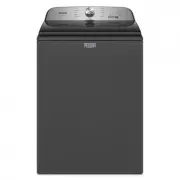
This Quick Guide provides essential operating fundamentals for a Maytag top-loading washing machine, emphasizing core functionalities such as cycle selection, load management, and safety protocols. The document highlights key operational areas–including how to use the control panel, adjust settings like water levels or detergent amounts, and maintain efficiency with features like pet hair filtration. Safety warnings are central, alongside practical tips for pre-treating stains and handling bleach safely. The guide also touches on energy-saving configurations and basic maintenance routines.

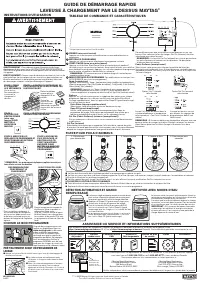
STEP 1. SORT &
LOAD LAUNDRY
See Loading
Recommendation
section below.
STEP 2. ADD HE DETERGENT &
LAUNDRY PRODUCTS TO
DISPENSERS*
Remove inside tray for
powder HE
detergent.
Follow
manufacturer’s
instructions to
determine
amount of
laundry products to use.
STEP 3.
PRESS
POWER BUTTON
TO TURN ON THE
WASHER
STEP 4.
SELECT THE DESIRED CYCLE
FOR YOUR LOAD*
STEP 5. ADJUST CYCLE
SETTINGS AND SELECT
ADDITIONAL OPTIONS*
STEP 6. PRESS, HOLD, AND
RELEASE HOLD TO START
BUTTON TO BEGIN CYCLE
*NOTE: Not all cycles, settings or options are available with
all models.
QUICK START GUIDE
MAYTAG
®
TOP LOADING WASHING MACHINE
OPERATING INSTRUCTIONS
Fire Hazard
Never place items in the washer that are dampened
with gasoline or other flammable fluids.
No washer can completely remove oil.
Do not dry anything that has ever had any type of
oil on it (including cooking oils).
Doing so can result in death, explosion, or fire.
WARNING:
To reduce the risk of fire, electric shock, or injury to
persons, read the IMPORTANT SAFETY INSTRUCTIONS, located in
your appliance’s Owner’s Manual, before operating this appliance.
1
POWER
Press to turn on/off or to stop/cancel a cycle.
2
CYCLE KNOB
Turn knob to select desired cycle. See “Cycle Guide” online for
detailed cycle descriptions.
3
START/PAUSE
Press and hold the Start/Pause button for 1 second until all status
lights are illuminated, then release to start cycle. Press during a cycle
to pause cycle and unlock lid.
NOTE:
If machine is spinning it may take longer to unlock lid.
4
CYCLE MODIFIERS
(Not all modifiers are available on all cycles)
Temp
Press “Temp” button to modify the cycle’s available temperatures
(Tap Cold, Cold, Cool, Warm, Hot).
NOTE:
Pressing Temp will toggle through available temperature
options. When no lights in the temperature column are illuminated
the selected temperature is Tap Cold.
Options
Press to add or remove options for each cycle. Press once to add an
Extra Rinse, twice to activate Deep Water and three times for both.
Extra Rinse
Select this option to add a second rinse.
Deep Fill
Use this option to automatically add more water to your wash cycle.
You can also use this option to reduce the likelihood of white
residue on dark clothing.
Pet Pro (Fabric Softener)
See notes below for how to turn these modifiers on/off.
Pet Pro
Select this option to boost pet hair filtering performance. You can
use this mode anytime but it’s especially suited for loads with high
amounts of pet hair. Turn this modifier on/off with a single button
Appearance may vary depending on model.
LOADING
RECOMMENDATION
For best performance, it is
recommended to load items by
dropping them in loose heaps
evenly around the washplate and
agitator. Do not lay items length-
wise around the washplate or
agitator.
press. For some load sizes “Pet Pro” must be selected in order
to collect hair.
NOTE:
Pet Pro modifier is intended for removing pet hair from
clothes. Do not put pets into the Washer.
Fabric Softener
Select this option to let the machine know when you have added
liquid fabric softener. Turn this modifier on/off by holding the button
until the fabric softener light turns on/off.
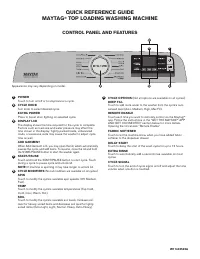
CONTROL PANEL AND FEATURES
ASSISTANCE OR SERVICE AND ADDITIONAL INFORMATION
To access the full cycle guide, detailed product dimensions, warranty details, visit
https://www.maytag.com/owners
(USA), or
https://www.maytag.ca/owners
(Canada). This may save you the cost of a service call.
REGISTER
PRODUCT
SCHEDULE
SERVICE
TROUBLESHOOTING
MANUALS &
DOWNLOADS
ADD SERVICE
PLAN
PARTS
ACCESSORIES
To speak with a customer service representative or if you have additional questions, call us toll free at
1-800-344-1274
or in Canada call
1-800-807-6777
.
You can write with any questions or concerns at:
Maytag Brand Appliances
Customer eXperience Center
533 Benson Road
Benton Harbor, MI 49022-2692
Maytag Brand Appliances
Customer eXperience Center
Unit 200-6750 Century Ave
Mississauga, Ontario L5N 0B7
Please include a daytime phone number in your correspondence.
Model & Serial
Number Tag
location
3
1
2
4
“Hot” option selected
When no lights in the temperature
column are illuminated the
selected temperature is “Tap
Cold”
“Pet Pro” Option Selected
When lights are not
illuminated, default cycle
settings are selected
ADDING LIQUID CHLORINE
BLEACH
Do not overfill, dilute, or use
more than 1 cup (236 mL). Do
not use color-safe bleach or oxi
products in the same cycle with
liquid chlorine bleach.
Liquid
Chlorine Bleach
AUTO SENSING AND DEEP
FILL
■
The washer will adjust the water level to the
optimal amount for a High Efficiency wash of
the detected load size.
■
Press Deep Fill to automatically add more water
to your wash cycle.
■
It is recommended to use BULKY ITEMS cycle
with Deep Fill option for loads where maximum
water level is desired.
■
Expect longer cycle times due to extended fill
duration when using the Deep Fill option.
A cycle guide for your washer can
be found online at
www.maytag.com
.
The document
will help identify which cycle to
choose for various load types as
well as the default cycle options.
For example we recommend using
the NORMAL cycle with Warm
water for cottons, linens and mixed-
garment loads.
CHOOSING THE RIGHT CYCLE
CLEANING WITH LESS WATER
The washer has been designed and optimized to
provide a thorough cleaning using less water to
conserve energy and resources.
As the washer dampens and moves the load, the
level of the items will settle in the basket. This is
normal, and does not indicate that more items
should be added.
IMPORTANT:
You will not see a full basket of
water as with older, less efficient washing machines.
It is normal for some of the load to be above the
water line.
1. Twist to Unlock
2. Remove Filter
3. Remove Hair
4. Insert Filter
5. Twist to Lock
■
Filter must be installed in the agitator during the cycle to capture hair.
■
Filter is intended to be emptied between each cycle. If filter is not emptied between loads then collected material will build up and
decrease the efficiency of the filter in future cycles.
■
Filter may collect hair whenever it is installed but it works best when the Pet Pro modifier is turned on.
USING THE PET HAIR FILTER
■
Grab the cap and twist to unlock. Remove the filter and empty collected material out of the filter cup.
■
Reinsert the Filter and twist to lock before beginning the next cycle.
PET HAIR FILTER
WARNING:
Do not wash water-resistant or water repellant-type
clothing. Failure to closely follow these instructions may result in an
abnormal vibrating and out-of-balance condition that could result in
physical injury, property damage, and/or appliance damage.
PRE-TREATING BEFORE A WASH CYCLE
■
Press the Faucet button once to turn on and press again to turn off.
■
Faucet will automatically shut off after 10 minutes or when max water
level is reached.
■
Water will automatically drain if water level
becomes too high. Water will also drain after
10 minutes if the lid is left open or 3 hours if the
lid is left closed.
Press
faucet button
W11553334D
NOTE:
If the washer detects an out-of-balance condition it may
pause and attempt to correct the situation. During this time the
Sense and Wash status indicators will both briefly illuminate.
"Loading the manual" means you need to wait until the file loads and becomes available for online reading. Some manuals are very large, and the time they take to appear depends on your internet speed.
Was this manual helpful?
About this manual
- Brand
- Maytag
- Model
- MVW6500MBK
- Document type
- User Manual
- Category
- Washing Machine
- Language(s)
- English
- Pages
- 2
- File size
- 4.3 MB
- Format
Other Manuals for Maytag MVW6500MBK
Ask a question
Related manuals
Popular Maytag Washing Machines


More Maytag Washing Machines models
 Maytag MVW5035MW User Manual
 Maytag MVW5430MW User Manual
 Maytag MVW6230HC User Manual
 Maytag MVW6230HW User Manual
 Maytag MVW6500MW User Manual
 Maytag MVW7230HC User Manual
- Maytag MVW7230HW User Manual
 Maytag MVW7232HW User Manual
 Maytag MVWC465HW User Manual
 Maytag MVWC565FW User Manual
 Maytag MVWP585GW User Manual
 Maytag MAT20PDAWW User Manual