Master Flow MOTOR24DD - User Manual
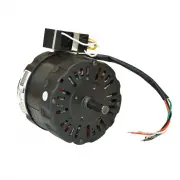
Master Flow MOTOR24DD Fan – User Manual, read for free online in PDF format. We hope this helps you resolve any issues you may have. If you have further questions, please contact us through the contact form.

WHFS24M Motor Replacement
Locate breaker switch in household breaker panel and shut power off to unit and turn.
Disconnect fan wiring
Remove electrical box cover and disconnect wiring.
Disconnect green ground wire.
Using an adjustable wrench remove the blade from the motor shaft by loosening the set
screw located on the center collar of the blade.
** ( NOTE POSITION OF BLADE ON SHAFT BEFORE REMOVING ) **
Red wire (Port 2) and Black motor wires (Port 1) can be released from switch by
inserting a push pin into the release port.
Loosen the bolts that secure the motor to the support arms. At this point you should be
able to slide the motor out and replace with new.
Reconnect electrical wiring.
Attach green ground wire.
Replace blade making sure that the blade is in the correct position.
Turn power back on at breaker switch.
Masterflow Tech. Services / Warranty Dept.
800-211-9612
Fax : 910-259-1677
"Loading the manual" means you need to wait until the file loads and becomes available for online reading. Some manuals are very large, and the time they take to appear depends on your internet speed.


