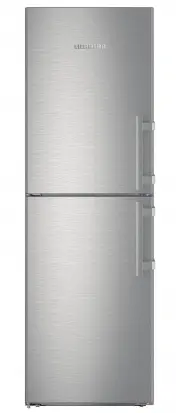
Page 2 - Contents; ment; Appliance range of use; Intended use; Appliance at a glance
Contents 1 Appliance at a glance............................................ 2 1.1 Description of appliance and equipment.................. 2 1.2 Appliance range of use............................................. 2 1.3 Conformity................................................................ 3 1.4...
Page 3 - ance
The appliance is only suitable for cooling food products in a domestic or household-like envi- ronment. This includes, for example, use: - in staff kitchens, bed and breakfast establish- ments, - by guests in country houses, hotels, motels and other accommodation, - for catering and similar services...
Page 4 - Example of food arrangement; Danger of tipping and falling:; General safety information
- Use the holiday function if you intend to be away for an extended period . 1.7 Example of food arrangement Fig. 3 1.8 Smart device The appliance is ready for integration into a smart home and for extended services. Other options can be selected with a SmartDeviceBox. This is acti- vated via the My...
Page 5 - Operating structure; Controls and displays
- Do not misuse the plinth, drawers, doors etc. as a step or for support. This applies particu- larly to children. Danger of food poisoning: - Do not consume food which has been stored too long. Danger of frostbite, numbness and pain: - Avoid lasting skin contact with cold surfaces or refrigerated/f...
Page 6 - Appliance options; Transporting the appliance; Putting into operation
3.3 Navigation Touch the menu to access the individual options. An audible signal sounds after confirming an option or a setting. The display switches to the home screen.The appliance is operated using the following symbols: Standby:Switches the appliance or tempera- ture zone on.Menu:Calls up optio...
Page 7 - Installing the appliance
4.2 Installing the appliance WARNING Fire hazard due to dampness! If live parts or the mains lead become damp this may cause short circuits. u The appliance is designed for use in enclosed areas. Do not operate the appliance outdoors or in areas where it is exposed to splash water or damp conditions...
Page 8 - Reversing the door; Remove the upper soft stop mechanism
Note u Clean the appliance (see 6.4) . If the appliance is installed in a very damp environment, condensate may form on the outside of the appliance. u Always see to good ventilation at the installation site. 4.3 Reversing the door If necessary, you can change the way the door opens:Ensure that the ...
Page 9 - Remove the bottom soft stop mechanism
Fig. 12 u Undo the soft stop mechanism screw with a T15 screwdriver approx. 14 mm. Fig. 12 (1) u Insert a screwdriver behind the soft stop mechanism on the handle side and rotate forwards. Fig. 12 (2) u Remove the soft stop mechanism. Fig. 12 (3) 4.3.2 Remove the bottom soft stop mechanism Fig. 13 u...
Page 11 - Moving the upper bearing parts to the
CAUTION Risk of injury if the door tips! u Take good hold of the door. u Set down the door carefully. u Carefully remove the protective cover. Fig. 21 (1) u Undo the bolt a little with a T15 screwdriver. Fig. 21 (2) u Hold the door and remove the bolts with your fingers. Fig. 21 (3) u Lift the door ...
Page 13 - 0 Moving the handles to the other side
u Undo the screws with a T25 screwdriver and remove the bearing bracket Fig. 30 (3) Fig. 31 u Remove the cover and fix it on the other side. Fig. 31 (1) u Place the bearing bracket on the other side and screw in with the aid of a T25 screwdriver. Start with screw 2 at the bottom in the middle. Fig. ...
Page 15 - 5 Fit the bottom soft stop mechanism
u Insert the holder with its cable into the opening. Fig. 36 (5) u Press the holder downwards until the tab clicks into place. Fig. 36 (6) u Insert the plugs. Fig. 36 (7) 4.3.13 Fitting the cable connection Fig. 37 u Engage the plug above the upper bearing bracket and care- fully place the cable str...
Page 16 - Water connection
4.3.16 Fit the top soft stop mechanism Fig. 41 u Slide the soft stop mechanism on the bearing bracket side at an angle into the slot as far as the limit stop. Fig. 41 (1) u Slide the unit in fully. w The unit is positioned correctly when the rib on the soft stop mechanism is in the guide in the hous...
Page 17 - Insertion into a row of kitchen units
- The water must be connected to the appliance via a cold water pipe that can withstand the operating pressure and complies with hygiene standards. Use the stainless steel hose supplied (length 1.5 m). Do not reuse old hoses. A 3 m hose is available as an optional extra. This must be professionally ...
Page 18 - Disposing of packaging; Connecting the appliance; Switching on the appliance
A [mm] B [mm] C [cm 2 ] D [mm] E [mm] 665 x 65 Min. 300 Min. 50 Min. 46 x If wall spacers are used, the dimensions increase by 15 mm (see 4.2) .The dimensions apply for an opening angle of 90 °. Spacing angles will vary according to the opening angle.You can purchase a kit to limit the door opening ...
Page 19 - Setting the clean ventilation grid; Changing the temperature unit; Switching on the child safety device; Control
w The appliance is switched on. w The appliance is set to the displayed temperatures. This is shown by down arrows. If the screen is black: u Touch the screen. w The standby symbol appears on the whole screen. u Press the standby symbol. w The appliance is switched on. The display switches to the ho...
Page 20 - BioFresh compartment; Setting the humidity in the HydroSafe
- The internal light is off. 5.3.1 Switching SabbathMode on. u Press menu. u Press the navigation arrow until SabbathMode is displayed. u Press ON. w SabbathMode is switched on. Only the SabbathMode symbol appears on the screen. SabbathMode switches off automatically after 120 hours if it has not al...
Page 22 - Freezer compartment
u To remove the humidity control plate: Having removed the drawers, carefully draw the plate forwards and lower it for removal. u Inserting the humidity control plate: Insert the plate from below into the front and back bracket and push back until it clicks into place. 5.4.11 Shelf You can remove an...
Page 25 - Defrosting with NoFrost; Maintenance
u Press OFF. w The ice cube tray moves to the operating position. The IceMaker switches on. w The IceMaker symbol appears in the menu field instead of the IceMaker holiday function symbol. Switching off the IceMakerIf no ice cubes are required, the IceMaker can be switched off independently of the f...
Page 26 - Cleaning the IceMaker; Customer service; Malfunctions
NOTICE Incorrect cleaning damages the appliance! u Do not use cleaning agents in concentrated form. u Do not use any scouring or abrasive sponges or steel wool. u Do not use any sharp or abrasive cleaning agents, nor any that contain sand, chloride or acid. u Do not use chemical solvents. u Do not d...
Page 28 - Messages
WARNING Danger of injury by LED lamp! The light intensity of the LED lighting corresponds to risk group RG 2. If the cover is defective: u Do not look into the illumination with optical lenses from the immediate proximity. This can cause injury to the eyes. The door seal is defective or needs to be ...
Page 29 - Switching the appliance off; Switch off the appliance from the menu; Taking the appliance out of service; 0 Disposing of the appliance; Decommissioning
u Open the water connection. -or- u Check the water connection and the hoses (see 4) . -or- u Clean the filter. u Switch the IceMaker on (see 5.5.10.2) . u Contact Customer Service if the message persists (see 6) . Other messages FreshAirChange filter (see 6) Clean the ventilation grille (see 6) Ope...