Lenovo 15 G2 - User Manual
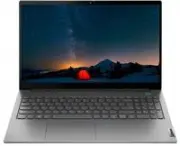
This user guide covers the Lenovo ThinkBook 14 Gen 2 and ThinkBook 15 Gen 2 laptops, offering essential setup instructions for initial configuration. The manual includes detailed component identification diagrams–such as ports (USB, HDMI, Thunderbolt), indicators (battery light, speakers), and hardware features like microphones and cameras–to help users recognize key parts. It also addresses regulatory compliance, particularly focusing on Specific Absorption Rate (SAR) limits for wireless technologies (Wi-Fi, Bluetooth) to ensure safe operation near the body or medical devices.


Table of Contents:
- Page 1 – Setup Guide Cover and Identification
- Page 2 – Accessing the User Guide
- Page 3 – Initial Setup Instructions
- Page 4 – Initial Setup Instructions
- Page 5 – ThinkBook 14 Gen 2 Overview Diagram
- Page 6 – ThinkBook 15 Gen 2 Overview Diagram
- Page 7 – Component Identification Chart (Bilingual)
- Page 8 – Component Identification Chart (Multi-lingual)
- Page 9 – Manual Table of Contents
- Page 10 – Radio Wave Exposure Compliance Overview
- Page 11 – Specific Absorption Rate (SAR) Details
- Page 12 – Radio Frequency Emission Compliance
- Page 13 – Wireless Connectivity and SAR Specifications
- Page 14 – Copyright and Recycling Information
Setup Guide
Руководство по установке
Посібник зі встановлення
Kurulum Kılavuzu
הנקתה ךירדמ
For Barcode Position Only
Printed in China
PN: SP41B16498
Lenovo ThinkBook 14 Gen 2
Lenovo ThinkBook 15 Gen 2
"Loading the manual" means you need to wait until the file loads and becomes available for online reading. Some manuals are very large, and the time they take to appear depends on your internet speed.
Was this manual helpful?
About this manual
- Brand
- Lenovo
- Model
- 15 G2
- Document type
- User Manual
- Category
- Laptop
- Language(s)
- English, Russian
- Pages
- 14
- File size
- 839.5 KB
- Format
Summary
Cover page for the Setup Guide of Lenovo ThinkBook laptops, including product part numbers and branding information.
Instructions for accessing the full user manual via a QR code and notes regarding reference illustrations versus detailed specifications.
Steps for connecting power adapters, display cables, and accessories during the initial setup of the Lenovo ThinkBook 14 Gen 2 laptop, including component listing.
Ask a question
Related manuals
More Lenovo Laptops models
 Lenovo 83A100ECUS User Manual
 Lenovo IdeaPad S10-2 User Manual
 Lenovo IdeaPad S10-3 User Manual
 Lenovo IdeaPad S10-3c User Manual
 Lenovo IdeaPad S10-3s User Manual
 Lenovo IdeaPad S10-3t User Manual
 Lenovo IdeaPad S12 User Manual
 Lenovo IdeaPad U110 User Manual
 Lenovo IdeaPad U150 User Manual
 Lenovo IdeaPad U450p User Manual
 Lenovo IdeaPad U550 User Manual
 Lenovo IdeaPad Y430 User Manual
 Lenovo IdeaPad Y550 User Manual
 Lenovo T14s Gen 3 User Manual
 Lenovo Y70-70 Touch Manual


