KitchenAid KFDC558JIB - Manual
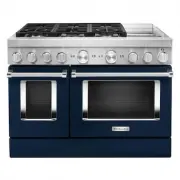
KitchenAid KFDC558JIB Range – Manual, read for free online in PDF format. We hope this helps you resolve any issues you may have. If you have further questions, please contact us through the contact form.


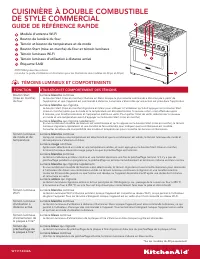
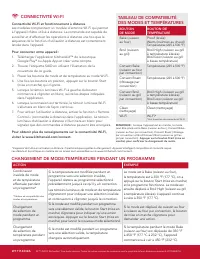
Table of Contents:
- Page 2 – WIFI CONNECTIVITY; WIFI Connectivity and Remote Operation; MODE AND TEMPERATURE; ACTION; CHANGING MODE/TEMPERATURE DURING A CYCLE
- Page 3 – TÉMOINS LUMINEUX ET COMPORTEMENTS; CUISINIÈRE À DOUBLE COMBUSTIBLE; GUIDE DE RÉFÉRENCE RAPIDE
- Page 4 – TABLEAU DE COMPATIBILITÉ; CHANGEMENT DE MODE/TEMPÉRATURE PENDANT UN PROGRAMME
KFDC506J shown on right
(reference Use & Care Guide for 30” and 48” diagrams)
FUNCTION
USE & LIGHT BEHAVIOR
Oven Start
Button
Solid
White
Light
The Start Button will illuminate solid white when the most recent command was sent from the app and the appliance is
being controlled remotely. The light will turn off as soon as an action is taken on the appliance.
Pulsing
White
Light
The Start Button will flash white to prompt the user to press start after the Mode and Temperature have been selected.
If no action is taken after 2 minutes, a tone will sound and the unit will timeout and return to idle.
To exit idle, re-select a Mode and Temperature before pressing the Start Button.
Quick-Blinking
White
Light
If an invalid knob combination has been chosen and the Start Button is pressed, the Indicator Light will quickly blink and
a tone will sound to indicate that the chosen combination is invalid. See the Mode and Temperature Compatibility Table
for valid combinations.
Mode and
Temperature
Indicator Light
Solid
White
Light
When a Mode or Temperature is selected, and the combination is valid, the Mode and Temperature Indicator Light
will illuminate white.
Solid
Red
Light
After a valid Mode and Temperature have been selected and the Start Button has been pressed, the Indicator Light
will turn red until the preheat is completed.
Solid
White
Light
The light will turn solid white and a tone will sound when the preheat is complete. If there is no preheat for a cycle,
the preheat completes immediately and the light turns solid white.
Quick-Blinking
White
Light
If an invalid knob combination has been selected, the light will blink and a tone will sound prompting the user to select
a valid combination. The Indicator Light will continue to blink and a tone will sound every 30 seconds until the error is
fixed or the unit will timeout after 2 minutes of inactivity and return to idle.
Pulsing
Amber
Light
The Indicator Light will pulse amber if the oven is undergoing a 100+ degree decrease in temperature
(i.e. changing from Bake 450℉ to Bake 350℉) or if the oven is too hot to properly proof and needs to cool down.
WIFI Indicator
Light
Solid
White
Light
The WIFI Indicator Light illuminates white when the unit is WIFI enabled allowing the user to monitor
the unit. All lights will turn off in idle even when the unit is connected to WIFI.
Remote Enabled
Indicator Light
Solid
White
Light
The Remote Indicator Light illuminates white when the unit is remote enabled and the user can send instructions
to the unit. All lights will turn off in idle even when the unit is remote enabled.
Griddle Power
Indicator Light*
Solid
Blue
Light
The Griddle Power Indicator Light illuminates blue when the griddle is powered on.
Griddle
Preheat Light*
Blinking
Blue
Light
The Griddle Preheat Light flashes blue while the griddle is preheating.
Solid
Blue
Light
Once the preheat temperature has been reached, the Indicator Light turns solid blue.
LIGHT INDICATORS AND BEHAVIORS
WIFI Antenna Module
Oven Light Button
Mode and Temperature Knob and Indicator Light
Oven Start Button and Indicator Light
WIFI Indicator Light
Remote Enabled Indicator Light
SAID Label
COMMERCIAL-STYLE DUAL FUEL RANGE
QUICK REFERENCE GUIDE
*on 48” models only
W11114332A
"Loading the manual" means you need to wait until the file loads and becomes available for online reading. Some manuals are very large, and the time they take to appear depends on your internet speed.
Was this manual helpful?
About this manual
- Brand
- KitchenAid
- Model
- KFDC558JIB
- Document type
- Manual
- Category
- Range
- Language(s)
- English, French
- Pages
- 4
- File size
- 872.3 KB
- Format
Summary
WIFI CONNECTIVITY WIFI Connectivity and Remote Operation Models are provided with a WIFI Antenna Module that allows the unit to be remotely operated. The control is capable of monitoring and performing remote operations once the remote enabling function sequence is properly initiated at the applianc...
KFDC506J présentée à droite (consulter le guide d’utilisation et d’entretien pour les illustrations des modèles de 30 po et 48 po) FONCTION UTILISATION ET COMPORTEMENT DES TÉMOINS Bouton Start (mise en marche) du four Lumière blanche continue Le bouton Start (mise en marche) s’illumine en blanc lors...
CONNECTIVITÉ WI-FI Connectivité Wi-Fi et fonctionnement à distance Les modèles comprennent un module d’antenne Wi-Fi qui permet à l’appareil d’être utilisé à distance. La commande est capable de surveiller et d’effectuer les opérations à distance une fois que la séquence de la fonction d’utilisation...
Ask a question
Related manuals
Popular KitchenAid Ranges


More KitchenAid Ranges models
 KitchenAid KSGG700ESS User Manual
 KitchenAid KSIS730PSS Manual
 KitchenAid KFDC506JSS Manual
 KitchenAid KFDC558JSS Manual
 KitchenAid KFED500EBS Manual
 KitchenAid KFED500ESS Manual
 KitchenAid KFEG500EBS Manual
 KitchenAid KFEG500ESS Manual
 KitchenAid KFEG500EWH Manual
 KitchenAid KFEG504KPS User Manual
 KitchenAid KFGC500JSS Manual
 KitchenAid KFGC506JPA Manual
 KitchenAid KFGC558JSS Manual