Page 3 - Customized effects; Record and delete
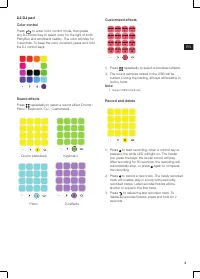
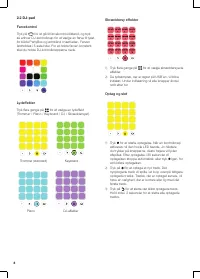
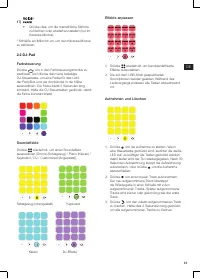
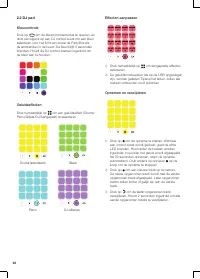
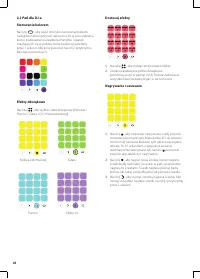
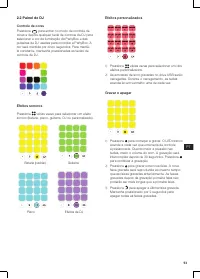
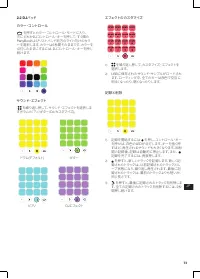
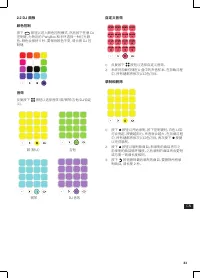
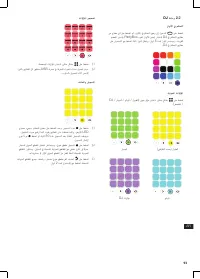
3 EN 2.2 DJ pad Color control Press to enter color control mode, then press any DJ control key to select color for the light of both PartyBox and wristband nearby. The color will stay for 5 seconds. To keep the color constant, press and hold the DJ control keys. Sound effects Press repeatedly to sel...
Page 4 - Power on
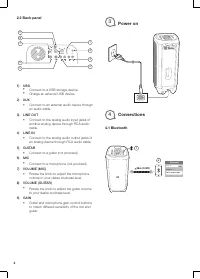
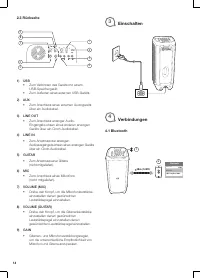
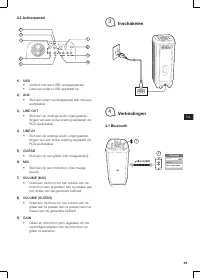
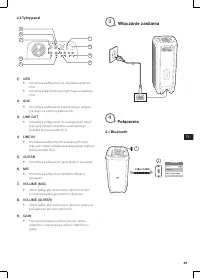
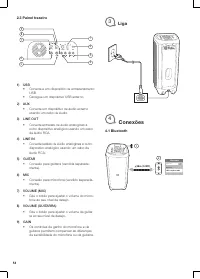
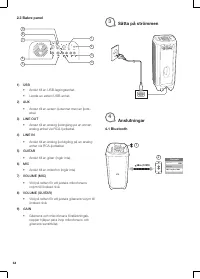
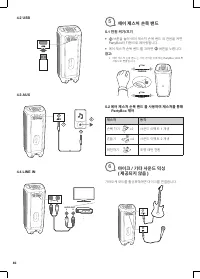
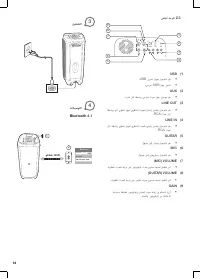
4 2.3 Back panel 2 3 1 4 5 6 7 8 9 1) USB • Connect to a USB storage device. • Charge an external USB device. 2) AUX• Connect to an external audio device through an audio cable. 3) LINE OUT • Connect to the analog audio input jacks of another analog device through RCA audio cable. 4) LINE IN • Conne...
Page 5 - Air Gesture Wristband; Control PartyBox by using Air Gesture; Mixing sound with microphone/
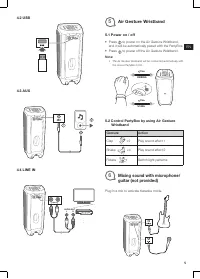
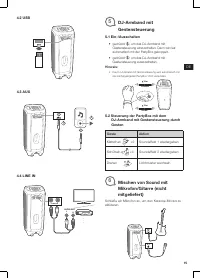
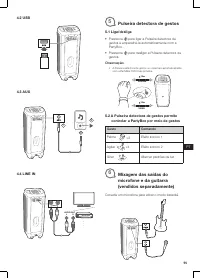
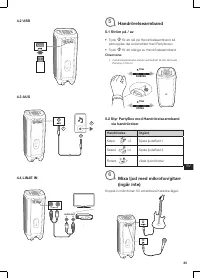
5 EN 4.2 USB 4.3 AUX 2 1 4.4 LINE IN R L AUDIO OUT . . . LINE IN 5 Air Gesture Wristband 5.1 Power on / off • Press to power on the Air Gesture Wristband, and it will be automatically paired with the PartyBox. • Press to power off the Air Gesture Wristband. Note: • The Air Gesture Wristband will be ...
Page 6 - mode; LED behavior
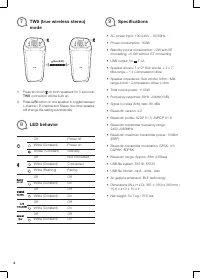
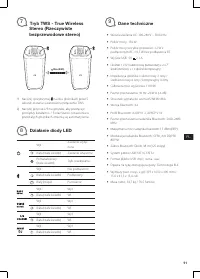
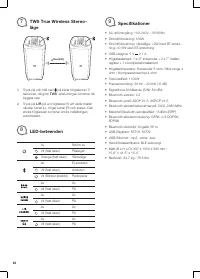
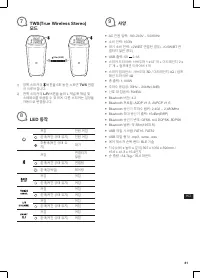
6 7 TWS (true wireless stereo) mode 10m (33ft) 1) Press and hold on both speakers for 5 seconds, TWS connection will be built up. 2) Press L/R button on one speaker to toggle between L channel / R channel and Stereo, the other speaker will change the setting automatically. 8 LED behavior Off Power o...
Page 7 - Hvad er der i æsken; Oversigt
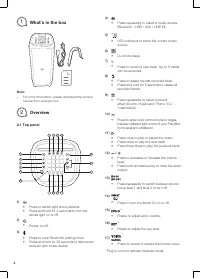
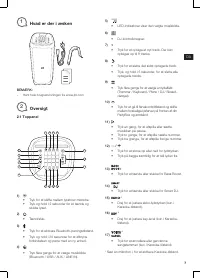
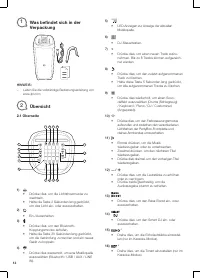
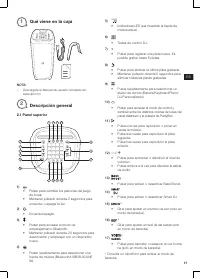
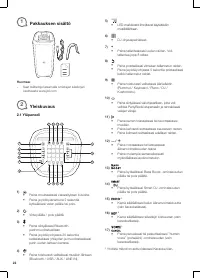
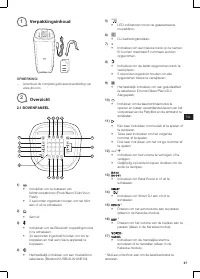
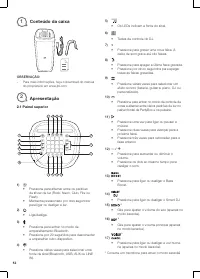
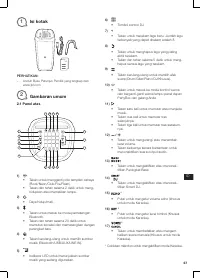
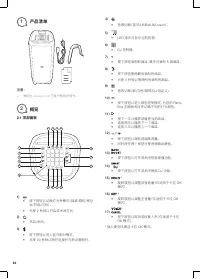
DA 7 1 Hvad er der i æsken BEMÆRK: – Hent hele brugsanvisningen fra www.jbl.com 2 Oversigt 2.1 Toppanel 11 13 234 1 5 6 17 16 15 14 7 8 9 10 12 1) • Tryk for at skifte mellem lysshow-mønstre. • Tryk og hold I 2 sekunder for at tænde og slukke lyset. 2) • Tænd/sluk. 3) • Tryk for at aktivere Bluetoot...
Page 9 - Tænd
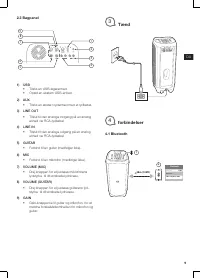
DA 9 2.3 Bagpanel 2 3 1 4 5 6 7 8 9 1) USB • Tilslut en USB-lagerenhed. • Oplad en ekstern USB-enhed. 2) AUX• Tilslut en ekstern lydenhed med et lydkabel. 3) LINE OUT • Tilslut til den analoge indgang på en analog enhed via RCA-lydkabel. 4) LINE IN • Tilslut til den analoge udgang på en analog enhed...
Page 10 - Air bevægelses-armbånd; Kontrollér PartyBox ved hjælp af; Mixe lyd med mikrofon/guitar
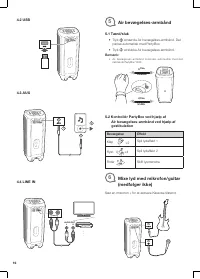
10 4.2 USB 4.3 AUX 2 1 4.4 LINE IN R L AUDIO OUT . . . LINE IN 5 Air bevægelses-armbånd 5.1 Tænd/sluk • Tryk at tænde Air bevægelses-armbånd. Det parres automatisk med PartyBox. • Tryk at slukke Air bevægelses-armbånd. Bemærk: • Air bevægelses-armbånd forbindes automatisk med den nærmeste PartyBox 1...
Page 11 - tilstand; Specifikationer
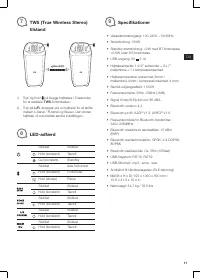
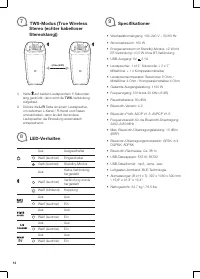
DA 11 7 TWS (True Wireless Stereo) tilstand 10m (33ft) 1) Tryk og hold på begge højttalere i 5 sekunder for at etablere TWS -forbindelsen. 2) Tryk på L/R -knappen på en højttaler for at skifte mellem L-kanal / R-kanal og Stereo. Den anden højttaler vil automatisk ændre indstillingen. 8 LED-adfærd Sl...
Page 15 - Gestensteuerung; Steuerung der PartyBox mit dem; Mischen von Sound mit
DE 15 4.2 USB 4.3 AUX 2 1 4.4 LINE IN R L AUDIO OUT . . . LINE IN 5 DJ-Armband mit Gestensteuerung 5.1 Ein-/Ausschalten • gedrückt , um das DJ-Armband mit Gestensteuerung einzuschalten. Dann wird es automatisch mit der PartyBox gekoppelt. • gedrückt , um das DJ-Armband mit Gestensteuerung auszuschal...
Page 19 - Encendido
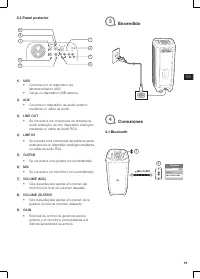
19 ES 2.3 Panel posterior 2 3 1 4 5 6 7 8 9 1) USB • Conecta con un dispositivo de almacenamiento USB. • Carga un dispositivo USB externo. 2) AUX• Conecta un dispositivo de audio externo mediante un cable de audio. 3) LINE OUT • Se conecta a los conectores de entrada de audio analógico de otro dispo...
Page 20 - pulsera para gestos en el aire; Controlar el PartyBox utilizando una; Mezclar el sonido con un
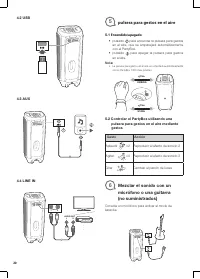
20 4.2 USB 4.3 AUX 2 1 4.4 LINE IN R L AUDIO OUT . . . LINE IN 5 pulsera para gestos en el aire 5.1 Encendido/apagado • pulsado para encender la pulsera para gestos en el aire, que se emparejará automáticamente con el PartyBox. • pulsado para apagar la pulsera para gestos en el aire. Nota: • La puls...
Page 21 - Modo TWS (True Wireless; Comportamiento de los LED
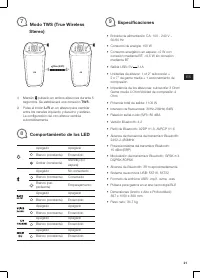
21 ES 7 Modo TWS (True Wireless Stereo) 10m (33ft) 1) Mantén pulsado en ambos altavoces durante 5 segundos. Se establecerá una conexión TWS . 2) Pulsa el botón L/R en un altavoz para cambiar entre los canales izquierdo y derecho y estéreo. La configuración del otro altavoz cambia automáticamente. 8 ...
Page 23 - fektien kustomointi
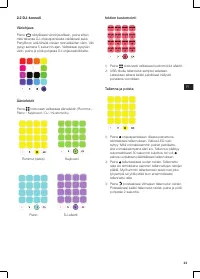
23 FI 2.2 DJ-konsoli Väriohjaus Paina siirtyäksesi väriohjaustilaan, paina sitten mitä tahansa DJ-ohjauspainiketta valitaksesi sekä PartyBoxin että lähellä olevien rannekkeiden värin. Väri pysyy samana 5 sekunnin ajan. Valitaksesi pysyvän värin, paina ja pidä pohjassa DJ-ohjauspainikkeita. Ääniefekt...
Page 24 - Virta päälle
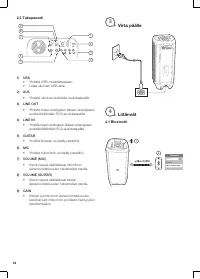
24 2.3 Takapaneeli 2 3 1 4 5 6 7 8 9 1) USB • Yhdistä USB-muistilaitteeseen. • Lataa ulkoinen USB-laite. 2) AUX• Yhdistä ulkoinen audiolaite audiokaapelilla. 3) LINE OUT • Yhdistä toisen analogisen laitteen analogiseen audiotuloliitäntään RCA-audiokaapelilla. 4) LINE IN • Yhdistä toisen analogisen l...
Page 25 - Ohjaa PartyBoxia Air-eleranneke eleillä; Äänen miksaus mikrofonilla /
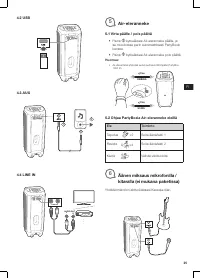
25 FI 4.2 USB 4.3 AUX 2 1 4.4 LINE IN R L AUDIO OUT . . . LINE IN 5 Air-eleranneke 5.1 Virta päälle / pois päältä • Paina kytkeäksesi Air-eleranneke päälle, ja se muodostaa parin automaattisesti PartyBoxin kanssa. • Paina kytkeäksesi Air-eleranneke pois päältä. Huomaa: • Air-eleranneke yhdistää auto...
Page 26 - Tekniset tiedot
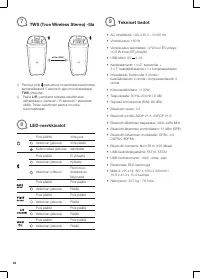
26 7 TWS (True Wireless Stereo) -tila 10m (33ft) 1) Paina ja pidä painettuna molemmista kaiuttimista samanaikaisesti 5 sekunnin ajan muodostaaksesi TWS -yhteyden. 2) Paina L/R -painiketta toisesta kaiuttimesta vaihtaaksesi L-kanavan / R-kanavan / stereotilan välillä. Toisen kaiuttimen asetus muuttuu...
Page 27 - Panneau supérieur
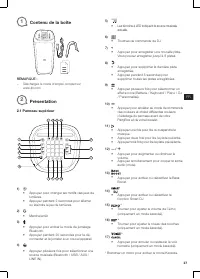
27 FR 1 Contenu de la boîte REMARQUE : – Téléchargez le mode d’emploi complet sur www.jbl.com 2 Présentation 2.1 Panneau supérieur 11 13 234 1 5 6 17 16 15 14 7 8 9 10 12 1) • Appuyez pour changer les motifs des jeux de lumières. • Appuyez pendant 2 secondes pour allumer ou éteindre le jeu de lumièr...
Page 28 - Personnalisation des effets
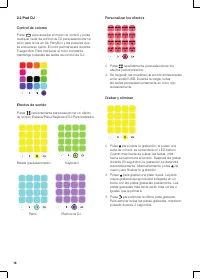
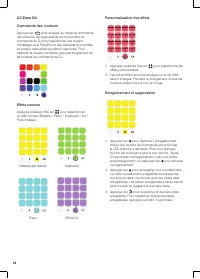
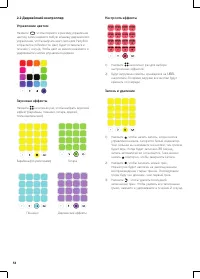
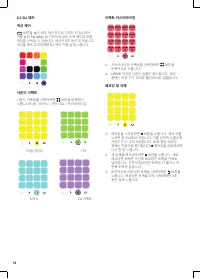
28 2.2 Zone DJ Commande des couleurs Appuyez sur pour accéder au mode de commande des couleurs, appuyez ensuite sur une touche de commande du DJ pour sélectionner une couleur d’éclairage de la PartyBox et des bracelets à proximités. La couleur reste active pendant 5 secondes. Pour maintenir la coule...
Page 29 - Marche
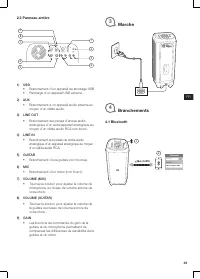
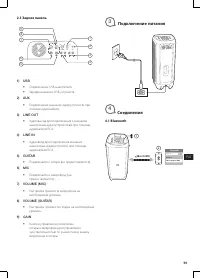
29 FR 2.3 Panneau arrière 2 3 1 4 5 6 7 8 9 1) USB • Branchement d’un appareil de stockage USB • Recharge d’un appareil USB externe. 2) AUX• Branchement à un appareil audio externe au moyen d’un câble audio. 3) LINE OUT • Branchement aux prises d’entrée audio analogique d’un autre appareil analogiqu...
Page 30 - Bracelet à détection de; Commande de la PartyBox au moyen du; Mixage du son avec un
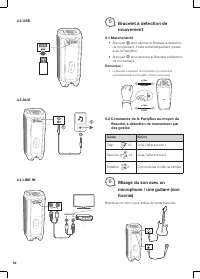
30 4.2 USB 4.3 AUX 2 1 4.4 LINE IN R L AUDIO OUT . . . LINE IN 5 Bracelet à détection de mouvement 5.1 Marche/arrêt • Appuyez pour allumer le Bracelet à détection de mouvement, il sera automatiquement jumelé avec la PartyBox. • Appuyez pour éteindre le Bracelet à détection de mouvement. Remarque : •...
Page 31 - Mode TWS (True Wireless; Comportement de la LED
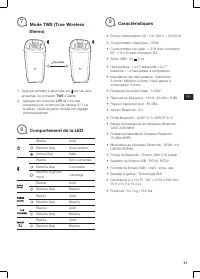
31 FR 7 Mode TWS (True Wireless Stereo) 10m (33ft) 1) Appuyez pendant 5 secondes sur sur les deux enceintes, la connexion TWS s’établit. 2) Appuyez sur le bouton L/R de l’une des enceintes pour commuter les canaux G / D et la stéréo, l’autre enceinte modifie son réglage automatiquement. 8 Comporteme...
Page 32 - Pannello superiore
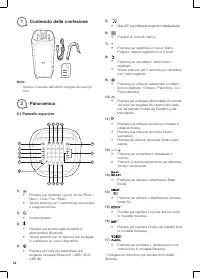
32 1 Contenuto della confezione Note: – Scarica il manuale dell’utente integrale da www.jbl.com 2 Panoramica 2.1 Pannello superiore 11 13 234 1 5 6 17 16 15 14 7 8 9 10 12 1) • Premere per cambiare i giochi di luce (Rock / Neon / Club / Fire / Flash). • Tenere premuto per 2 secondi per accendere o s...
Page 33 - Personalizza gli effetti
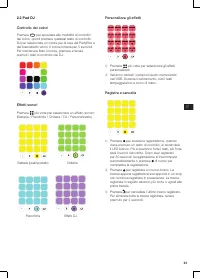
33 IT 2.2 Pad DJ Controllo dei colori Premere per accedere alla modalità di controllo dei colori, quindi premere qualsiasi tasto di controllo DJ per selezionare un colore per la luce del PartyBox e del braccialetto vicino. Il colore rimarrà per 5 secondi. Per mantenere fisso il colore, premere e ten...
Page 34 - Pannello posteriore; Accensione
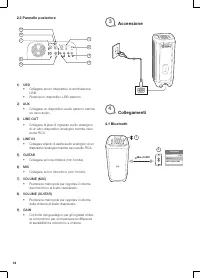
34 2.3 Pannello posteriore 2 3 1 4 5 6 7 8 9 1) USB • Collegare ad un dispositivo di archiviazione USB. • Ricarica un dispositivo USB esterno. 2) AUX• Collegare un dispositivo audio esterno tramite un cavo audio. 3) LINE OUT • Collegare al jack di ingresso audio analogico di un altro dispositivo ana...
Page 35 - Braccialetto con controllo; Controllo gestuale del PartyBox utilizzando; Mixaggio del suono con il
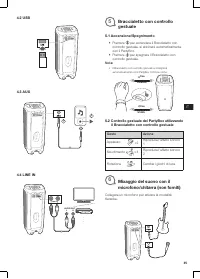
35 IT 4.2 USB 4.3 AUX 2 1 4.4 LINE IN R L AUDIO OUT . . . LINE IN 5 Braccialetto con controllo gestuale 5.1 Accensione/Spegnimento • Premere per accendere il Braccialetto con controllo gestuale, si abbinerà automaticamente con il PartyBox. • Premere per spegnere il Braccialetto con controllo gestual...
Page 36 - Modalità TWS (True Wireless; Comportamento dei LED
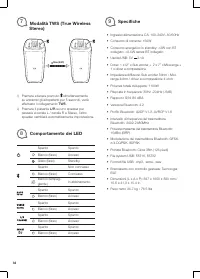
36 7 Modalità TWS (True Wireless Stereo) 10m (33ft) 1) Premere e tenere premuto simultaneamente su entrambi gli altoparlanti per 5 secondi, verrà effettuato il collegamento TWS . 2) Premere il pulsante L/R su uno speaker per passare a canale L / canale R e Stereo, l’altro speaker cambierà automatica...
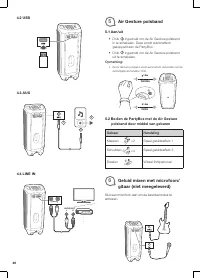
Page 40 - Air Gesture polsband; Bedien de PartyBox met de Air Gesture; Geluid mixen met microfoon/
40 4.2 USB 4.3 AUX 2 1 4.4 LINE IN R L AUDIO OUT . . . LINE IN 5 Air Gesture polsband 5.1 Aan/uit • Druk ingedrukt om de Air Gesture polsband in te schakelen. Deze wordt automatisch gekoppeld aan de PartyBox. • Druk ingedrukt om de Air Gesture polsband uit te schakelen. Opmerking: • De Air Gesture p...
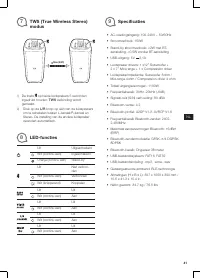
Page 41 - modus; Specificaties
41 NL 7 TWS (True Wireless Stereo) modus 10m (33ft) 1) De toets op beide luidsprekers 5 seconden ingedrukt houden. TWS verbinding wordt gemaakt. 2) Druk op de L/R knop op één van de luidsprekers om te schakelen tussen L-kanaal/R-kanaal en Stereo. De instelling van de andere luidspreker verandert aut...
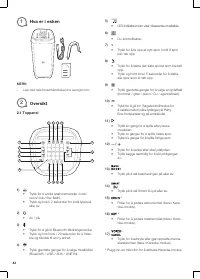
Page 42 - Hva er i esken; Oversikt
42 1 Hva er i esken MERK: – Last ned hele brukerhåndboken fra www.jbl.com 2 Oversikt 2.1 Toppanel 11 13 234 1 5 6 17 16 15 14 7 8 9 10 12 1) • Trykk for å endre lysshowmønster /rock/ neon/ club/ fire/ flash). • Trykk og hold i 2 sekunder for å slå lyset på eller av. 2) • Av / på. 3) • Trykk for å gå...
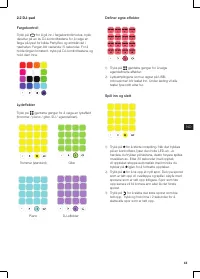
Page 43 - Definer egne effekter
43 NO 2.2 DJ-pad Fargekontroll Trykk på for å gå inn i fargekontrollmodus, trykk deretter på en av DJ-kontrolltastene for å velge en farge på lyset for både PartyBox og armbåndet i nærheten. Fargen blir værende i 5 sekunder. For å holde fargen konstant, trykk på DJ-kontrolltastene og hold dem inne. ...
Page 44 - Strøm på
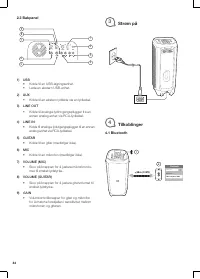
44 2.3 Bakpanel 2 3 1 4 5 6 7 8 9 1) USB • Koble til en USB-lagringsenhet. • Lade en ekstern USB-enhet. 2) AUX• Koble til en ekstern lydkilde via en lydkabel. 3) LINE OUT • Koble til analoge lydinngangsplugger fra en annen analog enhet via RCA-lydkabel. 4) LINE IN • Koble til analoge lydutgangsplugg...
Page 45 - Bevegelsesarmbånd; Kontroller PartyBox ved å bruke; Blande lyden med mikrofon/
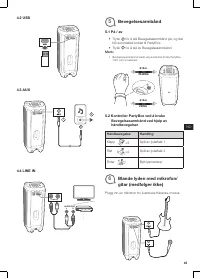
45 NO 4.2 USB 4.3 AUX 2 1 4.4 LINE IN R L AUDIO OUT . . . LINE IN 5 Bevegelsesarmbånd 5.1 På / av • Trykk for å slå Bevegelsesarmbånd på, og det blir automatisk koblet til PartyBox. • Trykk for å slå av Bevegelsesarmbånd. Merk: • Bevegelsesarmbånd vil koble seg automatisk til den PartyBox 1000 som e...
Page 46 - Spesifikasjoner
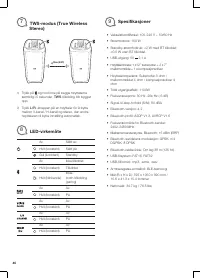
46 7 TWS-modus (True Wireless Stereo) 10m (33ft) 1) Trykk på og hold inne på begge høyttalerne samtidig i 5 sekunder, TWS -tilkobling blir bygget opp. 2) Trykk L/R -knappen på en høyttaler for å bytte mellom V-kanal / H-kanal og stereo, den andre høyttaleren vil bytte innstilling automatisk. 8 LED-v...
Page 50 - opaska na rękę Air Gesture; Włączanie / wyłączanie zasilania; Sterowanie urządzeniem PartyBox za
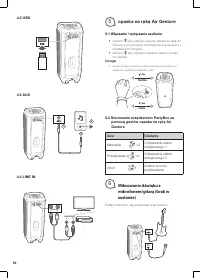
50 4.2 USB 4.3 AUX 2 1 4.4 LINE IN R L AUDIO OUT . . . LINE IN 5 opaska na rękę Air Gesture 5.1 Włączanie / wyłączanie zasilania • Naciśnij aby włączyć zasilanie opaska na rękę Air Gesture, a ona zostanie automatycznie sparowana z urządzeniem PartyBox. • Naciśnij aby wyłączyć zasilanie opaska na ręk...
Page 53 - Efeitos sonoros; Efeitos personalizados
53 PT 2.2 Painel de DJ Controle de cores Pressione para entrar no modo de controle de cores e depois qualquer tecla de controle de DJ para selecionar a cor da iluminação da PartyBox e das pulseiras de DJ usadas para controlar a PartyBox. A cor será mantida por cinco segundos. Para mantê-la constante...
Page 54 - Liga; Conexões
54 2.3 Painel traseiro 2 3 1 4 5 6 7 8 9 1) USB • Conecte a um dispositivo de armazenamento USB. • Carregue um dispositivo USB externo. 2) AUX • Conecte um dispositivo de áudio externo usando um cabo de áudio. 3) LINE OUT • Conecte entradas de áudio analógicas a outro dispositivo analógico usando um...
Page 55 - Pulseira detectora de gestos; A Pulseira detectora de gestos permite; Mixagem das saídas do
55 PT 4.2 USB 4.3 AUX 2 1 4.4 LINE IN R L AUDIO OUT . . . LINE IN 5 Pulseira detectora de gestos 5.1 Liga/desliga • Pressione para ligar a Pulseira detectora de gestos e emparelhá-la automaticamente com a PartyBox. • Pressione para desligar a Pulseira detectora de gestos. Observação: • A Pulseira de...
Page 56 - Funcionamento do LED
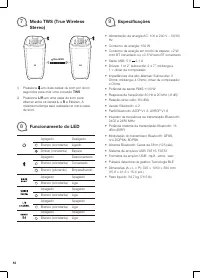
56 7 Modo TWS (True Wireless Stereo) 10m (33ft) 1) Pressione em duas caixas de som por cinco segundos para criar uma conexão TWS . 2) Pressione L/R em uma caixa de som para alternar entre os canais L e R e Estéreo. A mesma mudança será realizada na outra caixa de som. 8 Funcionamento do LED Apagado ...
Page 60 - Примечание; PartyBox; Жест
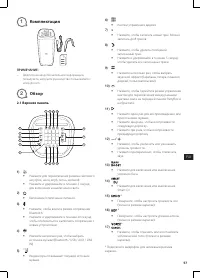
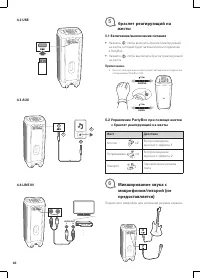
60 4.2 USB 4.3 AUX 2 1 4.4 LINE IN R L AUDIO OUT . . . LINE IN 5 браслет реагирующий на жесты 5.1 Включение/выключение питания • Нажмите , чтобы включить браслет реагирующий на жесты, который будет автоматически подключен к PartyBox. • Нажмите , чтобы выключить браслет реагирующий на жесты. Примечан...
Page 61 - Режим; Поведение индикатора
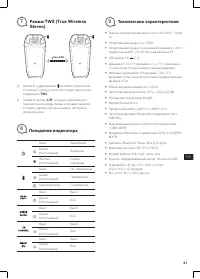
61 RU 7 Режим TWS (True Wireless Stereo) 10m (33ft) 1) Нажмите и удерживайте на обоих устройствах в течение 5 секунд, после этого будет выполнено соединение TWS . 2) Нажмите кнопку L/R на одном динамике для переключения между левым и правым каналом и стерео , другая колонка изменит настройки автомат...
Page 62 - Detta finns i lådan; Översikt
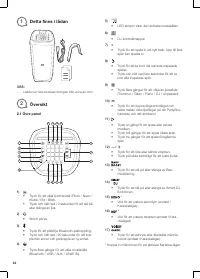
62 1 Detta finns i lådan OBS: – Ladda ner hela bruksanvisningen från www.jbl.com 2 Översikt 2.1 Övre panel 11 13 234 1 5 6 17 16 15 14 7 8 9 10 12 1) • Tryck för att välja ljusmönster (Rock / Neon / Klubb / Eld / Blixt). • Tryck och håll ned i 2 sekunder för att slå på eller stänga av ljus. 2) • Str...
Page 63 - Anpassa effekter
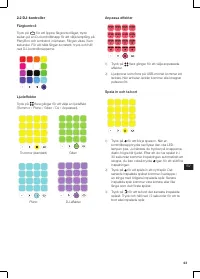
63 SV 2.2 DJ-kontroller Färgkontroll Tryck på för att öppna färgkontrolläget, tryck sedan på en DJ-kontrollknapp för att välja lampfärg på PartyBox och armband i närheten. Färgen visas i fem sekunder. För att hålla färgen konstant, tryck och håll ned DJ-kontrollknapparna. Ljudeffekter Tryck på flera...
Page 65 - Handrörelsearmband; Styr PartyBox med Handrörelsearmband; Mixa ljud med mikrofon/gitarr
65 SV 4.2 USB 4.3 AUX 2 1 4.4 LINJE IN R L AUDIO OUT . . . LINE IN 5 Handrörelsearmband 5.1 Ström på / av • Tryck för att slå på Handrörelsearmband så parkopplas det automatiskt med Partyboxen. • Tryck för att stänga av Handrörelsearmband. Observera: • Handrörelsearmband ansluts automatiskt till den...
Page 68 - Menyesuaikan efek
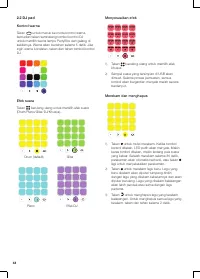
68 2.2 DJ pad Kontrol warna Tekan untuk masuk ke mode kontrol warna, kemudian tekan sembarang tombol kontrol DJ untuk memilih warna lampu PartyBox dan gelang di sekitarnya. Warna akan bertahan selama 5 detik. Jika ingin warna konsisten, tekan dan tahan tombol kontrol DJ. Efek suara Tekan berulang-ul...
Page 69 - Menghidupkan daya
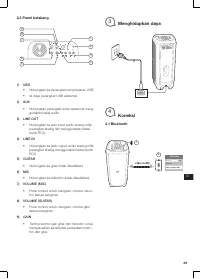
69 ID 2.3 Panel belakang 2 3 1 4 5 6 7 8 9 1) USB • Hubungkan ke perangkat penyimpanan USB. • Isi daya perangkat USB eksternal. 2) AUX • Hubungkan perangkat audio eksternal meng-gunakan kabel audio. 3) LINE OUT • Hubungkan ke jack input audio analog milik perangkat analog lain menggunakan kabel audi...
Page 70 - Gelang Gerak; Mengontrol PartyBox dengan gerakan; Memadukan suara dengan
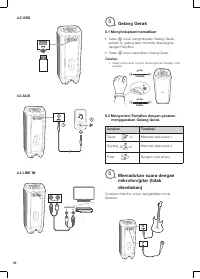
70 4.2 USB 4.3 AUX 2 1 4.4 LINE IN R L AUDIO OUT . . . LINE IN 5 Gelang Gerak 5.1 Menghidupkan/mematikan • Tekan untuk menghidupkan Gelang Gerak, setelah itu gelang akan otomatis dipasangkan dengan PartyBox. • Tekan untuk mematikan Gelang Gerak. Catatan: • Gelang Gerak akan otomatis dihubungkan ke P...
Page 71 - Pola LED
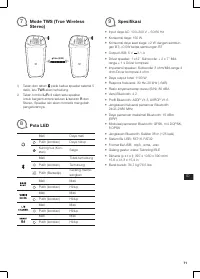
71 ID 7 Mode TWS (True Wireless Stereo) 10m (33ft) 1) Tekan dan tahan pada kedua speaker selama 5 detik, lalu TWS akan terhubung. 2) Tekan tombol L/R di salah satu speaker untuk berganti antara saluran L /saluran R dan Stereo. Speaker lain akan otomatis mengubah pengaturannya. 8 Pola LED Mati Daya m...
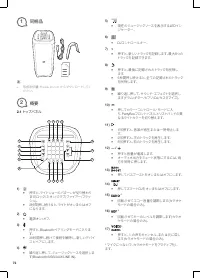
Page 72 - 同�品; 概要; トップパネル
72 1 同�品 注: – 取扱説明書 を www.jbl.com からダウンロードしてく ださい。 2 概要 2.1 トップパネル 11 13 234 1 5 6 17 16 15 14 7 8 9 10 12 1) • 押すと、ライトショーのパターンが切り替わり ます ( ロック / ネオン / クラブ / ファイアー / フラッ シュ ) 。 • 2 秒間押し続けると、ライトがオンまたはオフ になります。 2) • 電源オン / オフ。 3) • 押すと、 Bluetooth ペアリングモードに入りま す。 • 20 秒間押し続けて接続を解除し、新しいデバイ スとペアにします。 4) •...
Page 74 - 背面パネル; 電�オン
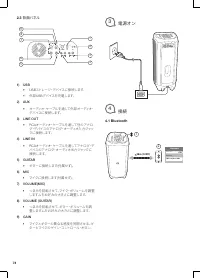
74 2.3 背面パネル 2 3 1 4 5 6 7 8 9 1) USB • USB ストレージ・デバイスに接続します。 • 外部 USB デバイスを充電します。 2) AUX • オーディオ・ケーブルを通して外部オーディオ・ デバイスに接続します。 3) LINE OUT • RCA オーディオ・ケーブルを通して別のアナロ グ・デバイスのアナログ・オーディオ入力ジャッ クに接続します。 4) LINE IN • RCA オーディオ・ケーブルを通してアナログ・デ バイスのアナログ・オーディオ出力ジャックに 接続します。 5) GUITAR • ギターに接続します ( 付属せず ) 。 6) ...
Page 75 - JP
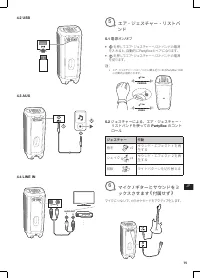
75 JP 4.2 USB 4.3 AUX 2 1 4.4 LINE IN R L AUDIO OUT . . . LINE IN 5 エア・ジェスチャー・リストバ ンド 5.1 電源オン / オフ • を押してエア・ジェスチャー・リストバンドの電源 を入れると、自動的に PartyBox とペアになります。 • を押してエア・ジェスチャー・リストバンドの電源 を切ります。 注: • エア・ジェスチャー・リストバンドは最も近くにある PartyBox 1000 に自動的に接続されます。 PAIRING USING 15m 15m 5.2 ジェスチャーによる、エア・ジェスチャー・ リストバンドを...
Page 76 - LED; の状態
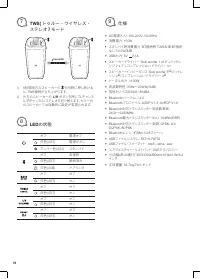
76 7 TWS( トゥルー・ワイヤレス・ ステレオ ) モード 10m (33ft) 1) 5 秒間両方のスピーカーの を同時に押し続ける と、 TWS 接続が立ち上がります。 2) 片方のスピーカーの L/R ボタンを押して L チャンネ ル /R チャンネル / ステレオを切り替えます。もう一台 のスピーカーでは自動的に設定が変更されます。 8 LED の状態 オフ 電源オフ 白色 ( 点灯 ) 電源がオン アンバー色 ( 点灯 ) スタンバイ オフ 未接続 白色 ( 点灯 ) 接続済み 白色 ( 点滅 ) ペアリング オフ オフ 白色 ( 点灯 ) オン オフ オフ 白色 ( 点灯 )...
Page 77 - 구성품; 개요; 상단
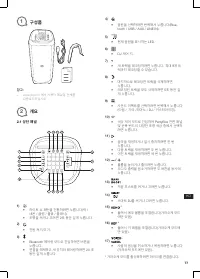
77 KO 1 구성품 참고 : – www.jbl.com 에서 사용자 매뉴얼 전체를 다운로드하십시오 2 개요 2.1 상단 패널 11 13 234 1 5 6 17 16 15 14 7 8 9 10 12 1) • 라이트 쇼 패턴을 전환하려면 누릅니다 ( 락 / 네온 / 클럽 / 불꽃 / 플래시 ). • 조명을 켜거나 끄려면 2 초 동안 길게 누릅니다 . 2) • 전원 켜기 / 끄기 . 3) • Bluetooth 페어링 모드로 진입하려면 버튼을 누릅니다 . • 연결을 해제하고 새 장치와 페어링하려면 20 초 동안 길게 누릅니다 . 4) • ...
Page 79 - 전원
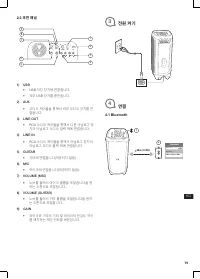
79 KO 2.3 후면 패널 2 3 1 4 5 6 7 8 9 1) USB • USB 저장 장치에 연결합니다 . • 외부 USB 장치를 충전합니다 . 2) AUX • 오디오 케이블을 통해서 외부 오디오 장치를 연 결합니다 . 3) LINE OUT • RCA 오디오 케이블을 통해서 다른 아날로그 장 치의 아날로그 오디오 입력 잭에 연결합니다 . 4) LINE IN • RCA 오디오 케이블을 통해서 아날로그 장치의 아날로그 오디오 출력 잭에 연결합니다 . 5) GUITAR • 기타에 연결합니다 ( 제공되지 않음 ). 6) MIC • 마이...
Page 81 - 모드
81 KO 7 TWS(True Wireless Stereo) 모드 10m (33ft) 1) 양쪽 스피커의 버튼을 5 초 동안 누르면 TWS 연결 이 이루어집니다 . 2) 한쪽 스피커의 L/R 버튼을 눌러 L 채널 /R 채널 및 스테레오를 토글할 수 있으며 , 다른 스피커는 설정을 자동으로 변경합니다 . 8 LED 동작 꺼짐 전원 꺼짐 흰색 ( 켜진 상태 유지 ) 전원 켜짐 주황색 ( 켜진 상태 유 지 ) 대기 꺼짐 연결되지 않음 흰색 ( 켜진 상태 유지 ) 연결됨 흰색 ( 깜박임 ) 페어링 꺼짐 꺼짐 흰색 ( 켜진 상태 유지 ) 켜...
Page 82 - 产品清单; 概览; 顶部面板
82 1 产品清单 注意: – 请前往 www.jbl.com 下载完整版说明书。 2 概览 2.1 顶部面板 11 13 234 1 5 6 17 16 15 14 7 8 9 10 12 1) • 按下按钮以切换灯光秀模式(摇滚 / 霓虹 / 夜总 会 / 烈焰 / 闪烁)。 • 长按 2 秒钟以开启或关闭灯光。 2) • 开启 / 关闭。 3) • 按下按钮以进入蓝牙配对模式。 • 长按 20 秒钟以断开连接并与新设备配对。 4) • 音源切换(蓝牙 /USB/AUX/Line In )。 5) • LED 指示灯显示当前音源。 6) • DJ 控制键。 7) • 按下按钮录制新曲目。最...
Page 83 - CN; 面板; 音效; 自定义音效
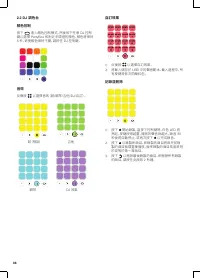
83 CN 2.2 DJ 面板 颜色控制 按下 按钮以进入颜色控制模式,然后按下任意 DJ 控制键,为附近的 PartyBox 和手环选择一种灯光颜 色。颜色会保持 5 秒。要保持颜色不变,请长按 DJ 控 制键。 音效 反复按下 按钮以选择音效(鼓 / 钢琴 / 吉他 /DJ/ 自定 义 ) 。 鼓(默认) 吉他 钢琴 DJ 音效 自定义音效 1) 反复按下 按钮以选择自定义音效。 2) 系统将加载存储在 U 盘中的声音样本。在加载过程 中,所有键都将依次以红色闪烁。 录制和删除 1) 按下 按钮以开始录制,按下控制键时,白色 LED 灯会亮起。按键越用力,声音就会越大。在加载过程 中,所有...
Page 84 - 后面板; 启动; 蓝牙
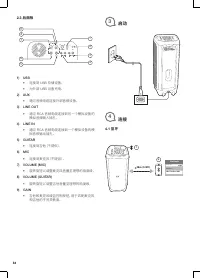
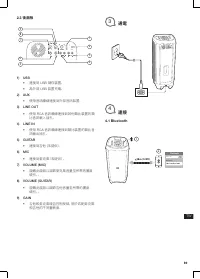
84 2.3 后面板 2 3 1 4 5 6 7 8 9 1) USB • 连接到 USB 存储设备。 • 为外部 USB 设备充电。 2) AUX • 通过音频电缆连接外部音频设备。 3) LINE OUT • 通过 RCA 音频电缆连接到另一个模拟设备的 模拟音频输入插孔。 4) LINE IN • 通过 RCA 音频电缆连接到一个模拟设备的模 拟音频输出插孔。 5) GUITAR • 连接到吉他(不提供)。 6) MIC • 连接到麦克风(不提供)。 7) VOLUME (MIC) • 旋转旋钮以调整麦克风音量至理想的响度级。 8) VOLUME (GUITAR) • 旋转旋钮以调整吉他...
Page 85 - 手势感应手环; 使用; 使用麦克风
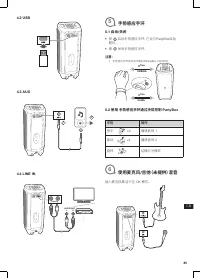
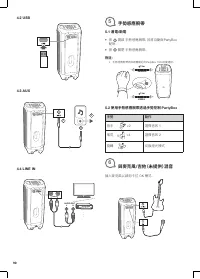
85 CN 4.2 USB 4.3 AUX 2 1 4.4 LINE IN R L AUDIO OUT . . . LINE IN 5 手势感应手环 5.1 启动 / 关闭 • 按 启动手势感应手环,它会与 PartyBox 自动 配对。 • 按 关闭手势感应手环。 注意: • 手势感应手环将自动与最近的 PartyBox 1000 连接。 PAIRING USING 15m 15m 5.2 使用 手势感应手环通过手势控制 PartyBox 手势 操作 拍手 ×2 播放音效 1 摇动 ×4 播放音效 2 旋转 切换灯光模式 6 使用麦克风 / 吉他(未提供)混音 插入麦克风激活卡拉 OK 模式...
Page 87 - TW; 包裝盒內物品; 概覽; 頂部面板
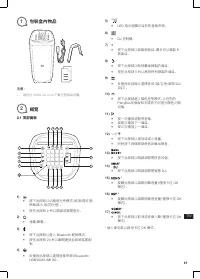
87 TW 1 包裝盒內物品 注意: – 請前往 WWW.JBL.COM 下載完整版說明書。 2 概覽 2.1 頂部面板 11 13 234 1 5 6 17 16 15 14 7 8 9 10 12 1) • 按下此按鈕以切換燈光秀模式(搖滾 / 霓虹燈 / 俱樂部 / 火焰 / 閃光燈)。 • 按住此按鈕 2 秒以開啟或關閉燈光。 2) • 通電 / 斷電。 3) • 按下此按鈕以進入 Bluetooth 配對模式。 • 按住此按鈕 20 秒以斷開連接並與新裝置配 對。 4) • 反復按此按鈕以選擇音樂來源( Bluetooth/ USB/AUX/LINE IN )。 5) • LED 指...
Page 89 - 後面板; 通電
89 TW 2.3 後面板 2 3 1 4 5 6 7 8 9 1) USB • 連接到 USB 儲存裝置。 • 為外部 USB 裝置充電。 2) AUX • 使用音訊纜線連接到外部音訊裝置。 3) LINE OUT • 使用 RCA 音訊纜線連接到其他類比裝置的類 比音訊輸入插孔。 4) LINE IN • 使用 RCA 音訊纜線連接到類比裝置的類比音 訊輸出插孔。 5) GUITAR • 連接到吉他(未提供)。 6) MIC • 連接到麥克風(未提供)。 7) VOLUME (MIC) • 旋轉此旋鈕以調節麥克風音量至所需的響度 級別。。 8) VOLUME (GUITAR) • 旋轉此旋...
Page 90 - 手勢感應腕帶; 附註:; 使用手勢感應腕帶透過手勢控制; 與麥克風
90 4.2 USB 4.3 AUX 2 1 4.4 LINE IN R L AUDIO OUT . . . LINE IN 5 手勢感應腕帶 5.1 通電 / 斷電 • 按 開啟 手勢感應腕帶,其將自動與 PartyBox 配對。 • 按 關閉 手勢感應腕帶。 附註: • 手勢感應腕帶將與距離最近的 PartyBox 1000 自動連接。 PAIRING USING 15m 15m 5.2 使用手勢感應腕帶透過手勢控制 PartyBox 手勢 動作 拍手 ×2 選擇音效 1 搖晃 ×4 選擇音效 2 旋轉 切換燈光模式 6 與麥克風 / 吉他(未提供)混音 插入麥克風以啟用卡拉 OK 模式。
Page 91 - 真正無線立體聲(
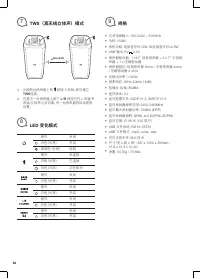
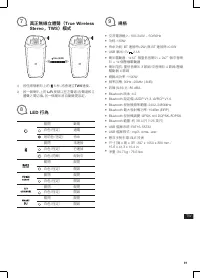
91 TW 7 真正無線立體聲( True Wireless Stereo , TWS )模式 10m (33ft) 1) 按住兩個喇叭上的 5 秒,將會建立 TWS 連接。 2) 按一個喇叭上的 L/R 按鈕以在左聲道 / 右聲道和立 體聲之間切換,另一個喇叭將自動變更設定。 8 LED 行為 關閉 斷電 白色(恆定) 通電 琥珀色(恆定) 待命 關閉 未連接 白色(恆定) 已連接 白色(閃爍) 配對中 關閉 關閉 白色(恆定) 開啟 關閉 關閉 白色(恆定) 開啟 關閉 關閉 白色(恆定) 開啟 關閉 關閉 白色(恆定) 開啟 9 規格 • 交流電源輸入: 100-240V ~ 50/60...
Page 92 - ةظحلام; ةماع; ةيولعلا
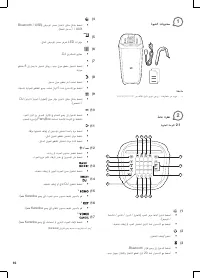
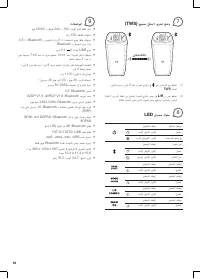
92 ﺓﻮﺒﻌﻟﺍ ﺕﺎﻳﻮﺘﺤﻣ 1 : ﺔﻈﺣﻼﻣ – www.jbl.com ﻦﻣ ﻚﻟﺎﳌﺍ ﻞﻴﻟﺩ ﻞﻳﺰﻨﺗ ﻰﺟﺮﻳ ، ﺕﺎﻣﻮﻠﻌﳌﺍ ﻦﻣ ﺪﻳﺰﳌ ﺔﻣﺎﻋ ﺓﺮﻈﻧ 2 ﺔﻳﻮﻠﻌﻟﺍ ﺔﺣﻮﻠﻟﺍ 2.1 11 13 234 1 5 6 17 16 15 14 7 8 9 10 12 1 ( • ﻝﺎﻌﺘﺷﻻﺍ / ﻱﺩﺎﻨﻟﺍ / ﻥﻮﻴﻨﻟﺍ / ﺯﺍﺰﺘﻫﻻﺍ ) ﺀﻮﻀﻟﺍ ﺽﺮﻋ ﻁﺎنمﺃ ﻞﻳﺪﺒﺘﻟ ﻂﻐﺿﺍ .( ﺾﻴﻣﻮﻟﺍ / • . ﻪﻠﻴﻐﺸﺗ ﻑﺎﻘﻳﺇ ﻭﺃ ﺀﻮﻀﻟﺍ ﻞﻴﻐﺸﺘﻟ ينﺘﻴﻧﺎﺛ ﺓﺪﳌ ﺭﺍﺮﻤﺘﺳﻻﺍ ﻊﻣ ﻂﻐ...
Page 94 - ليغشتلا
94 ﻲﻔﻠﺨﻟﺍ ﺔﺣﻮﻠﻟﺍ 2.3 2 3 1 4 5 6 7 8 9 1 ( USB • .USB ﻦﻳﺰﺨﺗ ﺯﺎﻬﺠﺑ ﻞﻴﺻﻮﺘﻟﺎﺑ ﻢﻗ • . ﻲﺟﺭﺎﺧ USB ﺯﺎﻬﺟ ﻦﺤﺷﺍ 2 ( AUX • . ﺕﻮﺻ ﻞﺒﻛ ﺔﻄﺳﺍﻮﺑ ﻲﺟﺭﺎﺧ ﺕﻮﺻ ﺯﺎﻬﺟ ﻞﻴﺻﻮﺘﺑ ﻢﻗ 3 ( LINE OUT • ﺔﻄﺳﺍﻮﺑ ﺮﺧﺁ ﻱﺮﻇﺎﻨﺗ ﺯﺎﻬﺠﻟ ﻱﺮﻇﺎﻨﺘﻟﺍ ﺕﻮﺼﻟﺍ ﻝﺎﺧﺩﺇ ﺲﺑﺎﻘبم ﻞﻴﺻﻮﺘﻟﺎﺑ ﻢﻗ .RCA ﺕﻮﺻ ﻞﺒﻛ 4 ( LINE IN • ﻞﺒﻛ ﺔﻄﺳﺍﻮﺑ ﻱﺮﻇﺎﻨﺗ ﺯﺎﻬﺠﻟ ﻱﺮﻇﺎﻨﺘﻟﺍ ﺕﻮﺼﻟﺍ ﺝ...
Page 95 - Air; ءارجلإا
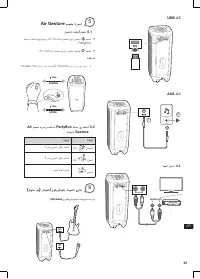
95 AR USB 4.2 AUX 4.3 2 1 ﻂﺨﻟﺍ ﻞﺧﺪﻣ 4.4 R L AUDIO OUT . . . LINE IN Air Gesture ﻢﺼﻌﻣ ﺓﺭﻮﺳﺇ 5 ﻞﻴﻐﺸﺘﻟﺍ ﻑﺎﻘﻳﺇ / ﻞﻴﻐﺸﺗ 5.1 • ﺔﻋماﺴﺑ ﺎًﻴﺋﺎﻘﻠﺗ ﺎﻬﻧﺍﺮﻗﺇ ﻢﺘﻴﺳﻭ Air Gesture ﻢﺼﻌﻣ ﺓﺭﻮﺳﺇ ﻞﻴﻐﺸﺘﻟ ﻂﻐﺿﺍ .PartyBox • . Air Gesture ﻢﺼﻌﻣ ﺓﺭﻮﺳﺇ ﻞﻴﻐﺸﺗ ﻑﺎﻘﻳﻹ ﻂﻐﺿﺍ : ﺔﻈﺣﻼﻣ • .PartyBox 1000 ﺔﻋماﺳ ﺏﺮﻗﺄﺑ ﺎًﻴﺋﺎﻘﻠﺗ Air Gesture ﻢﺼ...
Page 101 - и с полноформатными световыми эффектами
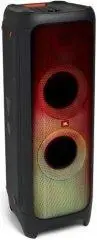
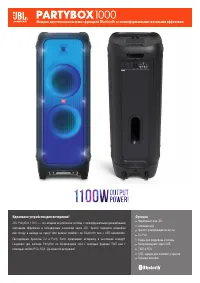
Функции Фирменный звук JBL Световые шоу браслет , реагирующий на жесты DJ Pad Входы для микрофона и гитары Воспроизведение через USB TWS и RCA USB- зарядка для внешних устройств Скрытые колесики Идеальное устройство для вечеринки! JBL PartyBox 1000 — это мощная акустическая система с полноформатными...
Page 102 - Технические характеристики:; Функции и преимущества; JBL; Мощная
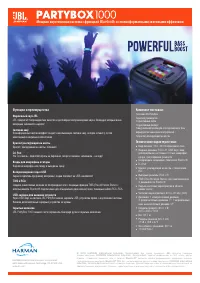
HARMAN International Industries, Incorporated8500 Balboa Boulevard, Northridge, CA 91329 USAwww.jbl.com © 2019 HARMAN International Industries, Incorporated. Все права защищены . JBL является товарным знаком компании HARMAN International Industries, Incorporated, зарегистрированным в США и / или дру...





 JBL PARTYBOX User Manual
 JBL PARTYBOX 110 User Manual
 JBL PartyBox 710 User Manual
 JBL PARTYBOX 1000 User Manual
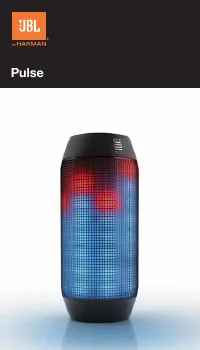 JBL Pulse User Manual
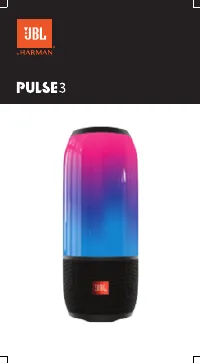 JBL Pulse 3 User Manual
 JBL Radial Micro Manual
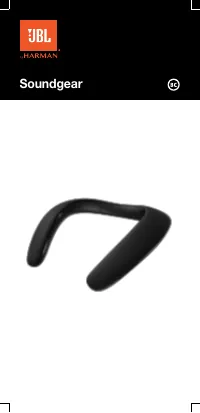 JBL Soundgear User Manual
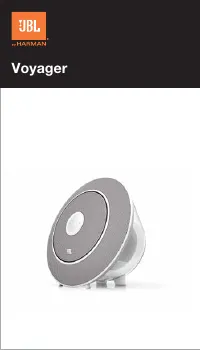 JBL Voyager User Manual
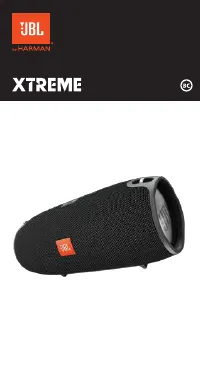 JBL Xtreme User Manual
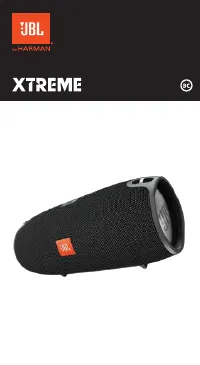 JBL Xtreme Special Edition User Manual
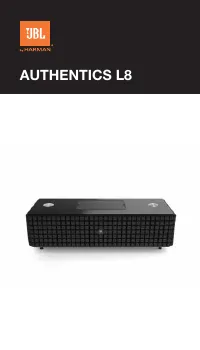 JBL Authentics L8 User Manual
 JBL Authentics L16 User Manual
 JBL Charge 3 Special Edition User Manual