JBL JBLL75MSAM - User Manual
JBL JBLL75MSAM Wireless Speaker – User Manual, read for free online in PDF format. We hope this helps you resolve any issues you may have. If you have further questions, please contact us through the contact form.


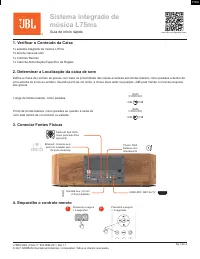


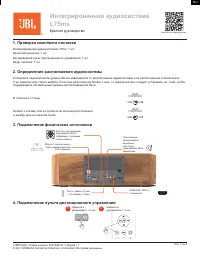
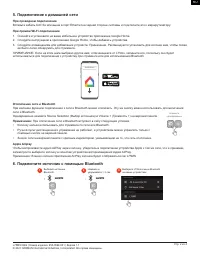
Table of Contents:
- Page 2 – Connect to a Network; Connect a Source via Bluetooth; Listening to Streaming Media Sources; Press Simultaneously
- Page 3 – cation; Bluetooth; Trademarks and Licenses; Flac
- Page 4 – Sistema integrado de; Guia de início rápido; car o Conteúdo da Caixa; Determinar a Localização da caixa de som; Conectar Fontes Físicas
- Page 5 – Conectar à uma Rede; Para uma Conexão com; Desligando a rede e o Bluetooth; Conecte uma fonte via Bluetooth
- Page 6 – Ouvindo fontes de mídia de streaming; Apple Airplay; Spotify; nição de Fábrica; cações de conexão sem
- Page 7 – Marcas registradas e licenças
- Page 8 – Интегрированная аудиосистема; Краткое руководство; Проверка комплекта поставки; Подключение физических источников
- Page 9 – Подключение к домашней сети; При проводном подключении; Отключение сети и Bluetooth; Подключите источник с помощью Bluetooth
- Page 10 – Прослушивание потоковых источников мультимедиа; Сброс до заводских настроек
- Page 11 – Товарные знаки и лицензии
- Page 12 – 产品中有害物质的名称及含量
EN
EN
Pg 1 of 3
L75MS QSG | Part No: 950-0594-001 | Rev 1.1
© 2021 HARMAN International Industries, Incorporated. All rights reserved.
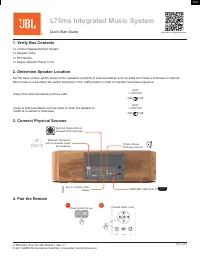
L75ms Integrated Music System
Quick Start Guide
1. Verify Box Contents
1x L75ms Integrated Music System
1x Speaker Grille
1x RF Remote
1x Region Speci
fi
c Power Cord
2. Determine Speaker Location
Set the bass contour switch based on the speakers proximity to side boundaries such as walls and inside a bookcase or cabinet.
When close to a boundary the switch should be in the -3dB position in order to maintain level bass response.
Away from side boundaries such as walls.
BASS
CONTOUR
0dB
-3dB
Close to side boundaries such as walls or when the speaker is
inside of a cabinet or bookcase.
BASS
CONTOUR
0dB
-3dB
3. Connect Physical Sources
Sub Out: Single RCA to
Powered Sub (Optional)
Aux In: 3.5mm (1/8in)
Stereo
Ethernet: Connect to
port on wireless router
for streaming
Phono: Stereo
RCA plus Ground
HDMI ARC: ARC from TV
4. Pair the Remote
-
1
2
Press & Hold >2 sec
Press & Hold >3 sec
www.JBL.com/Specialty-Audio
"Loading the manual" means you need to wait until the file loads and becomes available for online reading. Some manuals are very large, and the time they take to appear depends on your internet speed.
Was this manual helpful?
About this manual
- Brand
- JBL
- Model
- JBLL75MSAM
- Document type
- User Manual
- Category
- Wireless Speaker
- Language(s)
- English, Russian
- Pages
- 12
- File size
- 3.4 MB
- Format
Summary
EN Pg 2 of 3 L75MS QSG | Part No: 950-0594-001 | Rev 1.1 © 2021 HARMAN International Industries, Incorporated. All rights reserved. 5. Connect to a Network For a Wired Connection Connect the Ethernet port on the rear to the port on a wireless router using a CAT-5e or higher cable. For a Wi-Fi Direct...
EN EN Pg 3 of 3 L75MS QSG | Part No: 950-0594-001 | Rev 1.1 © 2021 HARMAN International Industries, Incorporated. All rights reserved. 8. Factory Reset The L75ms can be reset to factory defaults should the need to arise. This will erase all settings for Network and Bluetooth requiring that all conne...
PTBR PTBR PTBR Pg 1 de 4 L75MS QSG | Parte nº: 950-0594-001 | Rev 1.1 © 2021 HARMAN International Industries, Incorporated. Todos os direitos reservados. Sistema integrado de música L75ms Guia de início rápido 1. Veri fi car o Conteúdo da Caixa 1x sistema integrado de música L75ms1x tela de caixa de ...
Ask a question
Related manuals
Other JBL appliances
 JBL 6 Manual
- JBL 8 Manual
 JBL 24CT Manual
 JBL 100 User Manual
 JBL 200 User Manual
 JBL 201 Manual
 JBL 210 Manual
 JBL 260 Manual
 JBL 300 User Manual
 JBL 300 Series Manual
- JBL 312CS Manual
- JBL 321C Manual
- JBL 321CT Manual
- JBL 322C Manual
- JBL 328C Manual
- JBL 328CT Manual
 JBL 400 User Manual
 JBL 400P Manual
 JBL 410 Manual
 JBL 430 Manual