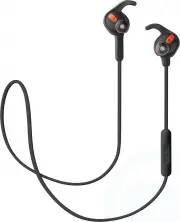
Page 3 - ENGLISH; INCLUDED ACCESSORIES
3 ENGLISH JABRA ROX WIRELESS CONTENTS1. WELCOME .......................................... 42. HEADSET OVERVIEW ......................... 5 2.1 INCLUDED ACCESSORIES 3. HOW TO WEAR .................................. 6 3.1 CHANGING EARGELS 3.2 WEARING THE EARWINGS3.3 WEARING THE FITCLIP3.4 HOW-TO-WEAR...
Page 4 - JABRA ROX WIRELESS FEATURES
4 ENGLISH JABRA ROX WIRELESS 1. WELCOME Thank you for using the Jabra Rox Wireless. We hope you will enjoy it! JABRA ROX WIRELESS FEATURES High definition Dolby® Digital Plus enhanced sound with the exclusive Jabra Sound App Cable controls for easy music and call management Life proof: weather...
Page 6 - CHANGING EARGELS
6 ENGLISH JABRA ROX WIRELESS 3. HOW TO WEAR jabra jabra 3.1 CHANGING EARGELS Choose between 4 Colorcore Eargels for optimal fit and comfort.
Page 7 - WEARING THE EARWINGS; Align the L or R on the EarWing with the L or R
7 ENGLISH JABRA ROX WIRELESS 3.2 WEARING THE EARWINGS Choose between 3 EarWing sizes for optimal fit and stability. 1. Align the L or R on the EarWing with the L or R on the earbud and gently pull the EarWing onto the earbud. Adjust by rotating, if needed. 2. When wearing the headset, the EarWing fi...
Page 8 - WEARING THE FITCLIP; , EarWings and fitclip at
8 ENGLISH JABRA ROX WIRELESS 3.3 WEARING THE FITCLIP Attach the fitclip to the cable, and adjust for optimal fit. jabra jabra 3.4 HOW-TO-WEAR VIDEOS You can watch how-to-wear instructional videos for the ColorCore EarGels TM , EarWings and fitclip at jabra.com/roxwireless.
Page 9 - Standby mode ON
9 ENGLISH JABRA ROX WIRELESS 3.5 MAGNETIC EARBUDS The earbuds are magnetic. Join or separate them to turn Standby mode on/off, or end/answer a call. Standby mode ON Standby mode OFF jabra jabra NOTE : The headset will power off after 5 minutes when the magnetic earbuds are separated and the headset ...
Page 10 - HOW TO CHARGE THE
10 ENGLISH JABRA ROX WIRELESS 4. HOW TO CHARGE THE BATTERY Remove the charging cover on the right earbud to expose the micro-USB port. Plug the USB cable into the headset and the PC to begin charging. jabra It takes approx. 2.5 hours to fully charge the headset. NOTE : For safety reasons, it is reco...
Page 11 - CONNECT WITH A BLUETOOTH DEVICE; button until the LED rapidly flashes blue.
11 ENGLISH JABRA ROX WIRELESS 5. HOW TO CONNECT 5.1 CONNECT WITH A BLUETOOTH DEVICE 1. Ensure the headset earbuds are separated.2. Press and hold (5 secs) the Multi-function button until the LED rapidly flashes blue. 3. Wear the headset, and follow the voice-guided pairing instructions to pair to yo...
Page 12 - CONNECT WITH AN NFC DEVICE; Ensure that NFC is enabled on your mobile; CONNECT MULTIPLE DEVICES
12 ENGLISH JABRA ROX WIRELESS 5.2 CONNECT WITH AN NFC DEVICE 1. Ensure that NFC is enabled on your mobile device. 2. Ensure that the magnetic earbuds are separated.3. Slowly slide the NFC zone of the headset (button side of the control box) directly against the NFC device until an NFC connection is ...
Page 16 - MULTIPLE CALL HANDLING
16 ENGLISH JABRA ROX WIRELESS 6.1 MULTIPLE CALL HANDLING The headset can accept and handle multiple calls simultaneously. FUNCTION ACTION End current call and answer incoming call Tap the Multi- function button Switch between held call and active call Press and hold (2 secs) the Multi- function butt...
Page 17 - LIST OF VOICE GUIDANCE
17 ENGLISH JABRA ROX WIRELESS 6.2 LIST OF VOICE GUIDANCE CLICK TO LISTEN WHAT YOU HEAR To connect Jabra Rox wireless, go to the Bluetooth menu on your phone and select it from the list Connected Two devices connected Disconnected Call ended Redialling Recharge battery Battery low Battery medium Batt...
Page 18 - View the comprehensive FAQ on Jabra.com/roxwireless; Q Why do I hear crackling noises?; HOW TO CARE FOR YOUR HEADSET
18 ENGLISH JABRA ROX WIRELESS 7. SUPPORT 7.1 FAQ View the comprehensive FAQ on Jabra.com/roxwireless Q Why do I hear crackling noises? A Bluetooth is a radio technology that is sensitive to objects between the headset and the connected device. Ensure the headset and the connected device are within r...
Page 19 - SPECIFICATIONS
19 ENGLISH JABRA ROX WIRELESS 8. TECHNICAL SPECIFICATIONS JABRA ROX WIRELESS SPECIFICATION Weight: 19g Dimensions: H 16.5mm x W 20mm x D 16mm Microphones: MEMS microphone Speaker: 6 mm dynamic speaker Operating range: 10m/33ft (phone dependent) Bluetooth version: 3.0 Paired devices: Up to 8, connect...