Page 2 - CONTENTS; PAIRING YOUR JABRA SPORT WIRELESS+ TO A PHONE OR
1 JABRA SPORT WIRELESS+ CONTENTS THANK YOU . . . . . . . . . . . . . . . . . . . . . . . . . . . . . . . . . . . . . . . . . . . . . . . . . . . . 2 ABOUT YOUR JABRA SPORT WIRELESS+ . . . . . . . . . . . . . . . . . . . . . . . . 3 WHAT YOUR HEADSET DOES . . . . . . . . . . . . . . . . . . . . . . ....
Page 3 - THANK YOU; Thank you for purchasing the Jabra SPORT WIRELESS+ Bluetooth®
2 JABRA SPORT WIRELESS+ THANK YOU Thank you for purchasing the Jabra SPORT WIRELESS+ Bluetooth® Stereo Headset . We hope you enjoy it! This instruction manual will get you started and ready to make the most of your headset .
Page 4 - ABOUT YOUR JABRA SPORT WIRELESS+; The Jabra SPORT WIRELESS+ lets you enjoy wireless music and; Features and Specifications; and shock resistance
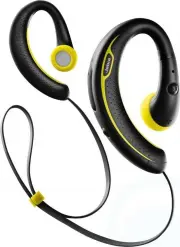
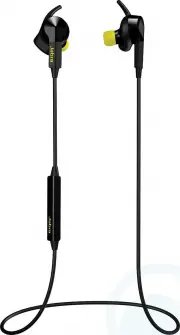
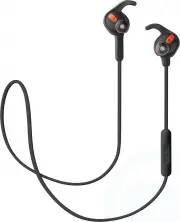
3 JABRA SPORT WIRELESS+ ABOUT YOUR JABRA SPORT WIRELESS+ A On/Off, Answer/End, Play/Pause or Endomondo StatusB MicrophoneC Indicator lightD Volume Control, Skip Track, FM Auto seekE FMF EargelsG Fitclip R L A B R E C D F G WHAT YOUR HEADSET DOES The Jabra SPORT WIRELESS+ lets you enjoy wireless musi...
Page 5 - GET TING STARTED; The lifetime of the battery will be significantly reduced
4 JABRA SPORT WIRELESS+ 5 . Advanced Multiuse™ - connect 2 Bluetooth devices at the same time 6 . AM3D Power Bass for an enhanced music experience7 . 7 different sets of eargels for an individual fit8 . Exclusive features with Endomondo Sports Tracker** a . Instant Feedback; get your Endomondo worko...
Page 6 - TURNING YOUR JABRA SPORT WIRELESS+ ON AND; Put the headset in pairing mode
5 JABRA SPORT WIRELESS+ TURNING YOUR JABRA SPORT WIRELESS+ ON AND OFF To turn your Jabra SPORT WIRELESS+ on press the On/Off button (A) until the indicator light flashes Blue . After the headset has turned on the indicator light will flash green if the battery is medium/high or red if the battery is...
Page 7 - USING YOUR JABRA SPORT WIRELESS+; Change between music tracks*
6 JABRA SPORT WIRELESS+ USING YOUR JABRA SPORT WIRELESS+ Main features:Play or pause music (some phones may require you to start a media player first)* Tap the Play/Pause button (A) to play and pause music . Change between music tracks* Change tracks by pressing for approx . 1 sec . on the Volume up...
Page 8 - Press
7 JABRA SPORT WIRELESS+ Endomondo features (see page 9 for more details): Instant feedback**: With your Jabra SPORT WIRELESS+ stereo headset, you can hear instant performance updates during your workout . Tap the Play/Pause button (A) to get status on speed, distance and duration . Workout control**...
Page 9 - Place each ear piece so the speaker is in front of the ear canal and; Using the Fitclip; Attach the fitclip to the cable, and adjust for optimal fit .
8 JABRA SPORT WIRELESS+ WEARING ST YLE, EARGELS & FITCIP Place each ear piece so the speaker is in front of the ear canal and the ear hook wraps snugly around the back of the ear . The wire should run behind the neck for optimum comfort and freedom of movement .Three different eargels are includ...
Page 10 - HEADSET VISUAL AND AUDIO INDICATORS
9 JABRA SPORT WIRELESS+ HEADSET VISUAL AND AUDIO INDICATORS The Jabra SPORT WIRELESS+ provides status messages using both lights and Voice Guidance . The indicator light on the back side of Jabra SPORT WIRELESS+ indicates different states of the product: Indicator light What the light means Flashing...
Page 11 - Voice Guidance
10 JABRA SPORT WIRELESS+ Voice Guidance Jabra SPORT WIRELESS+ an- nouncements What it means “Welcome! You are now ready for pairing . Go to the Bluetooth menu on your phone . Turn on or enable Bluetooth . Search for devices and select your Jabra hands free device and chose pair or OK . If asked for ...
Page 12 - USING YOUR JABRA SPORT WIRELESS+ WITH THE
11 JABRA SPORT WIRELESS+ ”Power on” Announced when Jabra SPORT WIRELESS+ is turned on . ”Call ended” Announced when call is ended . “Battery level is low/medium/ high” ”Battery level is high” is announced when battery has more than 50% left . If the battery level is between 10% - 50% . “Battery leve...
Page 13 - Tap; USING YOUR JABRA SPORT WIRELESS+ WITH T WO
12 JABRA SPORT WIRELESS+ Instant feedback*: With your Jabra SPORT WIRELESS+ stereo headset, you can hear instant performance updates during your workout . Tap the Play/Pause button (A) to get status on speed, distance and duration . Workout control*: With your Jabra SPORT WIRELESS+ stereo headset, y...
Page 14 - TROUBLESHOOTING & FAQ; How can I use the MultiuseTM feature on my Jabra SPORT
13 JABRA SPORT WIRELESS+ TROUBLESHOOTING & FAQ What is Bluetooth Stereo/A2DP? Bluetooth Stereo enables a wireless connection of stereo audio between two Bluetooth Stereo devices . In order to provide a wireless Bluetooth Stereo connection between two devices, both devices must support the A2DP (...
Page 15 - I cannot use Reject call, Call on hold or Redial; TAKING CARE OF YOUR HEADSET
14 JABRA SPORT WIRELESS+ I cannot use Reject call, Call on hold or Redial These features are dependent on your phone supporting them; please consult your phone’s manual for details . I cannot hear music in the headset Ensure that the headset is connected to your Bluetooth enabled device .You may hav...
Page 16 - GLOSSARY
15 JABRA SPORT WIRELESS+ GLOSSARY 1 Bluetooth is a radio technology that connects devices, such as mobile phones and headsets, without wires or cords over a short distance (approx . 10 meters/33 feet) . Bluetooth is safe to use . It is secure too, so once a connection has been made no-one can listen...