HP 960 - User Manual
A user manual for the HP webcam model TPA-P001CAM covers essential setup procedures, including powering on, mounting, and connecting via USB. Key topics include hardware installation, software requirements (such as downloading the HP Accessory Center app), and basic configuration through platforms like Microsoft Store or Apple App Store. The document also highlights compatibility with multiple languages and regulatory compliance details.
RMN/
型號/
型号
: TPA-P001CAM
© Copyright 2022 HP Development Company, L.P.
The information contained herein is subject to change without notice. The only warranties
for HP products and services are set forth in the express warranty statements accompanying
such products and services. Nothing herein should be construed as constituting an additional
warranty. HP shall not be liable for technical or editorial errors or omissions contained herein.
First Edition: June 2022
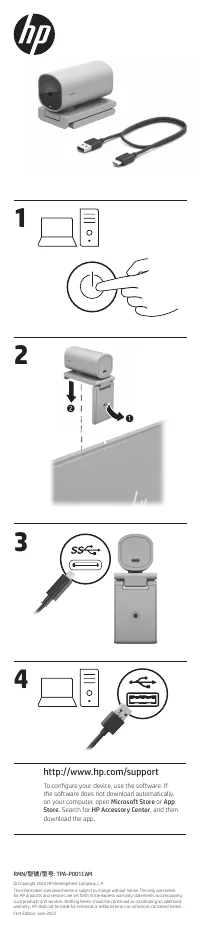
1
2
http://www.hp.com/support
To configure your device, use the software. If
the software does not download automatically,
on your computer, open
Microsoft Store
or
App
Store
. Search for
HP Accessory Center
, and then
download the app.
1
2
3
4
"Loading the manual" means you need to wait until the file loads and becomes available for online reading. Some manuals are very large, and the time they take to appear depends on your internet speed.
Was this manual helpful?
About this manual
- Brand
- HP
- Model
- 960
- Document type
- User Manual
- Category
- Web Camera
- Language(s)
- German, English, Spanish, French, Italian, Dutch, Russian
- Pages
- 2
- File size
- 1.6 MB
- Format


