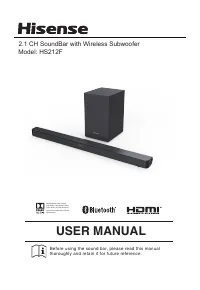
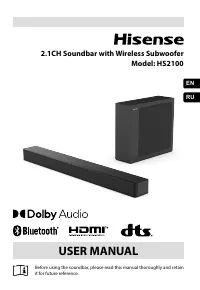
Page 2 - Contents
2 EN Contents Important Safety Instructions 3 Safety ...........................................................................................................................................................................................3Warning ......................................................
Page 3 - Important Safety Instructions; C A U T I O N
3 EN third prong is provided for your safety. If the provided plug does not fit into your outlet, consult an electrician for replacement of the obsolete outlet. 10 Protect the power cord from being walked on or pinched particularly at plugs, convenience receptacles, and the point where they exit fro...
Page 4 - Warning
4 EN Caution: - Use of controls or adjustments or performance of procedures other than those described herein, may result in hazardous radiation exposure or other unsafe operation. - To reduce the risk of fire or electric shock, do not expose this apparatus to rain or moisture. T h e a p p a r a t u...
Page 5 - What’s in the Box
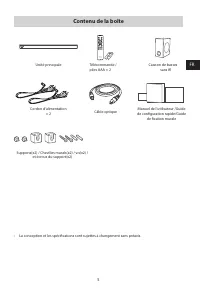
5 EN What’s in the Box • Design and specifications are subject to change without notice. AC Power Cord x 2 Main Unit Remote Control / AAA Batteries x 2 Wireless Subwoofer Bracket(x2) / Wall Plug(x2) / screw(x2) / bracket screw(x2) Optical Cable User Manual/Quick Start Guide/ Wall Mount Guide
Page 6 - Identifying the Parts; Main Unit
6 EN 4 5 6 1 2 3 7 10 8 9 11 12 3 ARC 1 2 Identifying the Parts Main Unit 1 Remote Control Sensor Receive signal from the remote control. 2 Display Window Show the current status. 3 Screws Remove the screws then install the wall mounting screws into the back of the unit. 4 ( ON/OFF ) Button Switch t...
Page 7 - Remote Control; Preparations; Prepare the Remote Control
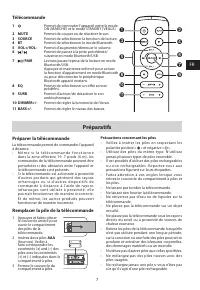
7 EN Remote Control 1 Switch the unit between ON and STANDBY mode. 2 MUTE Mute or resume the sound. 3 SOURCE Select the play function. 4 BT Select the Bluetooth mode. 5 VOL+/VOL- Increase/decrease the volume level. 6 / Skip to previous/next track in Bluetooth/USB mode. 7 /PAIR Play/pause/resume play...
Page 9 - Connections; Connect to OPTICAL Socket; Connect to COAXIAL Socket
9 EN Connections Connect to HDMI (ARC) Socket Your Soundbar supports HDMI with Audio Return Channel (ARC). If your TV is HDMI ARC compliant, you can hear the TV audio through your Soundbar by using a single HDMI cable.1 Using a High Speed HDMI cable (not included), connect the HDMI OUT (ARC)-TO TV c...
Page 10 - Connect to LINE IN Socket; Connect Power; Risk of product damage!; Manual pairing
10 EN Connect to LINE IN Socket A U s e a R C A t o 3 . 5 m m a u d i o c a b l e ( n o t included) to connect the TV’s audio output sockets to the LINE IN socket on the unit. B Use a 3.5mm to 3.5mm audio cable (not included) to connect the T V’s or external audio device headphone socket to the LINE...
Page 11 - Basic Operation
11 EN 2 Then press on the unit or remote control to switch the unit ON . 3 T h e Pa i r i n d i c a t o r o n t h e s u bwo o fe r w i l l become solid when successful. 4 If the Pair indicator still keeps blinking, repeat step 1-3. NOTE: • The subwoofer should be within 6 m of the soundbar in an ope...
Page 12 - Pair Bluetooth-enabled Devices
12 EN LINE IN / OPTICAL / COAXIAL / HDMI ARC Operation 1 Ensure that the unit is connected to the TV or audio device. 2 Press the button repeatedly on the unit or the SOURCE button on the remote control to select the LINE , OPTICAL , COAXIAL, HDMI ARC mode. 3 Operate your audio device directly for p...
Page 13 - USB Operation; Troubleshooting
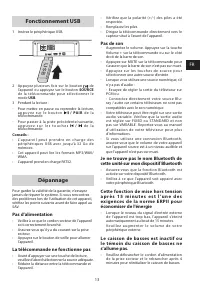
13 EN USB Operation 1 Insert the USB device. 2 Press the button repeatedly on the unit or press the SOURCE button on the remote control to select USB mode. 3 During playback:- To pause or resume play, press the /PAIR button on the remote control. - To skip to the previous/next file, press the / butt...
Page 14 - Specifications; Model Name; USER MANUAL; Barre de son 2.1CH avec caisson de basses sans fil; utiliser la barre de son, veuillez lire attentivement ce; MANUEL DE L'UTILISATEUR
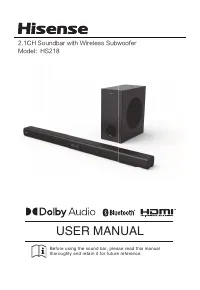
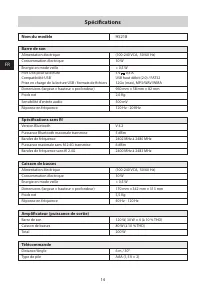
14 EN Specifications Model Name HS218 Soundbar Power Supply AC100-240V~ 50/60Hz Power Consumption 30W Standby Power < 0.5 W USB port for playbackUSB CompatibilityUSB Playback support / file formats 5V 0.5AHi-Speed USB (2.0) / FAT3232G (max) , MP3/WAV/WMA Dimension (WxHxD) 960mm x 58mm x 82mm Net ...
Page 18 - Avertissement; Contenu de la boîte
FR FR 4 MISE EN GARDE relative aux piles Pour éviter les fuites des piles qui pourraient entraîner des blessures corporelles, des dommages matériels ou endommager l’appareil : - Installer toutes les piles correctement, + et - comme indiqué sur l’appareil. - Ne pas mélanger des piles usagées et neuve...
Page 20 - Identification des pièces; Unité principale; Préparatifs; Préparer la télécommande
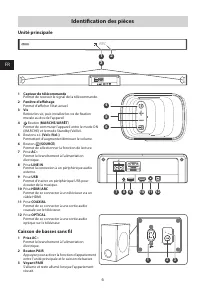
FR FR 6 4 5 6 1 2 3 7 10 8 9 11 12 3 ARC 1 2 Identification des pièces Unité principale 1 Capteur de télécommande Permet de recevoir le signal de la télécommande. 2 Fenêtre d’affichage Permet d’afficher l’état actuel. 3 Vis Retirez les vis, puis installez les vis de fixation murale au dos de l’appar...
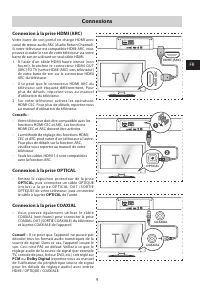
Page 22 - Connexions; Connexion à la prise OPTICAL; Connexion à la prise COAXIAL
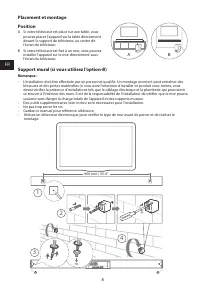
FR FR 8 Placement et montagePosition A Si votre téléviseur est placé sur une table, vous pouvez placer l’appareil sur la table directement devant le support de téléviseur, au centre de l’écran du téléviseur. B Si votre téléviseur est fixé à un mur, vous pouvez installer l’appareil sur le mur directe...
Page 24 - Caisson de basses; Barre de son; Fonctionnement de base
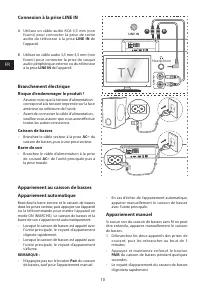
FR FR 10 56:/)'2 .*3/' 8) .*3/'8) .KGJVNUTK )5'>/'2 2/4+/4 )5'>/'2 B A Connexion à la prise LINE IN A Utilisez un câble audio RCA-3,5 mm (non fourni) pour connecter la prise de sor tie audio du téléviseur à la prise LINE IN de l’appareil. B Utilisez un câble audio 3,5 mm-3,5 mm (non fourni) po...
Page 26 - Écouter de la musique à partir d’un
FR FR 12 2 Activez votre appareil Bluetooth et sélectionnez le mode de recherche. « HS218 » apparaîtra dans votre liste de périphériques Bluetooth. - Si vous ne trouvez pas l’appareil, appuyez et maintenez enfoncé le bouton /PAIR de la télécommande pour permettre la recherche. « PAIR » (Appariemen...
Page 28 - Spécifications; Nom du modèle; MANUAL DO UTILIZADOR; Antes de utilizar a barra de som, leia cuidadosamente; Som 2.1CH com Subwoofer sem fios
FR FR 14 Spécifications Nom du modèle HS218 Barre de son Alimentation électrique (100-240 VCA, 50/60 Hz) Consommation électrique 30 W énergie en mode veille < 0,5 W Port USB pour la lectureCompatibilité USBPrise en charge de la lecture USB / formats de fichiers 5 V 0,5 AUSB haut débit (2.0) / FAT...
Page 30 - Conteúdo
PT PT 2 Conteúdo Instruções de segurança importantes 3 Segurança ..................................................................................................................................................................................3Aviso .....................................................
Page 32 - Instruções de segurança importantes
PT PT 3 e um terceiro pino terra. A lâmina larga ou o terceiro pino é facultado para sua segurança. S e a f i c h a fo r n e c i d a n ã o e n c a i x a r n a s u a tomada, consulte um eletricista para trocar a tomada obsoleta. 10 Proteja o cabo elétrico de ser pisado ou dobrado, principalmente nas ...
Page 34 - O que está na caixa; Identificar as peças; Aparelho principal
PT PT 5 O que está na caixa Cabo de alimentação CA × 2 Aparelho principal Suportes para montagem na parede Cabo ótico Manual do utilizador/Papel de padrão Guia de início rápido Controlo remoto / Pilhas AAA × 2 Subwoofer sem fios • Design e especificações sujeitas a alterações sem aviso. 6 4 5 6 1 2 ...
Page 36 - Preparações; Montagem na parede (se utilizar a opção B)
PT PT 7 Controlo remoto 1 Ligar o aparelho ou colocar em modo Standby. 2 MUTE Silencia ou retoma o som. 3 SOURCE Selecionar a função de reprodução. 4 BT Selecionar o modo Bluetooth. 5 VOL+/VOL- Aumentar/reduzir o nível do volume. 6 / Saltar para a faixa anterior/seguinte no modo Bluetooth/USB. 7 /PA...
Page 38 - Ligações; Ligar a tomada OPTICAL; Ligar à tomada LINE IN; Risco de danos ao produto!; Barra de som; Emparelhar manual
PT PT 9 Ligações Ligar à tomada HDMI (ARC) A sua barra de som supor ta HDMI com Canal de retorno áudio (ARC). Se a sua T V estiver em conformidade com HDMI ARC, irá poder ouvir o áudio da sua T V através da sua barra de som, através de um simples cabo HDMI.1 Com um cabo HDMI de alta velocidade (não ...
Page 42 - Funcionamento USB; Resolução de problemas; Especificações; Nome do modelo
PT PT 13 Funcionamento USB 1 Insira um dispositivo USB. 2 Prima repetidamente a tecla na unidade ou prima a tecla SOURCE no controlo remoto para selecionar o modo USB . 3 Durante a reprodução:- Para pausar ou retomar a reprodução, prima a tecla /PAIR no controlo remoto. - Para saltar para faixa ante...