Page 2 - Using the Control Panel; English
2 Your WorkForce Pro WP-4530 Your WorkForce Pro WP-4530 After you set up your WorkForce ® Pro WP-4530 (see the Start Here sheet), turn to this Quick Guide and your online User’s Guide for instructions on using your product. Note: Your product may look different from the illustrations in this guide, ...
Page 3 - Using Special Papers
Using Special Papers 3 Using Special Papers ■ You can load letter-, A4-, or legal-size plain paper (or Epson Bright White paper) in the cassette, as described on the Start Here sheet. ■ You can use the rear multipurpose (MP) tray to load envelopes and various sizes of special papers. Epson offers a ...
Page 5 - Using the Scanner Glass; Using the Automatic Document Feeder
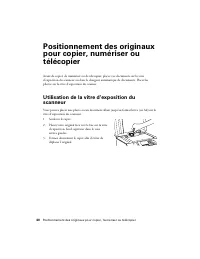
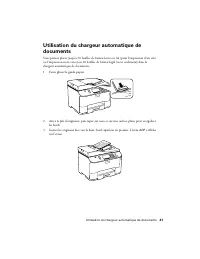
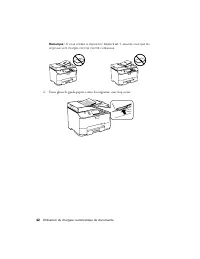
Placing Originals for Copying, Scanning, or Faxing 5 Placing Originals for Copying, Scanning, or Faxing Before you copy, scan, or fax, place your documents on the scanner glass or in the Automatic Document Feeder (ADF). Place photos on the scanner glass. Using the Scanner Glass You can place a photo...
Page 7 - Printing; Printing in Windows
Printing 7 Printing This section describes the basic steps for printing from a Windows ® or Mac ® computer. For detailed instructions on printing, see the online User’s Guide . Before you start, make sure you have installed your printer software and connected your product to your computer, as descri...
Page 8 - Printing With a Mac
8 Printing With a Mac Printing With a Mac Follow the steps below to print from Mac OS ® X 10.5 to 10.6. Note: If you’re printing from Mac OS X 10.4, see your online User’s Guide for instructions. 1. Open a photo or document in a printing program, open the File menu, and select Print . 2. Select your...
Page 9 - Selecting the Correct Paper Type
Selecting the Correct Paper Type 9 5. For automatic duplex printing, choose Two-sided Printing Settings from the pop- up menu, and select the binding option you want. 6. Choose any other printing options you may need from the pop-up menu. See the online User’s Guide for details, or click ? when it a...
Page 10 - Faxing a Document; Connecting a Phone or Answering Machine
10 Faxing a Document Faxing a Document Your product lets you send faxes by entering fax numbers or selecting entries from a speed dial list. Using the ADF, you can fax up to 30 pages at a time. Note: You can also send or receive a fax from your computer using the Epson FAX Utility. For more informat...
Page 11 - Setting Up Fax Features; Entering Fax Header Information; Entering Your Sender Name
Setting Up Fax Features 11 In Auto Answer mode, if the incoming call is a fax and you pick up the phone or the answering machine answers, the product automatically begins receiving the fax. If the other party is a caller, the phone can be used as normal or a message can be left on the answering mach...
Page 12 - Entering Your Phone Number; Selecting the Number of Rings to Answer; Sending a Fax From the Control Panel
12 Sending a Fax From the Control Panel Entering Your Phone Number 1. Select Your Phone Number from the Header menu. 2. Use the numeric buttons on the control panel to enter your phone number, up to 20 digits. You don’t need to use dashes. Use the # button to type the + symbol for an international n...
Page 13 - Receiving Faxes
Receiving Faxes 13 ■ If you are scanning with the ADF (see page 5), your document is automatically scanned and faxed. ■ If you placed your document on the scanner glass, you can scan additional pages after the first one is sent. ■ If the fax number is busy, you see a redialing message and the produc...
Page 14 - Manually Receive a Fax
14 Receiving Faxes Manually Receive a Fax If you use a voicemail service provided by the phone company instead of an answering machine, you should set the product to receive faxes manually. Then you can check for a fax tone from the sending fax machine and press a button on the touch screen to recei...
Page 15 - Quick Scanning With the Scan Button
Scanning a Document or Photo 15 Scanning a Document or Photo You can use your product to scan original documents and photos and save them on your computer or on a thumb drive or other USB device. The u Scan button lets you scan quickly using preselected settings, or you can use the Epson Scan softwa...
Page 16 - Scanning With Epson Scan Software
16 Scanning With Epson Scan Software ■ Scan to PC (Email) automatically scans a photo, resizes it, launches your email application, and attaches a JPG image to a new outgoing message. This works with MAPI-type email such as Microsoft ® Outlook, Windows Live Mail, Mac Mail, and Entourage, but not web...
Page 17 - Scanning With Mac OS X 10.6
Scanning With Mac OS X 10.6 17 3. Epson Scan opens in Office Mode the first time you use it. (You can change the scan mode using the Mode selector in the upper right corner.) Note: You cannot use Home Mode to scan with the ADF. 4. Click Scan . The image is scanned and you see its icon in Windows Exp...
Page 18 - Maintaining Your Product; Checking the Print Head Nozzles
18 Maintaining Your Product Maintaining Your Product Follow the instructions in this chapter to check and clean the print head nozzles, check ink levels, and replace ink cartridges. If you need to align the print head, or replace the maintenance box, see the online User’s Guide . Checking the Print ...
Page 19 - Cleaning the Print Head; Checking Ink Levels
Cleaning the Print Head 19 Cleaning the Print Head If print quality has declined and the nozzle check indicates clogged nozzles, you can clean the print head. Print head cleaning uses ink, so clean it only if necessary. Note: You cannot clean the print head if an ink cartridge is expended, and may n...
Page 20 - Purchasing Epson Ink Cartridges
20 Purchasing Epson Ink Cartridges A window may also appear on your computer screen when you try to print when ink is low. This window can optionally display ink offers and other updates from Epson. Note: To disable checking for ink offers or updates from Epson, see the instructions in your online U...
Page 21 - Replacing Ink Cartridges
Replacing Ink Cartridges 21 Replacing Ink Cartridges Make sure you have a new ink cartridge before you begin. Caution: Do not open ink cartridge packages until you are ready to install the ink. Cartridges are vacuum packed to maintain reliability. Leave the expended cartridge installed until you hav...
Page 23 - Solving Problems; Problems and Solutions; Network Setup and Printing Problems
Solving Problems 23 Solving Problems Check the messages on the display screen to diagnose the cause of most problems. For more information, press the Help button on the product. You can also check the basic troubleshooting suggestions below, or in your online User’s Guide . Problems and Solutions Ch...
Page 24 - Cannot scan over the network; Print a Network Status Sheet; Printing and Copying Problems
24 Problems and Solutions Cannot scan over the network ■ Epson Scan is not available in Mac OS X 10.6; see page 17 for scanning instructions. ■ If you cannot scan from the product’s control panel, make sure you restarted your computer after installing the product software. Make sure Epson Event Mana...
Page 25 - Paper Feeding Problems
Problems and Solutions 25 Paper Feeding Problems If paper doesn’t feed correctly, remove the paper and fan the sheets, then reload them as shown on the Start Here sheet. Don’t load paper above the tabs on the edge guides. If paper has jammed, follow the steps on the LCD screen. If necessary, check t...
Page 26 - ADF Document Feeding Problems
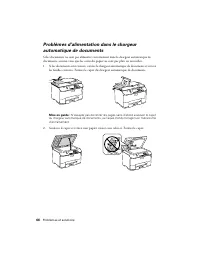
26 Problems and Solutions 4. Remove the paper cassette, then check for jammed paper inside the product. 5. Reload paper in the cassette, then carefully insert it back into the product. ADF Document Feeding Problems If documents don’t feed correctly in the Automatic Document Feeder (ADF), make sure t...
Page 28 - Where to Get Help; Purchase Supplies and Accessories
28 Where to Get Help ■ The ink cartridges may be low on ink. Check your cartridge levels (see page 19) and replace cartridges, if necessary (see page 21). ■ Clean the scanner glass with a soft, dry, lint-free cloth (paper towels are not recommended), or use a small amount of glass cleaner on a soft ...
Page 29 - Notices; Important Safety Instructions
Notices 29 Notices Important Safety Instructions Before using your Epson product, read and follow these safety instructions: ■ Be sure to follow all warnings and instructions marked on the product. ■ Use only the type of power source indicated on the product label. ■ Use only the power cord that com...
Page 30 - LCD Screen Safety Instructions
30 Important Safety Instructions ■ When connecting the printer to a computer or other device with a cable, ensure the correct orientation of the connectors. Each connector has only one correct orientation. Inserting a connector in the wrong orientation may damage both devices connected by the cable....
Page 31 - Ink Cartridge Safety Instructions; Telephone Equipment Safety Instructions
Important Safety Instructions 31 Ink Cartridge Safety Instructions ■ Keep ink cartridges out of the reach of children. ■ Be careful when you handle used ink cartridges; there may be ink remaining around the ink supply port. If ink gets on your skin, wash it off with soap and water. If it gets in you...
Page 32 - Declaration of Conformity; FCC Compliance Statement; For United States Users
32 Declaration of Conformity Declaration of Conformity According to 47CFR, Part 2 and 15 for: Class B Personal Computers and Peripherals; and/or CPU Boards and Power Supplies used with Class B Personal Computers: We: Epson America, Inc. Located at: MS 3-133840 Kilroy Airport WayLong Beach, CA 90806T...
Page 34 - WARNING; For Canadian Users
34 Epson America, Inc., Limited Warranty ■ Connect the equipment into an outlet on a circuit different from that to which the receiver is connected. ■ Consult the dealer or an experienced radio/TV technician for help. WARNING The connection of a non-shielded equipment interface cable to this equipme...
Page 36 - Copyright Notice; Responsible Use of Copyrighted Materials
36 Copyright Notice To find the Epson Authorized Reseller nearest you, visit our website at: http://www.epson.com. To find the Epson Customer Care Center nearest you, visit http://www.epson.com/support. You can also write to: Epson America, Inc., P.O. Box 93012, Long Beach, CA 90809-3012 Copyright N...
Page 37 - Votre WorkForce Pro WP-4530; Utilisation du panneau de commande; Français
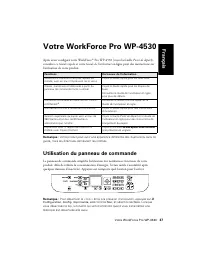
Votre WorkForce Pro WP-4530 37 Votre WorkForce Pro WP-4530 Après avoir configuré votre WorkForce ® Pro WP-4530 (voyez la feuille Point de départ ), consultez ce Guide rapide et votre Guide de l’utilisateur en ligne pour des instructions sur l’utilisation de votre produit. Remarque : Votre produit pe...
Page 38 - Utilisation de papiers spéciaux
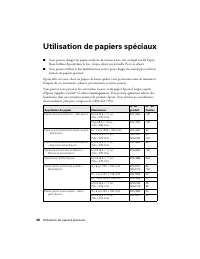
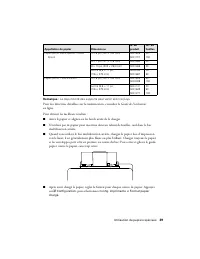
38 Utilisation de papiers spéciaux Utilisation de papiers spéciaux ■ Vous pouvez charger du papier ordinaire de format lettre, A4, ou légal (ou du Papier blanc brillant Epson) dans le bac, tel que décrit sur la feuille Point de départ . ■ Vous pouvez utiliser le bac multifonction arrière pour charge...
Page 43 - Impression; Impression sous Windows
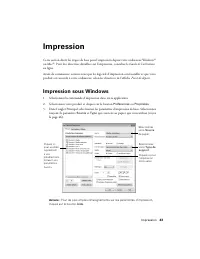
Impression 43 Impression Cette section décrit les étapes de base pour l’impression depuis votre ordinateur Windows ® ou Mac ® . Pour des directives détaillées sur l’impression, consultez le Guide de l’utilisateur en ligne. Avant de commencer, assurez-vous que les logiciels d’impression sont installé...
Page 44 - Impression sous Mac
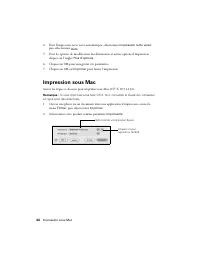
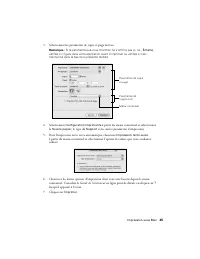
44 Impression sous Mac 4. Pour l’impression recto verso automatique, sélectionnez Impression recto verso , puis sélectionnez Auto . 5. Pour les options de modification des dimensions et autres options d’impression, cliquez sur l’onglet Plus d’options . 6. Cliquez sur OK pour enregistrer vos paramètr...
Page 46 - Sélection du type de papier correct
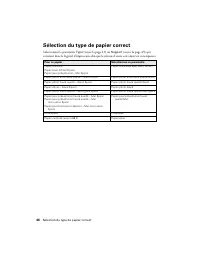
46 Sélection du type de papier correct Sélection du type de papier correct Sélectionnez le paramètre Type (voyez la page 43) ou Support (voyez la page 45) qui convient dans le logiciel d’impression afin que le niveau d’encre soit ajusté en conséquence. Pour ce papier Sélectionnez ce paramètre Papier...
Page 48 - Numérisation à l’aide du logiciel Epson Scan
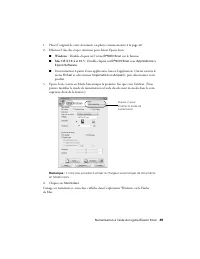
48 Numérisation à l’aide du logiciel Epson Scan 3. Sélectionnez l’une des options suivantes : ■ Numériser vers périph. USB vous permet de numériser et d’enregistrer l’image sur une clé de mémoire. Vous pouvez sélectionner le format de fichier, la résolution et d’autres paramètres, y compris la numér...
Page 50 - Numérisation sous Mac OS X 10.6
50 Numérisation sous Mac OS X 10.6 Numérisation sous Mac OS X 10.6 Vous pouvez numériser les originaux de documents et de photos et les sauvegarder sous forme de fichiers sur votre ordinateur. 1. Ouvrez une application d’édition d’images tel qu’Aperçu et sélectionnez Importer depuis le scanner à par...
Page 51 - Télécopie d’un document; Connexion d’un téléphone ou d’un répondeur
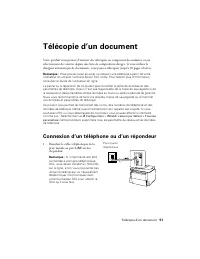
Télécopie d’un document 51 Télécopie d’un document Votre produit vous permet d’envoyer des télécopies en composant des numéros ou en sélectionnant des entrées depuis une liste de composition abrégée. Si vous utilisez le chargeur automatique de documents, vous pouvez télécopier jusqu’à 30 pages à la ...
Page 52 - Configuration des fonctions de télécopie; Entrée des renseignements d’en-tête
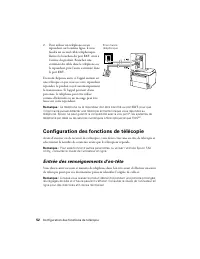
52 Configuration des fonctions de télécopie 2. Pour utiliser un téléphone ou un répondeur sur la même ligne, il vous faudra un second câble téléphonique. Retirez le bouchon du port EXT. situé à l’arrière du produit. Branchez une extrémité du câble dans le téléphone ou le répondeur, puis l’autre extr...
Page 53 - Entrée de votre nom d’expéditeur; Entrée de votre numéro de téléphone; Sélection du nombre de sonneries avant réponse
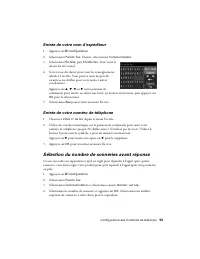
Configuration des fonctions de télécopie 53 Entrée de votre nom d’expéditeur 1. Appuyez sur F Configuration . 2. Sélectionnez Param. fax . Ensuite, sélectionnez Communication . 3. Sélectionnez En-tête , puis En-tête fax . Vous voyez le clavier du fax virtuel. 4. Servez-vous du clavier pour saisir le...
Page 55 - Réception d’une télécopie; Réception manuelle d’une télécopie
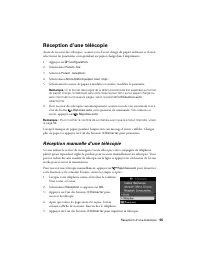
Réception d’une télécopie 55 Réception d’une télécopie Avant de recevoir des télécopies, assurez-vous d’avoir chargé du papier ordinaire et d’avoir sélectionné les paramètres correspondant au papier chargé dans l’imprimante. 1. Appuyez sur F Configuration . 2. Sélectionnez Param. fax . 3. Sélection ...
Page 56 - Entretien de votre produit; Vérification des buses de la tête d’impression
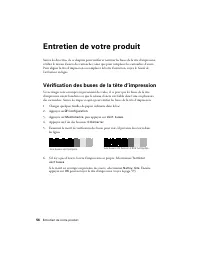
56 Entretien de votre produit Entretien de votre produit Suivez les directives de ce chapitre pour vérifier et nettoyer les buses de la tête d’impression, vérifier le niveau d’encre des cartouches, ainsi que pour remplacer les cartouches d’encre. Pour aligner la tête d’impression ou remplacer la boî...
Page 57 - Nettoyage de la tête d’impression
Nettoyage de la tête d’impression 57 Nettoyage de la tête d’impression Si la qualité d’impression s’est dégradée et que le motif de test indique que les buses sont bouchées, vous pouvez nettoyer la tête d’impression. N’exécutez un nettoyage de la tête d’impression que lorsque cela est nécessaire, ca...
Page 58 - Vérification des niveaux d’encre; Achat de cartouches d’encre Epson
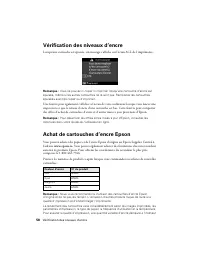
58 Vérification des niveaux d’encre Vérification des niveaux d’encre Lorsqu’une cartouche est épuisée, un message s’affiche sur l’écran ACL de l’imprimante : Remarque : Vous ne pouvez ni copier ni imprimer lorsqu’une cartouche d’encre est épuisée, même si les autres cartouches ne le sont pas. Rempla...
Page 59 - Remplacement des cartouches d’encre
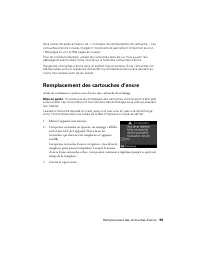
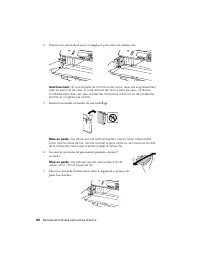
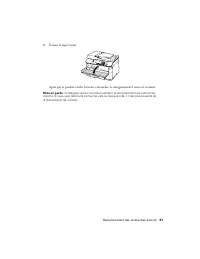
Remplacement des cartouches d’encre 59 de la cartouche après activation de « l’indicateur de remplacement de cartouche ». Les cartouches d’encre incluses chargent l’imprimante et permettent d’imprimer environ 1000 pages en noir et 900 pages en couleur. Pour les meilleurs résultats, utilisez les cart...
Page 62 - Résolution des problèmes; Problèmes et solutions; Problèmes de configuration et d’impression réseau
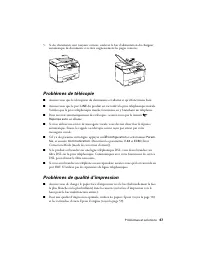
62 Résolution des problèmes Résolution des problèmes Vérifiez les messages à l’écran d’affichage pour diagnostiquer la cause de la plupart des problèmes. Pour obtenir plus d’informations, appuyez sur le bouton Aide sur le produit. Vous pouvez aussi vérifier les suggestions de dépannage de base ci-de...
Page 63 - Impossible de numériser sur le réseau; Impression d’une feuille d’état réseau; Problèmes d’impression et de copie
Problèmes et solutions 63 ■ Désactivez temporairement le pare-feu pour voir s’il ne serait pas à l’origine du problème. Communiquez avec le fabricant du pare-feu pour obtenir de l’aide. ■ Assurez-vous que le pare-feu ou le logiciel de sécurité n’est pas configuré pour bloquer le port 3629 (TCP/UDP)....
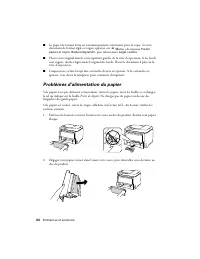
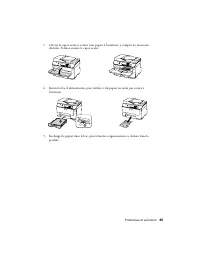
Page 64 - Problèmes d’alimentation du papier
64 Problèmes et solutions ■ Le papier de format lettre est automatiquement sélectionné pour la copie. Si votre document de format légal est rogné, appuyez sur x Menu , sélectionnez Param papier et copie , Réduire/Agrandir , puis sélectionnez Légal->Lettre . ■ Placez votre original dans le coin su...
Page 68 - Comment obtenir de l’aide
68 Comment obtenir de l’aide ■ Assurez-vous que les paramètres de taille du papier sélectionnés sur le panneau de commande ou dans le logiciel d’imprimante corespondent au papier chargé dans l’imprimante (voyez la page 46). ■ Si vous remarquez des lignes claires ou foncées sur vos tirages ou si ces ...
Page 69 - Achat de fournitures et d’accessoires; Soutien technique pour les autres logiciels
Comment obtenir de l’aide 69 Achat de fournitures et d’accessoires Vous pouvez acheter du papier et de l’encre Epson d’origine au Epson Supplies Central à l’adresse www.epson.ca . Vous pouvez également acheter des fournitures chez un revendeur autorisé de produits Epson. Pour obtenir les coordonnées...
Page 70 - Avis; Consignes de sécurité importantes
70 Avis Avis Consignes de sécurité importantes Avant d’utiliser votre produit Epson, lisez et suivez les consignes de sécurité ci-après: ■ Observez les directives et les avertissements indiqués sur le produit. ■ N’utilisez que le type de source d’alimentation indiqué sur l’étiquette du produit. ■ N’...
Page 72 - Consignes de sécurité concernant l’écran ACL
72 Consignes de sécurité importantes Consignes de sécurité concernant l’écran ACL ■ Utilisez seulement un chiffon sec et doux pour nettoyer l’écran ACL. N’utilisez pas de produits de nettoyage liquides ou chimiques. ■ Si l’écran d’affichage est endommagé, communiquez avec votre revendeur. Si la solu...
Page 73 - Déclaration de conformité; Déclaration de conformité FCC; Pour les utilisateurs des États-Unis
Déclaration de conformité 73 Consignes de sécurité concernant l’équipement téléphonique Lorsque vous utilisez de l’équipement téléphonique, vous devez prendre des précautions de base pour réduire le risque d’incendie, d’électrocution et de blessures, notamment : ■ Évitez d’utiliser un téléphone pend...
Page 75 - AVERTISSEMENT; Pour les utilisateurs du Canada
Déclaration de conformité FCC 75 renseignements dans votre télécopieur, suivez les directives de la section « Entrée des renseignements d’en-tête » à la page 52. Selon les consignes de sécurité en électricité de la FCC, nous recommandons d’installer un suppresseur de transitoires CA dans la prise CA...
Page 77 - Avis sur les droits d’auteur
Avis sur les droits d’auteur 77 problèmes logiciels, d’une interaction avec des produits d’une autre marque qu’Epson ou d’une intervention effectuée par un tiers autre qu’un réparateur Epson agréé. Si une anomalie signalée ne peut être décelée ni reproduite, les frais engagés seront à votre charge. ...
Page 78 - Marques de commerce
78 Avis sur les droits d’auteur Ni Seiko Epson Corporation ni ses filiales ne sauraient être tenues responsables vis-à-vis de l’acheteur de ce produit, ou de tiers, des dommages, pertes, frais ou dépenses découlant : d’un accident, d’une utilisation incorrecte ou abusive, de modifications non autori...