Epson S041586 - Troubleshooting Guide

Epson S041586 – Troubleshooting Guide, read for free online in PDF format. We hope this helps you resolve any issues you may have. If you have further questions, please contact us through the contact form.


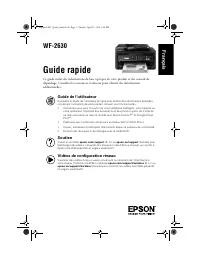
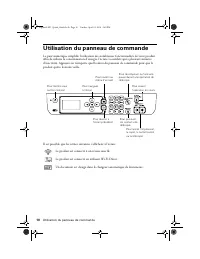
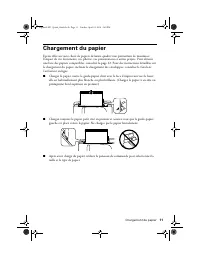
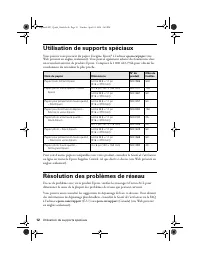
Table of Contents:
- Page 2 – Using the Control Panel
- Page 3 – Loading Paper
- Page 4 – Using Special Papers
- Page 5 – Solving Network Problems
- Page 6 – Notices; Declaration of Conformity
- Page 8 – Copyright Notice
- Page 9 – Guide rapide; Soutien; Français
- Page 10 – Utilisation du panneau de commande
- Page 11 – Chargement du papier
- Page 12 – Utilisation de supports spéciaux; Résolution des problèmes de réseau
- Page 14 – Avis; Déclaration de conformité
- Page 16 – Avis sur les droits d’auteur
WF-2630
Quick Guide
This guide includes basic information about your product and troubleshooting tips. See
the resources below for additional information.
User’s Guide
See the online
User’s Guide
for detailed information on using your product, including
these features:
•
Connect wirelessly from your smartphone, tablet, or computer. Print documents
and photos from across the room or around the world with Epson Connect
TM
and
Google Cloud Print
TM
.
•
Easily set up networking—Wi-Fi and Wi-Fi Direct.
•
Copy, scan, and fax directly from the control panel.
•
Save paper and power with ECO mode.
Support
Visit
epson.com/support
(U.S.) or
epson.ca/support
(Canada) where you can
download drivers, view manuals, see FAQs, or e-mail Epson support.
Wireless Videos
View easy-to-follow videos on connecting the printer to your network. Visit
epson.com/support/wireless
(U.S.) or
epson.ca/support/wireless
(Canada) to
view the videos.
English
Raphael2-FD_Quick_Guide.book Page 1 Tuesday, April 22, 2014 2:40 PM
"Loading the manual" means you need to wait until the file loads and becomes available for online reading. Some manuals are very large, and the time they take to appear depends on your internet speed.
Other Manuals for Epson S041586
Summary
2 Using the Control Panel Using the Control Panel The keypad makes it easy to use all the features of your product. To save energy, the screen turns off after several minutes of inactivity. Press any button to wake it up. You may see the following icons on the screen: The product is connected to a w...
Loading Paper 3 Loading Paper Epson offers a wide array of high quality papers, making it easy to maximize the impact of your documents, photos, presentations, and other projects. For a list of compatible papers, see page 4. For detailed paper loading instructions, including loading envelopes, see t...
4 Using Special Papers Using Special Papers You can purchase genuine Epson ® paper at epson.com/paper (U.S. sales) or epson.ca/paper (Canadian sales). You can also purchase supplies from an Epson authorized reseller. To find the nearest one, call 800-GO-EPSON (800-463-7766). To view additional paper...




