Page 2 - Using the Control Panel; Viewing the LCD screen
2 Using the Control Panel Using the Control Panel The control panel makes it easy to use all the features of your product. Viewing the LCD screen To save energy, the LCD screen goes dark after several minutes of inactivity. Press any button to wake it up. For more information on the icons displayed ...
Page 3 - Loading Paper
Loading Paper 3 Loading Paper 1. Slide the edge guide to the right. 2. Load paper, glossy or printable side up and short edge first, against the left side of the paper feed slot. 3. Slide the edge guide against the paper, but not too tightly. pm_400_quick_guide.book Page 3 Wednesday, July 8, 2015 3:...
Page 4 - Selecting the Correct Paper Type
4 Selecting the Correct Paper Type 4. Check the paper size and paper type settings displayed on the LCD screen and confirm or change the settings. Note: If you don’t see the above screen, this option may have been disabled on the product. To enable this option, press and select Setup > Printer Se...
Page 5 - Printing; Mobile Printing; Epson Connect
Printing 5 Printing This section describes basic steps to print with your product. For detailed instructions on any of these printing options, see the online User’s Guide . Mobile Printing To print from a mobile device, your product must first be set up for wireless printing. See the Start Here shee...
Page 6 - Printing From a Memory Card; Supported Memory Cards
6 Printing From a Memory Card The following Epson Connect solutions are available for your product: ■ Epson Remote Print: When Epson Remote Print is installed on your computer, you can select your product through the File > Print command from anywhere in the world. (An Internet connection is requ...
Page 7 - Inserting the Card; Removing the Card; Windows
Printing From a Memory Card 7 Inserting the Card 1. Make sure your product is turned on. 2. Remove the cap covering the memory card slot. 3. Insert your card as shown. Caution: Do not force the card into the slot; it won’t go in all the way. Keep the memory card slot cap out of the reach of children...
Page 8 - Printing Photos From the LCD Screen; or
8 Printing From a Memory Card Printing Photos From the LCD Screen You can select individual photos for printing as you view them on the LCD screen. 1. Make sure you loaded paper and inserted a memory card in the product. 2. Press if necessary, then select Print Photos and press the OK button. 3. Sel...
Page 9 - Printing Photos From a Digital Camera; Printing From a Computer
Printing Photos From a Digital Camera 9 Printing Photos From a Digital Camera If you have a digital camera that supports PictBridge printing, you can print your photos directly from the camera using a USB cable. Check your camera manual to see if it is compatible. If you want to print from a digital...
Page 10 - Maintenance
10 Maintenance Maintenance Follow the instructions in this chapter to check and clean the print head nozzles, clean the paper path, and replace the ink cartridge. To align the print head, see your online User’s Guide . Checking and Cleaning the Print Head Nozzles If your printouts are faint or have ...
Page 11 - Cleaning the Paper Path; Checking Ink Levels
Cleaning the Paper Path 11 5. Do one of the following: ■ If there are no gaps, the print head is clean. Select Finish Nozzle Check and press the OK button. ■ If there are gaps or the pattern is faint, select Head Cleaning and press the OK button. Then press x to clean the print head. Caution: Never ...
Page 12 - Replacing the Ink Cartridge
12 Replacing the Ink Cartridge Replacing the Ink Cartridge Make sure you have a new ink cartridge before you begin. You must install the new cartridge immediately after removing the old one. Caution: Do not open the ink cartridge package until you are ready to install the ink. Cartridges are vacuum ...
Page 15 - Purchasing Epson Ink Cartridges and Paper
Purchasing Epson Ink Cartridges and Paper 15 Purchasing Epson Ink Cartridges and Paper You can purchase genuine Epson ink and paper at epson.com/ink3 (U.S. sales) or epson.ca (Canadian sales). You can also purchase supplies from an Epson authorized reseller. To find the nearest one, call 800-GO-EPSO...
Page 16 - Transporting Your Product
16 Transporting Your Product Transporting Your Product If you need to store or transport your product, prepare it as described here. Caution: ■ Avoid tilting the product, placing it vertically, or turning it upside down; otherwise ink may leak. ■ Leave the ink cartridge installed. Removing the cartr...
Page 17 - Solving Problems; Problems and Solutions; Product Status Messages
Solving Problems 17 Solving Problems If you have a problem with your product, check the messages on the control panel to diagnose the cause. You can also check “Problems and Solutions” below for basic troubleshooting suggestions, or see your online User’s Guide for more detailed help. Note: Breakdow...
Page 18 - Network Problems; Check Network Status; Printing Problems
18 Problems and Solutions Network Problems ■ Try connecting to the router or access point with your computer or another device to confirm that it is working correctly. ■ The product can only connect to a network that supports 2.4 GHz. If you are using a 5 GHz wireless router, set the router to opera...
Page 19 - Paper Feeding Problems; Print Quality Problems
Problems and Solutions 19 ■ Run a nozzle check to see if any of the print head nozzles are clogged. Then clean the print head, if necessary. ■ You may need to align the print head. Paper Feeding Problems ■ If paper doesn’t feed, remove it from the paper feed slot. Flip through the stack to separate ...
Page 20 - Where to Get Help; Internet Support; Purchase Supplies and Accessories
20 Where to Get Help Where to Get Help Internet Support Visit Epson’s support website at epson.com/support (U.S.) or epson.ca/support (Canada) and select your product for solutions to common problems. You can download drivers and documentation, get FAQs, or e-mail Epson. Speak to a Support Represent...
Page 21 - Notices; Declaration of Conformity
Notices 21 Notices Note: See your online User’s Guide for safety and use instructions. Declaration of Conformity According to 47CFR, Part 2 and 15 for: Class B Personal Computers and Peripherals; and/or CPU Boards and Power Supplies used with Class B Personal Computers: We: Epson America, Inc. Locat...
Page 23 - Copyright Notice; Responsible Use of Copyrighted Materials
Copyright Notice 23 award rendered by the arbitrator may be entered in any court having jurisdiction thereof. This Agreement shall be construed in accordance with the laws of the State of California, except this arbitration clause which shall be construed in accordance with the Federal Arbitration A...
Page 25 - Guide rapide; Soutien; Français
PM-400 Guide rapide Ce guide inclut des informations de base à propos de votre produit et des conseils de dépannage. Consultez les ressources ci-dessous pour obtenir des informations additionnelles. Guide de l’utilisateur Consultez le Guide de l’utilisateur en ligne pour obtenir des informations dét...
Page 26 - Visionnement de l’écran ACL
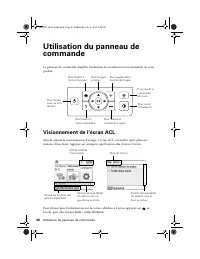
26 Utilisation du panneau de commande Utilisation du panneau de commande Le panneau de commande simplifie l’utilisation des nombreuses fonctionnalités de votre produit. Visionnement de l’écran ACL Afin de réduire la consommation d’énergie, l’écran ACL s’assombrit après plusieurs minutes d’inactivité...
Page 27 - Chargement du papier
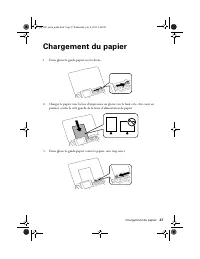
Chargement du papier 27 Chargement du papier 1. Faites glisser le guide-papier vers la droite. 2. Chargez le papier, avec la face d’impression ou glacée vers le haut et le côté court en premier, contre le côté gauche de la fente d’alimentation de papier. 3. Faites glisser le guide-papier contre le p...
Page 28 - Sélection du type de support approprié
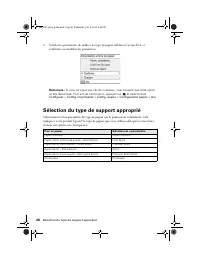
28 Sélection du type de support approprié 4. Vérifiez les paramètres de taille et de type de papier affichés à l’écran ACL et confirmez ou modifiez les paramètres. Remarque : Si vous ne voyez pas l’écran ci-dessus, il est possible que cette option ait été désactivée. Pour activer cette option, appuy...
Page 29 - Impression; Impression mobile
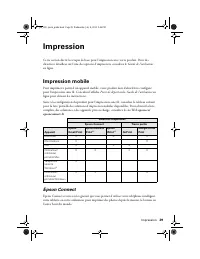
Impression 29 Impression Cette section décrit les étapes de base pour l’impression avec votre produit. Pour des directives détaillées sur l’une des options d’impression, consultez le Guide de l’utilisateur en ligne. Impression mobile Pour imprimer à partir d’un appareil mobile, votre produit doit d’...
Page 30 - Impression depuis une carte mémoire
30 Impression depuis une carte mémoire Certaines solutions (comme Epson Remote Print et Epson Email Print) nécessitent que votre produit soit enregistré et connecté à Internet. Consultez le site Web epson.ca/ epsonconnect-fr et suivez les instructions à l’écran afin d’enregistrer votre produit. Rema...
Page 31 - Cartes mémoire prises en charge
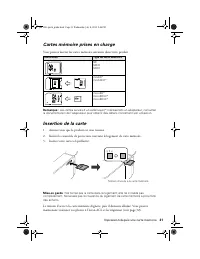
Impression depuis une carte mémoire 31 Cartes mémoire prises en charge Vous pouvez insérer les cartes mémoire suivantes dans votre produit : Remarque : Les cartes suivies d’un astérisque (*) nécessitent un adaptateur; consultez la documentation de l’adaptateur pour obtenir des détails concernant son...
Page 32 - Retrait de la carte; Impression de photos depuis l’écran ACL; ou
32 Impression depuis une carte mémoire Retrait de la carte Lorsque vous avez terminé d’imprimer vos photos, suivez ces étapes afin de retirer la carte : 1. Assurez-vous que le témoin d’accès à la carte mémoire ne clignote pas. Mise en garde : Ne retirez pas la carte et n’éteignez pas le produit lors...
Page 34 - Impression depuis un ordinateur
34 Impression depuis un ordinateur 6. Branchez le câble USB fourni avec votre appareil photo au port USB situé sur le côté de votre produit. 7. Allumez votre appareil photo. 8. Suivez les instructions fournies avec votre appareil photo pour sélectionner et imprimer vos photos. Lorsque vous avez term...
Page 35 - Entretien
Entretien 35 Entretien Suivez les instructions dans ce chapitre afin de vérifier et nettoyer les buses de la tête d’impression, de nettoyer le circuit papier et de remplacer la cartouche d’encre. Pour aligner la tête d’impression, consultez le Guide de l’utilisateur en ligne. Vérification et nettoya...
Page 36 - Nettoyage du circuit papier
36 Nettoyage du circuit papier 5. Effectuez l’une des étapes suivantes : ■ S’il n’y a pas d’écarts, la tête d’impression est propre. Sélectionnez Terminer vérif buses et appuyez sur le bouton OK . ■ Si le motif est estompé ou présente des écarts, sélectionnez Nettoy. tête et appuyez sur le bouton OK...
Page 37 - Remplacement de la cartouche d’encre
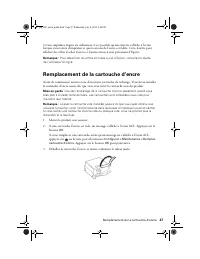
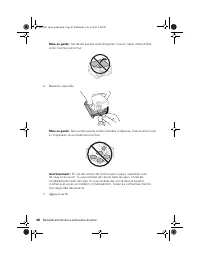
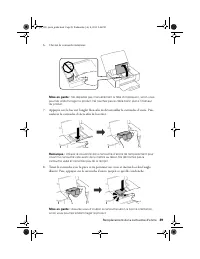
Remplacement de la cartouche d’encre 37 Si vous imprimez depuis un ordinateur, il est possible qu’une fenêtre s’affiche à l’écran lorsque vous tentez d’imprimer et que le niveau de l’encre est faible. Cette fenêtre peut afficher des offres d’achat d’encre et d’autres mises à jour provenant d’Epson. ...
Page 42 - Transport de votre produit
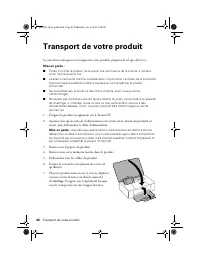
42 Transport de votre produit Transport de votre produit Si vous devez entreposer ou transporter votre produit, préparez-le tel que décrit ici. Mise en garde : ■ Évitez d’incliner le produit, de le placer à la verticale ou de le tourner à l’envers; sinon l’encre pourrait fuir. ■ Laissez la cartouche...
Page 43 - Dépannage; Problèmes et solutions; Messages d’état du produit
Dépannage 43 Dépannage En cas de problème avec votre produit, vérifiez les messages sur le panneau de commande pour en déterminer la cause. Vous pouvez aussi consulter « Problèmes et solutions » ci-dessous pour obtenir des suggestions de dépannage de base ou consulter le Guide de l’utilisateur en li...
Page 44 - Problèmes de réseau; Vérification de l’état du réseau
44 Problèmes et solutions Problèmes de réseau ■ Tentez de connecter votre ordinateur ou un autre appareil à votre routeur ou point d’accès afin de confirmer qu’il fonctionne correctement. ■ Le produit peut être connecté seulement à un réseau qui prend en charge la fréquence 2,4 GHz. Si vous utilisez...
Page 45 - Problèmes d’impression; Problèmes de qualité d’impression
Problèmes et solutions 45 3. Sélectionnez État réseau et appuyez sur le bouton OK . 4. Appuyez sur d ou u afin de faire défiler les informations du réseau, ou appuyez sur l ou r afin de voir les options additionnelles. Problèmes d’impression ■ Assurez-vous que le papier est chargé côté court en prem...
Page 46 - Comment obtenir de l’aide
46 Comment obtenir de l’aide ■ Si vous remarquez des lignes horizontales claires ou foncées sur vos tirages ou si ces derniers sont estompés, vous pourriez avoir besoin de nettoyer la tête d’impression (voir page 40). Exécutez une vérification des buses pour voir si l’une des buses de la tête d’impr...
Page 47 - Avis; Déclaration de conformité
Avis 47 Avis Remarque : Consultez le Guide de l’utilisateur en ligne pour les directives d’utilisation et de sécurité. Déclaration de conformité Selon la norme 47CFR, parties 2 et 15, régissant les ordinateurs personnels et périphériques de classe B, et/ou les unités centrales et les dispositifs d’a...
Page 49 - Avis sur les droits d’auteur
Avis sur les droits d’auteur 49 incluant la perte de bénéfices, les coûts de l’équipement de substitution, le temps d’arrêt, les réclamations des tiers, incluant les clients, ou les dommages matériels résultant de l’utilisation ou de l’impossibilité d’utiliser les produits Epson, qu’elle soit causée...
Page 50 - Marques de commerce
50 Avis sur les droits d’auteur Utilisation responsable du matériel protégé par les lois sur les droits d’auteur Epson encourage les utilisateurs de ses produits à faire preuve de responsabilité et à respecter les lois sur les droits d’auteurs. Dans certains pays, la loi permet une reproduction ou u...