Page 2 - Instruction for use
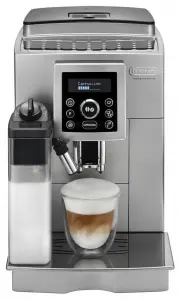
DE GB ECAM23.460 BEAN TO CUP ESPRESSO AND CAPPUCCINO MACHINE Instruction for use
Page 7 - CONTENTS
6 CONTENTS INTRODUCTION .......................................................7 Symbols used in these instructions ................................ 7Letters in brackets .......................................................... 7Troubleshooting and repairs .............................................
Page 8 - INTRODUCTION; Symbols used in these instructions; Failure to observe the warning could result in burns.; Letters in brackets; SAFETY; Fundamental safety warnings; enabling the appliance to be unplugged when necessary.; DESIGNATED USE; damage to the appliance.
7 INTRODUCTION Thank you for choosing this automatic espresso and cappuccino machine. We hope you enjoy using your new appliance. Take a few minutes to read this Instruction for Use. This will avoid all risks and damage to the appliance. Symbols used in these instructions Important warnings are iden...
Page 9 - DESCRIPTION; (When in the settings MENU, turn to select the; BEFORE USE
8 Keep this Instruction for Use. If the appliance is passed to other persons, they must also be provided with this Instruction for Use. DESCRIPTION Description of the appliance (page 3 - A ) A1. Control panel A2. Grinding adjustment dial A3. Cup shelf A4. Beans container lid A5. Pre-ground coffee fu...
Page 10 - Descaling
9 Setting up the appliance Please note: • Coffee has been used to factory test the appliance and it is therefore completely normal for there to be traces of coffee in the mill. The machine is, however, guaranteed to be new. • You should customise water hardness as soon as possible following the Inst...
Page 11 - • When in energy saving mode, a few seconds elapse; Setting the temperature
10 Replacing the filter For instructions on how to replace the filter, see the section “Replacing the filter” (page 18). Adjust time To adjust the time on the display, proceed as follows: 1. Press the P button to enter the menu; 2. Turn the selection dial (fig. 8) until “Adjust time” is displayed; 3...
Page 12 - MAKING COFFEE
11 Enable/disable the beep This enables or disables the beep emitted by the machine each time the buttons are pressed or an accessory is inserted/removed. The beep is active by default. To disable or re-enable the beep, proceed as follows:1. Press the P button to enter the menu; 2. Turn the selectio...
Page 14 - Filling and attaching the milk container; Description; Making cappuccino or macchiato
13 1. Press the button (fig. 7) repeatedly until “Pre- ground” is displayed. 2. Make sure the funnel is not blocked, then add one level measure of pre-ground coffee (fig. 14). 3. Place a cup under the coffee spouts.4. Press the 1 cup button (fig. 9). 5. Preparation begins. The amount of coffee selec...
Page 15 - HOT WATER; • Do not use solvents, abrasive detergents or alcohol to
14 Cleaning the milk frother using the CLEAN function Important! Danger of burns When cleaning the internal tubes of the milk container, a little hot water and steam leak out of the frothed milk spout. Avoid contact with splashes of water. “SET DIAL TO CLEAN” flashes on the display each time you use...
Page 17 - DESCALING; • Descaler contains acids which may irritate the skin
16 Please note: If the infuser is difficult to insert, before insertion, squeeze the two levers shown in the figure to make it smaller. 8. Once inserted, make sure the two red buttons have snapped out. 9. Close the infuser door.10. Replace the water tank. Cleaning the milk container Clean the milk c...
Page 18 - SETTING WATER HARDNESS; Measuring water hardness; WATER SOFTENER FILTER; Installing the filter; Please note
17 8. Place an empty container with a minimum capacity of 1.5 litres under the hot water spout (fig. 4). Important ! Danger di scottature Hot water containing acid flows out of the hot water spout. Avoid contact with splashes of water. 9. Press the button to confirm that you have added the solution....
Page 19 - Removing the filter; TECHNICAL DATA; • EMC Directive 2004/108/EC and subsequent; DISPOSAL; Replacing the filter
18 Removing the filter If you want to use the appliance without the filter, you must remove it and notify the appliance of its removal. Proceed as follows:1. Extract the tank and exhausted filter;2. Press the P button to enter the menu; 3. Turn the selection dial (fig. 8) until “Install filter*” is ...
Page 20 - DISPLAYED MESSAGES; DISPLAYED MESSAGE; FILL TANK
19 DISPLAYED MESSAGES DISPLAYED MESSAGE POSSIBLE CAUSE SOLUTION FILL TANK Insufficient water in the tank. Fill the tank with water and/or insert it correctly, pushing it as far as it will go until it clicks into place (fig. 3). EMPTY GROUNDS CONTAINER The grounds container (A14) is full. Empty the g...
Page 21 - TROUBLESHOOTING; PROBLEM
20 INSERT TANK The tank is not correctly in place. Insert the tank correctly and press as far as it will go. GENERAL ALARM The inside of the appliance is very dirty. Clean the inside of the appliance thoroughly, as described in the section “Cleaning and maintenance”. If the message is still displaye...