Page 2 - PRODUCT LABEL; AS/NZS CISPR 14.1 Electromagnetic Compatibility Requirements.; This appliance is designed and manufactured solely for the coo-
2 Dear Customer, Thank you for having purchased and given your preferen- ce to our product. The safety precautions and recommendations reported below are for your own safety and that of others. They will also provide a means by which to make full use of the fea- tures offered by your appliance. Plea...
Page 3 - ries of fundamental rules. In particular:; IMPORTANT PRECAUTIONS AND RECOMMENDATIONS; sionally qualified technician.
3 IMPORTANT PRECAUTIONS AND RECOMMENDATIONS FOR USE OF ELECTRICAL APPLIANCES Use of any electrical appliance implies the necessity to follow a se- ries of fundamental rules. In particular: ■ Never touch the appliance with wet hands or feet. ■ Do not operate the appliance barefooted. ■ The appliance ...
Page 4 - agent or a similarly qualified person in order to avoid a hazard.
4 ■ WARNING: Accessible parts will become hot when in use. To avoid burns and scalds, young children should be kept away. ■ Young children should be supervised to ensure that they do not play with the appliance. ■ Children, or persons with a disability which limits their ability to use the appliance...
Page 5 - will not be affected by the electromagnetic field.
5 OTHER IMPORTANT PRECAUTIONS AND RECOMMENDATIONS ■ Do not place or leave empty pans on the glass ceramic hob. ■ Metallic objects such as knives, forks, spoons and lids should not be placed on the hob surface since they can get hot. ■ Do not use metallic kitchen utensils (e.g. ladles). It is prefera...
Page 6 - INSTALLATION; FITTING REQUIREMENTS; in figure 1 has to be made, keeping in consideration the following:
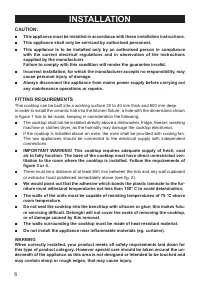
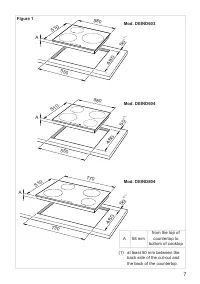
6 INSTALLATION CAUTION: ■ This appliance must be installed in accordance with these installation instructions. ■ This appliance shall only be serviced by authorised personnel. ■ This appliance is to be installed only by an authorised person in compliance with the current electrical regulations and i...
Page 7 - Figure 1
7 480 730 770 510 A 480 50 (1) 50 (1) 50 (1) 550 580 510 A 480 550 580 510 A A 58 mm from the top of countertop to bottom of cooktop (1) at least 50 mm between the back side of the cut-out and the back of the countertop. Mod. DEIND804 Mod. DEIND604 Mod. DEIND603 Figure 1
Page 8 - Oven with
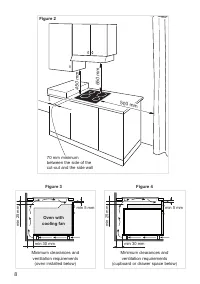
8 min 5 mm min 30 mm min 25 mm min 5 mm min 30 mm min 25 mm Minimum clearances and ventilation requirements (oven installed below) Minimum clearances and ventilation requirements (cupboard or drawer space below) Oven with cooling fan 650 mm 500 mm 450 mm 70 mm minimum between the side of the cut-out...
Page 9 - FASTENING THE COOKTOP; Cut the unit according to the dimensions in fig. 1.; min; Figure 5
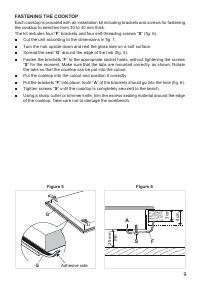
9 FASTENING THE COOKTOP Each cooktop is provided with an installation kit including brackets and screws for fastening the cooktop to benches from 30 to 40 mm thick. The kit includes four “ F ” brackets and four self-threading screws “ S ” (fig. 6). ■ Cut the unit according to the dimensions in fig. ...
Page 10 - ELECTRICAL REQUIREMENTS; withstand the load specified on the plate.; and in compliance with established electrical regulations.; CONNECTION OF THE POWER SUPPLY CABLE
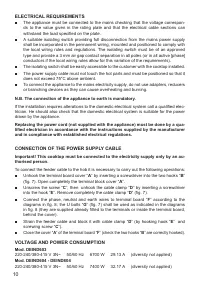
10 ELECTRICAL REQUIREMENTS ■ The appliance must be connected to the mains checking that the voltage correspon- ds to the value given in the rating plate and that the electrical cable sections can withstand the load specified on the plate. ■ A suitable isolating switch providing full disconnection fr...
Page 11 - FEEDER CABLE SECTION; Notes for models DEIND604, DEIND804 only:; Figure 7
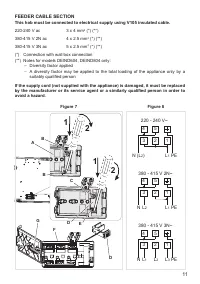
11 FEEDER CABLE SECTION This hob must be connected to electrical supply using V105 insulated cable. 220-240 V ac 3 x 4 mm 2 (*) (**) 380-415 V 2N ac 4 x 2.5 mm 2 (*) (**) 380-415 V 3N ac 5 x 2.5 mm 2 (*) (**) (*) Connection with wall box connection(**) Notes for models DEIND604, DEIND804 only: – Div...
Page 12 - ELECTRIC DIAGRAMS; Figure 9
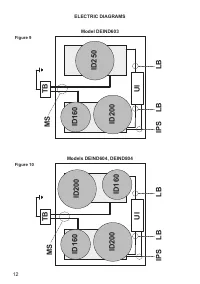
12 UI MS LB LB ID160 ID200 ID160 ID200 ID160 ID200 ID250 UI IPS MS LB LB IPS TB TB ELECTRIC DIAGRAMS Figure 9 Figure 10 Models DEIND604, DEIND804 Model DEIND603
Page 13 - ELECTRIC DIAGRAM KEY; UI
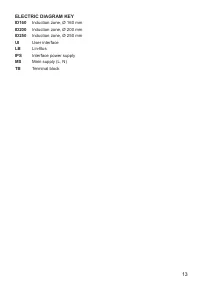
13 ELECTRIC DIAGRAM KEY ID160 Induction zone, Ø 160 mm ID200 Induction zone, Ø 200 mm ID250 Induction zone, Ø 250 mm UI User interface LB Lin-Bus IPS Interface power supply MS Main supply (L, N) TB Terminal block
Page 14 - USE AND CARE; Induction cooking zone; FEATURES AND TECHNICAL DATA
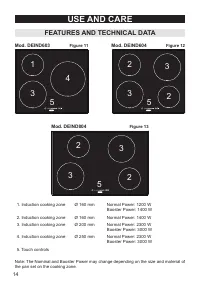
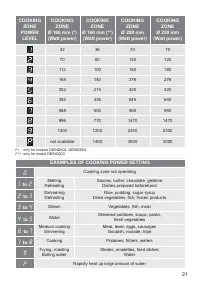
14 USE AND CARE 1. Induction cooking zone Ø 160 mm Normal Power: 1200 W Booster Power: 1400 W 2. Induction cooking zone Ø 160 mm Normal Power: 1400 W 3. Induction cooking zone Ø 200 mm Normal Power: 2300 W Booster Power: 3000 W 4. Induction cooking zone Ø 250 mm Normal Power: 2300 W Booster Power: 3...
Page 15 - TOUCH CONTROLS; combination with other keys, see chapter CHILD LOCK SAFETY); lids should not be placed on the hob surface since they can get hot.
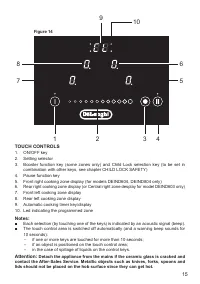
15 1 3 4 2 7 8 5 6 9 10 TOUCH CONTROLS 1. ON/OFF key 2. Setting selector3. Booster function key (some zones only) and Child Lock selection key (to be set in combination with other keys, see chapter CHILD LOCK SAFETY) 4. Pause function key5. Front right cooking zone display (for models DEIND604, DEIN...
Page 16 - The ceramic hob is fitted with induction cooking zones.; INDUCTION COOKING SYSTEM; king zone. Please refer to COOKWARE FOR INDUCTION COOKING.; HOW TO USE THE COOKING HOB
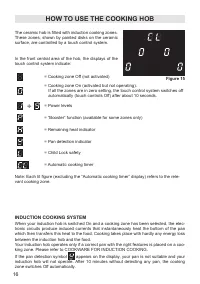
16 = Cooking zone Off (not activated) = Cooking zone On (activated but not operating). If all the zones are in zero setting, the touch control system switches off automatically (touch controls Off) after about 10 seconds. ÷ = Power levels = “Booster” function (available for some zones only) = Remain...
Page 17 - Induction cooking zone
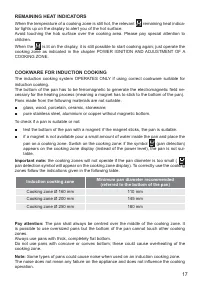
17 REMAINING HEAT INDICATORS When the temperature of a cooking zone is still hot, the relevant remaining heat indica- tor lights up on the display to alert you of the hot surface. Avoid touching the hob surface over the cooking area. Please pay special attention to children.When the is lit on the di...
Page 18 - HOW TO SWITCH ON/OFF THE COOKTOP; Switching ON; POWER IGNITION AND; increase; Increase
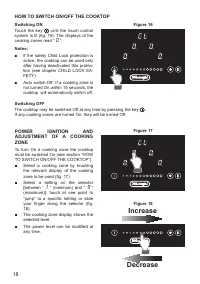
18 HOW TO SWITCH ON/OFF THE COOKTOP Switching ON Touch the key until the touch control system is lit (fig. 16). The displays of the cooking zones read “ 0 ”. Notes: ■ If the safety Child Lock protection is active, the cooktop can be used only after having deactivated this protec- tion (see chapter C...
Page 19 - BOOSTER FUNCTION; The “Booster” function is always limited to a maximum of 5 minutes.; To activate the “Booster” function:
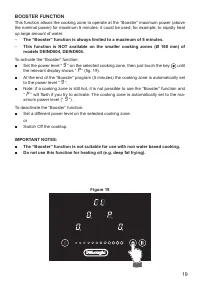
19 BOOSTER FUNCTION This function allows the cooking zone to operate at the “Booster” maximum power (above the nominal power) for maximum 5 minutes; it could be used, for example, to rapidly heat up large amount of water. – The “Booster” function is always limited to a maximum of 5 minutes. – This f...
Page 20 - switched Off after a maximum preset; POWER LEVEL OF
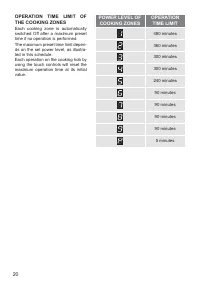
20 OPERATION TIME LIMIT OF THE COOKING ZONES Each cooking zone is automatically switched Off after a maximum preset time if no operation is performed. The maximum preset time limit depen- ds on the set power level, as illustra- ted in this schedule. Each operation on the cooking hob by using the tou...
Page 22 - CL
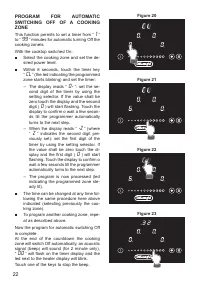
22 PROGRAM FOR AUTOMATIC SWITCHING OFF OF A COOKING ZONE This function permits to set a timer from “ 1 ” to “ 99 ” minutes for automatic turning Off the cooking zone/s. With the cooktop switched On: ■ Select the cooking zone and set the de- sired power level. ■ Within 8 seconds, touch the timer key ...
Page 24 - flashing figure for about 3 seconds before auto; THERMAL PROTECTIONS; One or more cooking zone switched Off.
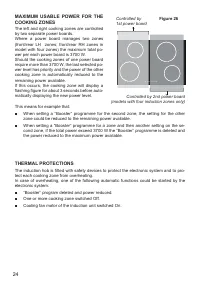
24 MAXIMUM USABLE POWER FOR THE COOKING ZONES The left and right cooking zones are controlled by two separate power boards. Where a power board manages two zones (front/rear LH zones; front/rear RH zones in model with four zones) the maximum total po- wer per each power board is 3700 W. Should the c...
Page 25 - Switch Off the cooktop and discon; ERROR CODES ON THE DISPLAYS OF THE COOKING ZONES
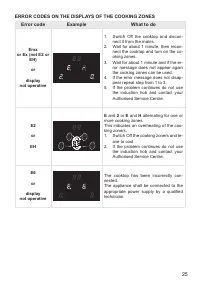
25 Error code Example What to do Erxx or Ex (not E2 or EH) or display not operative 1. Switch Off the cooktop and discon - nect it from the mains. 2. Wait for about 1 minute, then recon- nect the cooktop and turn on the co- oking zones. 3. Wait for about 1 minute and if the er- ror message does not ...
Page 26 - ADVICE FOR SAFE USE OF THE HOB; Use cookware with flat and even bot; This also makes it more; PANS WITH ROUGH
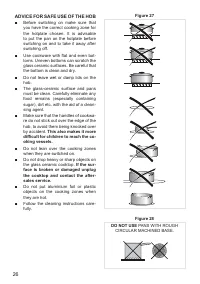
26 ADVICE FOR SAFE USE OF THE HOB ■ Before switching on make sure that you have the correct cooking zone for the hotplate chosen. It is advisable to put the pan on the hotplate before switching on and to take it away after switching off. ■ Use cookware with flat and even bot - toms. Uneven bottoms c...
Page 27 - GENERAL ADVICE; and disconnected from the electrical power supply.; It is advisable to clean when the appliance is cold.; handling or cleaning of this appliance.; CLEANING THE CERAMIC HOB; CLEANING AND MAINTENANCE
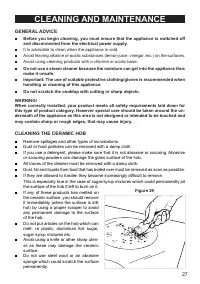
27 GENERAL ADVICE ■ Before you begin cleaning, you must ensure that the appliance is switched off and disconnected from the electrical power supply. ■ It is advisable to clean when the appliance is cold. ■ Avoid leaving alkaline or acidic substances (lemon juice, vinegar, etc.) on the surfaces. ■ Av...
Page 28 - SERVICE AND MAINTENANCE; Servicing the appliance:; Authorised Delonghi Service Agent:; Servicing shall be carried out only by authorized personnel.
28 SERVICE AND MAINTENANCE Servicing the appliance: Service may be obtained by contacting our Customer Service Centre to locate the nearest Authorised Delonghi Service Agent: Servicing shall be carried out only by authorized personnel. The appliance shall not be modified.