Cougar Puri - User Manual
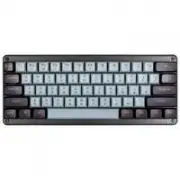
The Cougar Puri Mini gaming keyboard is a device designed for customizable functionality and immersive media experiences, with a focus on lighting and automation features. This manual covers its core capabilities: programmable function keys for adjusting underglow lighting effects (such as Rainbow or Breathing modes), color customization, brightness control, and macro recording. It also outlines essential technical details like switch types, actuation force, and system requirements to ensure proper operation. While the document includes some administrative information–such as warranty terms and manufacturer contact–the primary emphasis remains on user configuration and performance optimization.
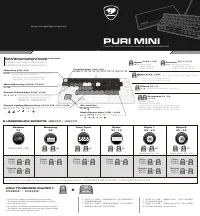
PURI MINI
C O M P A C T 6 0 % D S A M E C H A N I C A L G A M I N G K E Y B O A R D
FN + D / F / G / < / > / ?
Function Keys
Custom Profiles Keys
Media Control Keys
Custom Lighting Options Keys
Win-Lock Key
FN + WIN
FN + ESC / F1 / F2 / F3 / F4 / F5 / F6 / F7 / F8 / F9 / F10 / F11 / F12
FN + Q / W / E
FN + X / C / V / B / N / M
M
C
Macro Recording
Reset Key
FN + TAB
FN + ESC
6 UNDERGLOW EFFECTS
Press FN key and specific keys with functional
icon to activate settings or effects.
FN 鍵搭配其他帶有功能圖示的按鍵能啟用快捷功能。
FN 键搭配其他带有功能图示的按键能启用快捷功能。
重 置 鍵 / 重 置 键
功 能 鍵 / 功 能 键
長 按 E S C 鍵 2 秒 , 閃 爍 3 次 白 光 後 即 回 歸 出 廠 設 定 。
长 按 E S C 键 2 秒 , 闪 烁 3 次 白 光 后 即 回 归 出 厂 设 定 。
3 組 自 定 義 設 定 檔 , 可 儲 存 巨 集 及 燈 光 設 定 。
3 组 自 定 义 设 定 档 , 可 储 存 巨 集 及 灯 光 设 定 。
巨 集 錄 製 鍵 / 巨 集 录 制 键
設 定 檔 鍵 / 设 定 档 键
自 定 義 燈 光 選 項 鍵 / 自 定 义 灯 光 选 项 键
6 種 背 光 燈 效 / 6 种 背 光 灯 效
6 種 背 光 燈 效 / 6 种 背 光 灯 效
多 媒 體 鍵 / 多 媒 体 键
P r e s s a n d h o l d t h e F N a n d E S C k e y s f o r 2 s e c o n d s ,
t h e w h i t e l i g h t w i l l fl a s h 3 t i m e s .
S w i t c h a n d s a v e 3 p r o fi l e s t h r o u g h p r o fi l e k e y s ,
i n c l u d i n g R G B e f f c e c t s a n d m a c r o s s e t t i n g s .
w w w . c o u g a r g a m i n g . c o m
1. Press FN and TAB key simultaneously to start recording.
The keyboard will flash with white light to prepare recording.
2. Press the keys to record.
3. Press the FN and TAB keys simultaneously to stop the recording.
The keyboard will quickly flash with white light to stop recording.
4. Press a key you want to save your macro.
HOW TO RECORD MACRO ?
1 . 同 時 按 下 F n + T A B 鍵 , T A B 鍵 將 閃 爍 白 燈 , 代 表 已 開 啟 錄 製 模 式 。
2 . 依 序 點 擊 欲 錄 製 的 按 鍵 。
3 . 同 時 按 下 F n + T A B 鍵 , T A B 鍵 將 快 速 閃 爍 白 燈 , 即 停 止 錄 製 模 式 。
4 . 點 擊 欲 儲 存 巨 集 的 按 鍵 , 即 完 成 巨 集 設 定 。
1 . 同 时 按 下 F n + T A B 键 , T A B 键 将 闪 烁 白 灯 , 代 表 已 开 启 录 制 模 式 。
2 . 依 序 点 击 欲 录 制 的 按 键 。
3 . 同 时 按 下 F n + T A B 键 , T A B 键 将 快 速 闪 烁 白 灯 , 即 停 止 录 制 模 式 。
4 . 点 击 欲 储 存 巨 集 的 按 键 , 即 完 成 巨 集 设 定 。
如 何 錄 製 巨 集 ? / 如 何 录 制 巨 集 ?
TAB
MACRO
FN
+
Rainbow
波 浪
呼 吸
Breathing
Color Cycle
霓 虹
Ripple 1
漣 漪 / 涟 漪
Ripple 2
漣 漪 / 涟 漪
Static
恆 亮 / 恒 亮
燈 效 方 向 / 灯 效 方 向
Only for the specific effects
只 有 特 定 的 燈 效 模 式 可 以 切 換 方 向 。
只 有 特 定 的 灯 效 模 式 可 以 切 换 方 向 。
Direction
FN + C
C
燈 效 速 度 / 灯 效 速 度
4 Speed options
4 階 速 度 , 循 環 切 換
4 阶 速 度 , 循 环 切 换
Speed
FN + X
X
燈 效 / 灯 效
6 E f f e c t o p t i o n s
Effects
FN + B
B
燈 光 顏 色 / 灯 光 颜 色
彩 色 → 紅 → 橙 → 黃 → 綠 → 青 → 藍 → 紫 → 白
彩 色 → 红 → 橙 → 黄 → 绿 → 青 → 蓝 → 紫 → 白
Colors
FN + V
V
Rainbow
→
Red
→
Orange
→
Yellow
→
Green
→
Cyan
→
Blue
→
Purple
→
White
Brightness
FN + N / M
M
N
亮 度 / 亮 度
5 階 亮 度 可 調 整 / 5 阶 亮 度 可 调 整
5 B r i g h t n e s s o p t i o n s
The light will flash 2 times when it is up to 100% brightness.
切 換 到 1 0 0 % 亮 度 時 , 如 持 續 按 壓 燈 光 會 閃 爍 2 下 提 示 已 經 最 亮 。
切 换 到 1 0 0 % 亮 度 时 , 如 持 续 按 压 灯 光 会 闪 烁 2 下 提 示 已 经 最 亮 。
Default
Auto Mode
Manual Mode
The color of the light will var y depending on the underglow effects.
燈光顏色會因燈效產生些許差異 / 灯光颜色会因灯效产生些许差异。
自 動 / 自 动
預 設 / 预 设
手 動 / 手 动
Colors
+
FN
V
燈 光 顏 色
灯 光 颜 色
燈 效 方 向
灯 效 方 向
Direction
C
+
FN
Colors
+
FN
V
燈 光 顏 色
灯 光 颜 色
Colors
+
FN
V
燈 光 顏 色
灯 光 颜 色
Colors
+
FN
V
燈 光 顏 色
灯 光 颜 色
Colors
+
FN
V
燈 光 顏 色
灯 光 颜 色
燈 效 方 向
灯 效 方 向
Direction
C
+
FN
Colors
+
FN
V
燈 光 顏 色
灯 光 颜 色
燈 效 方 向
灯 效 方 向
Direction
C
+
FN
+
x1
FN
B
+
x2
FN
B
+
x3
FN
B
+
x4
FN
B
+
x5
FN
B
"Loading the manual" means you need to wait until the file loads and becomes available for online reading. Some manuals are very large, and the time they take to appear depends on your internet speed.
Was this manual helpful?
About this manual
- Brand
- Cougar
- Model
- Puri
- Document type
- User Manual
- Category
- Keyboard
- Language(s)
- German, English, Spanish, French, Russian, Swedish
- Pages
- 2
- File size
- 1 MB
- Format
Ask a question
Related manuals
More Cougar Keyboards models


Other Cougar appliances
 Cougar Airblader User Manual
 Cougar Armor User Manual
 Cougar Armor one User Manual
 Cougar Armor S User Manual
 Cougar Atlas User Manual
 Cougar BXM User Manual
 Cougar Dualblader User Manual
 Cougar GEX X2 User Manual
 Cougar Immersa Essential User Manual
 Cougar Phontum Essential User Manual
 Cougar STC User Manual
 Cougar STX User Manual
 Cougar STX650 User Manual
 Cougar STX750 User Manual
 Cougar VTE500 User Manual
 Cougar XTC User Manual