Cougar Dualblader - User Manual
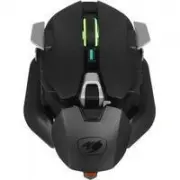
A user manual for the Cougar DualBlader gaming mouse covers its ergonomic design, customizable features, and control configurations. The document highlights the mouse’s adjustable DynaStrut system for comfort, explains default button assignments, and describes technical specifications such as sensor type, polling rate, and connectivity options. It also includes setup instructions and links to required software downloads, emphasizing both hardware customization and performance optimization.
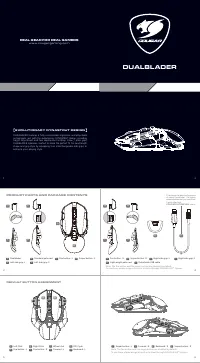
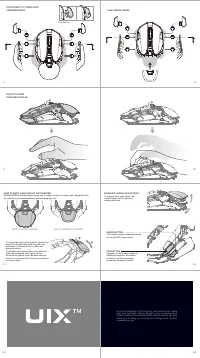
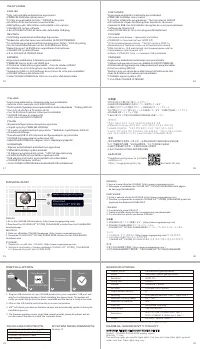
Table of Contents:
- Page 1 – Product Introduction and Included Components
- Page 2 – Ergonomics and Adjustable Features
- Page 3 – Product Specifications and Installation Guide
- Page 4 – Warranty, Compliance, and Serial Information
DUALBLADER features a fully customizable ergonomic and adjustable
arched palm rest with the evolutionary DYNASTRUT design, providing
height adjustment and two deployment settings (claw / palm grip).
DUALBLADER optimizes comfort to make the perfect fit for hand length,
shape and grip style by equipping four interchangeable side grips to
enhance your playing style.
A
Left Click
B
Right Click
C
Wheel click
D
DPI Cycle
E
Fire button : L
F
Fire button : R
G
For ward : L
H
Backward : L
DEFAULT BUTTON ASSIGNMENT
A
B
I
Sniper button : L
J
For ward : R
K
Backward : R
L
Sniper button : R
Note: The fire button and the sniper button are disabled by default.
To use them, please assign a function to them through COUGAR UIX™ System.
5
6
3
4
1
2
DUALBL ADER
REAL GEAR FOR REAL GAMERS
w w w . c o u g a r g a m i n g . c o m
A
B
K
C
E
G
I
H
J
D
F
K
Light weight palm rest
L
Detachable USB cable
Note: The fire button and the sniper button are disabled by default.
To use them, please assign a function to them through COUGAR UIX™ System.
A
Dualblader
B
Standard palm rest
C
Fire button : L
D
Sniper button : L
G
Fire button : R
H
Sniper button : R
E
Left side grip-L
F
Left side grip-S
I
Right side grip-L
J
Right side grip-S
E V O L U T I O N A R Y D Y N A S T R U T D E S I G N
L
L
R
G
H
I
J
K
L
C
D
E
F
PRODUCT PAR T S AND PACKAGE CONTENT S
R
L
To achieve the best performance
of using Dualblader, it’s highly
recommended that you could use
it with attached
COUGAR ULTRAFLEX
cable.
"Loading the manual" means you need to wait until the file loads and becomes available for online reading. Some manuals are very large, and the time they take to appear depends on your internet speed.
Was this manual helpful?
About this manual
- Brand
- Cougar
- Model
- Dualblader
- Document type
- User Manual
- Category
- Computer Mouse
- Language(s)
- English, Russian
- Pages
- 4
- File size
- 2.6 MB
- Format
Summary
Introduction to the DualBlader mouse featuring the Evolutionary DynaStrut Design, details of included parts with diagrams, and default button assignments.
Details on ergonomic design, magnetic options, palm rest adjustment methods, and functions for specific buttons like sniper and fire buttons.
Technical specifications including sensor type, polling rate, button count, connectivity, step-by-step installation guidance, and software download instructions.
Ask a question
Related manuals
More Cougar Computer Mice models

Other Cougar appliances
 Cougar Armor User Manual
 Cougar Armor one User Manual
 Cougar Armor S User Manual
 Cougar Atlas User Manual
 Cougar BXM User Manual
 Cougar GEX X2 User Manual
 Cougar Immersa Essential User Manual
 Cougar LUXLIM User Manual
 Cougar Phontum Essential User Manual
 Cougar Puri User Manual
 Cougar RGB User Manual
 Cougar STC User Manual
 Cougar STX User Manual
 Cougar STX650 User Manual
 Cougar STX750 User Manual
 Cougar VTE500 User Manual
 Cougar XTC User Manual