Cougar LUXLIM - User Manual
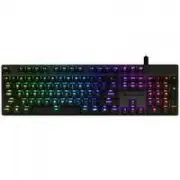
A user manual for the Cougar Luxlim gaming keyboard highlights its customizable lighting effects, including dynamic modes like Rainbow, Breathing, and Static, alongside media and function shortcuts. The guide covers setup options for background light profiles and explains key specifications such as RGB backlighting, mechanical switches, and low-profile design. System requirements and warranty details are also addressed to ensure proper operation and maintenance.
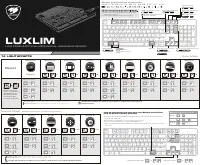
LUXLIM
L O W P R O F I L E O P T I C A L - M E C H A N I C A L G A M I N G K E Y B O A R D
F N + F 1
、
F 2
、
F 3
、
F 4
、
F 5
、
F 6
、
F 7
、
F 8
、
F 9
、
F 1 0
、
F 1 1
、
F 1 2
B a c k g r o u n d o p t i o n
F N + P R T
W I N - L O C K
F N k e y
K e y - l i g h t b r i g h t n e s s
F N + I N S
L i g h t e f f e c t s
R G B u n d e r g l o w m o d e
F N + D E L
K e y - l i g h t d i r e c t i o n
K e y - l i g h t o p t i o n
M e d i a a n d f u n c t i o n s h o r t c u t s
K e y - l i g h t s p e e d
14 LIGHT EFFECT S
Auto Mode
Raninbow
Reset
Color Cycle
Breathing
Twinkle
x 3
+
x 2
+
x 1
+
B a c k g r o u n d o p t i o n
+
K e y - l i g h t o p t i o n
+
B a c k g r o u n d o p t i o n
+
K e y - l i g h t o p t i o n
+
B a c k g r o u n d o p t i o n
+
K e y - l i g h t o p t i o n
+
+
B a c k g r o u n d o p t i o n
K e y - l i g h t o p t i o n
+
K e y - l i g h t d i r e c t i o n
+
P r e s s a n d h o l d
d o w n t h e F N k e y
a n d E S C k e y f o r
3 s e c o n d s a n d
t h e w h i t e l i g h t
w i l l f l a s h 4 t i m e s .
Wave
Ripple 1
Static
Radar
Reactive
x 8
+
x 7
+
x 6
+
x 5
+
x 4
+
B a c k g r o u n d o p t i o n
+
K e y - l i g h t o p t i o n
+
B a c k g r o u n d o p t i o n
+
K e y - l i g h t o p t i o n
+
B a c k g r o u n d o p t i o n
+
K e y - l i g h t o p t i o n
+
B a c k g r o u n d o p t i o n
+
K e y - l i g h t o p t i o n
+
+
B a c k g r o u n d o p t i o n
K e y - l i g h t o p t i o n
+
K e y - l i g h t d i r e c t i o n
+
Some shortcuts keys do not works with Mac OS.
Direction
、
brightness & speed
do not be adjusted.
F N +
D e f a u l t
Key-light option
Rainbow, Red, Yellow, Green, Cyan, Blue, Purple, White
Background option
Red, Yellow, Green, Cyan, Blue, Purple, White, OFF
F N + S C R
F N + P A U
F N +
F N +
F N +
K e y - l i g h t b r i g h t n e s s
+
K e y - l i g h t s p e e d
+
How to customize and save your own Background ef fect
to 2 on-board memory profiles?
1.Press and hold the FN key and END key simultaneously to make the PGUP(C1) and PGDN(C2)
key flash with white light.
2.Press PGUP(C1) or PGDN(C2) to choose mode you want to set.
3.Press any key you want to set to change the backlight color.
4. Press and hold down the FN key and END key simultaneously to save it.(Or wait for 10 seconds
auto save.)
Background custom mode
S t e p 1
S t e p 2
S t e p 3
+
o r
+
s e t u p
+
Manual Mode
Laser
Cross
Pulse
Firework
Ripple 2
x 10
+
x 9
+
x 11
+
x 12
+
x 13
+
B a c k g r o u n d o p t i o n
+
K e y - l i g h t o p t i o n
+
B a c k g r o u n d o p t i o n
+
K e y - l i g h t o p t i o n
+
B a c k g r o u n d o p t i o n
+
K e y - l i g h t o p t i o n
+
+
B a c k g r o u n d o p t i o n
K e y - l i g h t o p t i o n
+
K e y - l i g h t d i r e c t i o n
+
+
B a c k g r o u n d o p t i o n
K e y - l i g h t o p t i o n
+
K e y - l i g h t d i r e c t i o n
+
B a c k g r o u n d c u s t o m m o d e
The light effect would be not obvious if you set similar or rainbow colors as key-light and
background option.
Key-light option
Rainbow, Red, Yellow, Green, Cyan, Blue, Purple, White
Background option
Red, Yellow, Green, Cyan, Blue, Purple, White, OFF
The light effect would be not obvious if you set similar or rainbow colors as key-light and background option.
= O p t i o n
1. Only the shortcuts keys, FN+(F1, F5, F9, F10, F11, F12),
can not work in Mac OS.
2. Luxlim's FN key different from Mac OS’s FN key.
= C o m m a n d
M a c O S
( N e e d t o p r e s s t h e k e y t o s h o w t h e l i g h t e f f c e t s . )
"Loading the manual" means you need to wait until the file loads and becomes available for online reading. Some manuals are very large, and the time they take to appear depends on your internet speed.
Was this manual helpful?
About this manual
- Brand
- Cougar
- Model
- LUXLIM
- Document type
- User Manual
- Category
- Keyboard
- Language(s)
- German, English, Spanish, French, Russian
- Pages
- 2
- File size
- 1.1 MB
- Format
Ask a question
Related manuals
More Cougar Keyboards models


Other Cougar appliances
 Cougar Airblader User Manual
 Cougar Armor User Manual
 Cougar Armor one User Manual
 Cougar Armor S User Manual
 Cougar Atlas User Manual
 Cougar BXM User Manual
 Cougar Dualblader User Manual
 Cougar GEX X2 User Manual
 Cougar Immersa Essential User Manual
 Cougar Phontum Essential User Manual
 Cougar STC User Manual
 Cougar STX User Manual
 Cougar STX650 User Manual
 Cougar STX750 User Manual
 Cougar VTE500 User Manual
 Cougar XTC User Manual