Page 2 - Handling Precautions
Handling Precautions 1. This camera is not resistant to water, and should not be used outdoors if it is raining or snowing. If it is accidentallydropped in water, contact an authorized Canon servicefacility. Keep the camera out of salt spray and excessivehumidity. If used at the beach, clean it thor...
Page 4 - Précautions d’emploi; Cet appareil n’est pas étanche, et ne doit pas être utilisé en
Précautions d’emploi 1. Cet appareil n’est pas étanche, et ne doit pas être utilisé en extérieur lorsqu’il pleut ou qu’il neige. Si l’appareil tombeaccidentellement dans l’eau, portez-le au Service Après-VenteCanon. Évitez d’exposer l’appareil aux embruns et à unehumidité excessive. Si l’appareil a ...
Page 5 - Precauciones de manipulación
Precauciones de manipulación 1. Esta cámara no es resistente al agua, y no la deberá usar bajo la lluvia o la nieve. Si la deja caer accidentalmente enel agua, póngase en contacto con un servicio Canonautorizado. 2. Guarde la cámara en un lugar fresco, seco y libre de polvo. Asegúrese de proteger la...
Page 6 - Wichtige Hinweise zum Gebrauch; Das -Zeichen entspricht den EG-Richtlinien; Hinweise für Deutschland; Batterien und Akkumulatoren gehören nicht in den Hausmüll !
Wichtige Hinweise zum Gebrauch 1. Diese Kamera ist nicht wasserdicht und eignet sich daher nicht für den Einsatz in Regen oder Schnee. Sollte die Kamera versehentlichins Wasser fallen, wenden Sie sich an einen autorisierten Canon-Kundendienst. Schützen Sie die Kamera vor salzhaltigemSprühwasser und ...
Page 7 - Precauzioni per l’uso
Precauzioni per l’uso 1. Questa macchina fotografica non è impermeabile, e non deve quindi essere usata all’esterno in caso di pioggia oneve. Se la si è lasciata cadere accidentalmente in acqua,rivolgersi ad un Centro di servizio autorizzato Canon perun controllo. Tenere la macchina al riparo da spr...
Page 8 - Precauções no Manuseamento
Precauções no Manuseamento 1. Esta máquina fotográfica não é à prova de água, e portanto, não deve ser usada ao ar livre se estiver a chover ou nevar. Se amáquina cair acidentalmente na água, entre em contacto com umcentro de assistência autorizado da Canon. Mantenha a máquinaafastada de salpicos de...
Page 10 - Shutter Button; Nomenclature; Déclencheur; Touche de rembobinage; Nomenclatura; Disparador
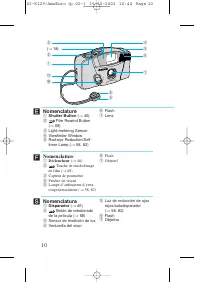
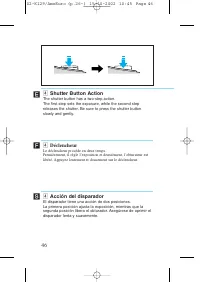
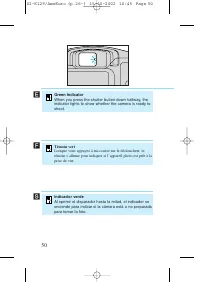
Nomenclature q Shutter Button ( → 46) w Film Rewind Button ( → 68) e Light-metering Sensor r Viewfinder Window t Red-eye Reduction/Self-timer Lamp ( → 58, 82) y Flash u Lens 10 ´ OFF ON e ( → 18) w q !0 !1 r i u y t o Nomenclature q Déclencheur ( → 46) w Touche de rembobinage de film ( → 68) e Capte...
Page 11 - Pulsante di scatto; Tasto di; Teilebezeichnungen; Auslöser
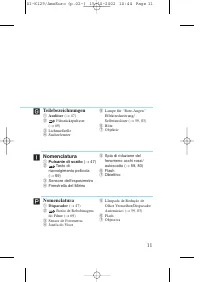
Nomenclatura q Pulsante di scatto ( → 47) w Tasto di riavvolgimento pellicola ( → 69) e Sensore dell’esposimetro r Finestrella del Mirino t Spia di riduzione delfenomeno occhi rossi/autoscatto ( → 59, 83) y Flash u Obiettivo Teilebezeichnungen q Auslöser ( → 47) w Filmrückspultaste ( → 69) e Lichtme...
Page 12 - Main Switch; Passant de sangle; Interrupteur principal; Anneau de bandoulière; Interruptor principal
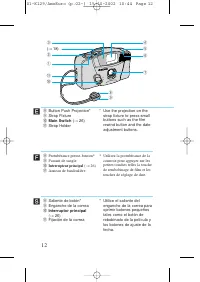
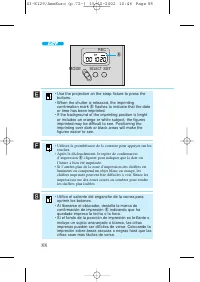
12 i Button Push Projection* o Strap Fixture !0 Main Switch ( → 26) !1 Strap Holder * Use the projection on the strap fixture to press smallbuttons such as the filmrewind button and the dateadjustment buttons. ´ i Protubérance presse-bouton* o Passant de sangle !0 Interrupteur principal ( → 26) !1 A...
Page 13 - Presilha para Correia; Interruptor Principal; Braçadeira da Correia; Interruttore principale; Attacco per la tracolla
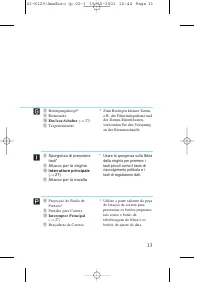
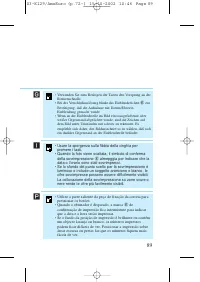
13 i Projecção do Botão dePressão* o Presilha para Correia !0 Interruptor Principal ( → 27) !1 Braçadeira da Correia * Utilize a parte saliente da peça de fixação da correia parapressionar os botões pequenostais como o botão derebobinagem do filme e osbotões de ajuste da data. ∏ i Betätigungsknopf* ...
Page 14 - Film Check Window; Fenêtre de contrôle de film; Ventanilla de verificación de la película
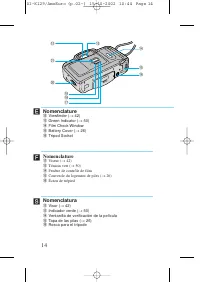
14 Nomenclature !2 Viewfinder ( → 42) !3 Green Indicator ( → 50) !4 Film Check Window !5 Battery Cover ( → 26) !6 Tripod Socket ´ RE C MO DE SEL ECT SE T OP EN !3 !2 !4 @1 @0 !9 !5 !6 !7 !8 Nomenclature !2 Viseur ( → 42) !3 Témoin vert ( → 50) !4 Fenêtre de contrôle de film !5 Couvercle du logement ...
Page 15 - Finestrella di controllo pellicola
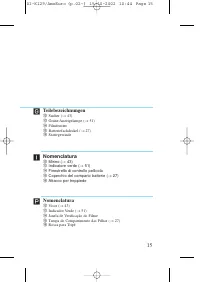
15 Nomenclatura !2 Visor ( → 43) !3 Indicador Verde ( → 51) !4 Janela de Verificação do Filme !5 Tampa do Compartimento das Pilhas ( → 27) !6 Rosca para Tripé ∏ Teilebezeichnungen !2 Sucher ( → 43) !3 Grüne Anzeigelampe ( → 51) !4 Filmfenster !5 Batteriefachdeckel ( → 27) !6 Stativgewinde ˝ Nomencla...
Page 20 - Thank you for purchasing this Canon product.; Table of Contents
20 ´ Thank you for purchasing this Canon product. Before taking pictures, please read these instructionscarefully for a thorough understanding of how the cameraoperates. Table of Contents Handling Precautions ..............................................................2Conventions....................
Page 21 - Merci d’avoir acheté cet appareil photo Canon.; Table des matières; Impression de la date et l’heure
21 Ï Merci d’avoir acheté cet appareil photo Canon. Avant d’effectuer des prises de vue, veuillez lire attentivement cesinstructions pour bien comprendre comment l’appareil fonctionne. Table des matières Précautions d’emploi .........................................................................4C...
Page 22 - Muchas gracias por adquirir este producto Canon.; Tabla de contenidos
22 Í Por favor tenga en cuenta que estas instrucciones sonaplicables a ambos modelos, con y sin la función de fecha. Lainformación relacionada solamente con modelo con funciónde fecha está marcada con el símbolo . Muchas gracias por adquirir este producto Canon. Para obtener el máximo rendimiento de...
Page 23 - Inhaltsverzeichnis; Einstellen von Datum
23 ˝ Beachten Sie bitte, daß diese Anleitung sowohl das Modell mitDatumseinblendung als auch das Modell ohne Datumseinblendungbehandelt. Informationen, die sich nur auf das Modell mitDatumseinblendung beziehen, sind durch das Symbolgekennzeichnet. Zunächst einmal vielen Dank für Ihr Vertrauen in den...
Page 24 - Grazie per aver acquistato questo prodotto Canon.; Indice
24 ˆ Queste istruzioni sono valide per entrambi i modelli, sia o nodotati della funzione della data. Eventuali informazioni cheriguardino solamente il modello dotato della funzione delladata sono contrassegnate dal simbolo . Grazie per aver acquistato questo prodotto Canon. Prima di passare a scatta...
Page 25 - Obrigado por comprar este produto Canon.; Sumário; Impressão da Data e da Hora
25 ∏ Repare por favor que estas instruções são usadas tanto para omodelo com a função de data como para o modelo sem a função dedata. As informações relevantes apenas para o modelo com a funçãode data são marcadas com o símbolo . Obrigado por comprar este produto Canon. Antes de tirar fotos, por fav...
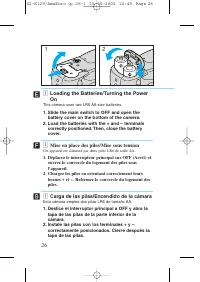
Page 26 - Mise en place des piles/Mise sous tension; Cet appareil est alimenté par deux piles LR6 de taille AA.; Chargez les piles en orientant correctement leurs; Carga de las pilas/Encendido de la cámara; Esta cámara emplea dos pilas LR6 de tamaño AA.; Deslice el interruptor principal a OFF y abra la; This camera uses two LR6 AA-size batteries.; Slide the main switch to OFF and open the
z Mise en place des piles/Mise sous tension Cet appareil est alimenté par deux piles LR6 de taille AA. 1. Déplacez le interrupteur principal sur OFF (Arrêt) et ouvrez le couvercle du logement des piles sousl’appareil. 2. Chargez les piles en orientant correctement leurs bornes + et –. Refermez le co...
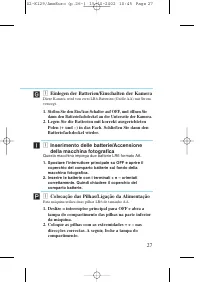
Page 27 - Questa macchina impiega due batterie LR6 formato AA.; Spostare l’interruttore principale su OFF e aprire il; Colocação das Pilhas/Ligação da Alimentação; Esta máquina utiliza duas pilhas LR6 de tamanho AA.; Deslize o interruptor principal para OFF e abra a; Einlegen der Batterien/Einschalten der Kamera; dann den Batteriefachdeckel an der Unterseite der Kamera.
27 z Inserimento delle batterie/Accensionedella macchina fotografica Questa macchina impiega due batterie LR6 formato AA. 1. Spostare l’interruttore principale su OFF e aprire il coperchio del comparto batterie sul fondo dellamacchina fotografica. 2. Inserire le batterie con i terminali + e – orient...
Page 28 - et vérifiez les piles.; • Vérifiez que le pictogramme apparaît sur le panneau; Deslice el interruptor principal a ON y revise las
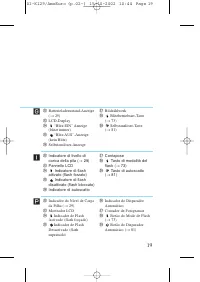
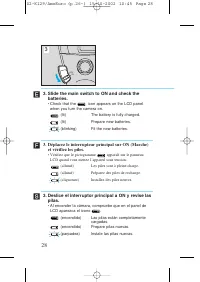
3. Déplacez le interrupteur principal sur ON (Marche) et vérifiez les piles. • Vérifiez que le pictogramme apparaît sur le panneau LCD quand vous mettez l’appareil sous tension. (allumé) Les piles sont à pleine charge. (allumé) Préparez des piles de rechange. (clignotant) Installez des piles neuves....
Page 29 - • Controllare che l’icona sia visualizzata sul pannello; Deslize o interruptor principal para ON e verifique a
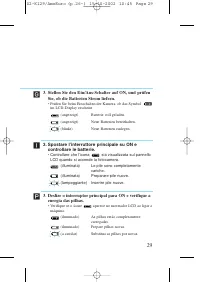
29 3. Spostare l’interruttore principale su ON e controllare le batterie. • Controllare che l’icona sia visualizzata sul pannello LCD quando si accende la fotocamera. (illuminata) Le pile sono completamentecariche. (illuminata) Preparare pile nuove. (lampeggiante) Inserire pile nuove. ˆ 3. Deslize o...
Page 34 - pilas nuevas, saque las pilas y vuélvalas a instalar.
34 • Long-life alkaline batteries are recommended.• If the camera does not work after new batteries have been loaded, remove the batteries, then insert themagain. Ï Í ´ • Utilisez des piles alcalines longue durée.• Si l’appareil ne fonctionne pas quand des piles neuves sont insérées, retirez les pil...
Page 36 - Chargement du film; L’appareil; Carga de la película
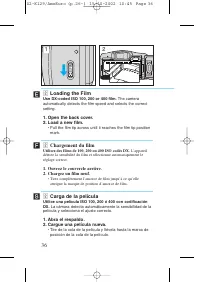
FIL M FIL M OPEN x Chargement du film Utilisez des films de 100, 200 ou 400 ISO codés DX. L’appareil détecte la sensibilité du film et sélectionne automatiquement leréglage correct. 1. Ouvrez le couvercle arrière.2. Chargez un film neuf. • Tirez complètement l’amorce de film jusqu’à ce qu’elle attei...
Page 37 - Inserimento della pellicola; La; Carregamento do Filme; A máquina; Einlegen des Films; Die Kamera erkennt die Empfindlichkeit dieser
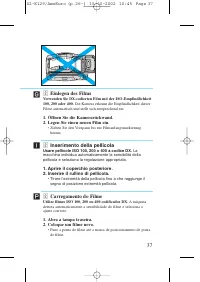
37 x Inserimento della pellicola Usare pellicole ISO 100, 200 o 400 a codice DX. La macchina individua automaticamente la sensibilità dellapellicola e seleziona la regolazione appropriata. 1. Aprire il coperchio posteriore.2. Inserire il rullino di pellicola. • Tirare l’estremità della pellicola fin...
Page 38 - “1” est affiché sur le compteur de vues.; • Si le compteur de vues indique un “0” clignotant, le film n’a; Se visualiza “1” en el contador de exposiciones.; • Si en el contador de exposiciones aparece un “0”; “1” is displayed in the frame counter.; • If the frame counter shows a blinking “0”, the film did not
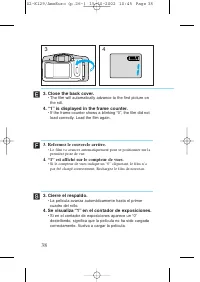
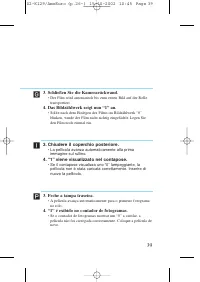
3. Refermez le couvercle arrière. • Le film va avancer automatiquement pour se positionner sur la première prise de vue. 4. “1” est affiché sur le compteur de vues. • Si le compteur de vues indique un “0” clignotant, le film n’a pas été chargé correctement. Rechargez le film de nouveau. 38 Ï 1 4 3. ...
Page 39 - “1” é exibido no contador de fotogramas.; • Se o contador de fotogramas mostrar um “0” a cintilar, a
39 3. Chiudere il coperchio posteriore. • La pellicola avanza automaticamente alla prima immagine sul rullino. 4. “1” viene visualizzato nel contapose. • Se il contapose visualizza uno “0” lampeggiante, la pellicola non è stata caricata correttamente. Inserire dinuovo la pellicola. ˆ 3. Feche a tamp...
Page 42 - Prise en main de l’appareil/Viseur; • Tenez l’appareil des deux mains et maintenez vos coudes; Sosteniendo la cámara/Visor
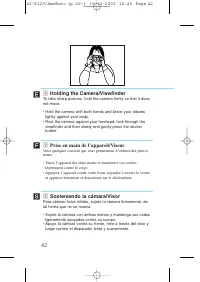
c Prise en main de l’appareil/Viseur Voici quelques conseils qui vous permettront d’obtenir des photosnettes. • Tenez l’appareil des deux mains et maintenez vos coudes légèrement contre le corps. • Appuyez l’appareil contre votre front, regardez à travers le viseur et appuyez lentement et doucement ...
Page 43 - Come tenere la macchina fotografica/Mirino; • Tenere la fotocamera con entrambe le mani e appoggiare; Maneira de Segurar a Máquina/Visor
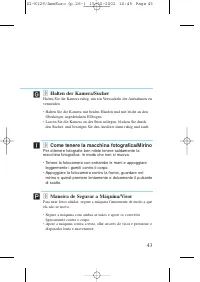
43 c Come tenere la macchina fotografica/Mirino Per ottenere fotografie ben nitide tenere saldamente lamacchina fotografica, in modo che non si muova. • Tenere la fotocamera con entrambe le mani e appoggiare leggermente i gomiti contro il corpo. • Appoggiare la fotocamera contro la fronte, guardare ...
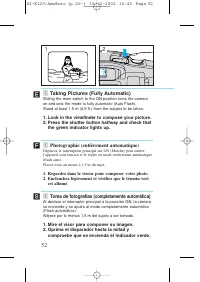
Page 52 - the green indicator lights up.; Toma de fotografías (completamente automática); compruebe que se encienda el indicador verde.
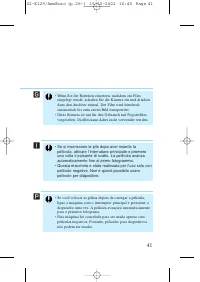
b Taking Pictures (Fully Automatic) Sliding the main switch to the ON position turns the cameraon and sets the mode to fully automatic (Auto Flash).Stand at least 1.5 m (4.9 ft.) from the subject to be taken. 1. Look in the viewfinder to compose your picture.2. Press the shutter button halfway and c...
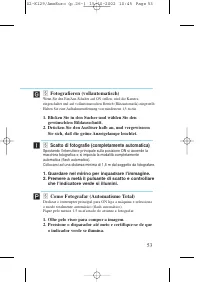
Page 53 - Scatto di fotografie (completamente automatica); che l’indicatore verde si illumini.
53 b Fotografieren (vollautomatisch) Wenn Sie den Ein/Aus-Schalter auf ON stellen, wird die Kameraeingeschaltet und auf vollautomatischen Betrieb (Blitzautomatik) eingestellt.Halten Sie eine Aufnahmeentfernung von mindestens 1,5 m ein. 1. Blicken Sie in den Sucher und wählen Sie den gewünschten Bild...
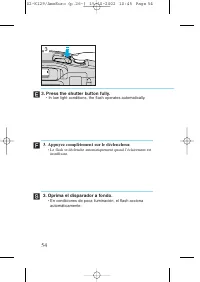
Page 54 - • In low light conditions, the flash operates automatically.; Appuyez complètement sur le déclencheur.; • Le flash se déclenche automatiquement quand l’éclairement est
54 ´ Ï 3 Í 3. Press the shutter button fully. • In low light conditions, the flash operates automatically. 3. Appuyez complètement sur le déclencheur. • Le flash se déclenche automatiquement quand l’éclairement est insuffisant. 3. Oprima el disparador a fondo. • En condiciones de poca iluminación, e...
Page 55 - • Em condições de pouca luminosidade, o flash dispara; Premere a fondo il pulsante di scatto.; • In condizioni di illuminazione scarsa, il flash si attiva; Drücken Sie den Auslöser schließlich ganz durch.; • Bei schwachem Licht wird der Blitz automatisch gezündet.
55 ˆ ∏ 3. Pressione o disparador completamente. • Em condições de pouca luminosidade, o flash dispara automaticamente. ˝ 3. Premere a fondo il pulsante di scatto. • In condizioni di illuminazione scarsa, il flash si attiva automaticamente. 3. Drücken Sie den Auslöser schließlich ganz durch. • Bei sc...
Page 56 - Flash Distance Range; Alcance de distancias para las tomas con flash
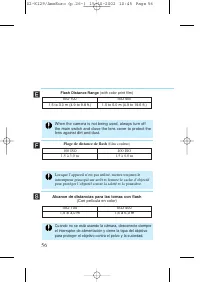
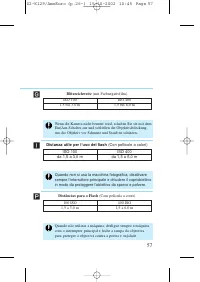
56 ´ Ï Í When the camera is not being used, always turn offthe main switch and close the lens cover to protect thelens against dirt and dust. Lorsque l’appareil n’est pas utilisé, mettez toujours leinterrupteur principal sur arrêt et fermez le cache d’objectifpour protéger l’objectif contre la salet...
Page 59 - Funktion zur Reduzierung des “Rote-Augen” Effekts; Funzione di riduzione del fenomeno “occhi rossi”
59 Funktion zur Reduzierung des “Rote-Augen” Effekts Die Augen von Personen, die in dunkler Umgebung oder bei schwachemLicht mit Blitzlicht fotografiert werden, erscheinen oft als grellrotePunkte auf dem Bild. Dieses Phänomen wird “Rote-Augen” Effektgenannt und beruht auf Blitzlicht, das durch die w...
Page 63 - Diese Funktion liefert nur dann gute Ergebnisse, wenn die
63 ˝ ˆ ∏ Orientações Importantes para utilizar a função deredução de olhos vermelhos 1. Esta função não é eficaz a menos que a pessoa olhe directamente para a lâmpada de redução de olhos vermelhos enquanto a mesma estiveriluminada. Diga à pessoa que está fotografar para olhar directamentepara a lâmp...
Page 66 - Verifique que el contador de exposiciones haya
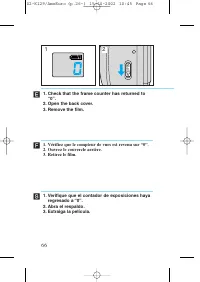
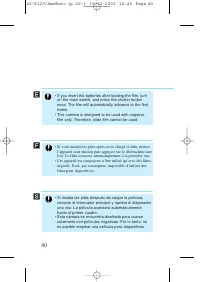
OPEN 66 Ï 1 2 Í 1. Verifique que el contador de exposiciones haya regresado a “0”. 2. Abra el respaldo.3. Extraiga la película. 1. Vérifiez que le compteur de vues est revenu sur “0”.2. Ouvrez le couvercle arrière.3. Retirez le film. ´ 1. Check that the frame counter has returned to “0”. 2. Open the...
Page 67 - Certifique-se de que o contador de exposições
67 ˆ ∏ 1. Certifique-se de que o contador de exposições retornou a “0”. 2. Abra a tampa traseira.3. Retire o filme. 1. Sehen Sie nach, ob das Bildzählwerk “0” anzeigt.2. Öffnen Sie die Kamerarückwand.3. Entnehmen Sie den Film. 1. Controllare che il contapose sia tornato ad “0”.2. Aprire il coperchio...
Page 68 - • Press the button.; Rembobinage du film à mi-course; • Appuyez sur la touche .; Rebobinado de la película a mitad del rollo; • Oprima el botón .
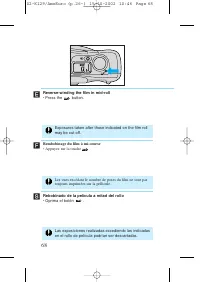
68 ´ Ï Í Reverse-winding the film in mid-roll • Press the button. Exposures taken after those indicated on the film rollmay be cut off. Rembobinage du film à mi-course • Appuyez sur la touche . Rebobinado de la película a mitad del rollo • Oprima el botón . Las exposiciones realizadas excediendo las...
Page 69 - Rebobinagem da película a meio do rolo; • Pressione o botão .; Rückspulen des Films vor seinem Ende; • Premere il tasto .
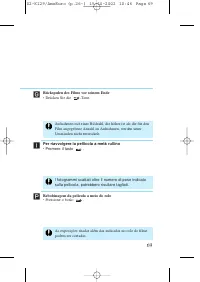
69 ˆ ∏ Rebobinagem da película a meio do rolo • Pressione o botão . As exposições tiradas além das indicadas no rolo do filmepodem ser cortadas. ˝ Rückspulen des Films vor seinem Ende • Drücken Sie die -Taste. Aufnahmen mit einer Bildzahl, die höher ist als die für denFilm angegebene Anzahl an Aufna...
Page 80 - • If you press the button again, the disappears and; Mode de retardateur; • Si vous appuyez de nouveau sur la touche , le disparaît; Modo de autodisparador; • Si usted oprime el botón otra vez, el icono
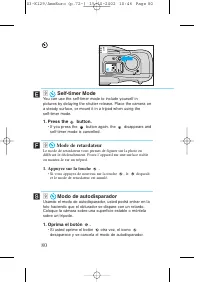
80 ´ Ï 1 Í . Self-timer Mode You can use the self-timer mode to include yourself inpictures by delaying the shutter release. Place the camera ona steady surface, or mount it in a tripod when using the self-timer mode. 1. Press the button. • If you press the button again, the disappears and self-time...
Page 81 - Modo de Disparador Automático; • Se pressionar o botão de novo, o ícone desaparece e o; Selbstauslöser-Betriebsart; • Falls Sie die -Taste noch einmal drücken, verschwindet das; Modalità autoscatto; • Se si preme di nuovo il tasto l’icona scompare e la
81 ˆ ∏ . Modo de Disparador Automático Você pode utilizar o modo do disparador automático para sair juntonas fotos, retardando o disparo do obturador. Coloque a máquinanuma superfície estável, ou monte-a num tripé. 1. Pressione o botão . • Se pressionar o botão de novo, o ícone desaparece e o modo d...
Page 82 - button is pressed and the self-timer starts.; • The red-eye reduction lamp starts flashing and the; déclencheur et la fonction de retardateur est activée.; • La lampe d’atténuateur d’yeux rouges clignote et l’obturateur
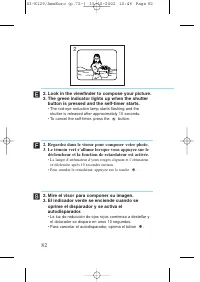
2. Look in the viewfinder to compose your picture.3. The green indicator lights up when the shutter button is pressed and the self-timer starts. • The red-eye reduction lamp starts flashing and the shutter is released after approximately 10 seconds. • To cancel the self-timer, press the button. 2. R...
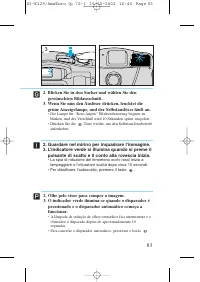
Page 83 - • Die Lampe für “Rote-Augen” Effektreduzierung beginnt zu; pulsante di scatto e il conto alla rovescia inizia.; • La spia di riduzione del fenomeno occhi rossi inizia a
83 2. Blicken Sie in den Sucher und wählen Sie den gewünschten Bildausschnitt. 3. Wenn Sie nun den Auslöser drücken, leuchtet die grüne Anzeigelampe, und der Selbstauslöser läuft an. • Die Lampe für “Rote-Augen” Effektreduzierung beginnt zu blinken, und der Verschluß wird 10 Sekunden später ausgelös...
Page 86 - Impresión de la fecha y hora; Oprima el botón; para seleccionar la fecha y hora para; Imprinting the Date and Time; Press the; MODE; button to select the date and time to be; Appuyez sur la touche; MODE; pour sélectionner la date et l’heure à
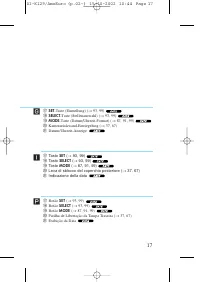
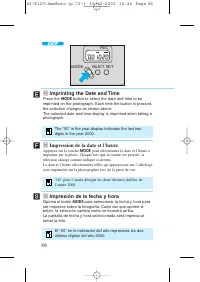
86 ´ Ï Í ⁄0 Impresión de la fecha y hora Oprima el botón MODE para seleccionar la fecha y hora para ser impresos sobre la fotografía. Cada vez que oprime elbotón, la selección cambia como se muestra arriba.La pantalla de fecha y hora seleccionada será impresa altomar la foto. MODE SELECT SET REC ⁄0 ...
Page 87 - Pressione o botão; para seleccionar a data e a hora a serem; Sovrimpressione della data e dell’ora; Premere il tasto; per selezionare la data e l’ora da
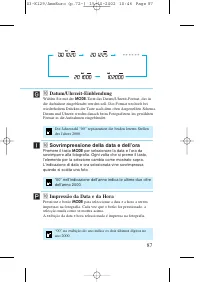
87 ˆ ∏ ⁄0 Impressão da Data e da Hora Pressione o botão MODE para seleccionar a data e a hora a serem impressas na fotografia. Cada vez que o botão for pressionado, aselecção muda como se mostra acima.A exibição da data e hora seleccionada é impressa na fotografia. ˝ ⁄0 Datum/Uhrzeit-Einblendung Wäh...
Page 90 - Ajuste de la fecha; • Visualice el formato de fecha que se va a corregir.; Réglage de la date; Appuyez sur la touche; • Le format de date à corriger est affiché.; Setting the Date; • Display the date format to be corrected.
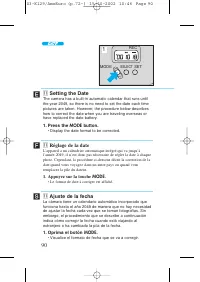
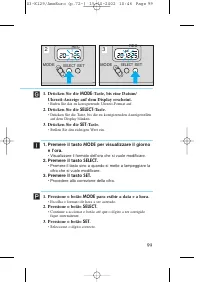
MODE SELECT SET REC 90 ´ Ï 2 Í ⁄1 Ajuste de la fecha La cámara tiene un calendario automático incorporado quefunciona hasta el año 2049 de manera que no hay necesidadde ajustar la fecha cada vez que se toman fotografías. Sinembargo, el procedimiento que se describe a continuaciónindica cómo corregir...
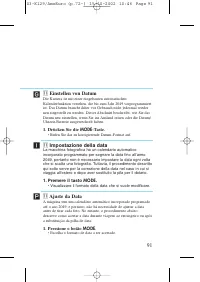
Page 91 - Ajuste da Data; Pressione o botão; • Escolha o formato de data a ser acertado.; • Rufen Sie das zu korrigierende Datum-Format auf.; Impostazione della data; • Visualizzare il formato della data che si vuole modificare.
91 ˆ ∏ ⁄1 Ajuste da Data A máquina tem um calendário automático incorporado programadoaté o ano 2049, e portanto, não há necessidade de ajustar a dataantes de tirar cada foto. No entanto, o procedimento abaixodescreve como acertar a data durante viagens ao estrangeiro ou apósa substituição da pilha ...
Page 92 - hasta que dejen de; • Cuando dejen de destellar y se iluminen todos los dígitos,; • Appuyez sur jusqu’à ce que le chiffre à corriger clignote.; Appuyez sur la touche; • Corrige le chiffre.; Appuyez sur la touche; • Le réglage est terminé lorsque tous les chiffres sont allumés et; button until all digits stop
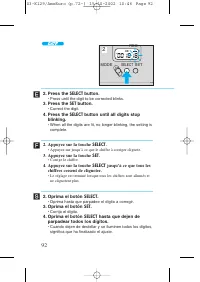
MODE SELECT SET REC 92 Ï 2 Í ´ 2. Oprima el botón SELECT . • Oprima hasta que parpadee el dígito a corregir. 3. Oprima el botón SET . • Corrija el dígito. 4. Oprima el botón SELECT hasta que dejen de parpadear todos los dígitos. • Cuando dejen de destellar y se iluminen todos los dígitos, significa ...
Page 93 - sino a quando tutte le; • Quando tutte le cifre rimangono illuminate stabilmente
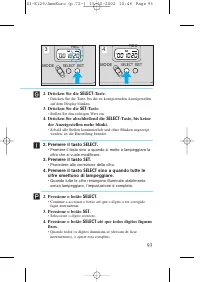
93 ˆ ∏ 2. Pressione o botão SELECT . • Continue a accionar o botão até que o dígito a ser corrigido fique intermitente. 3. Pressione o botão SET . • Seleccione o dígito correcto. 4. Pressione o botão SELECT até que todos dígitos fiquem fixos. • Quando todos os dígitos iluminam-se (deixam de ficar in...
Page 94 - • Une seule pression sur la touche; déplace le réglage au; SET
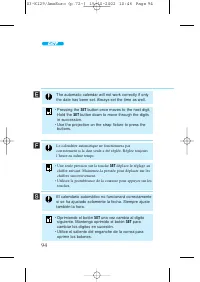
94 ´ Ï Í The automatic calendar will not work correctly if onlythe date has been set. Always set the time as well. El calendario automático no funcionará correctamentesi se ha ajustado solamente la fecha. Siempre ajustetambién la hora. Le calendrier automatique ne fonctionnera pascorrectement si la ...
Page 98 - para que se visualicen la; • Visualice el formato de hora que se va a corregir.; • Le format de heure à corriger est affiché.; button to display the date and; • Display the time format to be corrected.
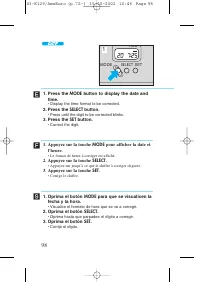
98 Ï Í ´ 1. Oprima el botón MODE para que se visualicen la fecha y la hora. • Visualice el formato de hora que se va a corregir. 2. Oprima el botón SELECT . • Oprima hasta que parpadee el dígito a corregir. 3. Oprima el botón SET . • Corrija el dígito. 1. Appuyez sur la touche MODE pour afficher la ...
Page 99 - • Visualizzare il formato dell’ora che si vuole modificare.
99 ˆ ∏ 1. Pressione o botão MODE para exibir a data e a hora. • Escolha o formato de hora a ser acertado. 2. Pressione o botão SELECT . • Continue a accionar o botão até que o dígito a ser corrigido fique intermitente. 3. Pressione o botão SET . • Seleccione o dígito correcto. ˝ 1. Drücken Sie die M...
Page 100 - SELECT
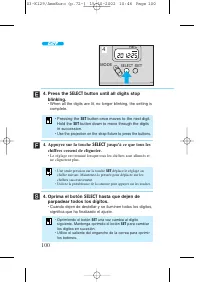
100 ´ Ï Í 4. Oprima el botón SELECT hasta que dejen de parpadear todos los dígitos. • Cuando dejen de destellar y se iluminen todos los dígitos, significa que ha finalizado el ajuste. MODE SELECT SET REC 4. Press the SELECT button until all digits stop blinking. • When all the digits are lit, no lon...
Page 101 - Drücken Sie abschließend die
101 ˆ ∏ 4. Pressione o botão SELECT até que todos dígitos fiquem fixos. • Quando todos os dígitos iluminam-se (deixam de ficar intermitentes), o ajuste está completo. • Pressione o botão SET para mover para o próximo dígito. Mantenha o botão SET pressionado para mover através dos dígitos em sucessão...
Page 105 - REC; Aprire il coperchio posteriore e aprire il
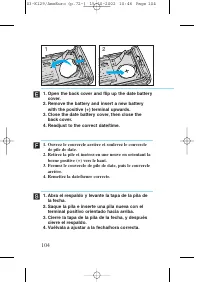
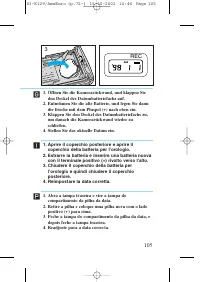
105 ˝ ˆ ∏ REC M 3 1. Abra a tampa traseira e vire a tampa do compartimento da pilha da data. 2. Retire a pilha e coloque uma pilha nova com o lado positivo (+) para cima. 3. Feche a tampa do compartimento da pilha da data, e depois feche a tampa traseira. 4. Readjuste para a data correcta. 1. Öffnen...
Page 108 - Troubleshooting
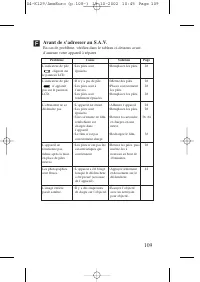
´ 108 Troubleshooting In case of trouble check the table below before taking youcamera to be repaired. Problem The iconblinks on the LCDpanel. The icon isnot displayed onthe LCD panel. The shutter doesnot release. The camera doesnot work even afternew batteries havebeen installed. The photographsare...
Page 110 - Localización de averías
110 Í Localización de averías En el caso de que ocurra alguna avería, revise la tabla deabajo antes de llevar su cámara al servicio. Problema El icono parpadea en elpanel de LCD. El icono nose visualiza en elpanel de LCD. El obturador no selibera. La cámara nofunciona inclusodespués de haberinstalad...
Page 111 - Im Problemfall
111 ˝ Im Problemfall Wenn beim Gebrauch ein Problem auftritt, gehen Sie bitte diefolgende Tabelle durch, bevor Sie einen Defekt annehmen. Problem Das Symbolblinkt im LCD-Display. Das Symbol wird nicht auf demLCD-Dispalyangezeigt. Der Verschluß wirdnicht ausgelöst. Die Kamerafunktioniert nachdem Einl...
Page 112 - Diagnostica
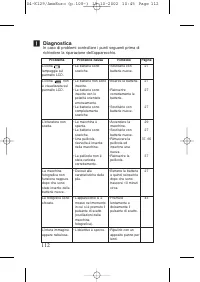
112 ˆ Diagnostica In caso di problemi controllare i punti seguenti prima dirichiedere la riparazione dell’apparecchio. Problema L’iconalampeggia sulpannello LCD. L’icona nonè visualizzata sulpannello LCD. L’otturatore nonscatta. La macchinafotografica nonfunziona neppuredopo che sonostate inserite d...
Page 113 - Localização e Solução de Problemas
113 ∏ Localização e Solução de Problemas No caso de problemas, verifique a tabela abaixo antes de levar a suamáquina para reparação. Problema O ícone estáintermitente nomostrador LCD. O ícone nãoaparece nomostrador LCD. O obturador não édisparado. A máquina nãofunciona mesmoapós a instalação depilha...
Page 114 - Specifications
´ 114 Specifications Type: 35mm fully automatic lens-shutter fixed focus camera Image Size: 24 × 36mm Lens: Canon 32 mm f/5.6 Focal Distance: 1.5 m/4.9 ft. to infinity Shutter: Shutter with combinable programs Viewfinder: Inverted Galilean finder Film Loading: Automatic (automatic blank film advance...
Page 115 - Spécifications
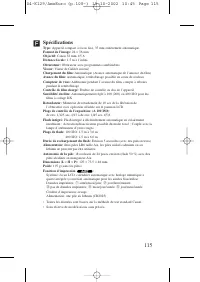
Ï 115 Spécifications Type: Appareil compact à focus fixe, 35 mm entièrement automatique. Format de l’image: 24 × 36 mm Objectif: Canon 32 mm, f/5,6 Distance focale: 1,5 m à l’infini Obturateur: Obturateur avec programmes combinables Viseur: Viseur de Galilée inversé Chargement du film: Automatique (...
Page 116 - Especificaciones
116 Especificaciones Tipo: Cámara de 35 mm completamente automática de enfoque fijo con obturador-objetivo Tamaño de la imagen: 24 × 36 mm Objetivo: Canon de 32 mm f/5,6 Distancia focal: 1,5 m hasta el infinito Obturador: Obturador con programas combinables Visor: Visor de Galileo invertido Carga de...
Page 117 - Technische Daten
117 ˝ Technische Daten Typ: vollautomatische 35-mm-Kamera mit Fixfokus-objektiv und Objektivverschluß Bildformat: 24 × 36 mm Objektiv: Canon 32 mm f/5,6 Einstellenfernung: 1,5 m bis unendlich Verschluß: mit kombinierbaren Programmen Sucher: umgekehrter galiläischer Sucher Filmeinfädelung: automatisc...
Page 118 - Caratteristiche tecniche
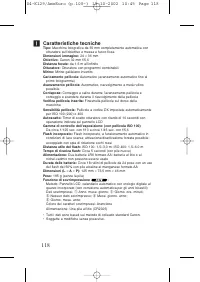
118 ˆ Caratteristiche tecniche Tipo: Macchina fotografica da 35 mm completamente automatica con otturatore sull’obiettivo e messa a fuoco fissa Dimensioni immagine: 24 × 36 mm Obiettivo: Canon 32 mm f/5,6 Distanza focale: da 1,5 m all’infinito Otturatore: Otturatore con programmi combinabili Mirino:...
Page 119 - Especificações
119 Especificações Tipo: Máquina fotográfica de focagem fixa, com objectiva-obturador de 35 mm Tamanho da Imagem: 24 × 36 mm Objectiva: Canon 32 mm f/5,6 Distância de Focagem: 1,5 m a infinito Obturador: Obturador com programas combináveis Visor: Visor Galileano Invertido Carregamento do Filme: Auto...