Canon PowerShot S5 IS - User Manual
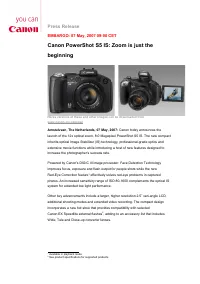
Canon PowerShot S5 IS – User Manual, read for free online in PDF format. We hope this helps you resolve any issues you may have. If you have further questions, please contact us through the contact form.


Table of Contents:
- Page 3 – New technologies for better photos; are distant or move within the frame. Unique to the PowerShot S5 IS,; Photographic versatility; with the camera held above the head.; Extensive movie functions; resolution stills during movie recording.
- Page 4 – Creative shooting; Events – based on face detection and the shooting mode selected.; – Ends –; Further information about Canon
- Page 5 – Additional Information; Printing; organising and editing images, movies and slideshows.; Accessories; High Power Flash HF-DC1
- Page 6 – supplied with a 32MB Canon card.
- Page 7 – Technologies Explained; Optical Image Stabilizer; increase in image blur.; DIGIC III; reducing the risk of image blur.
Press Release
EMBARGO: 07 May, 2007 09:00 CET
Canon PowerShot S5 IS: Zoom is just the
beginning
Hi-r
es versions of these and other images can be downloaded from
Amstelveen, The Netherlands, 07 May, 2007:
Canon today announces the
launch of the 12x optical zoom, 8.0 Megapixel PowerShot S5 IS. The new compact
inherits optical Image Stabilizer (IS) technology, professional-grade optics and
extensive movie functions while introducing a host of new features designed to
increase the photographer’s success rate.
Powered by Canon’s DIGIC III image processor, Face Detection Technology
improves focus, exposure and flash output for people shots while the new
Red-Eye Correction feature
effectively solves red-eye problems in captured
photos. An increased sensitivity range of ISO 80-1600 complements the optical IS
system for extended low light performance.
Other key advancements include a larger, higher resolution 2.5” vari-angle LCD,
additional shooting modes and extended video recording. The compact design
incorporates a new hot shoe that provides compatibility with selected
Canon EX Speedlite external flashes
, adding to an accessory list that includes
Wide, Tele and Close-up converter lenses.
1
Available in playback mode
2
See product specifications for supported products
"Loading the manual" means you need to wait until the file loads and becomes available for online reading. Some manuals are very large, and the time they take to appear depends on your internet speed.
Was this manual helpful?
About this manual
- Brand
- Canon
- Model
- PowerShot S5 IS
- Document type
- User Manual
- Language(s)
- English
- Pages
- 8
- File size
- 167.8 KB
- Format
Other Manuals for Canon PowerShot S5 IS
Summary
New technologies for better photos Canon’s DIGIC III processor introduces several new features engineered to return better photos, more easily. Face Detection AF/AE/FE automatically detects up to nine faces within a scene and optimises focus, exposure and flash output accordingly. The system perform...
Creative shooting An expanded selection of 22 shooting modes ranges from automatic to full Manual mode and includes Aperture Priority, Shutter Speed Priority and a user-defined Custom mode. The My Category function simplifies image management by automatically tagging images with categories – such as...
Additional Information Printing The PowerShot S5 IS features a dedicated Print menu for quick access to direct print options. Full PictBridge support means users can print directly to any PictBridge compatible printer without the need for a PC. A Print/Share button allows one-touch printing and easy...
Ask a question
Related manuals
Popular Canon Other


More Canon Other models
 Canon PowerShot N100 User Manual
 Canon POWERSHOT PRO 1 User Manual
 Canon Powershot Pro70 User Manual
 Canon PowerShot Pro 90 IS User Manual
 Canon Powershot S2 IS User Manual
 Canon PowerShot S3 IS User Manual
 Canon POWERSHOT S10 User Manual
 Canon PowerShot S30 User Manual
 Canon PowerShot S40 User Manual
 Canon Powershot S60 User Manual
 Canon Powershot S70 User Manual
 Canon Powershot S80 User Manual