Page 3 - Español
English Français Italiano Deutsch Español English Settings for the Machine and Software Installation Next, specify the settings for the machine and install software. See the language tab page on the right. Français Paramètres pour l’installation de la machine et du logiciel Spéci fi ez ensuite les p...
Page 4 - Spéci
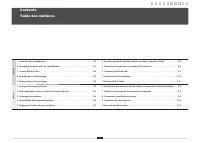
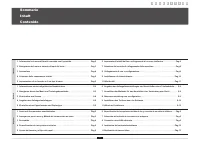
1 English 1 About the Supplied Manuals . . . . . . . . . . . . . . . . . . . . . . . . . . . . . . . . . . . . . . . . . . . . P.2 2 Navigating the Menu and Text Input Method . . . . . . . . . . . . . . . . . . . . . . . . . . . . . . . P.3 3 Turning ON the Power . . . . . . . . . . . . . . . . . . ...
Page 5 - English Français; Guide des paramètres du réseau sans
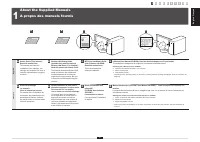
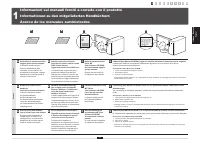
English Français 2 English A Starter Guide (This manual):Read this manual fi rst. This manual describes the installation of the machine, the settings, and a caution. Be sure to read this manual before using the machine. B Wireless LAN Setting Guide (Available only when the optional Wireless LAN Boar...
Page 6 - Numeric
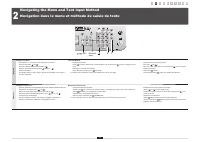
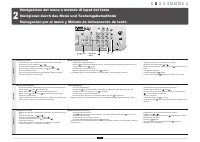
3 English Navigating the Menu ▪ Item selection or moving the cursor among the menu itemsSelect an item with [ ] or [ ]. Proceed to the next hierarchy with [OK] or [ ]. Return to the previous hierarchy with [ ] (Back) or [ ]. ▪ Setting con fi rmation Press [OK]. However, when <Apply> appears on...
Page 8 - Language; cation des paramètres initiaux; Select Paper
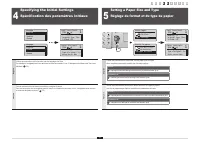
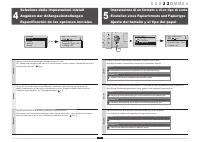
5 English Follow the instructions on the screen, set the language and time.For details on navigating the menu and how to input the numbers, see 2 "Navigating the Menu and Text Input Method" ( P.3). Français Suivez les instructions à l'écran pour dé fi nir la langue et l'heure. Pour en savoir...
Page 9 - Specify the initial fax settings.; What happens with the unit name; Connect a telephone cable.; Spéci; Comment utiliser un nom d'utilisateur; Connectez un câble téléphonique.; Set up Now
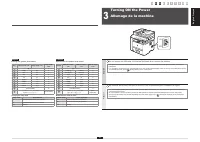
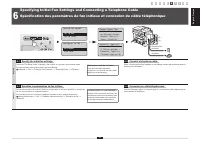
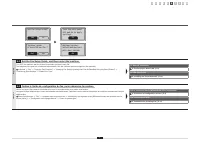
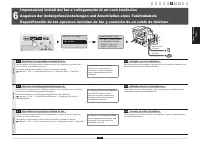
English Français 6 English 6-1 Specify the initial fax settings. Follow the "Fax Setup Guide" to specify a fax number, a unit name, and a receive mode.For more details on the receive mode, see the e-Manual. e-Manual -> "Fax" -> "Using the Fax Functions" -> "Recei...
Page 10 - Exit the Fax Setup Guide, and then restart the machine.; For Network Connection; Quittez le Guide de con; Avec une connexion USB; Yes
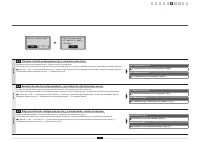
7 English 6-3 Exit the Fax Setup Guide, and then restart the machine. Turn OFF the machine, wait for at least 10 seconds, and then it back ON.The telephone line types are not detected automatically. See the e-Manual and set a telephone line manually. e-Manual -> "Fax" -> "Using the...
Page 12 - guration réseau
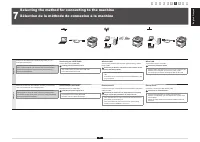
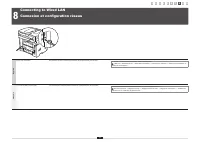
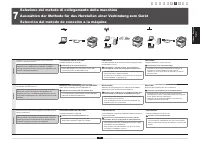
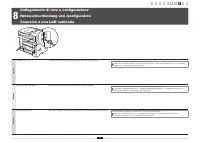
9 English Connect the LAN cable. The machine sets the IP address automatically. Wait approximately two minutes. If you want to set the IP address manually, see the following items. e-Manual -> "Network Settings" -> "Basic Network Settings" -> "Setting the IP Address"...
Page 14 - Perform Useful Tasks
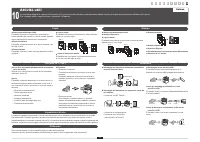
11 Copy Print Remote UI Network Settings Fax (iR 1133iF Only) Scan ● Sending a Document Directly from a Computer (PC Fax) In addition to the normal sending and receiving faxes, you can use the PC fax. ● Sending You can register fax destinations in the address book. You can specify the destinations u...
Page 15 - Exécution de tâches utiles
English Français 12 10 Exécution de tâches utiles Français Vous pouvez utiliser les diverses fonctions de la machine. Voici les principales fonctions que vous utiliserez au quotidien. Pour en savoir plus sur chaque fonction, voir le manuel électronique. 1 2 3 4 5 6 7 8 9 10 Copie Impression Interf d...
Page 16 - Collegamento di rete e con; Netzwerkverbindung und -kon; Especi
1 Italiano 1 Informazioni sui manuali forniti a corredo con il prodotto . . . . . . . . . . . . . . . . . . Pag.2 2 Navigazione del menu e metodo di input del testo . . . . . . . . . . . . . . . . . . . . . . . . Pag.3 3 Accensione . . . . . . . . . . . . . . . . . . . . . . . . . . . . . . . . . . ...
Page 17 - Italiano Deutsch; Guida alla con; Guía de con
2 Italiano Deutsch Español Italiano A Guida all'avvio (questo manuale):Leggere prima questo manuale. In questo manuale vengono descritti l'installazione della macchina, le impostazioni e le avvertenze da osservare. Leggere attentamente il manuale prima di utilizzare la macchina. B Guida alla con fi ...
Page 20 - cación de las opciones iniciales
5 Italiano Seguire le istruzioni visualizzate per impostare la lingua e l'orario.Per i dettagli sulla navigazione del menu e su come immettere i numeri, vedere 2 "Navigazione del menu e metodo di input del testo" ( Pag.3). Deutsch Folgen Sie den Anweisungen auf dem Bildschirm, und stellen Si...
Page 21 - Come utilizzare un nome utente; Verwendung eines Anwendernamens; Qué ocurre con el nombre de unidad
6 Italiano Deutsch Español Italiano 6-1 Speci fi care le impostazioni iniziali del fax. Attenersi alle istruzioni della "Guida con fi gurazione fax" per speci fi care il numero del fax, il nome dell'unità e la modalità di ricezione.Per ulteriori dettagli sulla modalità di ricezione, consulta...
Page 22 - Chiudere la Guida con; Per il collegamento di rete; Für Netzwerkverbindung; Salga de la Guía de con; Para conexión de red
7 Italiano 6-3 Chiudere la Guida con fi gurazione fax e riavviare la macchina. Spegnere la macchina e attendere almeno 10 secondi prima di riaccenderla.Le tipologie di linea telefonica non vengono riconosciute automaticamente. Consultare l'e-Manual e impostare manualmente una linea telefonica. e-Man...
Page 24 - Collegamento di rete e con
9 Italiano Collegare il cavo LAN. La macchina imposta l'indirizzo IP automaticamente. Attendere circa due minuti. Per impostare manualmente l'indirizzo IP vedere le voci seguenti. e-Manual -> "Impostazioni di rete" -> "Impostazioni di rete di base" -> "Impostazione dell'...
Page 26 - Attività utili
1 2 3 4 5 6 7 8 9 10 11 10 Attività utili Italiano La macchina dispone di una serie di funzioni utili. Le funzioni descritte sono una panoramica delle funzioni principali che si possono utilizzare tutti i giorni. Per i dettagli relativi a ogni funzione, consultare l'e-Manual. Copia Stampa IU Remota ...
Page 27 - Hilfreiche Funktionen
1 2 3 4 5 6 7 8 9 10 12 Italiano Deutsch Español 10 Hilfreiche Funktionen Deutsch Sie können verschiedene Funktionen dieses Geräts nutzen. Die folgenden Funktionen sind ein Überblick über die Hauptfunktionen, die Sie routinemäßig verwenden können. Nähere Informationen zu den einzelnen Funktionen fi ...
Page 28 - Realización de tareas útiles
1 2 3 4 5 6 7 8 9 10 13 10 Realización de tareas útiles Español Podrá utilizar diversas funciones en esta máquina. Las siguientes funciones constituyen una visión general de las principales funciones que puede utilizar de forma rutinaria. Para obtener una información detallada acerca de cada función...
Page 30 - Power Supply
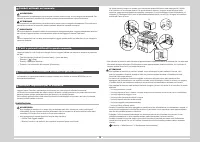
Symbols Used in This Manual WARNING Indicates a warning concerning operations that may lead to death or injury to persons if not performed correctly. To use the machine safely, always pay attention to these warnings. CAUTION Indicates a caution concerning operations that may lead to injury to person...
Page 31 - Handling; WARNING; Maintenance and Inspections; WARNING
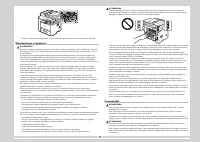
▪ Keep the power cord away from all heat sources. Failure to do so can cause the power cord insulation to melt, resulting in a fi re or electrical shock. ▪ The power cord should not be taut, as this may lead to a loose connection and cause overheating, which could result in a fi re. ▪ The power cord...
Page 32 - Consumables; Others
▪ Clean the machine with a well wrung out cloth dampened with water or mild detergent diluted with water. Do not use alcohol, benzene, paint thinner, or other fl ammable substances. If fl ammable substances come into contact with electrical parts inside the machine, this may result in a fi re or ele...
Page 33 - Power Supply Requirements; IMPORTANT; Installation Requirements; IMPORTANT; Notes on wireless LAN; IMPORTANT
Installation Requirements and Handling In order to use this machine in a safe and trouble-free manner, install the machine in a place that ful fi lls the following conditions. Also, read the remarks carefully. Temperature and Humidity Conditions ▪ Temperature range: 10 to 30°C ▪ Humidity range: 20 t...
Page 34 - Legal Notices
Legal Notices Model Names imageRUNNER 1133iF (F161602)imageRUNNER 1133A/imageRUNNER 1133 (F161600) WEEE Directive European Union (and EEA) only.These symbols indicate that this product is not to be disposed of with your household waste, according to the WEEE Directive (2002/96/EC), the Battery Direc...
Page 36 - Symboles en vigueur dans ce manuel; Touches et boutons utilisés dans ce manuel; AVERTISSEMENT; ATTENTION
Symboles en vigueur dans ce manuel AVERTISSEMENT Avertissement concernant les opérations susceptibles de représenter un danger de mort ou de provoquer des blessures si les instructions ne sont pas respectées. Ces recommandations sont à respecter rigoureusement. ATTENTION Point important concernant l...
Page 37 - Alimentation électrique; Manipulation
Alimentation électrique AVERTISSEMENT ▪ N'abîmez pas ou ne modi fi ez pas le cordon d'alimentation. Veillez également à ne pas poser d'objets lourds sur le câble d'alimentation, à ne pas tirer dessus et à ne pas le plier excessivement. Cela risquerait d'entraîner des dommages électriques, et de prov...
Page 38 - Consommables
- Si le faisceau laser vient à s'échapper de l'appareil et que vos yeux s'y trouvent exposés, le rayonnement peut provoquer des lésions oculaires. Entretien et véri fi cations AVERTISSEMENT ▪ Lorsque vous nettoyez la machine, éteignez-la, ainsi que l'ordinateur, puis débranchez les câbles d'interfac...
Page 39 - Consignes d'installation et de manipulation
▪ Si de l'encre fuit de la cartouche d'encre, faites attention de ne pas l'inhaler et prenez soin d'éviter tout contact direct avec votre peau. Si l'encre vient en contact avec votre peau, lavez la zone affectée avec du savon. Si vous sentez une irritation au niveau de la zone affectée ou une gêne a...
Page 42 - Simboli utilizzati nel manuale; Tasti e pulsanti utilizzati in questo manuale; AVVERTENZA; ATTENZIONE
Simboli utilizzati nel manuale AVVERTENZA Indica operazioni che potrebbero provocare gravi incidenti, anche mortali, se non eseguite correttamente. Per utilizzare la macchina in condizioni di sicurezza, prestare pertanto attenzione a queste avvertenze. ATTENZIONE Indica operazioni che potrebbero pro...
Page 43 - Alimentazione; Gestione
Alimentazione AVVERTENZA ▪ Non danneggiare o fare modi fi che sul cavo di alimentazione. Non appoggiare oggetti pesanti sul cavo di alimentazione né tirarlo o piegarlo eccessivamente. Ciò potrebbe causare danni elettrici, provocando un incendio o scosse elettriche. ▪ Tenere il cavo di alimentazione ...
Page 44 - Manutenzione e ispezioni; Consumabili
- In caso di fuoriuscita del raggio laser, questo potrebbe colpire gli occhi e causare seri danni alla vista. Manutenzione e ispezioni AVVERTENZA ▪ Quando si pulisce la macchina, spegnere macchina e computer e scollegare i cavi d'interfaccia e il cavo di alimentazione. Se non ci si attiene a questa ...
Page 45 - Requisiti d'installazione e gestione; IMPORTANTE
▪ Se la cartuccia perde toner, fare attenzione a non inalare il toner né farlo venire a contatto diretto con la pelle. Se il toner entra a contatto con la pelle, lavare con sapone. Se la pelle si irrita o se si è inalato del toner, rivolgersi immediatamente a un medico. ▪ Non tirare il nastro di sig...
Page 48 - In diesem Handbuch verwendete Symbole; In diesem Handbuch verwendete Tasten und Schalt; In diesem Handbuch verwendete Abbildungen und Displays; WARNUNG; VORSICHT
In diesem Handbuch verwendete Symbole WARNUNG Wenn Sie eine so gekennzeichnete Warnung nicht beachten, können ernsthafte Verletzungen oder Tod die Folge sein. Bitte beachten Sie diese Warnungen unbedingt, um den sicheren Betrieb zu gewährleisten. VORSICHT So wird eine Vorsichtsmaßnahme bezüglich Vor...
Page 49 - Stromversorgung; Handhabung
Stromversorgung WARNUNG ▪ Beschädigen oder modi fi zieren Sie das Netzkabel nicht. Stellen Sie darüber hinaus keine schweren Gegenstände auf das Netzkabel, ziehen Sie nicht am Kabel, und biegen Sie es nicht übermäßig. Andernfalls kann es zur Beschädigung des Kabels kommen, was einen Brand oder elekt...
Page 50 - Wartung und Inspektion; Verbrauchsmaterial
- Wenn der Laserstrahl aus dem Gerät austritt, kann eine Bestrahlung der Augen schwere Sehschäden zur Folge haben. Wartung und Inspektion WARNUNG ▪ Wenn Sie das Gerät reinigen möchten, schalten Sie das Gerät und den Computer aus, und ziehen Sie die Schnittstellenkabel und das Netzkabel heraus. Ander...
Page 51 - Sonstiges; Installationsanforderungen und Handhabung; Anforderungen an die Stromversorgung; WICHTIG; Installationsanforderungen; WICHTIG; Hinweise zu Wireless LAN
VORSICHT ▪ Bewahren Sie Tonerpatronen und andere Verbrauchsmaterialien außerhalb der Reichweite von kleinen Kindern auf. Wenn Toner oder andere Materialien verschluckt wurden, wenden Sie sich unverzüglich an Ihren Arzt. ▪ Versuchen Sie nicht, die Tonerpatrone zu zerlegen. Der Toner kann sonst verstr...
Page 52 - Rechtliche Hinweise
Wartung und Inspektion WICHTIG ▪ Folgen Sie den Anweisungen auf dem an diesem Gerät angebrachten Warnaufkleber. ▪ Vermeiden Sie Erschütterungen des Geräts. ▪ Zur Vermeidung eines Papierstaus schalten Sie das Gerät nicht ein oder aus, öffnen oder schließen Sie das Bedienfeld oder die hintere Abdeckun...
Page 54 - Símbolos utilizados en este manual; Teclas y botones utilizados en este manual; ADVERTENCIA; ATENCIÓN
Símbolos utilizados en este manual ADVERTENCIA Indica una advertencia relativa a operaciones que pueden ocasionar la muerte o lesiones personales si no se ejecutan correctamente. Para utilizar el equipo de forma segura, preste atención siempre a estas advertencias. ATENCIÓN Indica una precaución rel...
Page 55 - Suministro eléctrico; Manipulación
Suministro eléctrico ADVERTENCIA ▪ No dañe ni modi fi que el cable de alimentación. Tampoco coloque objetos pesados sobre el cable de alimentación ni tire de él o lo doble excesivamente. Esto podría causar daños eléctricos y provocar un incendio o una descarga eléctrica. ▪ Mantenga el cable de alime...
Page 56 - Mantenimiento e inspecciones; Consumibles
- Si el haz de láser escapara y entrara en contacto con sus ojos, la exposición al mismo podría causarle daños oculares. Mantenimiento e inspecciones ADVERTENCIA ▪ Cuando limpie la máquina, apague la máquina y el ordenador y desconecte los cables de interfaz y el cable de alimentación. De lo contrar...
Page 57 - Requisitos de instalación y manipulación
▪ Si el cartucho de tóner tiene una fuga de tóner, procure no inhalarlo y no deje que entre en contacto directo con su piel. Si el tóner entra en contacto con su piel, lávese con jabón. Si se le irrita la piel o inhala el tóner, acuda al médico inmediatamente. ▪ No tire de la cinta de sellado brusca...
Page 58 - Avisos legales
▪ Los repuestos y los cartuchos de tóner para la máquina se encontrarán disponibles durante un mínimo de siete (7) años tras la interrupción de la producción de este modelo de máquina. Avisos legales Nombres de modelos imageRUNNER 1133iF (F161602)imageRUNNER 1133A/imageRUNNER 1133 (F161600) Directiv...
Page 60 - XXXXXXXXXX
CANON INC. 30-2, Shimomaruko 3-chome, Ohta-ku, Tokyo 146-8501, Japan CANON MARKETING JAPAN INC. 16-6, Konan 2-chome, Minato-ku, Tokyo 108-8011, Japan CANON U.S.A., INC. One Canon Plaza, Lake Success, NY 11042, U.S.A. CANON EUROPA N.V. Bovenkerkerweg, 59-61, 1185 XB Amstelveen, The Netherlands CANON ...









 Canon imagePROGRAF iPF8400S User Manual
 Canon imagePROGRAF PRO-1000 User Manual
 Canon imageRUNNER Manual
 Canon imageRUNNER 1025 Quick Guide
 Canon imagerunner 1025if User Manual
 Canon imageRunner 1133 User Manual
 Canon imageRUNNER 1310 User Manual
 Canon imageRUNNER 1600 User Manual
 Canon IMAGERUNNER 2016 User Manual