Canon ImageClass LBP6030 - User Manual
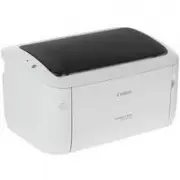
A user manual for Canon’s LBP6030 series printers covers essential setup, operation, and maintenance. The guide includes installation instructions–such as loading paper, connecting cables, and handling internal components–and detailed steps for replacing cartridges or cleaning the device. It also addresses troubleshooting common issues like paper jams, power checks, and error messages while emphasizing safety protocols to prevent accidents during use.
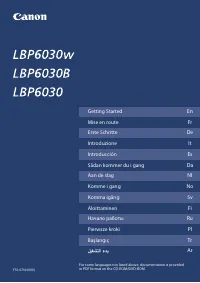
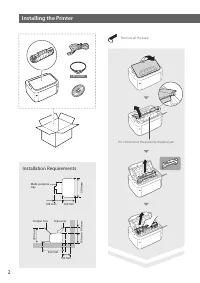
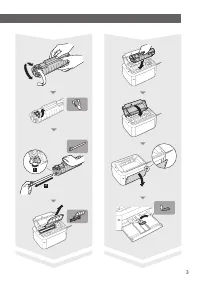
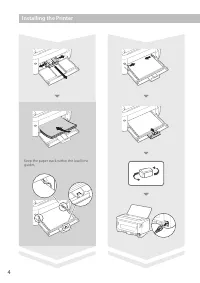
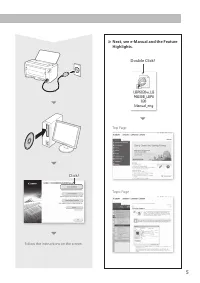
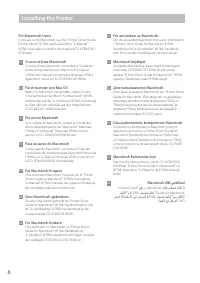
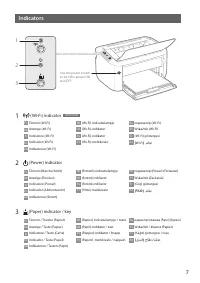
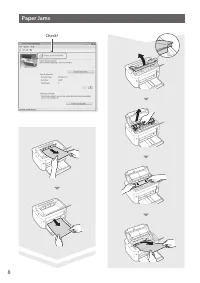
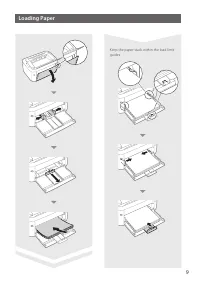
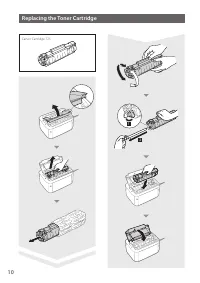
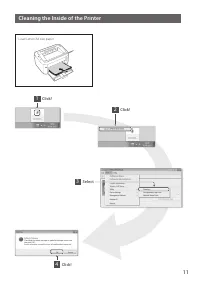
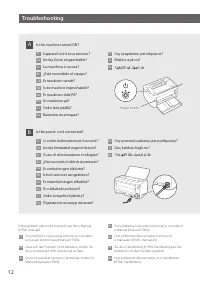
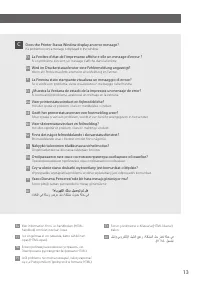
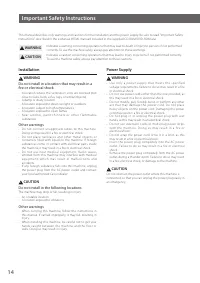
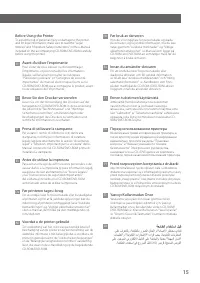
Table of Contents:
- Page 1 – Table of Contents and Documentation Access
- Page 2 – Printer Installation Procedures
- Page 3 – Toner Cartridge Installation Guide
- Page 4 – Initial Printer Setup and Paper Loading
- Page 5 – Printer Software Installation
- Page 6 – Macintosh Driver Installation Guidance
- Page 7 – Printer Indicator Light Functions
- Page 8 – Resolving Paper Jams
- Page 9 – Paper Loading Procedures
- Page 10 – Toner Cartridge Replacement
- Page 11 – Printer Internal Cleaning Procedure
- Page 12 – Power and Connection Troubleshooting
- Page 13 – Error Message Troubleshooting
- Page 14 – Safety Instructions for Installation and Power Supply
- Page 15 – Safety and Legal Notices
- Page 16 – Company Contact and Copyright Information
FT6-0754 (000)
FT6-0754 (000) XXXXXXXXXX Copyright CANON INC. 2014 PRINTED IN VIETNAM
For some languages not listed above, documentation is provided
in PDF format on the CD-ROM/DVD-ROM.
ﻞﻴﻐﺸﺘﻟﺍ ءﺪﺑ
Mise en route
Fr
Getting Started
En
Introduzione
Erste Schritte
Sådan kommer du i gang
Introducción
Komme i gang
Aan de slag
Aloittaminen
Komma igång
Pierwsze kroki
Начало работы
Başlangıç
De
Ar
Pl
Tr
Fi
Ru
No
Sv
Da
Nl
It
Es
"Loading the manual" means you need to wait until the file loads and becomes available for online reading. Some manuals are very large, and the time they take to appear depends on your internet speed.
Was this manual helpful?
Helpful for 3 of 3 readers
About this manual
- Brand
- Canon
- Model
- ImageClass LBP6030
- Document type
- User Manual
- Category
- Printer
- Language(s)
- German, English, Spanish, French, Italian, Dutch, Polish, Russian, Swedish
- Pages
- 16
- File size
- 5.4 MB
- Format
Summary
Listing of 'Getting Started' sections for multiple printer models and reference to additional documentation available on CD-ROM/DVD-ROM.
Instructions for installing the printer, including removing packing materials, internal component installation, and specifications for tray and cover dimensions.
Step-by-step instructions detailing the process of removing an old toner cartridge, preparing a new one, and inserting it into the printer slot.