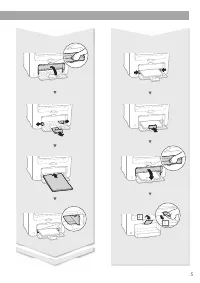
Page 2 - Installing the Machine; Installation Requirements
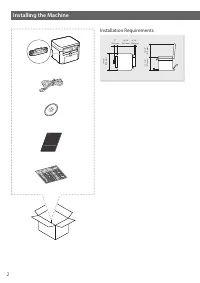
2 Installing the Machine Installation Requirements 15 3/8" (390 mm) 12 1/4" (312 mm) 12 1/4" (310 mm) 5" (128 mm) 14 1/4" (362 mm) 4 1/4" (106 mm)
Page 8 - MF Driver Installation Guide (Visit; Navigating the Menu; Setting confi rmation; Text Input Method; Changing entry mode; Connecting the Power Cord and Turning ON the Power
8 En Navigating the Menu and Text Input Method About the Manuals Getting Started (This manual): Read this manual fi rst. This manual describes the installation of the machine, the settings, and a caution. Be sure to read this manual before using the machine. MF Driver Installation Guide (Visit ...
Page 9 - Specifying the Initial Settings; Connecting via a Wired LAN; Connecting via a USB cable; Connecting via a Wireless LAN; Check if your router has a button; Direct Connection
9 En Specifying the Initial Settings Follow the instructions on the screen, set the language, region, time zone, and date and time. For details on navigating the menu and how to input the numbers, see “Navigating the Menu and Text Input Method” ( P.8). Language Chinese (Simplified) Chinese (Traditio...
Page 10 - NOTE; Install the driver and software using the provided; Connecting via a USB Cable; Install the Driver and Software; Connecting via a USB Cable; Checking Before the Setup
10 En Connecting via a Wired LAN Checking Before the Setup Internet Router or hub LAN cable Are the computer and the router (or hub) properly connected using a LAN cable? For more information, see the instruction manual for the network device you are using, or contact the networking device manufactu...
Page 11 - Checking the Router; Setting Wireless LAN; Push Button Mode; Read the message that is displayed, and then press; Press and hold* the button until the lamp lights or; Wait approximately 2 minutes after the connection.; When an error message appears:; When checking the network connection:; To set IP address manually:
11 En NOTE • You cannot connect both the wired LAN and wireless LAN at the same time. In addition, the machine is set to the “Wired LAN” by default. • When you connect to an unsecured network environment, your personal information could be disclosed to third parties. Please use caution. • If you con...
Page 12 - Setting the Access Point Manually; SSID
12 En Setting the Access Point Manually 1 Check SSID or Network Key for a Wireless LAN Router/Access Point. • Check the label on the Wireless LAN router. • You can check the SSID or the network key using “Canon MF / LBP Wireless Setup Assistant,” which is included in the DVD-ROM supplied with the ma...
Page 13 - For details on the installation procedures:; Setting a Paper Size and Type
13 En 12 After the <Connected.> screen is displayed, wait until the Wi-Fi indicator stops blinking and turns on. 13 Wait approximately 2 minutes after the connection. IP address is set during this period of time. When an error message appears: Press to close the screen, check whether or not th...
Page 14 - Perform Useful Tasks; Copy; Remote UI
14 En Perform Useful Tasks You can use various functions in this machine. Following functions are the overview of the main functions that you can use routinely. Copy Enlarged/Reduced Copies You can enlarge or reduce standard size documents to copy on standard size paper or specify the copy ratio in ...
Page 15 - Replacing Toner Cartridge; When a Message Appears; When this problem occurs:; When the print quality is still unacceptable:
15 En Replacing Toner Cartridge Toner cartridges are consumables. When the toner becomes nearly empty or has run out completely in the middle of a job run, a message appears on the screen, or the following problems may occur. Take the appropriate action accordingly. When a Message Appears When the t...
Page 16 - Clearing Paper Jams; Manual Feed Slot
16 En Clearing Paper Jams If the following screen appears, a paper jam has occurred inside the machine. Follow the procedure displayed on the screen to remove the jammed document or paper. This manual indicates only areas where paper jams occur. For details on each function, see the User’s Guide. Pa...
Page 18 - Power Supply; Handling; Important Safety; Installation; Appendix
18 En Power Supply WARNING • Use only a power supply that meets the specifi ed voltage requirements. Failure to do so may result in a fi re or electrical shock. • Do not use power cords other than the one provided, as this may result in a fi re or electrical shock. • The provided power cord is inten...
Page 19 - Legal Limitations on the Usage of Your; Maintenance and Inspections
19 En parts inside the machine, they may generate static electricity or result in a fi re or electrical shock. • Check the power cord and plug periodically for rust, bent prongs, fraying, cracks, or excessive heat generation. Use of poorly-maintained power cord or plug may result in a fi re or elect...
Page 22 - Guide d’installation du pilote MF; Navigation dans le menu; Validation des réglages; Méthode de saisie du texte; Modifi cation du mode de saisie; Branchement du cordon d’alimentation et mise sous tension
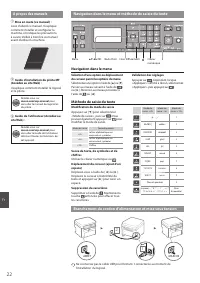
22 Fr Navigation dans le menu et méthode de saisie du texte A propos des manuels Mise en route (ce manuel) : Lisez d’abord ce manuel. Il explique comment installer et confi gurer la machine, et indique les précautions à suivre. Veillez à bien lire ce manuel avant d’utiliser la machine. Guide d...
Page 23 - Confi guration des réglages initiaux; Connexion via un réseau fi laire; Vérifi ez si votre routeur possède un bouton; Connexion directe
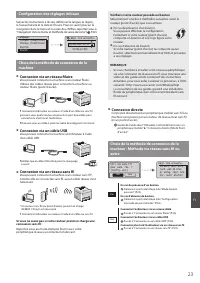
23 Fr Confi guration des réglages initiaux Suivez les instructions à l’écran, défi nissez la langue, la région, le fuseau horaire et la date et l’heure. Pour en savoir plus sur la navigation dans le menu et la saisie des chiff res, reportez-vous à “Navigation dans le menu et méthode de saisie du tex...
Page 24 - REMARQUE; Installez le pilote et le logiciel à l’aide du DVD-ROM; Connexion via un câble USB; Connexion via un câble USB; Connexion via un réseau sans fi l; Vérifi cation avant la confi guration
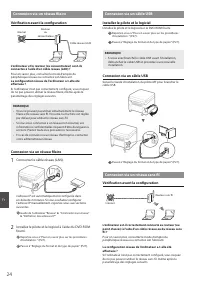
24 Fr Connexion via un réseau fi laire Vérifi cation avant la confi guration Internet Routeur ou concentrateur Câble réseau (LAN) L’ordinateur et le routeur (ou concentrateur) sont-ils connectés à l’aide d’un câble réseau (LAN) ? Pour en savoir plus, consultez le mode d’emploi du périphérique réseau...
Page 25 - Vérifi cation du routeur; En cas d’absence de bouton.; Si un message d’erreur apparaît :
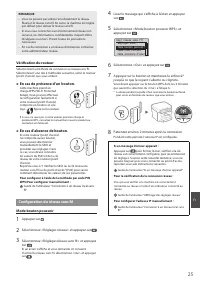
25 Fr REMARQUE • Vous ne pouvez pas utiliser simultanément le réseau fi laire et le réseau sans fi l. En outre, la machine est réglée par défaut pour utiliser le réseau sans fi l. • Si vous vous connectez à un environnement réseau non sécurisé, vos informations confi dentielles risquent d’être divul...
Page 26 - Confi guration manuelle du point d’accès
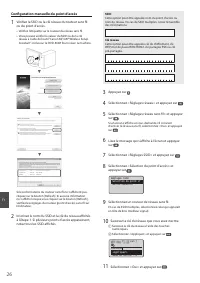
26 Fr Confi guration manuelle du point d’accès 1 Vérifi ez la SSID ou la clé réseau du routeur sans fi l ou du point d’accès. • Vérifi ez l’étiquette sur le routeur du réseau sans fi l. • Vous pouvez vérifi er la valeur du SSID ou de la clé réseau à l’aide de l’outil “Canon MF/LBP Wireless Setup Ass...
Page 27 - Pour confi gurer l’adresse IP manuellement :; Si vous utilisez Mac OS :
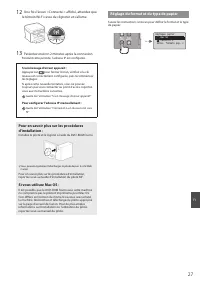
27 Fr 12 Une fois l’écran <Connecté.> affi ché, attendez que le témoin Wi-Fi cesse de clignoter et s’allume. 13 Patientez environ 2 minutes après la connexion. Pendant cette période, l’adresse IP est confi gurée. Si un message d’erreur apparaît : Appuyez sur pour fermer l’écran, vérifi ez si l...
Page 28 - Procédures utiles; Copie; IU distante
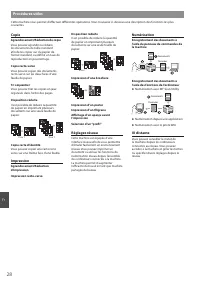
28 Fr Procédures utiles Cette machine vous permet d’eff ectuer diff érentes opérations. Vous trouverez ci-dessous une description des fonctions les plus courantes. Copie Agrandissement/Réduction de copie Vous pouvez agrandir ou réduire les documents de taille standard afi n de les copier sur du papi...
Page 29 - Remplacement de la cartouche d’encre; Lorsqu’un message apparaît; Lorsque ce problème survient :; Si la qualité d’impression reste inacceptable :
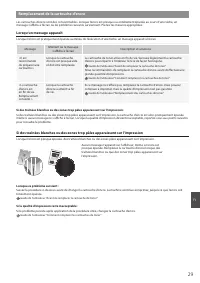
29 Fr Remplacement de la cartouche d’encre Les cartouches d’encre sont des consommables. Lorsque l’encre est presque ou entièrement épuisée au cours d’une tâche, un message s’affi che à l’écran ou les problèmes suivants surviennent. Prenez les mesures appropriées. Lorsqu’un message apparaît Lorsque ...
Page 30 - Résolution des bourrages papier; Fente d’alimentation
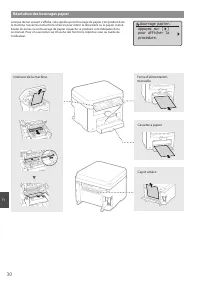
30 Fr Résolution des bourrages papier Lorsque l’écran suivant s’affi che, cela signifi e qu’un bourrage de papier s’est produit dans la machine. Suivez les instructions à l’écran pour retirer le document ou le papier coincé. Seules les zones où un bourrage de papier risque de se produire sont indiqu...
Page 32 - Alimentation; Manipulation; Consignes de sécurité; Annexe
32 Fr Alimentation AVERTISSEMENT • Utilisez exclusivement une alimentation électrique dont la tension correspond à celle indiquée. Sinon, vous risquez de provoquer des incendies ou de subir une électrocution. • Utilisez uniquement le cordon d’alimentation fourni, pour éviter tout risque d’incendie o...
Page 33 - Limites juridiques à l’utilisation du produit; Entretien et vérifi cations
33 Fr chaleur excessive. L’utilisation d’une prise ou d’un cordon d’alimentation en mauvais état risque de provoquer un incendie ou une électrocution. ATTENTION • L’intérieur de l’appareil comporte des composants à haute tension et à haute température. Tout contact avec ces composants risque d’entra...
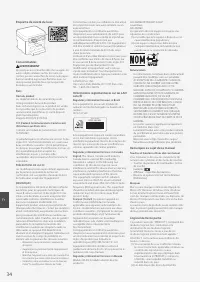
Page 34 - Avis
34 Fr Etiquette de sûreté du laser Consommables AVERTISSEMENT Ne jetez pas les cartouches de toner usagées ou autres objets similaires au feu. En outre, ne stockez pas les cartouches de toner ou le papier dans un endroit exposé aux fl ammes nues. Le toner pourrait prendre feu et provoquer des brûlur...
Page 36 - CANON MARKETING JAPAN INC.; Bovenkerkerweg 59, 1185 XB Amstelveen, The Netherlands; CANON SINGAPORE PTE LTD
CANON U.S.A., INC. One Canon Park, Melville, NY 11747, U.S.A. Call Center: 1-800-OK-CANON CANON MEXICANA, S. DE R.L. DE C.V. Boulevard Manuel Avila Camacho #138 Piso 17, Col. Lomas de Chapultepec Mexico City, Mexico 11000 Call Center: 01800-710-7168 CANON INC. 30-2, Shimomaruko 3-chome, Ohta-ku, Tok...