Canon 232 - User Manual
Canon 232 – User Manual, read for free online in PDF format. We hope this helps you resolve any issues you may have. If you have further questions, please contact us through the contact form.

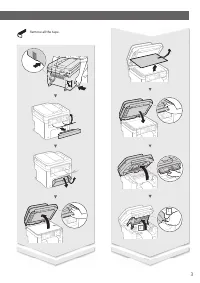
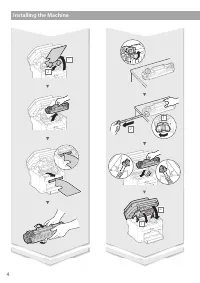







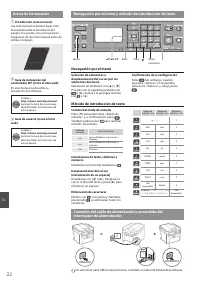
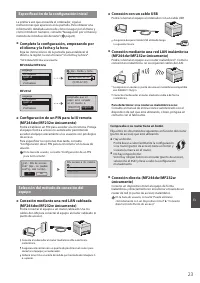
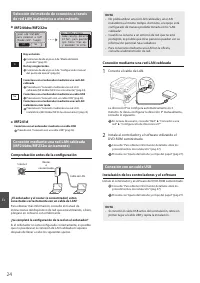
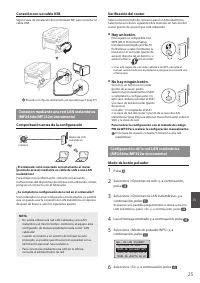
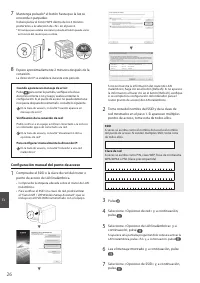
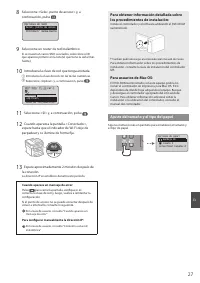
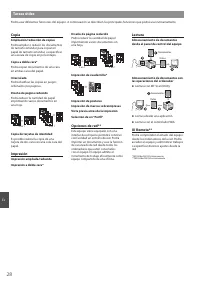
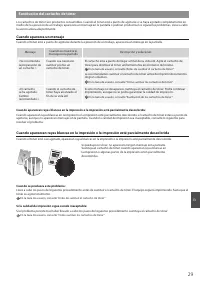
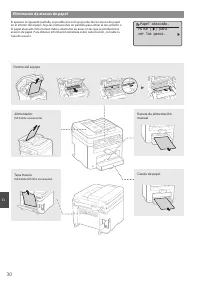


Table of Contents:
- Page 2 – Installing the Machine; Installation Requirements
- Page 8 – MF Driver Installation Guide (Visit; Navigating the Menu; Setting confi rmation; Text Input Method; Changing entry mode; Connecting the Power Cord and Turning ON the Power; OFF
- Page 9 – Specifying the Initial Settings; User’s Guide “Setting a Remote UI PIN”; Connecting via a USB cable; Check if your router has a button; User’s Guide “Can Be Used Conveniently with a Mobile
- Page 10 – Connect to the computer via a wired LAN; Checking Before the Setup; Connecting via a Wired LAN; Connect the LAN cable.; User’s Guide “Network”; Connecting via a USB Cable; Install the Driver and Software; NOTE
- Page 11 – Checking the Router; Push Button Mode; Read the message that is displayed, and then press; WPS Push Button Mode
- Page 12 – Wait approximately 2 minutes after the connection.; IP address is set during this period of time.; When an error message appears:; Press; User’s Guide “When an Error Message Appears”; When checking the network connection:; User’s Guide “Viewing Network Settings”; To set IP address manually:; User’s Guide “Connecting to a Wireless LAN”; Setting the Access Point Manually; Check the label on the Wireless LAN router.; SSID
- Page 13 – Select a wireless LAN router.; Enter the network key using the numeric keys.; XXXXXXXX; until the Wi-Fi indicator stops blinking and turns on.; For details on the installation procedures:; Setting a Paper Size and Type
- Page 14 – Perform Useful Tasks; Copy; ciency as a shared; Scan; Scanning with the MF Scan Utility; Scanning from an Application
- Page 15 – Replacing Toner Cartridge; When a Message Appears; Message; When this problem occurs:; User’s Guide “Before Replacing the Toner Cartridge”; When the print quality is still unacceptable:; User’s Guide “How to Replace Toner Cartridges”
- Page 16 – Clearing Paper Jams; Manual Feed Slot
- Page 18 – Power Supply; Handling; Important Safety; Installation; Appendix
- Page 19 – Legal Limitations on the Usage of Your; CAUTION; Maintenance and Inspections; WARNING; CAUTION
- Page 22 – Guía de instalación del; Guía de usuario (visite el sitio; Navegación por el menú; Confi rmación de la confi guración; Método de introducción de texto; Cambio del modo de entrada; APAGADO
- Page 23 – Especifi cación de la confi guración inicial; En la Guía de usuario, consulte “Confi guración de un PIN; Conexión con un cable USB; Podrá conectar el equipo al ordenador con un cable USB.; Para determinar si su router es inalámbrico o no:; En la Guía de usuario, consulte “Puede utilizarse
- Page 24 – Conéctese con el ordenador mediante un cable USB; Comprobación antes de la confi guración; ¿Se completó la confi guración de la red en el ordenador?; Conexión mediante una red LAN cableada; Conecte el cable de LAN.; Instalación de los controladores y el software; NOTA
- Page 25 – Verifi cación del router; No hay ningún botón.; Modo de botón pulsador; Lea el mensaje mostrado y, a continuación, pulse; Modo de pulsador WPS
- Page 26 – La dirección IP se establece durante este período.; Cuando aparece un mensaje de error:; Pulse; Verifi cación de la conexión de red:; Confi guración manual del punto de acceso
- Page 27 – Seleccione un router de red inalámbrico.; Introduzca la clave de red con las teclas numéricas.; Espere aproximadamente 2 minutos después de; En la Guía de usuario, consulte “Cuando aparece un; Para confi gurar manualmente la dirección IP:; En la Guía de usuario, consulte “Conexión a una red; Para usuarios de Mac OS:
- Page 28 – Tareas útiles; Copia; Lectura con MF Scan Utility; Lectura desde una aplicación
- Page 29 – Sustitución del cartucho de tóner; Cuando aparezca un mensaje; Mensaje; Cuando se produzca este problema:
- Page 30 – Eliminación de atascos de papel; Alimentador
- Page 32 – Manipulación; Fuente de alimentación; Instrucciones de; Instalación; Apéndice
- Page 33 – Limitaciones legales sobre el uso de su; ATENCIÓN; Mantenimiento e inspecciones; ADVERTENCIA
- Page 36 – CANON MARKETING JAPAN INC.; Bovenkerkerweg 59, 1185 XB Amstelveen, The Netherlands; CANON SINGAPORE PTE LTD; XXXXXXXXXX
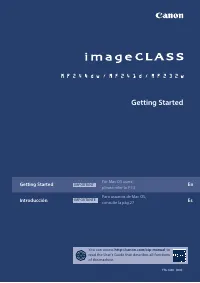
Getting Started
FT6-1690 (000)
Getting Started
IMPORTANT
For Mac OS users,
please refer to P.13
En
Introducción
IMPORTANTE
Para usuarios de Mac OS,
consulte la pág.27
Es
You can access
http://canon.com/oip-manual
to
read the User’s Guide that describes all functions
of this machine.
https://manual-hub.com/
"Loading the manual" means you need to wait until the file loads and becomes available for online reading. Some manuals are very large, and the time they take to appear depends on your internet speed.
Was this manual helpful?
About this manual
- Brand
- Canon
- Model
- 232
- Document type
- User Manual
- Language(s)
- English, Spanish
- Pages
- 36
- File size
- 4.8 MB
- Format
Other Manuals for Canon 232
Summary
2 Installing the Machine Installation Requirements 390 mm 312 mm 310 mm 128 mm 362 mm ● MF232w 390 mm 360 mm 270 mm 39 mm 128 mm 362 mm 106 mm ● MF244dw 390 mm 312 mm 310 mm 128 mm 362 mm 106 mm ● MF241d https://manual-hub.com/
8 En Navigating the Menu and Text Input Method About the Manuals Getting Started (This manual): Read this manual fi rst. This manual describes the installation of the machine, the settings, and a caution. Be sure to read this manual before using the machine. MF Driver Installation Guide (Visit ...
9 En Specifying the Initial Settings The fi rst time you turn on the power, follow the instructions on the screen. For details on navigating the menu and how to input the numbers, see “Navigating the Menu and Text Input Method” ( P.8). ● Complete settings starting with language and through to date a...