Page 2 - IMPORTANT; READ ALL INSTRUCTIONS; Contents
2 BREVILLE RECOMMENDS SAFETY FIRST At Breville we are very safety conscious. We design and manufacture consumer products with the safety of you, our valued customer, foremost in mind. In addition we ask that you exercise a degree of care when using any electrical appliance and adhere to the followin...
Page 8 - SUPERHEATED LIQUIDS
8 or tamper with the safety interlocks. • Do not place any object between the oven front face and the door or allow soil or cleaner residue to accumulate on sealing surfaces. • If the door or door seals are damaged, the oven must not be operated. Immediately cease use and call Breville Consumer Supp...
Page 9 - RADIO INTERFERENCE; CAUTION
9 microwave oven as they may explode during cooking, at the end of cooking or after removing from the microwave oven. • Do not heat oil or fat in the microwave oven. Doing so may cause the microwave oven and/ or the oil to overheat and/or ignite. • If any smoke is observed, switch off and unplug the...
Page 10 - WARNING
10 energy and, if not installed and used in accordance with the instructions, may cause harmful interference to radio communications. However, there is no guarantee that interference will not occur in a particular installation. If this equipment does cause harmful interference to radio or television...
Page 11 - SPECIFICATIONS; Power; Net Weight
11 FOR HOUSEHOLD USE ONLY SAVE THESE INSTRUCTIONS SPECIFICATIONS Power Consumption 120V – 60Hz; 1250W Output 1200W – 2450MHz Outside Dimensions 12.5 inch/316mm (H)20.4 inch/519mm (W)17.5 inch/443mm (D) with handle16.5 inch/420mm (D) without handle Glass Turntable Diameter 12.4 inch/315mm Net Weight ...
Page 12 - Components
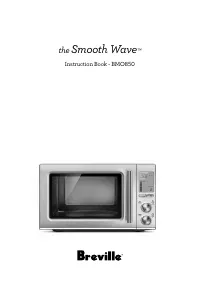
12 Components D F H G E A B C A. Viewing window B. Door handle Pull handle to open. C. LCD screen D. SMART COOK, DEFROST AND REHEAT buttons Automatically cook at the correct power for the correct time. See pages 18-23 for more details on the SMART COOK food types. SMART REHEAT and SMART DEFROST are ...
Page 13 - Assembly; BEFORE FIRST USE
13 Assembly BEFORE FIRST USE Before first use remove all promotional stickers and packaging material. Carefully unpack the microwave oven and keep all the packing material until all the parts of the microwave oven have been found and the appliance has been assembled. It is recommended to keep all th...
Page 15 - Cooking Functions; NOTE
15 Cooking Functions SETTING THE CLOCK - 12 OR 24-HOUR CLOCK DISPLAY Press SET CLOCK on shortcuts panel . The clock can be set as 12- or 24-hour clock display.When entering the SET CLOCK setting, ‘12’ will flash. To select a 12-hour clock display, press START to confirm the selection. START Instant ...
Page 16 - SETTING CHILD LOCK; STANDBY
16 SETTING THE UNIT WEIGHT CONVERSION MEASURE Press UNITS on shortcuts panel. You can change from grams (g) to ounces (oz.) The default UNITS is ounces (oz) . The highlighted ounces (oz) will flash to show it can be adjusted. Turn START/TIME or POWER/AMOUNT dials to toggle between grams (g) and ounc...
Page 17 - TURNTABLE OFF; Turntable; TIME & POWER LEVEL ADJUSTMENT; Turning the TIME Dial; Turning The POWER Dial
17 TURNTABLE OFF The TURNTABLE OFF button allows you to stop the turntable rotation while cooking in the microwave. This setting is useful if using a square dish that will constrain the rotation.In order to activate the TURNTABLE OFF setting, press once on the button. ‘Turntable off’ will be display...
Page 18 - DYNAMIC POWER ADJUSTMENT
18 DYNAMIC POWER ADJUSTMENT To suit your personal preference, adjustment of both time and power is available when using the microwave in manual setting. An example of dynamic power adjustment can be seen below in the SMART COOK mode.Please note that the dynamic power adjustment can only be used with...
Page 19 - A BIT MORETM BUTTON
19 STOP/CLEAR Press STOP/CLEAR once to pause the current function.Press twice to clear and return to default screen.For Smart Reheat and Smart Cook functions that use Sensor IQ, pressing stop clear ONCE will cancel the current function and return to the default screen. STOP CLEAR POWER Amount x2 Whe...
Page 21 - Functions
21 SMART SETTINGS Choose from SMART COOK, SMART DEFROST and SMART REHEAT . SMART REHEAT SMART COOK SMART DEFROST SMART REHEAT SMART COOK SMART DEFROST SMART REHEAT SMART COOK SMART DEFROST SMART REHEAT SMART COOK SMART DEFROST Then select from a list of most commonly used food types and press START....
Page 22 - FOR BEST RESULTS; Popcorn
22 FOR BEST RESULTS • Foods should be cooked in a microwave safe container, either plastic, pyrex or ceramic. • Moist foods will cook more evenly because microwave energy heats water molecules very efficiently. Add approximately 1 tablespoon of water per 4oz/115g of food. • For optimal results, arra...
Page 24 - SMART REHEAT
24 Rice The SMART COOK RICE setting is suitable for white rice such as long grain rice, jasmine and basmati. The Sensor IQ technology will automatically calculate the cooking time for the optimal food result, and for the rice grains to remain separate and tender.Always use a deep microwave-safe bowl...
Page 25 - SMART DEFROST
25 SMART DEFROST SMART REHEAT SMART COOK SMART DEFROST SMART REHEAT SMART COOK SMART DEFROST SMART REHEAT SMART COOK SMART DEFROST SMART REHEAT SMART COOK SMART DEFROST The SMART DEFROST setting is designed to gently defrost food without overheating and drying out of edges.Press SMART DEFROST button...
Page 26 - Chicken
26 FOR BEST RESULTS • Defrost times are for thoroughly frozen foods that have been in the freezer for at least 24 hours and maintained at temperatures of 0°F/–18°C or lower. • When freezing meats, poultry and fish, use good quality plastic wrap, bags and containers. • To separate meat, such as chick...
Page 27 - Soup; SHORTCUTS; Melt chocolate; Soften butter
27 Soup The SMART DEFROST SOUP is suitable for defrosting frozen prepared soups directly from the freezer (approx. 0°F/–18°C). Minimum amount of soup to defrost is 8 fl. oz (250mL) and maximum is 64 fl. oz (2L).Remove soup from any packaging and place into a microwave-safe bowl. Cover with a vented ...
Page 28 - Beverage
28 Turn POWER/AMOUNT dial to select weight and press START button to commence softening. Minimum amount of butter is 4oz (115g) and maximum is 1lb (450g). NOTE The butter should be soft enough to push your finger easily into the center. The butter should not be melted. Beverage The shortcut BEVERAGE...
Page 29 - MICROWAVE USTENSILS
29 Hints & Tips SOME IMPORTANT TIPS FOR MICROWAVE COOKING To help equalize energy in the food so that it cooks evenly follow these helpful tips. • Arrange foods with varying size ends, such as chicken drumsticks and broccoli with the thicker or tougher part positioned to the outside of the dish....
Page 31 - Troubleshooting; PROBLEM; POSSIBLE PROBLEM
31 Troubleshooting PROBLEM EASY SOLUTION Microwave oven interfering with radio, TV or similar equipment. • Clean door and sealing surface of the oven. • Reorient the receiving antenna of radio or television. • Relocate the microwave oven with respect to the receiver. • Move the microwave oven away f...
Page 32 - the; Smooth Wave
Page 33 - IMPORTANTES; LIRE TOUTES LES
33 BREVILLE RECOMMANDE LA SÉCURITÉ AVANT TOUT Chez Breville, la sécurité occupe une place de choix. Nous concevons et fabriquons des produits de consommation sans jamais perdre de vue la sécurité de notre précieuse clientèle. De plus, nous vous prions d'être très vigilant lorsque vous utilisez un ap...
Page 41 - AVERTISSEMENT
41 • La vitre de la porte a été spécialement traitée pour être plus durable et sécuritaire que le verre ordinaire. Cependant, elle n'est pas incassable. En cas de chute ou de frappe violente, elle peut se briser ou s'affaiblir et éclater en mille morceaux sans raison apparente. • Si vous voyez des é...
Page 42 - ATTENTION; Poids net
42 USAGE DOMESTIQUE SEULEMENT SAUVEGARDEZ CES INSTRUCTIONS ATTENTION Tout changement ou modification non expressément approuvés par la partie responsable de la conformité risque d'invalider l'autorisation accordée à l'utilisateur d'utiliser cet appareil. NOTE Cet appareil utilise, génère et peut irr...
Page 43 - Composants
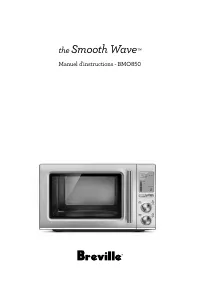
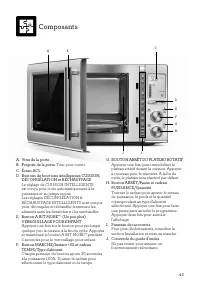
43 Composants D F H G E A B C A. Vitre de la porteB. Poignée de la porte. Tirer pour ouvrir. C. Écran ACLD. Boutons de fonctions intelligentes CUISSON, DÉCONGÉLATION et RÉCHAUFFAGE Le réglage de CUISSON INTELLIGENTE est conçu pour cuire automatiquement à la puissance et au temps requis. Les réglages...
Page 44 - Assemblage; AVANT LA PREMIÈRE UTILISATION
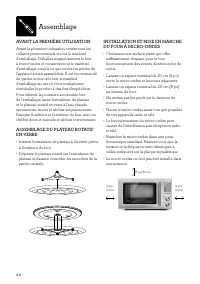
44 Assemblage AVANT LA PREMIÈRE UTILISATION Avant la première utilisation, retirez tous les collants promotionnels et tout le matériel d'emballage. Déballez soigneusement le four à micro-ondes et conservez tout le matériel d'emballage jusqu'à ce que toutes les pièces de l'appareil soient assemblées....
Page 46 - Fonctions du four à micro-ondes
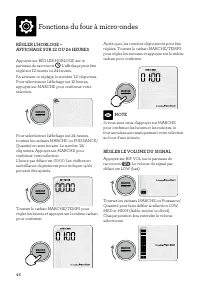
46 Fonctions du four à micro-ondes RÉGLER L'HORLOGE – AFFICHAGE SUR 12 OU 24 HEURES Appuyez sur RÉGLER HORLOGE sur le panneau de raccourcis . L'affichage peut être réglé sur 12 heures ou 24 heures.En activant ce réglage, le nombre '12' clignotera. Pour sélectionner l'affichage sur 12 heures, appuyez...
Page 47 - MODE ATTENTE
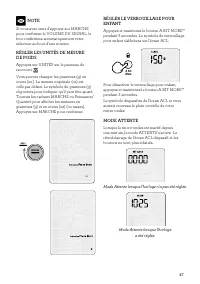
47 NOTE Si vous avez omis d'appuyer sur MARCHE pour confirmer le VOLUME DU SIGNAL, le four confirmera automatiquement votre sélection au bout d'une minute. RÉGLER LES UNITÉS DE MESURE DE POIDS Appuyez sur UNITÉS sur le panneau de raccourci. Vous pouvez changer les grammes (g) en onces (oz.). La mesu...
Page 48 - ARRÊT DU PLATEAU ROTATIF; Tourner le cadran TEMPS; Tourner le cadran PUISSANCE
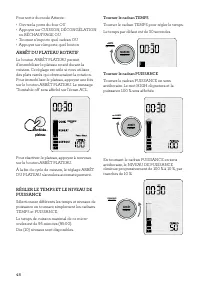
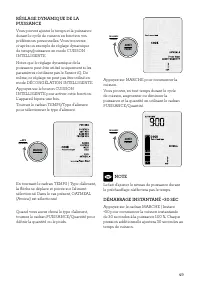
48 Pour sortir du mode Attente : • Ouvrez la porte du four OU • Appuyez sur CUISSON, DÉCONGÉLATION ou RÉCHAUFFAGE OU • Tournez n'importe quel cadran OU • Appuyez sur n'importe quel bouton ARRÊT DU PLATEAU ROTATIF Le bouton ARRÊT PLATEAU permet d'immobiliser le plateau rotatif durant la cuisson. Ce r...
Page 50 - À LA FIN DE LA CUISSON
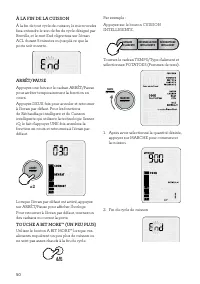
50 À LA FIN DE LA CUISSON À la fin de tout cycle de cuisson, le micro-ondes fera entendre le son de fin de cycle désigné par Breville, et le mot End clignotera sur l'écran ACL durant 5 minutes ou jusqu'à ce que la porte soit ouverte. ARRÊT/PAUSE Appuyez une fois sur le cadran ARRÊT/Pause pour arrête...
Page 53 - POUR DES RÉSULTATS OPTIMAUX
53 POUR DES RÉSULTATS OPTIMAUX • Les aliments doivent être cuits dans un récipient allant au micro-ondes, soit en plastique, en pyrex ou en céramique. • Les aliments humides cuisent plus uniformément, car l'énergie des micro-ondes chauffe efficacement les molécules d'eau. Ajoutez environ 1 c. à soup...
Page 57 - Poulet
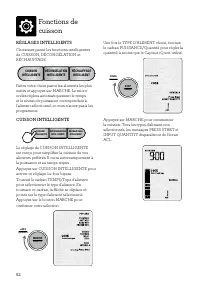
57 Appuyez sur MARCHE pour commencer la décongélation. Tous les TYPES D'ALIMENT non sélectionnés, les messages PRESS START et INPUT QUANTITY disparaîtront de l'écran ACL La minuterie s'affichera et le compte à rebours débutera. MARCHE Instant +30 TEMPS Type Aliment NOTE Pendant le cycle de décongéla...
Page 58 - RACCOURCIS; Chocolat fondu
58 Viande Le réglage de DÉCONGÉLATION INTELLIGENTE – VIANDE (Meat) convient à tout type de viande hachée ou en dés, comme le bœuf, l'agneau et le porc. La quantité minimale de viande à dégeler est de 6 oz (170 g) et la quantité maximale est de 2 lb (900 g). Retirez de la viande l'emballage et le des...
Page 59 - Beurre ramolli; Boisson
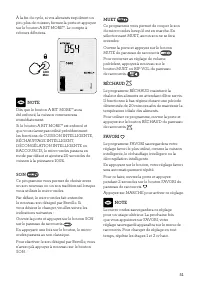
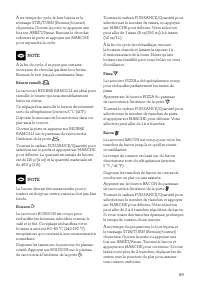
59 À mi-temps du cycle, le four bipera et le message STIR/TURN (Remuer/tourner) clignotera. Ouvrez la porte ou appuyez une fois sur ARRÊT/Pause. Remuez le chocolat, refermez la porte et appuyez sur MARCHE pour reprendre le cycle. NOTE À la fin du cycle, il se peut que certains morceaux de chocolat g...
Page 60 - Trucs et astuces; USTENSILES POUR MICRO-ONDES
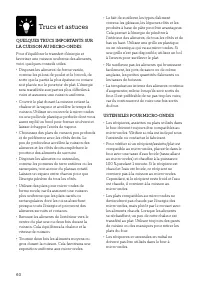
60 Trucs et astuces QUELQUES TRUCS IMPORTANTS SUR LA CUISSON AU MICRO-ONDES Pour d'équilibrer le transfert d'énergie et favoriser une cuisson uniforme des aliments, voici quelques conseils utiles. • Disposez les aliments de forme variée, comme les pilons de poulet et le brocoli, de sorte que la part...
Page 62 - Guide de Dépannage; PROBLÈME; PROBLÈME POSSIBLE RAISON POSSIBLE
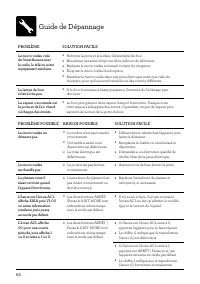
62 Guide de Dépannage PROBLÈME SOLUTION FACILE Le micro-ondes crée de l'interférence avec la radio, la télé ou autre équipement similaire. • Nettoyez la porte et la surface d'étanchéité du four. • Réorientez l'antenne réceptrice de la radio ou du téléviseur. • Replacez le micro-ondes en tenant compt...
Page 63 - Notes
Page 64 - Breville Consumer Support
Breville, the Breville Logo, Master Every Moment, Smooth Wave, A Bit More, Power Smoothing and Sensor iQ are trademarks of Breville Pty Ltd (“Breville”) and Breville's products are distributed in the USA and Canada under license. Breville, la Breville Logo, Master Every Moment, Smooth Wave, A Bit Mo...







 Breville 800BLXL User Manual
 Breville 800CP User Manual
 Breville 800CPXL User Manual
 Breville 800ES User Manual
 Breville 800esxl User Manual
 Breville 800GRXL User Manual
 Breville 800JEXL Manual
 Breville AF5 Manual
 Breville Aroma Fresh User Manual
 Breville Barista Express User Manual
 Breville BBL405 User Manual
 Breville BBL420 Manual
 Breville BBL420XL Manual
 Breville BBL600XL User Manual
 Breville BBL605 User Manual