Page 2 - WARNING; WARNING; CAUTION; ENVIRONMENTAL TIPS; ENVIRONMENT; CONTENTS; Conditions of use; Important information that may impact your; CONGRATULATIONS
2 CONTENTS General warnings.................................................................................3Important safety instructions ....................................................... 4Product description ...........................................................................5Utensils...
Page 3 - Children and vulnerable people safety; General safety; GENERAL WARNINGS
3 GENERAL WARNINGS Please read the user manual carefully and store in a handy place for later reference. Pass the user manual on to possible new owners of the appliance. Read the following carefully to avoid damage or injury. Children and vulnerable people safety WARNING WARNING Risk of suffocation,...
Page 4 - SAFETY INSTRUCTIONS; Installation; Electrical connection; Use; Care and cleaning; Disposal
4 SAFETY INSTRUCTIONS SAFETY INSTRUCTIONS Installation WARNING WARNING Only a qualified person must install this appliance. • Remove all the packaging. • Do not install or use a damaged appliance. • Obey the installation instructions supplied with the appliance. • Always be careful when you move the...
Page 5 - PRODUCT DESCRIPTION
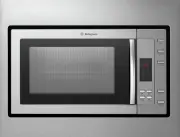
5 PRODUCT DESCRIPTION PRODUCT DESCRIPTION TURNTABLE INSTALLATION 1 Control panel 2 Turntable shaft 3 Turntable ring assembly 4 Glass tray 5 Observation window 6 Door assembly 7 Safety interlock system • Never place the glass tray upside down. The glass tray should never be restricted. • Both glass t...
Page 6 - OPERATING INSTRUCTIONS
6 AUTOMATIC FUNCTIONS Clock Setting When the microwave oven is electrified, the screen will display “0:00” and the buzzer will ring once. 1. Press Clock/Kitchen Timer once to select clock function. The hour figures will flash. 2. Turn to adjust the hour figures. The input time should be within 0 and...
Page 7 - Auto Menu; Lock-out Function for Children
7 AUTOMATIC FUNCTIONS Auto Menu 1. Turn right to choose the menu, and “A-1” to “A-10” will display. 2. Press Start/+30Sec./Confirm to confirm. 3. Turn to choose the default weight as per the menu chart. 4. Press Start/+30Sec./Confirm to start cooking. Example: If you want to use “Auto Menu” to cook ...
Page 8 - UTENSILS; Utensil Test; Materials to be avoided in microwave oven
8 BEFORE FIRST USE UTENSILS WARNING WARNING It is hazardous for anyone other than a competent person to carry out any service or repair operation that involves the removal of a cover which gives protection against exposure to microwave energy. See the instructions on “Materials you can use in microw...
Page 9 - TROUBLESHOOTING; Refer to the safety chapters.; If you accidentally do so, stop the oven immediately.
9 CONTENTS 9 TROUBLESHOOTING TROUBLESHOOTING WARNING WARNING Refer to the safety chapters. PROBLEM POSSIBLE CAUSE REMEDY The appliance does not operate. • Power cord not plugged in tightly. • Unplug, then plug in again after 10 seconds. • Fuse blown or circuit breaker tripped. • Reset the circuit br...
Page 10 - Built-in furniture – flush fit; Side view; INSTALLATION
10 CONTENTS 10 INSTALLATION WARNING CAUTION The oven is fitted with a plug and must only be connected to a properly installed earthed socket. The socket must only be installed and the connecting cable must only be replaced by a qualified electrician, in accordance with the appropriate regulations. I...
Page 11 - Positioning marking using the supplied template
11 INSTALLATION INSTALLATION (CONTINUED) Screw A Screw B Mounting plate Trim kit plastic cover Positioning marking using the supplied template 1. Read the instruction on the BOTTOM CABINET TEMPLATE and place the template on the bottom plane of cabinet. " a "" s e l o H PN:261800316968 2....
Page 12 - Installing the oven; Installation Hole
12 INSTALLATION INSTALLATION (CONTINUED) Installing the oven 1. Insert the oven into the cabinet, making sure the back of the oven is locked by the mounting plate. Do not trap or kink the power cord. Mounting Plate 2. Open the door and fix the oven to the cabinet with Screw B, at the installation ho...
Page 13 - Warranty; Important Notice; AUSTRALIA; NEW ZEALAND
13 WARRANTY This document sets out the terms and conditions of the product warranties for Westinghouse Appliances. It is an important document. Please keep it with your proof of purchase documents in a safe place for future reference should there be a manufacturing defect in your Appliance. This war...