Westinghouse WMF4102SA - User Manual
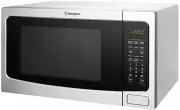
Westinghouse WMF4102SA Microwave – User Manual, read for free online in PDF format. We hope this helps you resolve any issues you may have. If you have further questions, please contact us through the contact form.


Table of Contents:
- Page 2 – Conditions of use; CONTENTS
- Page 3 – CAUTION; General safety; WARNING; GENERAL WARNINGS
- Page 4 – IMPORTANT SAFETY INSTRUCTIONS; Installation; Electrical connection; Use; Care and cleaning; Disposal
- Page 5 – BEFORE FIRST USE; Specifications; Radio Interference
- Page 6 – icrowave cooking principles; Utensils guide
- Page 7 – PRODUCT DESCRIPTION; Accessories; IMPORTANT
- Page 8 – Before first use; Initial cleaning; Setting the time; Setting the clock; CONTROL PANEL
- Page 9 – DAILY USE; General information about using the appliance
- Page 10 – Suitable cookware and materials
- Page 11 – Power setting table
- Page 12 – Auto menu table; Potato; Sensor Rehea; Preparing foods for Sensor Reheat:; Veggie
- Page 14 – ADDITIONAL FUNCTIONS; Timer; USING THE ACCESSORIES; Inserting the turntable set
- Page 15 – HELPFUL HINTS AND TIPS; CARE AND CLEANING
- Page 16 – TROUBLESHOOTING
- Page 17 – INSTALLATION
- Page 18 – Electrical installation
- Page 19 – Warranty; Important Notice
- Page 20 – TOP SERVICE
USER MANUAL
WMF4102SA, WMF4102WA
FREESTANDING MICROWAVE
"Loading the manual" means you need to wait until the file loads and becomes available for online reading. Some manuals are very large, and the time they take to appear depends on your internet speed.
Was this manual helpful?
About this manual
- Brand
- Westinghouse
- Model
- WMF4102SA
- Document type
- User Manual
- Category
- Microwave
- Language(s)
- English
- Pages
- 20
- File size
- 1.6 MB
- Format
Summary
2 General warnings.................................................................................3Important safety instructions ....................................................... 4Before first use .....................................................................................5Radio inte...
3 CAUTION It is important to use your appliance safely. Check these safety points before using your appliance. General safety • Internally the appliance becomes hot when in operation. Always use microwave gloves to remove or put in accessories or ovenware. • Do not use a steam cleaner to clean the a...
4 IMPORTANT SAFETY INSTRUCTIONS Installation WARNING Only a qualified person must install this appliance. • Remove all the packaging. • Do not install or use a damaged appliance. • Obey the installation instructions supplied with the appliance. • Always be careful when you move the appliance because...
Ask a question
Related manuals
More Westinghouse Microwaves models
 Westinghouse WMB2522SC User Manual
 Westinghouse WMB2802SA User Manual
 Westinghouse WMB4425DSC User Manual
 Westinghouse WMB4425SA User Manual
 Westinghouse WMB4425SC User Manual
 Westinghouse WMF2302SA User Manual
 Westinghouse WMF2302WA User Manual
 Westinghouse WMF2905GA User Manual
 Westinghouse WMF4102BA User Manual
 Westinghouse WMF4505GA User Manual
 Westinghouse WMS281SB User Manual


