Page 2 - COPYRIGHT & TRADEMARKS
COPYRIGHT & TRADEMARKS Specifications are subject to change without notice. is a registered trademark of TP-LINK TECHNOLOGIES CO., LTD. Other brands and product names are trademarks or registered trademarks of their respective holders. No part of the specifications may be reproduced in any form ...
Page 3 - CE Mark Warning
FCC STATEMENT This equipment has been tested and found to comply with the limits for a Class B digital device, pursuant to part 15 of the FCC Rules. These limits are designed to provide reasonable protection against harmful interference in a residential installation. This equipment generates, uses a...
Page 4 - 注意!
Canadian Compliance Statement This device complies with Industry Canada license-exempt RSS standard(s). Operation is subject to the following two conditions: (1)This device may not cause interference, and (2)This device must accept any interference, including interference that may cause undesired op...
Page 5 - Safety Information
Продукт сертифіковано згідно с правилами системи УкрСЕПРО на відповідність вимогам нормативних документів та вимогам, що передбачені чинними законодавчими актами України . Safety Information When product has power button, the power button is one of the way to shut off the product; when there is no...
Page 6 - DECLARATION OF CONFORMITY; 00Mbps WiFi Range Extender with Power Outlet Pass-through; The product carries the CE Mark:; Yang Hongliang
TP-LINK TECHNOLOGIES CO., LTD TP-LINK TECHNOLOGIES CO., LTD. Building 24 (floors 1, 3, 4, 5), and 28 (floors 1-4) Central Science and Technology Park, Shennan Rd, Nanshan, Shenzhen, China DECLARATION OF CONFORMITY For the following equipment: Product Description: 300Mbps WiFi Range Extender with Pow...
Page 7 - CONTENTS; Chapter 1
CONTENTS Package Contents .................................................................................................... 1 Chapter 1 Introduction ........................................................................................... 2 1.1 Product Overview ....................................
Page 8 - Package Contents; Conventions
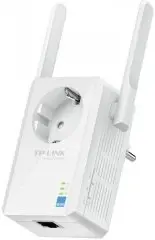
TL-WA860RE 300Mbps WiFi Range Extender with Power Outlet Pass-through 1 Package Contents The following items should be found in your package: TL-WA860RE 300Mbps WiFi Range Extender with Power Outlet Pass-through Ethernet Cable Quick Installation Guide Resource CD for TL-WA860RE 300Mbps WiFi ...
Page 9 - Chapter 1 Introduction; Product Overview
TL-WA860RE 300Mbps WiFi Range Extender with Power Outlet Pass-through 2 Chapter 1 Introduction 1.1 Product Overview The TL-WA860RE 300Mbps WiFi Range Extender with Power Outlet Pass-through is dedicated to Small Office/Home Office (SOHO) wireless network solutions. It will enlarge your existing wire...
Page 11 - Chapter 2 Hardware Installation; Before You Begin; an ideal location
TL-WA860RE 300Mbps WiFi Range Extender with Power Outlet Pass-through 4 Chapter 2 Hardware Installation 2.1 Before You Begin Please read this User Guide carefully before installing and using the equipment. The operating distance range of your wireless connection can vary significantly depending on t...
Page 12 - Basic Requirements
TL-WA860RE 300Mbps WiFi Range Extender with Power Outlet Pass-through 5 2.2 Basic Requirements Place your Range Extender in a well-ventilated place far from direct sunlight, any heater or heating vent. Leave at least 2 inches (5cm) space around the device for heat dissipation. Turn off your Ra...
Page 13 - Chapter 3 Quick Installation Guide; admin; Using Proxy; OK
TL-WA860RE 300Mbps WiFi Range Extender with Power Outlet Pass-through 6 Chapter 3 Quick Installation Guide This chapter will guide you to configure your PC to communicate with the Range Extender and to configure and manage the TL-WA860RE 300Mbps WiFi Range Extender with Power Outlet Pass-through eas...
Page 14 - Exit; Next
TL-WA860RE 300Mbps WiFi Range Extender with Power Outlet Pass-through 7 2. After successful login, there will pop up the Quick Setup Start page. Click Next to get the quick setup started. Figure 3-3 Quick Setup Start Note: If you are not to go through the Quick Setup right away, you can click Exit...
Page 15 - Rescan
TL-WA860RE 300Mbps WiFi Range Extender with Power Outlet Pass-through 8 5. A list of available wireless network will appear. Check the box before the SSID of your desired network, and then click Next . Figure 3-6 Quick Setup – Available Wireless Networks Note: If you could not find your wireless n...
Page 16 - Export Settings
TL-WA860RE 300Mbps WiFi Range Extender with Power Outlet Pass-through 9 7. Double-check your wireless setting and network setting, when Figure 3-8 appears. If verified, click Finish to complete the Quick Setup. If there is anything wrong, click Back to return the previous pages and reconfigure it. F...
Page 17 - Chapter 4 Configure the Device
TL-WA860RE 300Mbps WiFi Range Extender with Power Outlet Pass-through 10 Chapter 4 Configure the Device This Chapter describes how to configure your Range Extender via the web-based management page. The TL-WA860RE 300Mbps WiFi Range Extender with Power Outlet Pass-through is easy to configure and ma...
Page 29 - Deny the stations not specified by any enabled; Filtering Rules
TL-WA860RE 300Mbps WiFi Range Extender with Power Outlet Pass-through 22 Click the Enable All button to make all entries enabled Click the Disable All button to make all entries disabled. Click the Delete All button to delete all entries Click the Next button to go to the next page and click the Pre...
Page 33 - Reset
TL-WA860RE 300Mbps WiFi Range Extender with Power Outlet Pass-through 26 To upgrade the device's firmware, follow these instructions: 1. Download a more recent firmware upgrade file from the TP-LINK website ( http://www.tp-link.com ). 2. Enter the path name or click Browse… to select the downloaded ...
Page 37 - Appendix A: Factory Defaults; Item
TL-WA860RE 300Mbps WiFi Range Extender with Power Outlet Pass-through 30 Appendix A: Factory Defaults Item Default Value Common Default Settings Username admin Password admin IP Address 192.168.0.254 Subnet Mask 255.255.255.0 Domain http://tplinkrepeater.net Wireless SSID TP-LINK_Extender_XXXXXX Wir...
Page 38 - Appendix B: Troubleshooting
TL-WA860RE 300Mbps WiFi Range Extender with Power Outlet Pass-through 31 Appendix B: Troubleshooting T1. How do I restore my Range Extender’s configuration to its factory default settings? There are TWO methods available to restore the factory defaults. Option 1: With the Range Extender TL-WA860RE p...
Page 39 - RESET
TL-WA860RE 300Mbps WiFi Range Extender with Power Outlet Pass-through 32 2) Try to obtain an IP address and gateway; if succeed, open your web-browser, enter the default domain http://tplinkrepeater.net in the address field and get logged in. If you are unable to log in, please RESET the device, and...
Page 40 - Appendix C: Specifications; General
TL-WA860RE 300Mbps WiFi Range Extender with Power Outlet Pass-through 33 Appendix C: Specifications General Standards and Protocols IEEE 802.3, 802.3u, 802.11n, 802.11b and 802.11g, TCP/IP, DHCP Safety & Emission CE Ports One 10/100M Auto-Negotiation LAN RJ45 port Wireless Frequency Band 2.4~2.4...
Page 41 - Appendix D: Glossary
TL-WA860RE 300Mbps WiFi Range Extender with Power Outlet Pass-through 34 Appendix D: Glossary 802.11b - The 802.11b standard specifies a wireless networking at 11 Mbps using direct-sequence spread-spectrum (DSSS) technology and operating in the unlicensed radio spectrum at 2.4GHz, and WEP encrypti...