Page 2 - CONTENTS; 1 / Русский язык
CONTENTS 01 / English 05 / Български 09 / Čeština 13 / Eesti 17 / Hrvatski 21 / Қазақша 25 / Latviešu 29 / Lietuvių 33 / Magyar 37 / Polski 41 / Русский язык 45 / Română 49 / Slovenčina 53 / Slovenski 57 / Srpski jezik/Српски језик 61 / Українська мова
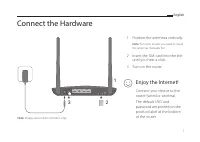
Page 3 - Connect the Hardware; Position the antennas vertically.; Insert the SIM card into the slot
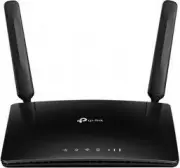
1 English Connect the Hardware 3 2 1 1 Position the antennas vertically. Note: For some routers you need to install the antennas manually first. 2 Insert the SIM card into the slot until you hear a click. 3 Turn on the router. Connect your device to the router (wired or wireless). The default SSID a...
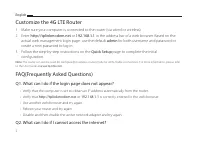
Page 4 - Customize the 4G LTE Router; admin; Q1. What can I do if the login page does not appear?; or; Q2. What can I do if I cannot access the internet?
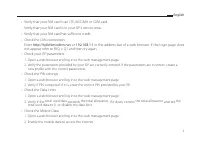
2 English Customize the 4G LTE Router 1 Make sure your computer is connected to the router (via wired or wireless).2 Enter http://tplinkmodem.net or 192.168.1.1 in the address bar of a web browser. Based on the actual web management login page : use the default admin for both username and password o...
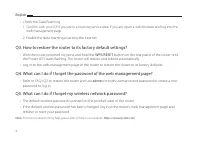
Page 6 - Q3. How to restore the router to its factory default settings?; Q5. What can I do if I forget my wireless network password?
4 English • Check the Data Roaming: 1 Confirm with your ISP if you are in a roaming service area. If you are, open a web browser and log into the web management page. 2 Enable the data roaming to access the internet. Q3. How to restore the router to its factory default settings? • With the router po...
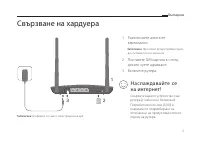
Page 7 - Свързване на хардуера; Разположете антените; Поставете SIM картата в слота,; Наслаждавайте се
5 Български Свързване на хардуера 3 2 1 1 Разположете антените вертикално. Забележка: При някои рутери трябва първо да поставите ръчно антените. 2 Поставете SIM картата в слота, докато чуете щракване. 3 Включете рутера. Свържете вашето устройство към рутера (с кабел или безжично). Потребителското им...
Page 8 - Персонализирайте 4G LTE рутера; B1. Какво да направя, ако страницата за влизане не се появява?; или
6 Български Персонализирайте 4G LTE рутера 1 Уверете се, че вашият компютър е свързан към рутера (с кабел или безжично).2 Въведете http://tplinkmodem.net или 192.168.1.1 в адресната лента на уеб браузър. В зависимост от реалната страница за влизане в управлението по интернет: използвайте по подразби...
Page 10 - WPS; B5. Какво да направя, ако забравя паролата на моята безжична мрежа?
8 Български • Проверете роуминга на данни: 1 Потвърдете с вашия интернет доставчик, че сте в район с роуминг услуги. Ако да, отворете уеб браузър и влезте в страницата за управление по интернет. 2 Активирайте роуминга на данни, за да получите достъп до интернет . B3. Как да възстановя състоянието на...
Page 11 - Připojení hardwaru; Zasuňte SIM kartu do slotu,; A j s t e p ř i p o j e n i k
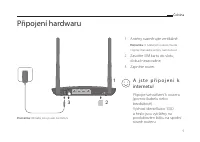
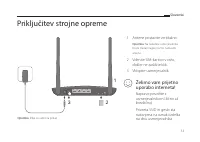
9 Čeština Připojení hardwaru 3 2 1 1 Antény nasměrujte vertikálně. Poznámka: U některých routerů musíte nejprve manuálně antény nainstalovat. 2 Zasuňte SIM kartu do slotu, dokud nezacvakne. 3 Zapněte router. Připojte své zařízení k routeru (pomocí kabelu nebo bezdrátově).Výchozí identifikátor SSID a...
Page 12 - Nastavení 4G LTE routeru; D1. Jak mám postupovat, pokud se přihlašovací stránka nezobrazí?; nebo
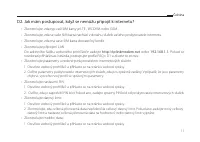
10 Čeština Nastavení 4G LTE routeru 1 Ujistěte se, že je počítač připojen k routeru (pomocí kabelu nebo bezdrátově).2 Do adresního řádku webového prohlížeče zadejte http://tplinkmodem.net nebo 192.168.1.1 . Podle aktuální přihlašovací stránky webové správy: zadejte výchozí uživatelské jméno a heslo ...
Page 14 - D5. Jak mám postupovat, když zapomenu heslo pro bezdrátovou síť?
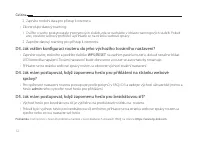
12 Čeština 2 Zapněte mobilní data pro přístup k internetu. • Zkontrolujte datový roaming: 1 Ověřte u svého poskytovatele internetových služeb, zda se nacházíte v oblasti roamingových služeb. Pokud ano, otevřete webový prohlížeč a přihlaste se na stránku webové správy. 2 Zapněte datový roaming pro př...
Page 15 - Ühenda riistvara; Paiguta antennid vertikaalselt.; Lülita ruuter sisse.
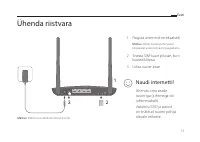
13 Eesti Ühenda riistvara 3 2 1 1 Paiguta antennid vertikaalselt. Märkus: Mõne ruuteri puhul pead kõigepealt antennid käsitsi paigaldama. 2 Sisesta SIM-kaart pilusse, kuni kuuled klõpsu. 3 Lülita ruuter sisse. Ühenda oma seade ruuteriga ( juhtmega või juhtmevabalt). Vaikimisi SSID ja parool on trüki...
Page 16 - Kohanda 4G LTE ruuterit; või
14 Eesti Kohanda 4G LTE ruuterit 1 Veendu, et su arvuti on ruuteriga ühendatud ( juhtmega või juhtmevabalt).2 Sisesta veebilehitseja aadressiribale http://tplinkmodem.net või http://192.168.1.1 . Olenevalt tegelikust veebihalduse sisselogimise leheküljest: kasuta vaikimisi admin nii kasutajanime kui...
Page 18 - Lülita internetti pääsemiseks andmerändlus sisse.; K3. Kuidas lähtestada ruuter selle tehaseseadetele?; • Sisselülitatud ruuteriga vajuta ja hoia tagapaneelil
16 Eesti 2 Lülita sisse mobiilsed andmed, et saada ligi internetile. • Kontrolli andmerändlust:: 1 Kontrolli oma teenusepakkuja juure üle, kui asud rändlusteenuse piirkonnas. Kui asud, ava veebilehitseja ja logi veebihalduse lehele sisse. 2 Lülita internetti pääsemiseks andmerändlus sisse. K3. Kuida...
Page 19 - Spajanje hardvera; Postavite antene okomito.; Umetnite SIM karticu u utor dok; Uživajte u internetu!
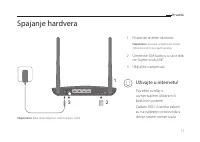
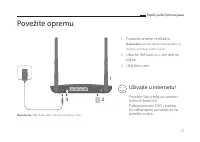
17 Hrvatski Spajanje hardvera 3 2 1 1 Postavite antene okomito. Napomena: Za neke usmjerivače morat ćete prvo ručno postaviti antene. 2 Umetnite SIM karticu u utor dok ne čujete zvuk „klik”. 3 Uključite usmjerivač. Povežite uređaj s usmjerivačem (žičanim ili bežičnim putem). Zadani SSID i lozinka ti...
Page 20 - Prilagođavanje usmjerivača 4G LTE; P1. Što mogu učiniti ako se ne prikaže stranica za prijavu?; ili
18 Hrvatski Prilagođavanje usmjerivača 4G LTE 1 Provjerite je li računalo povezano s usmjerivačem (žičanim ili bežičnim putem).2 Unesite http://tplinkmodem.net ili http://192.168.1.1 u adresnu traku internetskog preglednika. Na temelju stvarne mrežne stranice prijave za upravljanje: upotrijebite zad...
Page 21 - P2. Što mogu učiniti ako ne mogu pristupiti internetu?
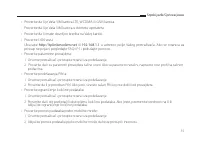
19 Hrvatski P2. Što mogu učiniti ako ne mogu pristupiti internetu? • Provjerite je li vaša SIM kartica LTE, WCDMA ili GSM kartica.• Provjerite je li vaša SIM kartica u području posluživanja vašeg pružatelja internetskih usluga.• Provjerite ima li na vašoj SIM kartici dovoljno kredita.• Provjerite LA...
Page 22 - • Provjerite podatkovni roaming:; P3. Kako vratiti izvorne tvorničke postavke usmjerivača?; ime i lozinku ili stvorite novu lozinku da biste se prijavili.; P5. Što mogu učiniti ako zaboravim lozinku bežične mreže?; usmjerivačem i preuzmite ili vratite izvornu lozinku.
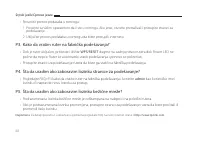
20 Hrvatski • Provjerite podatkovni roaming: 1 Provjerite s pružateljem internetskih usluga jeste li u području pružanja usluga roaminga. Ako jeste, otvorite internetski preglednik i prijavite se u mrežnu stranicu za upravljanje. 2 Omogućite podatkovni roaming da biste pristupili internetu. P3. Kako...
Page 23 - Жабдықты жалғау; Антенналарды тік орналастырыңыз.; Шертілгенін естігеніңізше SIM-; Өз құрылғыңызды; Интернетпен
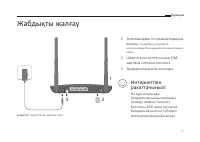
21 Қазақша Жабдықты жалғау 3 2 1 1 Антенналарды тік орналастырыңыз. Ескертпе: Сіз кейбір роутерлерге антенналарды басында қолмен орнатуыңыз керек. 2 Шертілгенін естігеніңізше SIM- картаны слотына енгізіңіз. 3 Бағдарғылауышты қосыңыз. Өз құрылғыңызды бағдарғылауышқа жалғаңыз (сымды немесе сымсыз). Ба...
Page 24 - G LTE бағдарғылауышты икемдеу; Веб-браузердің мекенжай жолына; Егер кіру беті шықпаса мен не істей аламын?; Веб браузерде
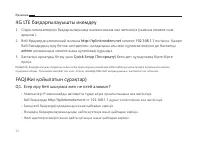
22 Қазақша 4G LTE бағдарғылауышты икемдеу 1 Сіздің компьютеріңіз бағдарғылауышқа жалғанғанына көз жеткізіңіз (сымсыз немесе сым арқылы). 2 Веб-браузердің мекенжай жолына http://tplinkmodem.net немесе 192.168.1.1 енгізіңіз. Қазіргі Веб басқарудың кіру бетіне негізделген: қолданушы аты мен құпиясөз ек...
Page 25 - Егер ғалматорға кіре алмасам мен не істей аламын?; LAN қосылуды тексеріңіз:
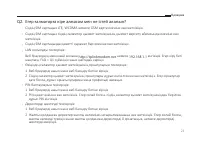
23 Қазақша Q2. Егер ғалматорға кіре алмасам мен не істей аламын? • Сіздің SIM картаңыз LTE, WCDMA немесе GSM карта екеніне көз жеткізіңіз. • Сіздің SIM картаңыз сіздің ғаламтор қызмет жеткізушінің қызмет көрсету аймағында екеніне көз жеткізіңіз. • Сіздің SIM картаңызда қажетті қаражат бар екеніне кө...
Page 26 - Егер мен веб басқару құпиясөзін ұмытып қалсам не істей аламын?; Егер мен сымсыз желінің құпиясөзін ұмытып қалсам не істей аламын?
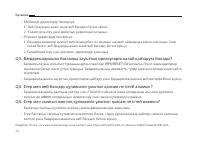
24 Қазақша • Мобильді деректерді тексеріңіз: 1 Веб браузерді ашып және веб басқару бетіне кіріңіз. 2 Ғаламторға кіру үшін мобильді деректерді қосыңыз. • Роуминг деректерді тексеріңіз: 1 Өзіңіздің ғаламтор қызмет жеткізушіңізбен сіз роуминг қызметі аймағында екенін растаңыз. Егер солай болса, веб бра...
Page 27 - Pievienojiet aparatūru; Novietojiet antenas vertikāli.; Ievietojiet SIM karti slotā, līdz
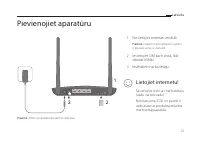
25 Latviešu Pievienojiet aparatūru 3 2 1 1 Novietojiet antenas vertikāli. Piezīme. Dažiem maršrutētājiem vispirms ir jāinstalē antenas manuāli. 2 Ievietojiet SIM karti slotā, līdz dzirdat klikšķi. 3 Ieslēdziet maršrutētāju. Savienojiet ierīci ar maršrutētāju (vadu vai bezvadu). Noklusējuma SSID un p...
Page 28 - Pielāgojiet 4G LTE maršrutētāju; vai
26 Latviešu Pielāgojiet 4G LTE maršrutētāju 1 Pārliecinieties, vai dators ir savienots ar maršrutētāju (izmantojot vadu vai bezvadu savienojumu).2 Ievadiet http://tplinkmodem.net vai http://192.168.1.1 tīmekļa pārlūkprogrammas adreses joslā. Pamatojoties uz faktisko tīmekļa pārvaldības pieteikšanās ...
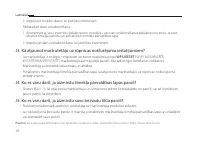
Page 30 - • Pārbaudiet datu viesabonēšanu:; J4. Ko es varu darīt, ja aizmirstu tīmekļa pārvaldības lapas paroli?; vai atiestatiet savu paroli.
28 Latviešu 2 Iespējojiet mobilos datus, lai piekļūtu internetam. • Pārbaudiet datu viesabonēšanu: 1 Apstipriniet ar savu interneta pakalpojumu sniedzēju, vai esat viesabonēšanas pakalpojumu zonā. Ja esat, atveriet tīmekļa pārlūku un piesakieties tīmekļa pārvaldības lapā. 2 Iespējojiet datu viesabon...
Page 31 - Įrenginio prisijungimas; Antenas nustatykite vertikaliai.; Stumkite SIM kortelę į vidų, kol; Mėgaukites internetu!
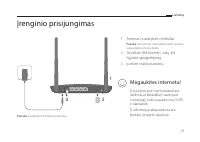
29 Lietuvių Įrenginio prisijungimas 3 2 1 1 Antenas nustatykite vertikaliai. Pastaba: Kai kuriems maršrutizatoriams antenas reikia įdiegti rankiniu būdu. 2 Stumkite SIM kortelę į vidų, kol išgirsite spragtelėjimą. 3 Įjunkite maršrutizatorių. Prisijunkite prie maršrutizatoriaus (laidiniai ar belaidži...
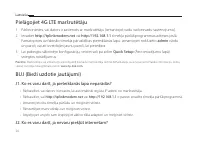
Page 32 - Pritaikykite maršrutizatoriaus 4G LTE nustatymus; Q1. Ką daryti, jeigu negaliu atverti valdymo svetainės lango?; arba
30 Lietuvių Pritaikykite maršrutizatoriaus 4G LTE nustatymus 1 Įsitikinkite, kad kompiuteris yra prijungtas prie maršrutizatoriaus (laidiniai ar belaidžiai).2 Atidarykite interneto naršyklę ir įveskite adresą http://tplinkmodem.net arba 192.168.1.1 į adreso juostą. Į vartotojo vardo ir slaptažodžio ...
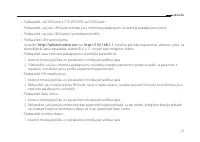
Page 34 - • Patikrinkite tarptinklinio ryšio duomenų perdavimą:; • Kai maršrutizatorius įjungtas, nuspauskite
32 Lietuvių 2 Įjunkite duomenų perdavimą,kad prisijungti prie interneto. • Patikrinkite tarptinklinio ryšio duomenų perdavimą: 1 Įsitikinkite, kad jūs esate toje vietoje, kur yra taikomas tarptinklinis ryšys, o tada atidarykite interneto naršyklę ir prisijunkite prie maršrutizatoriaus valdymo. 2 Įju...
Page 35 - Eszközök csatlakoztatása; Állítsa az antennákat függőleges; amíg nem hall egy kattanást.
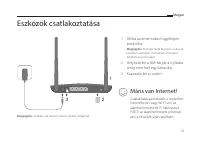
33 Magyar Eszközök csatlakoztatása 3 2 1 1 Állítsa az antennákat függőleges pozícióba. Megjegyzés: Első lépésként bizonyos router-ek esetében szükséges manuálisan a helyükre illeszteni az antennákat. 2 Helyezze be a SIM-káryát a nyílásba, amíg nem hall egy kattanást. 3 Kapcsolja be a routert. Csatla...
Page 36 - A 4G LTE Router testreszabása; vagy a
34 Magyar A 4G LTE Router testreszabása 1 Győződjön meg, hogy a számítógépe csatlakoztatva van a routerhez (vezetékesen vagy vezeték nélkül). 2 Gépelje be a http://tplinkmodem.net vagy a 192.168.1.1 címet internet böngészőjének címsávjába. Az aktuális bejelentkezési oldal: használja az alapértelmeze...
Page 38 - K3. Hogyan állíthatom vissza a router alap gyári beállításait?
36 Magyar 2 Kapcsolja be a mobil adatszolgáltatást az Internet eléréséhez. • Ellenőrizze az adat roamingot: 1 Egyeztesse szolgáltatójával, hogy saját szolgáltatási területen tartózkodik-e. Ha igen, nyisson egy böngészőt, és lépjen be a beállítási felületre. 2 Kapcsolja be az adat romingot. K3. Hogya...
Page 39 - Podłączanie sprzętu; Ustaw anteny pionowo.; Włóż kartę SIM do gniazda aż do; Korzystaj z Internetu!
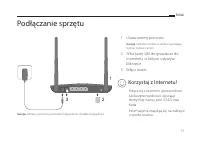
37 Polski Podłączanie sprzętu 3 2 1 1 Ustaw anteny pionowo. Uwaga: Niektóre modele routerów wymagają ręcznej instalacji anten. 2 Włóż kartę SIM do gniazda aż do momentu, w którym usłyszysz kliknięcie. 3 Włącz router. Połącz się z routerem (przewodowo lub bezprzewodowo) używając domyślnej nazwy sieci...
Page 40 - Dostosuj ustawienia routera 4G LTE; lub
38 Polski Dostosuj ustawienia routera 4G LTE 1 Upewnij się, że komputer połączony jest z routerem (przewodowo lub bezprzewodowo).2 Otwórz przeglądarkę internetową i wprowadź http://tplinkmodem.net lub 192.168.1.1 w pasek adresu. W pola nazwy użytkownika i hasła wpisz admin lub utwórz nowe hasło, aby...
Page 42 - • Sprawdź roaming danych:; Włącz roaming danych, aby uzyskać dostęp do Internetu.; Q3. W jaki sposób mogę przywrócić ustawienia fabryczne routera?; Q4. Co mogę zrobić, jeżeli zapomniałem hasła do strony logowania?
40 Polski 2 Włącz transfer danych, aby uzyskać dostęp do Internetu. • Sprawdź roaming danych: 1 Upewnij się, że znajdujesz się w miejscu objętym roamingiem, a następnie otwórz przeglądarkę internetową i zaloguj się na stronę zarządzania routerem. 2 Włącz roaming danych, aby uzyskać dostęp do Interne...
Page 43 - Подключение устройства; Установите антенны в; Вставьте SIM-карту в слот до; Подключите ваше устройство к; Интернет готов к
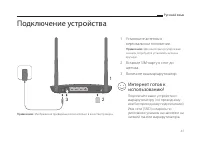
41 Русский язык Подключение устройства 3 2 1 1 Установите антенны в вертикальном положении. Примечание: Для некоторых роутеров вам сначала потребуется установить антенны вручную. 2 Вставьте SIM-карту в слот до щелчка. 3 Включите ваш маршрутизатор. Подключите ваше устройство к маршрутизатору (по пров...
Page 44 - Настройте 4G LTE маршрутизатор
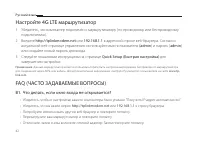
42 Русский язык Настройте 4G LTE маршрутизатор 1 Убедитесь, что компьютер подключён к маршрутизатору (по проводному или беспроводному подключению). 2 Введите http://tplinkmodem.net или 192.168.1.1 в адресной строке веб-браузера. Согласно актуальной веб-странице управления: используйте имя пользовате...
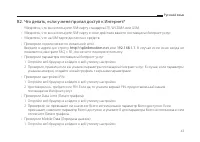
Page 46 - B3. Как восстановить заводские настройки маршрутизатора?
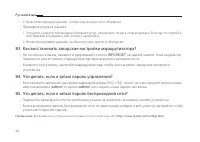
44 Русский язык 2 Включите передачу данных, чтобы получить доступ к Интернет. • Проверьте роуминг данных: 1 Уточните у вашего поставщика Интернет-услуг, находитесь ли вы в зоне роуминга. Если да, то откройте веб-браузер и войдите в веб-утилиту настройки. 2 Включите роуминг данных, чтобы получить дос...
Page 47 - Conectarea Dispozitivului; Poziționează antenele vertical.; Împinge cartela SIM în slot până; Navigare plăcută pe
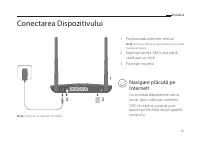
45 Română Conectarea Dispozitivului 3 2 1 1 Poziționează antenele vertical. Notă: Pentru anumite routere trebuie să instalezi manual antenele. 2 Împinge cartela SIM în slot până când auzi un click. 3 Pornește routerul. Conectează dispozitivele tale la router (prin cablu sau wireless). SSID-ul implic...
Page 48 - Personalizare Router 4G LTE; Î1. Ce pot face dacă pagina de autentificare nu este afișată?; sau
46 Română Personalizare Router 4G LTE 1 Asigură-te că ai conectat computerul la router (prin cablu sau wireless).2 Introdu http://tplinkmodem.net sau 192.168.1.1 în bara de adrese a unui browser web. La autentificarea în pagina de management web, utilizează credențialele implicite admin pentru numel...
Page 49 - Î2. Ce pot face dacă nu pot accesa Internetul?
47 Română Î2. Ce pot face dacă nu pot accesa Internetul? • Asigură-te că ai o cartelă SIM LTE, WCDMA sau GSM.• Asigură-te că ești în aria de acoperire a ISP-ului de la care ai cartela SIM.• Asigură-te că există suficient credit pe cartela SIM.• Verificare conexiune LAN: Tastează http://tplinkmodem.n...
Page 50 - Î3. Cum revin la setările implicite din fabrică ale routerului?; Î4. Ce pot face dacă am uitat parola paginii de management web?; Î5. Ce pot face dacă am uitat parola rețelei wireless?
48 Română 2 Activează datele mobile pentru a accesa Internetul. • Verificare roaming date: 1 Confirmă cu ISP-ul dacă ești într-o zonă cu acoperire de servicii roaming. Dacă ești, deschide un browser web și autentifică-te în pagina de management web. 2 Activează roamingul de date pentru a accesa Inte...
Page 51 - Zapojenie hardvéru; Užite si svoj Internet!
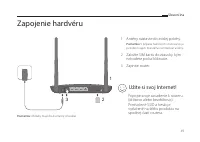
49 Slovenčina Zapojenie hardvéru 3 2 1 1 Antény nastavte do zvislej polohy. Poznámka: V prípade niektorých smerovačov je potrebné najprv manuálne nainštalovať antény. 2 Založte SIM kartu do zásuvky, kým nebudete počuť kliknutie. 3 Zapnite router. Pripojte svoje zariadenie k routeru (drôtovo alebo be...
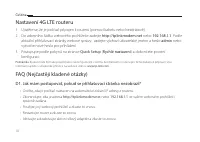
Page 52 - Nastavenie 4G LTE routera; Často kladené otázky; alebo
50 Slovenčina Nastavenie 4G LTE routera 1 Ubezpečte sa, či je váš počítač pripojený k routeru (drôtovo alebo bezdrôtovo).2 Zadajte http://tplinkmodem.net alebo 192.168.1.1 v políčku pre adresu vo webovom prehliadači. Podľa aktuálnej prihlasovacej stránky webovej správy: použite predvolené admin pre ...
Page 54 - Otázka č.3. Ako obnovím predvolené nastavenia routera od výroby?
52 Slovenčina 2 Aktivujte mobilné dáta pre prístup k Internetu. • Skontrolujte dátový roaming: 1 Potvrďte si so svojím ISP, či ste v oblasti pokrytia roamingovej služby. Ak ste, otvorte webový prehliadač a prihláste sa na stránku webovej správy. 2 Aktivujte mobilný dátový roaming pre prístup k Inter...
Page 55 - Priključitev strojne opreme; Antene postavite vertikalno.; dokler ne zaslišite klik.; Želimo vam prijetno
53 Slovenski Priključitev strojne opreme 3 2 1 1 Antene postavite vertikalno. Opomba: Na nekatere usmerjevalnike boste morali najprej ročno namestiti antene. 2 Vdenite SIM-kartico v režo, dokler ne zaslišite klik. 3 Vklopite usmerjevalnik. Napravo povežite z usmerjevalnikom (žično ali brezžično). Pr...
Page 56 - Prilagajanje usmerjevalnika 4G LTE; ali
54 Slovenski Prilagajanje usmerjevalnika 4G LTE 1 Zagotovite, da je vaš računalnik povezan z usmerjevalnikom (žično ali brezžično).2 V naslovno vrstico brskalnika vnesite http://tplinkmodem.net ali http://192.168.1.1 . Na osnovi dejanskega okna za spletno upravljanje ob prijavi uporabite privzet adm...
Page 58 - Omogočite podatkovno gostovanje za dostop do interneta.; V3: Kako usmerjevalnik obnovim na tovarniške nastavitve?; upravljanje in vrnite usmerjevalnik na tovarniške nastavitve.; V5: Kaj lahko storim, če pozabim svoje geslo za brezžično omrežje?; pridobite ali ponovno nastavite vaše geslo.
56 Slovenski 1 Pri svojem ISP preverite, ali ste na območju storitev gostovanja. Če ste, odprite spletni brskalnik in se prijavite na stran za spletno upravljanje. 2 Omogočite podatkovno gostovanje za dostop do interneta. V3: Kako usmerjevalnik obnovim na tovarniške nastavitve? • Ob vklopljenem usme...
Page 59 - Povežite opremu; Postavite antene vertikalno.; Ubacite SIM karticu u slot dok ne
57 Srpski jezik/Српски језик Povežite opremu 3 2 1 1 Postavite antene vertikalno. Napomena: Za neke tipove rutera,potebno je da prvo montirate antene ručno. 2 Ubacite SIM karticu u slot dok ne klikne. 3 Uključite ruter. Povežite Vaš uređaj sa ruterom (žično ili bežično). Podrazumevani SSID i lozinka...
Page 60 - Podesite 4G LTE ruter; P1. Šta da uradim ako se ne pojavi stranica za pristup?; P2. Šta da uradim ako ne mogu da pristupim internetu?
58 Srpski jezik/Српски језик Podesite 4G LTE ruter 1 Proverite da li je Vaš računar povezan sa ruterom (žično ili bežično).2 Unesite http://tplinkmodem.net ili 192.168.1.1 u adresno polje Vašeg pretraživača. Na stranici za pristup ukucajte: podrazumevano admin za korisničko ime i lozinku ili napravi...
Page 62 - P3. Kako da vratim ruter na fabrička podešavanja?; P4. Šta da uradim ako zaboravim lozinku stranice za podešavanje?; P5. Šta da uradim ako zaboravim lozinku bežične mreže?
60 Srpski jezik/Српски језик • Proverite prenos podataka u romingu: 1 Proverite sa Vašim operaterom da li ste u romingu. Ako jeste, otvorite pretraživač i pristupite stranici za podešavanje. 2 Uključite prenos podataka u romingu da biste pristupili internetu. P3. Kako da vratim ruter na fabrička pod...
Page 63 - Підключення Апаратного забезпечення; Насолоджуйтесь Інтернетом!
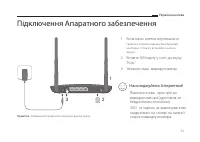
61 Українська мова Підключення Апаратного забезпечення 3 2 1 1 Встановіть антени вертикально. Примітка: У деяких маршрутизаторах вам необхідно спочатку встановити антени вручну. 2 Вставте SIM карту у слот до звуку "Клік". 3 Увімкніть ваш маршрутизатор. Підключіть ваш пристрій до маршрутизато...
Page 64 - Налаштування 4G LTE Маршрутизатора; Введіть; • Переконайтеся, що адреса
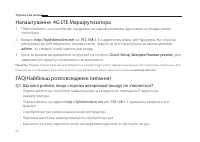
62 Українська мова Налаштування 4G LTE Маршрутизатора 1 Переконайтесь, що комп'ютер під'єднано до маршрутизатора (дротовим чи бездротовим способом). 2 Введіть http://tplinkmodem.net чи 192.168.1.1 в адресному рядку веб-браузера. На сторінці авторизації до веб керування: використайте пароль та ім'я к...
Page 65 - Q2. Що мені робити, якщо я не можу отримати доступ до Інтернет?
63 Українська мова Q2. Що мені робити, якщо я не можу отримати доступ до Інтернет? • Переконайтесь, що ваша SIM карта є LTE, WCDMA чи GSM картою.• Переконайтесь, що ваша SIM карта знаходиться у зоні обслуговування вашого провайдера.• Переконайтесь, що ваша SIM карта має достатній кредит.• Перевірте ...
Page 66 - • Перевірте Трафік у роумінгу:; Q3. Як скинути маршрутизатор до його заводських налаштувань?; • Коли маршрутизатор увімкнено, натисніть та утримуйте кнопку; Q5. Що мені робити, якщо я забув свій пароль бездротової мережі?; щоб дізнатися свій пароль або скинути його.
64 Українська мова 2 Включіть мобільний трафік для доступу в Інтернет. • Перевірте Трафік у роумінгу: 1 Дізнайтесь у вашого Інтернет-провайдера чи знаходитесь ви у зоні обслуговування роумінгу. Якщо це так, запустіть веб-браузер та увійдіть на сторінку веб-керування. 2 Увімкніть можливість доступу д...

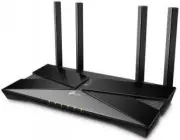 TP-Link Archer AX10
User Manual
TP-Link Archer AX10
User Manual
 TP-Link ARCHER AX11000
User Manual
TP-Link ARCHER AX11000
User Manual
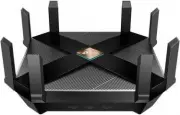 TP-Link Archer AX6000
User Manual
TP-Link Archer AX6000
User Manual
 TP-Link ARCHER AX73 AX5400 (ARCHER-AX73)
User Manual
TP-Link ARCHER AX73 AX5400 (ARCHER-AX73)
User Manual
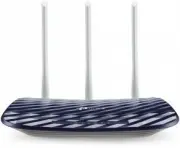 TP-Link Archer C20 v5.0
User Manual
TP-Link Archer C20 v5.0
User Manual
 TP-Link ARCHER GX90 AX6600
User Manual
TP-Link ARCHER GX90 AX6600
User Manual
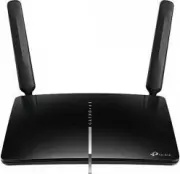 TP-Link Archer MR600
User Manual
TP-Link Archer MR600
User Manual
 TP-Link CPE210 N300, 10/100BASE-TX White
User Manual
TP-Link CPE210 N300, 10/100BASE-TX White
User Manual
 TP-Link CPE510 N300, 10/100BASE-TX White
User Manual
TP-Link CPE510 N300, 10/100BASE-TX White
User Manual
 TP-Link Deco E3
User Manual
TP-Link Deco E3
User Manual
 TP-Link Deco E4
User Manual
TP-Link Deco E4
User Manual
 TP-Link Deco E4 (2-Pack)
User Manual
TP-Link Deco E4 (2-Pack)
User Manual
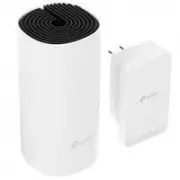 TP-Link Deco M3
User Manual
TP-Link Deco M3
User Manual
 TP-Link Deco M4
User Manual
TP-Link Deco M4
User Manual
 TP-Link Deco M4 AC1200 (3-PK)
User Manual
TP-Link Deco M4 AC1200 (3-PK)
User Manual
 TP-Link Deco M5
User Manual
TP-Link Deco M5
User Manual
 TP-Link DECO M9 1 pcs AC2200
User Manual
TP-Link DECO M9 1 pcs AC2200
User Manual
 TP-Link Deco M9 Plus
User Manual
TP-Link Deco M9 Plus
User Manual
 TP-Link Deco M9 Plus (3-PACK)
User Manual
TP-Link Deco M9 Plus (3-PACK)
User Manual
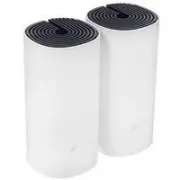 TP-Link Deco P9
User Manual
TP-Link Deco P9
User Manual