Page 3 - Content
3 Content EN HU RO FR DE AR Content Your Motion BTE hearing instrument 4 Intended use 7 General notes on safety 8 Handling of standard and rechargeable batteries 11 Inserting and removing your hearing instrument 14 Turning your hearing instrument on and off 15 Changing the hearing program 17 Changin...
Page 4 - Your Motion BTE hearing instrument; Motion S; optional with LifeTube
Your Motion BTE hearing instrument 4 Motion S optional with LifeTube battery type: 312 always non-rechargeable ① Earhook② LifeTube③ LifeTip④ Rocker switch* ⑤ Push button*⑥ Flat cover*⑦ Microphone openings⑧ Battery compartment * Alternative to a rocker switch your Hearing Care Profes-sional can fit yo...
Page 5 - Motion SX
Your Motion BTE hearing instrument 5 EN HU RO FR DE AR Motion SX optional with LifeTube battery type: 13 rechargeable or non-rechargeable ① Earhook② LifeTube③ LifeTip④ Rocker switch*⑤ Push button* ⑥ Flat cover*⑦ Microphone openings⑧ Battery compartment⑨ Charging contacts * Alternative to a rocker sw...
Page 6 - Motion P
Your Motion BTE hearing instrument 6 Motion P optional with LifeTube battery type: 13 rechargeable or non-rechargeable ① Earhook② LifeTube③ LifeTip④ Rocker switch⑤ Push button ⑥ Microphone openings⑦ Battery compartment⑧ Charging contacts⑨ Serial number⑩ Type of hearing instrument
Page 7 - Intended use
Intended use 7 EN HU RO FR DE AR Hearing instruments are intended to improve the hearing of hearing impaired persons. Diagnosis and prescription of a hearing instrument must be performed by hearing health specialists, e.g. ENT doctors, audiologists or acousticians.Read and follow the instructions of...
Page 8 - NOTICE; Do not leave them in direct sunlight.; WARNING; General notes on safety
General notes on safety 8 NOTICE Your hearing instruments are sensitive to extreme heat, high humidity, strong magnetic fields (> 0.1T), X-rays and mechanical stress. Do not expose your hearing instruments to extreme temperature or high humidity. Do not leave them in direct sunlight. Do n...
Page 9 - Choking hazard posed by small parts.
General notes on safety 9 EN HU RO FR DE AR WARNING Choking hazard posed by small parts. Keep hearing instruments, batteries and acces-sories out of children‘s reach. If swallowed consult a physician or hospital im-mediately. If infants, small children or mentally disabled persons need to w...
Page 10 - CAUTION; Risk of injury caused by incorrect use of LifeTip.; Leaking batteries damage the hearing instruments.
General notes on safety 10 CAUTION Risk of injury caused by incorrect use of LifeTip. Always wear the LifeTube with the LifeTip. Make sure that the LifeTip is completely at-tached to the LifeTip adapter. Change the LifeTube or LifeTip when they are cracked. Put the LifeTube with the Life...
Page 11 - Handling of standard and rechargeable batteries; Always use the right size of batteries.; Low battery indicator
Handling of standard and rechargeable batteries 11 EN HU RO FR DE AR original size Always use the right size of batteries. Charge the rechargeable batteries before first use. Remove the tab on standard batteries only when you are ready to use them. The positive (+) side of the batteries i...
Page 12 - Inserting the battery
Handling of standard and rechargeable batteries 12 Inserting the battery Open the battery compartment com-pletely using your fingernail as shown in the illustration. Insert the proper size battery.Make sure that the "+" symbol on the battery points up as shown in the pic-ture Close t...
Page 13 - Removing the battery
Handling of standard and rechargeable batteries 13 EN HU RO FR DE AR Removing the battery Open the battery compartment com-pletely.Normally the battery drops out whenthe compartment is completely open. If the battery does not come out, lightly tap the instrument or use the magnet stick availab...
Page 14 - Inserting and removing your hearing instrument; Inserting your hearing instrument; Turn your hearing instrument off.; Removing your hearing instrument
Inserting and removing your hearing instrument 14 For side recognition ask your Hearing Care Professional to apply colored markers in the bat-tery compartment. If the marker in the battery compartment is in red, the hearing instrument is intended for the right ear. If the marker is in blue, the hear...
Page 16 - Turning your hearing instrument on and off; Via remote control; Refer to the remote control user guide.
Turning your hearing instrument on and off 16 Via remote control Refer to the remote control user guide. Power-on delay Your hearing instrument is equipped with a "power-on de-lay" feature which can be activated by your Hearing Care Professional. This allows you to turn the hearing instru...
Page 17 - Via push button; Changing the hearing program
Changing the hearing program 17 EN HU RO FR DE AR Ask your Hearing Care Professional to check off the relevant information. Via push button Press the push button to switchto the next program. Via rocker switch Press up to switch to the nextprogram. Press down to switch to theprevious pro...
Page 18 - Automatic; The volume is adjusted automatically when in use.; Rocker switch; Press up to increase the volume.; Changing the volume
Changing the volume 18 The volume of your hearing instruments is controlled automatically and there is no need to manually adjust it.Should you prefer manual volume control, your Hearing Care Professional can program the hearing instrument for manual adjustment. Automatic The volume is adjusted auto...
Page 19 - e2e wireless; Allows the use of a remote control.; Automatic telephone program; Functionalities
Functionalities 19 EN HU RO FR DE AR Your Hearing Care Professional can activate the following functionalities. e2e wireless ■ Allows the use of a remote control. ■ Automatically adjusts both hearing instruments simultaneously to change the instrument set-tings, e.g. volume or program. The performan...
Page 22 - Regulary clean LifeTubes with a cleaning wire.; Maintenance and care
Maintenance and care 22 Your hearing instruments are highly sensitive systems. Proper care and handling will ensure the best possible performance.Clean instruments regularly to prevent damage to the hearing instruments and to avoid health problems. NOTICE Do not put the hearinginstruments in wate...
Page 23 - Accessories
Accessories 23 EN HU RO FR DE AR Charger (Motion SX and Motion P) Your hearing instruments work with standard or rechargeable batteries. With the easy-to-use charger you can charge the rechargeable batter-ies for one or two hearing instru-ments. After just 6 hours of charg-ing, the charger shuts its...
Page 24 - Tek wireless enhancement
Accessories 24 Tek wireless enhancement Your hearing instruments together with the Tek Connect remote control will allow you to connect your hear-ing instruments to the growing world of technology. Via a special Bluetooth connection it is possible to receive audio signals from your mobile, your tele...
Page 25 - Troubleshooting tips
Troubleshooting tips 25 EN HU RO FR DE AR Your hearing instruments are extremely reliable devices. Should a problem occur, it can usually be corrected quickly. Use these troubleshooting tips to resolve simple issues. Problem Possible solution Sound is weak. Replace / recharge empty battery.Clean ear...
Page 26 - Technical information
Technical information 26 Siemens Motion 701, Motion 501, Motion 301FCC ID: SGI-WL002BTEIC: 267AB-WL002Operating frequencies: F c =3.28 MHz N14203 This Class B digital apparatus complies with Canadian ICES-003.Changes or modifications not expressly approved by SAT GmbH for compliance could void the us...
Page 28 - Disposal information
Disposal information 28 Within the European Union, the marked equipment is covered by "Directive 2002/96/EC of the European Paliament and of the Council of 27 January 2003 on waste electrical and electronical equipment."Amended by "Directive 2003/108/EC" (WEEE). Recycle hearing in...
Page 29 - Your hearing instrument configuration
Your hearing instrument configuration 29 EN HU RO FR DE AR Hearing instrument LEFT RIGHT Model Serial number Battery □ yes □ no Power-on delay □ yes □ no □ yes □ no Push button □ yes □ no □ yes □ no Rocker switch □ yes □ no Signal tones □ on □ off Program change □ on □ off □ on □ off Low battery warn...
Page 31 - Tartalom
31 Tartalom EN HU RO FR DE AR Tartalom Az Ön Motion BTE hallókészüléke 32 Felhasználási terület 35 Általános biztonsági megjegyzések 36 Normál elemek és újratölthető akkumulátorok kezelése 39 Hallókészülékének behelyezése és eltávolítása 42 A hallókészülék be- és kikapcsolása 43 Hallóprogram-váltás ...
Page 32 - Az Ön Motion BTE hallókészüléke
Az Ön Motion BTE hallókészüléke 32 Motion S LifeTube-bal (nyitott illesztéssel) is kapható elemtípus: 312 csak nem újratölthető ① Könyök② LifeTube③ LifeTip④ Billenőkapcsoló* ⑤ Nyomógomb*⑥ Sima burkolat*⑦ Mikrofonnyílások⑧ Elemtartó rekesz * A billenőkapcsoló helyett hallókészülék-specialistája egy n...
Page 35 - Felhasználási terület
Felhasználási terület 35 EN HU RO FR DE AR A hallókészülékek a hallássérült személyek hallásának javítására szolgálnak. A diagnózis felállítását és a hallóké-szülék felírását fülspecialistának, pl. fül-orr-gégésznek, syakorvosnak vagy akusztikusnak kell végeznie.A sérülések és a hallókészülék károso...
Page 36 - Általános biztonsági megjegyzések; MEGJEGYZÉS; Ne hagyja tűző napon.; VIGYÁZAT
Általános biztonsági megjegyzések 36 MEGJEGYZÉS A hallókészülék érzékeny a nagy hőre, a magas pá-ratartalomra, az erős mágneses mezőkre (> 0,1 T), a röntgensugarakra és a mechanikai behatásokra. Ne tegye ki a hallókészüléket szélsőséges hő-mérséklet vagy magas páratartalom hatásának. Ne hag...
Page 37 - A kis alkatrészek fulladást okozhatnak.
Általános biztonsági megjegyzések 37 EN HU RO FR DE AR VIGYÁZAT A kis alkatrészek fulladást okozhatnak. A hallókészülék, az elemek és a tartozékok gyer-mekektől elzárva tartandók. Lenyelés esetén azonnal forduljon orvoshoz, vagy keressen fel egy kórházat. Ha csecsemő, kisgyermek vagy szelle...
Page 38 - FIGYELEM; A LifeTip helytelen használata sérülést okozhat.; A szivárgó elemek károsíthatják a hallókészüléket.
Általános biztonsági megjegyzések 38 FIGYELEM A LifeTip helytelen használata sérülést okozhat. A LifeTube-ot mindig felszerelt LifeTippel viselje. Ügyeljen arra, hogy a LifeTip megfelelően rög-zítve legyen a LifeTip adapterhez. Cserélje ki a LifeTube-ot vagy a LifeTipet, ha megrepedtek. ...
Page 39 - Normál elemek és újratölthető akkumulátorok kezelése; Mindig megfelelő méretű elemet használjon.
Normál elemek és újratölthető akkumulátorok kezelése 39 EN HU RO FR DE AR valós méret Mindig megfelelő méretű elemet használjon. Az első használat előtt töltse fel az újratölthető akkumulátort. A normál elemen található fület csak az elem használatba vétele előtt távolítsa el. Az elem po...
Page 41 - Az akkumulátor eltávolítása
Normál elemek és újratölthető akkumulátorok kezelése 41 EN HU RO FR DE AR Az akkumulátor eltávolítása Teljesen nyissa ki az akkumulátortartót.Normális esetben az akkumulátor kiesik, amikor a rekesz teljesen nyitva van. Ha az akkumulátor nem jön ki, finoman ütögesse meg a készüléket, vagy hasz-n...
Page 42 - Hallókészülékének behelyezése és eltávolítása; A hallókészülék felhelyezése; Kapcsolja ki a hallókészüléket.; A hallókészülék eltávolítása
Hallókészülékének behelyezése és eltávolítása 42 Az oldalak felismerése érdekében kérje meg hal-lókészülék-specialistáját, hogy helyezzen el színes jelzéseket az elemtartóban. Ha a jelzés az elem-tartóban piros, akkor a hallókészülék a jobb fülhöz való. Ha a jelzés kék, akkor a hallókészülék a bal f...
Page 44 - A hallókészülék be- és kikapcsolása; A távirányítóval; Lásd a távirányító használati útmutatóját.
A hallókészülék be- és kikapcsolása 44 A távirányítóval Lásd a távirányító használati útmutatóját. Késleltetett bekapcsolás Hallókészüléke késleltetett bekapcsolási funkcióval ren-delkezik, amelyet hallókészülék-specialistája aktiválhat. Ez lehetővé teszi a hallókészülék 6/12/18 másodperces autom...
Page 46 - Automatikus; A hangerő megváltoztatása
A hangerő megváltoztatása 46 A hallókészülék hangerő-szabályozása automatikus, így nincs szükség kézi beállításra.Ha mégis szeretné kézzel beállítani, kérje meg hallókészü-lék-specialistáját, hogy kézi beállításhoz programozza a készüléket. Automatikus A készülék a hangerőt a használat közben automa...
Page 47 - Lehetővé teszi távvezérlő használatát.; Automatikus telefonos program; Funkciók
Funkciók 47 EN HU RO FR DE AR A hallókészülék-specialista a következő funkciókat engedélyezheti. e2e wireless ■ Lehetővé teszi távvezérlő használatát. ■ Mindkét készülék beállításait egyszerre, auto-matikusan módosítja, például a hangerő vagy a program módosításakor. A e2e wireless működés teljesítm...
Page 50 - A hallókészüléket ne tegye vízbe.; LifeTube-bal rendelkező készülékekhez; Karbantartás és ápolás
Karbantartás és ápolás 50 A hallókészülék rendkívül érzékeny rendszer. A megfelelő gondozás és kezelés biztosítja a lehető legjobb teljesít-ményt.A készülék károsodásának és az egészségügyi problé-máknak az elkerülése érdekében rendszeresen tisztítsa a készüléket. MEGJEGYZÉS A hallókészüléket ne ...
Page 53 - Hibaelhárítási tanácsok
Hibaelhárítási tanácsok 53 EN HU RO FR DE AR Hallókészüléke rendkívül megbízható eszköz. Ha problé-ma merül fel, akkor általában gyorsan megoldható. Az egyszerű problémák megoldásához alkalmazza az alábbi, hibaelhárítással kapcsolatos tanácsokat. Probléma Lehetséges megoldás Gyenge hang. Cserélje ki...
Page 55 - Hulladékelhelyezési tudnivalók
Hulladékelhelyezési tudnivalók 55 EN HU RO FR DE AR Az Európai Unión belül a jelzéssel ellátott készülékekre az „Európai Parlament és a Tanács 2002/96/EK jelű, 2003. január 27-én kiadott, elektromos és elektronikus készülékek hulla-dék-elhelyezésére vonatkozó,a 2003/108/EK jelű direktívával módosíto...
Page 56 - Az Ön által vásárolt hallókészülék konfigurációja
Az Ön által vásárolt hallókészülék konfigurációja 56 Hallókészülék BAL JOBB Modell Sorozatszám Akkumulátor □ igen □ nem Késleltetett bekapcsolás □ igen □ nem □ igen □ nem Nyomógomb □ igen □ nem □ igen □ nem Billenőkapcsoló □ igen □ nem Hangjelzések □ be □ ki Program váltása □ be □ ki □ be □ ki Alacso...
Page 59 - Cuprins
59 Cuprins EN HU RO FR DE AR Cuprins Instrumentul dumneavoastră auditiv Motion BTE 60 Destinaţie de utilizare 63 Note generale privind siguranţa 64 Manipularea bateriilor standard sau reîncărcabile 67 Introducerea şi scoaterea instrumentului dumneavoastră auditiv 70 Pornirea şi oprirea instrumentulu...
Page 60 - Instrumentul dumneavoastră auditiv Motion BTE; opţional cu LifeTube; Dispozitiv de fixare în
Instrumentul dumneavoastră auditiv Motion BTE 60 Motion S opţional cu LifeTube tip baterie: 312 întotdeauna standard ① Dispozitiv de fixare în ureche ② LifeTube③ LifeTip④ Întrerupător rectangular* ⑤ Buton*⑥ Capac plat*⑦ Orificii microfon⑧ Compartimentul bate- riei * Ca alternativă la întrerupătorul re...
Page 63 - Destinaţie de utilizare
Destinaţie de utilizare 63 EN HU RO FR DE AR Instrumentele auditive sunt destinate îmbunătăţirii auzului persoanelor cu deficienţe auditive. Diagnosticarea şi prescrierea unui instrument auditiv trebuie efectuate de specialişti în probleme auditive, de exemplu, medici specialişti în ORL, audiologi sa...
Page 64 - NOTĂ; Nu le lăsaţi în lumina directă a soarelui.; AVERTISMENT; Note generale privind siguranţa
Note generale privind siguranţa 64 NOTĂ Instrumentele dumneavoastră auditive sunt sensibile la căldură extremă, umiditate ridicată, câmpuri magnetice puternice (> 0,1 T), raze X şi efort mecanic. Nu expuneţi instrumentele auditive la tempera-turi extreme sau umiditate ridicată. Nu le lăsaţi...
Page 65 - Pericol de sufocare cauzat de componente mici.
Note generale privind siguranţa 65 EN HU RO FR DE AR AVERTISMENT Pericol de sufocare cauzat de componente mici. Nu lăsaţi instrumentele auditive, bateriile şi accesoriile la îndemâna copiilor. În cazul ingerării, adresaţi-vă imediat unui me-dic sau unui spital. Dacă sugarii, copiii mici sau...
Page 66 - ATENŢIE; Purtaţi întotdeauna LifeTube cu LifeTip.
Note generale privind siguranţa 66 ATENŢIE Risc de rănire cauzat de utilizarea incorectă aLife-Tip. Purtaţi întotdeauna LifeTube cu LifeTip. Asiguraţi-vă că LifeTip este ataşat complet la adaptorul LifeTip. Înlocuiţi LifeTube sau LifeTip dacă acestea sunt fisurate. Introduceţi LifeTube cu...
Page 67 - Manipularea bateriilor standard sau reîncărcabile; Indicator de baterie consumată
Manipularea bateriilor standard sau reîncărcabile 67 EN HU RO FR DE AR dimensiune originală Utilizaţi întotdeauna baterii de mărimea potrivi-tă. Încărcaţi bateriile reîncărcabile înainte de prima utilizare. Îndepărtaţi elementul de protecţie de pe baterii-le standard doar înaintea utilizări...
Page 68 - Introducerea bateriei
Manipularea bateriilor standard sau reîncărcabile 68 Introducerea bateriei Deschideţi complet compartimentul bateriei cu degetul, în modul indicat în figură. Introduceţi o baterie de dimensiune corespunzătoare.Asiguraţi-vă că simbolul "+" de pe baterie este orientat în sus, conform imag...
Page 69 - Scoaterea bateriei
Manipularea bateriilor standard sau reîncărcabile 69 EN HU RO FR DE AR Scoaterea bateriei Deschideţi complet compartimentul bateriei.În mod normal, bateriile cad din compar-timent când acesta este complet deschis. Dacă bateria nu iese din compartiment, loviţi uşor instrumentul sau utilizaţi ma...
Page 70 - Introducerea instrumentului dumneavoastră auditiv; Opriţi instrumentul auditiv.; Scoaterea instrumentului auditiv
Introducerea şi scoaterea instrumentului dumneavoastră auditiv 70 Pentru recunoaştere laterală, solicitaţi audiologu-lui dumneavoastră să aplice marcatoare colorate în compartimentul bateriei. Dacă marcatorul din compartimentul bateriei are culoarea roşie, instru-mentul auditiv este destinat urechii...
Page 71 - Pornirea şi oprirea instrumentului dumneavoastră auditiv; De la compartimentul bateriei; Închideţi compartimentul bateriei.; De la butonul de comandă
Pornirea şi oprirea instrumentului dumneavoastră auditiv 71 EN HU RO FR DE AR Solicitaţi audiologului dumneavoastră să bifeze informaţiile relevante. De la compartimentul bateriei On (Pornire) Închideţi compartimentul bateriei. Off (Oprire) Deschideţi compartimentulbateriei. De la butonul d...
Page 72 - De la telecomandă; Consultaţi ghidul utilizatorului telecomenzii.
Pornirea şi oprirea instrumentului dumneavoastră auditiv 72 De la telecomandă Consultaţi ghidul utilizatorului telecomenzii. Pornire cu întârziere Instrumentul dumneavoastră auditiv poate fi prevăzut cu o funcţie "pornire cu întârziere" care poate fi activată de către audiologul dumneavoast...
Page 73 - Modificarea programului auditiv
Modificarea programului auditiv 73 EN HU RO FR DE AR Solicitaţi audiologului dumneavoastră să bifeze informaţiile relevante. De la butonul de comandă Apăsaţi butonul pentru a trece laurmătorul program. De la întrerupătorul rectangular Apăsaţi în sus pentru a trece laurmătorul program. Apă...
Page 74 - Întrerupător rectangular; Modificarea volumului
Modificarea volumului 74 Volumul instrumentelor auditive este controlat automat şi nu este necesar controlul manual al acestuia.Dacă preferaţi controlul manual al volumului, solicitaţi audiologului dumneavoastră să programeze instrumentul auditiv pentru reglare manuală. Automatic (Automat) Volumul es...
Page 75 - Permite utilizarea unei telecomenzi.; Program de telefon automat; Funcţionalităţi
Funcţionalităţi 75 EN HU RO FR DE AR Audiologul dumneavoastră poate activa următoarele funcţionalităţi. e2e wireless ■ Permite utilizarea unei telecomenzi. ■ Ajustează automat şi simultan ambele instru-mente auditive pentru a modifica setările de instrument, de exemplu volumul sau programul. Operarea...
Page 78 - Curăţaţi în mod regulat LifeTube cu o sârmă curată.; Întreţinere şi îngrijire
Întreţinere şi îngrijire 78 Instrumentele auditive sunt sisteme extrem de sensibile. O îngrijire şi manipulare adecvate vor asigura cele mai bune performanţe posibile.Curăţaţi în mod regulat instrumentele pentru a preveni deteriorarea instrumentelor auditive şi evita problemele de sănătate. NOTĂ ...
Page 79 - Accesorii
Accesorii 79 EN HU RO FR DE AR Încărcător (doar Motion SX, Motion P) Instrumentele dumneavoastră audi-tive funcţionează cu baterii stan-dard sau reîncărcabile. Cu ajutorul încărcătorului uşor de utilizat, puteţi încărca bateriile reîncărcabile pentru unul sau două instrumente auditi-ve. După doar 6 ...
Page 81 - Sfaturi privind identificarea şi remedierea problemelor
Sfaturi privind identificarea şi remedierea problemelor 81 EN HU RO FR DE AR Instrumentele auditive sunt dispozitive extrem de fiabile. În cazul în care apare o problemă, aceasta poate fi, de obicei, remediată rapid. Utilizaţi aceste sfaturi privind identificarea şi remedierea problemelor pentru a rezol...
Page 83 - Informaţii privind depunerea la deşeuri
Informaţii privind depunerea la deşeuri 83 EN HU RO FR DE AR În Uniunea Europeană, echipamentele marcate intră sub incidenţa "Directivei 2002/96/CE a Parlamentului European şi a Consiliului, din 27 ianuarie 2003, privind deşeurile de echipamen-te electrice şi electronice".Modificată prin "...
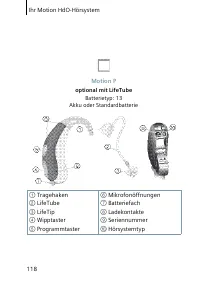
Page 84 - Configuraţia instrumentului dumneavoastră auditiv
Configuraţia instrumentului dumneavoastră auditiv 84 Instrument auditiv STÂNGA DREAPTA Model Număr de serie Baterie □ da □ nu Pornire cu întârziere □ da □ nu □ da □ nu Buton □ da □ nu □ da □ nu Întrerupător rectangular □ da □ nu Tonuri de semnal □ activare□ dezactivare Schimbare program □ activare□ d...
Page 87 - Sommaire
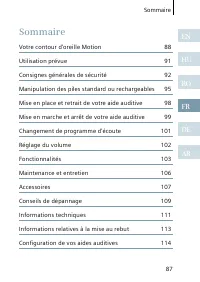
87 Sommaire EN HU RO FR DE AR Sommaire Votre contour d'oreille Motion 88 Utilisation prévue 91 Consignes générales de sécurité 92 Manipulation des piles standard ou rechargeables 95 Mise en place et retrait de votre aide auditive 98 Mise en marche et arrêt de votre aide auditive 99 Changement de pro...
Page 88 - option LifeTube; Votre contour d'oreille Motion
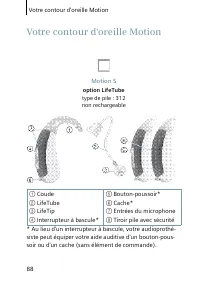
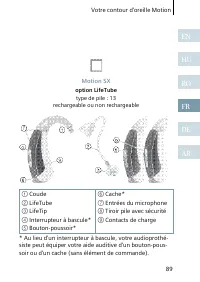
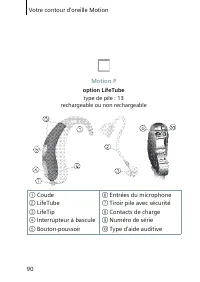
Votre contour d'oreille Motion 88 Motion S option LifeTube type de pile : 312 non rechargeable ① Coude② LifeTube③ LifeTip④ Interrupteur à bascule* ⑤ Bouton-poussoir*⑥ Cache*⑦ Entrées du microphone⑧ Tiroir pile avec sécurité * Au lieu d'un interrupteur à bascule, votre audioprothé-siste peut équiper ...
Page 91 - Utilisation prévue
Utilisation prévue 91 EN HU RO FR DE AR Les aides auditives sont conçues pour améliorer l'audition des personnes malentendantes. Seuls des spécialistes de l'audition (médecins ou audioprothésistes par exemple) sont habilités à établir un diagnostic et à prescrire le port d'une aide auditive.Lisez et...
Page 92 - REMARQUE; Consignes générales de sécurité
Consignes générales de sécurité 92 REMARQUE Vos aides auditives sont sensibles à une chaleur extrême, à une forte humidité, à des champs magnétiques élevés (> 0,1 T), aux rayons X et à la pression mécanique. N'exposez pas vos aides auditives à une tempé-rature extrême ou à une forte humidité. ...
Page 93 - AVERTISSEMENT; Risque d'étouffement par les petites pièces.
Consignes générales de sécurité 93 EN HU RO FR DE AR AVERTISSEMENT Risque d'étouffement par les petites pièces. Tenez les aides auditives, piles et accessoires hors de portée des enfants. En cas d'ingestion, consultez un médecin ou rendez-vous immédiatement à l'hôpital. Le port des aides au...
Page 94 - ATTENTION; Portez toujours le LifeTube avec le LifeTip.
Consignes générales de sécurité 94 ATTENTION Risque de blessure causée par une utilisation incor-recte du LifeTip. Portez toujours le LifeTube avec le LifeTip. Assurez-vous que le LifeTip est correctement fixé à l'adaptateur LifeTip. Changez le LifeTube ou le LifeTip s'ils sont abî-més. I...
Page 95 - Manipulation des piles standard ou rechargeables; Utilisez toujours la taille de pile appropriée.; Indicateur de pile faible
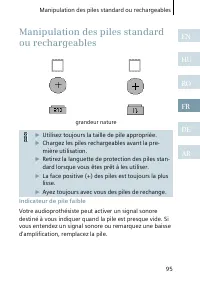
Manipulation des piles standard ou rechargeables 95 EN HU RO FR DE AR grandeur nature Utilisez toujours la taille de pile appropriée. Chargez les piles rechargeables avant la pre-mière utilisation. Retirez la languette de protection des piles stan-dard lorsque vous êtes prêt à les utiliser....
Page 96 - Mise en place de la pile
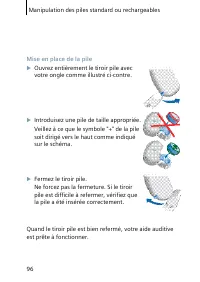
Manipulation des piles standard ou rechargeables 96 Mise en place de la pile Ouvrez entièrement le tiroir pile avec votre ongle comme illustré ci-contre. Introduisez une pile de taille appropriée.Veillez à ce que le symbole "+" de la pile soit dirigé vers le haut comme indiqué sur le s...
Page 97 - Retrait de la pile
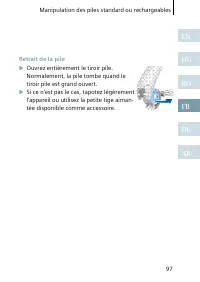
Manipulation des piles standard ou rechargeables 97 EN HU RO FR DE AR Retrait de la pile Ouvrez entièrement le tiroir pile.Normalement, la pile tombe quand le tiroir pile est grand ouvert. Si ce n'est pas le cas, tapotez légèrement l'appareil ou utilisez la petite tige aiman-tée disponible com...
Page 98 - Mise en place et retrait de votre aide auditive; Mise en place de votre aide auditive; Eteignez votre aide auditive.; Retrait de votre aide auditive
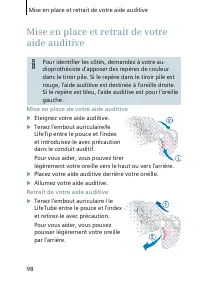
Mise en place et retrait de votre aide auditive 98 Pour identifier les côtés, demandez à votre au-dioprothésiste d'apposer des repères de couleur dans le tiroir pile. Si le repère dans le tiroir pile est rouge, l'aide auditive est destinée à l'oreille droite. Si le repère est bleu, l'aide auditive es...
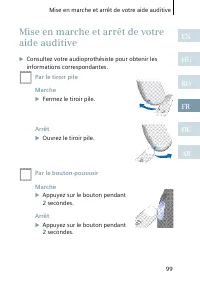
Page 100 - Mise en marche et arrêt de votre aide auditive; Par la télécommande
Mise en marche et arrêt de votre aide auditive 100 Par la télécommande Reportez-vous au guide d'utilisation de la télé-commande. Mise en route retardée Votre aide auditive est équipée de la fonction "Mise en route retardée" qui peut être activée par votre audiopro-thésiste. Ce dispositif ...
Page 101 - Changement de programme d'écoute; Par le bouton-poussoir
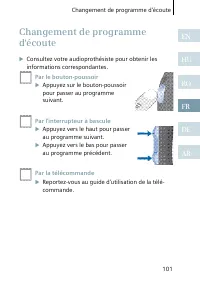
Changement de programme d'écoute 101 EN HU RO FR DE AR Consultez votre audioprothésiste pour obtenir les informations correspondantes. Par le bouton-poussoir Appuyez sur le bouton-poussoirpour passer au programmesuivant. Par l'interrupteur à bascule Appuyez vers le haut pour passerau progra...
Page 102 - Automatique; Réglage du volume
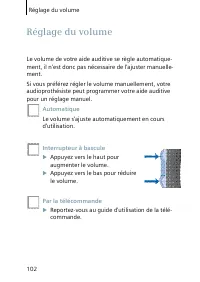
Réglage du volume 102 Le volume de votre aide auditive se règle automatique-ment, il n'est donc pas nécessaire de l'ajuster manuelle-ment.Si vous préférez régler le volume manuellement, votre audioprothésiste peut programmer votre aide auditive pour un réglage manuel. Automatique Le volume s’ajuste ...
Page 103 - La fonction e2e wireless; Fonctionnalités
Fonctionnalités 103 EN HU RO FR DE AR Votre audioprothésiste peut activer les fonctionnalités suivantes. La fonction e2e wireless ■ Cette fonction permet d‘utiliser une télécom-mande. ■ Cette fonction synchronise automatiquement les réglages de vos deux aides auditives aux changements de réglage, pa...
Page 106 - Maintenance et entretien
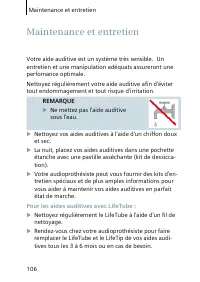
Maintenance et entretien 106 Votre aide auditive est un système très sensible. Un entretien et une manipulation adéquats assureront une perfomance optimale.Nettoyez régulièrement votre aide auditive afin d'éviter tout endommagement et tout risque d'irritation. REMARQUE Ne mettez pas l'aide auditiv...
Page 107 - Accessoires
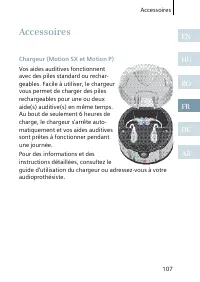
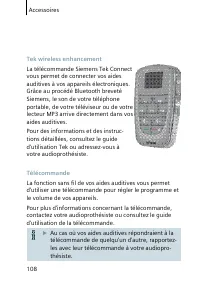
Accessoires 107 EN HU RO FR DE AR Chargeur (Motion SX et Motion P) Vos aides auditives fonctionnent avec des piles standard ou rechar-geables. Facile à utiliser, le chargeur vous permet de charger des piles rechargeables pour une ou deux aide(s) auditive(s) en même temps. Au bout de seulement 6 heur...
Page 109 - Conseils de dépannage
Conseils de dépannage 109 EN HU RO FR DE AR Vos aides auditives sont des appareils extrêmement fiables. Si toutefois un problème survenait, il pourrait être rapidement corrigé. Pour résoudre les problèmes simples, suivez ces conseils de dépannage. Problème Solutions envisageables Le son est faible. R...
Page 111 - Informations techniques
Informations techniques 111 EN HU RO FR DE AR Siemens Motion 701, Motion 501, Motion 301ID FCC : SGI-WL002BTEIC : 267AB-WL002Fréquences de fonctionnement : F c =3.28 MHz N14203 Cet appareil numérique de classe B est conforme à la norme canadienne ICES-003.Tout changement ou modification non expressém...
Page 113 - Informations relatives à la mise au rebut
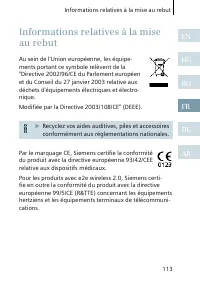
Informations relatives à la mise au rebut 113 EN HU RO FR DE AR Au sein de l'Union européenne, les équipe-ments portant ce symbole relèvent de la "Directive 2002/96/CE du Parlement européen et du Conseil du 27 janvier 2003 relative aux déchets d'équipements électriques et électro-nique.Modifiée p...
Page 114 - Configuration de vos aides auditives
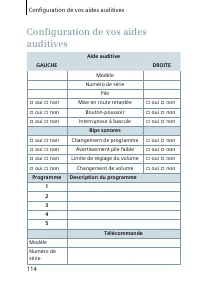
Configuration de vos aides auditives 114 Aide auditive GAUCHE DROITE Modèle Numéro de série Pile □ oui □ non Mise en route retardée □ oui □ non □ oui □ non Bouton-poussoir □ oui □ non □ oui □ non Interrupteur à bascule □ oui □ non Bips sonores □ oui □ non Changement de programme □ oui □ non □ oui □ n...
Page 115 - Inhaltsverzeichnis
115 Inhaltsverzeichnis EN HU RO FR DE AR Inhaltsverzeichnis Ihr Motion HdO-Hörsystem 116 Bestimmungsgemäßer Gebrauch 119 Allgemeine Sicherheitshinweise 120 Handhabung der Batterien 123 Einsetzen und Herausnehmen der Hörsysteme 126 Ein- und Ausschalten Ihrer Hörsysteme 127 Programmwechsel 129 Lautstä...
Page 116 - optional mit LifeTube; Ihr Motion HdO-Hörsystem
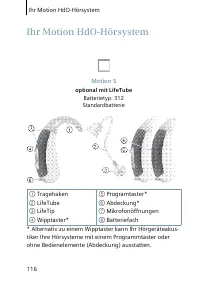
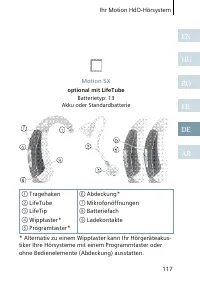
Ihr Motion HdO-Hörsystem 116 Motion S optional mit LifeTube Batterietyp: 312 Standardbatterie ① Tragehaken② LifeTube③ LifeTip④ Wipptaster* ⑤ Programtaster*⑥ Abdeckung*⑦ Mikrofonöffnungen⑧ Batteriefach * Alternativ zu einem Wipptaster kann Ihr Hörgeräteakus-tiker Ihre Hörsysteme mit einem Programmtas...
Page 119 - Bestimmungsgemäßer Gebrauch
Bestimmungsgemäßer Gebrauch 119 EN HU RO FR DE AR Hörsysteme dienen der Verbesserung des Hörvermögens hörgeschädigter Menschen. Diagnose und Anpassung von Hörsystemen müssen durch Spezialisten erfolgen, z. B. durch Fachärzte für Hals-, Nasen-, Ohrenheilkunde, Audiologen oder Hörgeräteakustiker.Lesen...
Page 120 - HINWEIS; Lassen Sie sie nicht in der Sonne liegen.; WARNUNG; Allgemeine Sicherheitshinweise
Allgemeine Sicherheitshinweise 120 HINWEIS Ihre Hörsysteme reagieren empfindlich auf ext-reme Hitze, hohe Luftfeuchtigkeit, starke mag-netische Felder (> 0,1T), Röntgenstrahlen und mechanische Beanspruchung. Setzen Sie Ihre Hörsysteme nicht extremen Temperaturen oder starker Feuchtigkeit aus. ...
Page 122 - VORSICHT; Tragen Sie den LifeTube immer mit dem LifeTip.
Allgemeine Sicherheitshinweise 122 VORSICHT Verletzungsgefahr durch falsche Benutzung von LifeTips. Tragen Sie den LifeTube immer mit dem LifeTip. Achten Sie auf den festen Sitz des LifeTips auf dem LifeTip-Adapter. Tauschen Sie LifeTube oder LifeTip aus, wenn sie Risse aufweisen. Setzen...
Page 123 - Laden Sie Akkus vor dem ersten Gebrauch.; Nachlassende Batterie; Handhabung der Batterien
Handhabung der Batterien 123 EN HU RO FR DE AR Originalgröße Verwenden Sie ausschließlich Batterien der richtigen Batteriegröße. Laden Sie Akkus vor dem ersten Gebrauch. Entfernen Sie die Schutzfolie der Batterie erst, wenn Sie die Batterie benutzen wollen. Die Plus-Seite ist immer geken...
Page 124 - Einlegen der Batterie
Handhabung der Batterien 124 Einlegen der Batterie Öffnen Sie das Batteriefach vollständig mit dem Fingernagel (siehe Abbildung). Setzen Sie die passende Batterie ein.Das Plus-Symbol auf der Batterie zeigt dabei nach oben (siehe Abbildung). Schließen Sie das Batteriefach.Wenn sich das Batte...
Page 125 - Herausnehmen der Batterie
Handhabung der Batterien 125 EN HU RO FR DE AR Herausnehmen der Batterie Öffnen Sie das Batteriefach vollständig.In der Regel fällt die Batterie heraus, wenn das Batteriefach vollständig geöff-net ist. Ist das nicht der Fall, klopfen Sie leicht auf das Gehäuse oder benutzen Sie den Magnetstift...
Page 126 - Einsetzen und Herausnehmen der Hörsysteme; Einsetzen; Schalten Sie das Hörsystem aus.; Herausnehmen
Einsetzen und Herausnehmen der Hörsysteme 126 Für die Kennzeichnung der Seiten in den Hörsyste-men bringt Ihr Hörgeräteakustiker farbige Markie-rungen im Batteriefach an. Eine rote Markierung im Batteriefach kennzeichnet das rechte Hörsys-tem, eine blaue Markierung kennzeichnet das linke Hörsystem. ...
Page 128 - Ein- und Ausschalten Ihrer Hörsysteme; Mit Fernbedienung; Siehe Gebrauchsanweisung der Fernbedienung.
Ein- und Ausschalten Ihrer Hörsysteme 128 Mit Fernbedienung Siehe Gebrauchsanweisung der Fernbedienung. Einschaltverzögerung Ihr Hörsystem ist mit einer Einschaltverzögerung ausge-stattet, die von Ihrem Hörgeräteakustiker aktiviert werden kann. Sie sorgt dafür, dass sich das Hörsystem erst nach e...
Page 129 - Über Programmtaster; Programmwechsel
Programmwechsel 129 EN HU RO FR DE AR Bitten Sie Ihren Hörgeräteakustiker, die für Sie relevan-ten Optionen anzukreuzen. Über Programmtaster Drücken Sie den Taster, um in dasnächste Programm zu wechseln. Wipptaster Drücken Sie oben, um in dasnächste Programm zu schalten. Drücken Sie unte...
Page 130 - Automatisch; Die Lautstärke wird automatisch eingestellt.; Wipptaster; Lautstärkeregelung
Lautstärkeregelung 130 Die Lautstärke Ihrer Hörsysteme wird automatisch geregelt. Es ist normalerweise nicht notwendig, dass Sie die Lautstärke von Hand ändern.Wenn Sie manuelle Bedienung bevorzugen, kann Ihr Hör-geräteakustiker Ihre Hörsysteme auf manuelle Bedienung umstellen. Automatisch Die Lauts...
Page 131 - Erlaubt die Verwendung einer Fernbedienung.; Automatisches Telefonprogramm; Funktionen
Funktionen 131 EN HU RO FR DE AR Ihr Hörgeräteakustiker kann die folgenden Funktionalitä-ten aktivieren. e2e wireless ■ Erlaubt die Verwendung einer Fernbedienung. ■ Stellt automatisch beide Hörsysteme gleichzeitig ein, wenn Sie die Geräteeinstellungen ändern, z. B. Lautstärke oder Hörprogramm. Die ...
Page 134 - Wartung und Pflege
Wartung und Pflege 134 Ihre Hörsysteme enthalten empfindliche Technik. Mit sachgemäßer Pflege und Handhabung erhalten Sie die Leistungsfähigkeit Ihrer Hörsysteme. Reinigen Sie Ihre Hörsysteme und Ohrpassstücke regel-mäßig, um Beschädigungen an den Hörsystemen vorzu-beugen und gesundheitliche Probleme z...
Page 135 - Zubehör
Zubehör 135 EN HU RO FR DE AR Ladestation (Motion SX und Motion P) Ihre Hörsysteme arbeiten mit nor-malen Batterien oder mit Akkus. Mit der einfach bedienbaren Ladestation können Sie ein oder zwei Hörsyste-me aufladen. Nach einer Ladezeit von 6 Stunden schaltet sich die Ladestation automatisch ab und...
Page 137 - Fehlerbehebung
Fehlerbehebung 137 EN HU RO FR DE AR Ihre Hörsysteme sind zuverlässige Geräte. Auftretende Schwierigkeiten können in der Regel schnell mit Hilfe der folgenden Hinweise behoben werden. Problem Mögliche Lösungen Der Ton ist sehr leise. Akku aufladen bzw. Batterie aus-wechseln.Ohrpassstück reinigen.Laut...
Page 138 - Entsorgungshinweis
Entsorgungshinweis 138 Innerhalb der Europäischen Union entspricht das aufgeführte Zubehör der Richtlinie 2002/96/EG des Europäischen Parlaments und des Rates vom 27. Januar 2003 über Elektro- und Elektronik-Altgeräte.Zuletzt geändert durch Richtlinie 2003/108/EG (WEEE). Entsorgen Sie Hörsysteme,...
Page 139 - Konfiguration Ihrer Hörsysteme
Konfiguration Ihrer Hörsysteme 139 EN HU RO FR DE AR Hörsystem LINKS RECHTS Modell Seriennummer Batterie □ ja □ nein Einschaltverzögerung □ ja □ nein □ ja □ nein Programmtaster □ ja □ nein □ ja □ nein Wipptaster □ ja □ nein Signaltöne □ ein □ aus Programmwechsel □ ein □ aus □ ein □ aus Batteriewarnto...
Page 142 - ك ب
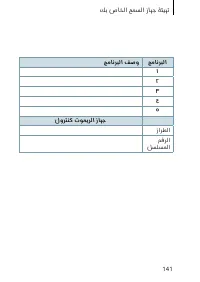
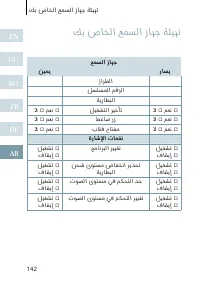
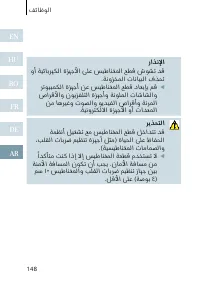
ﻚﺑ صﺎﺨﻟا ﻊﻤﺴﻟا زﺎﻬﺟ ﺔﺌﻴﻬﺗ 142 EN HU RO FR DE AR ﻊﻤﺴﻟا زﺎﻬﺟ رﺎﺴﻳ ﻦﻴﻤﻳ زاﺮﻄﻟا ﻞﺴﻠﺴﻤﻟا ﻢﻗﺮﻟا ﺔﻳرﺎﻄﺒﻟا ﻻ □ ﻢﻌﻧ □ ﻞﻴﻐﺸﺘﻟا ﺮﻴﺧﺄﺗ ﻻ □ ﻢﻌﻧ □ ﻻ □ ﻢﻌﻧ □ ﻂﻏﺎﺿ رز ﻻ □ ﻢﻌﻧ □ ﻻ □ ﻢﻌﻧ □ بﻼﻗ حﺎﺘﻔﻣ ﻻ □ ﻢﻌﻧ □ ةرﺎﺷﻹا تﺎﻤﻐﻧ ﻞﻴﻐﺸﺗ □ فﺎﻘﻳإ □ ﺞﻣﺎﻧﺮﺒﻟا ﺮﻴﻴﻐﺗ ﻞﻴﻐﺸﺗ □ فﺎﻘﻳإ □ ﻞﻴﻐﺸﺗ □ فﺎﻘﻳإ □ ﻦﺤﺷ ىﻮﺘﺴﻣ ضﺎﻔﺨﻧا ﺮﻳﺬﺤﺗ ﺔﻳرﺎﻄﺒﻟا ﻞ...
Page 144 - ت لا ك ش م ل ا
تﻼﻜﺸﻤﻟا لﻮﻠﺣ تادﺎﺷرإ 144 EN HU RO FR DE AR ﺎﻬﻴﻠﻋ دﺎﻤﺘﻋﻻا ﻦﻜﻤﻳ ةﺰﻬﺟأ ﻲﻫ ﻚﺑ ﺔﺻﺎﺨﻟا ﻊﻤﺴﻟا ةﺰﻬﺟأ نإ ﺎﻬﺤﻴﺤﺼﺗ ﻢﺘﻳ نأ ﻦﻜﻤﻳ ،ﺔﻠﻜﺸﻣ ثوﺪﺣ ﺔﻟﺎﺣ ﻲﻓو .ﺮﻴﺒﻛ ﻞﻜﺸﺑ ﻞﺤﻟ هﺬﻫ تﻼﻜﺸﻤﻟا لﻮﻠﺣ ﺢﺋﺎﺼﻧ مﺪﺨﺘﺳا .ﺔﻋﺮﺴﻟا ﻪﺟو ﻰﻠﻋ .ﺔﻄﻴﺴﺒﻟا تﻼﻜﺸﻤﻟا ﺔﻠﻜﺸﻤﻟا ﻦﻜﻤﻤﻟا ﻞﺤﻟا .ﻒﻴﻌﺿ تﻮﺼﻟا .ﺔﻏرﺎﻔﻟا ﺔﻳرﺎﻄﺒﻟا ﻦﺤﺷ ةدﺎﻋإ / لاﺪﺒﺘﺳﺎﺑ ﻢﻗ .نذﻷا ﺐﻟﺎﻗ ...
Page 145 - لورتنك توميرلا زاهج
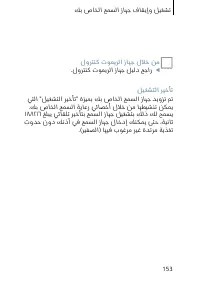
145 ت ﺎ ﻘ ﺤ ﻠ ﻤ ﻟ ا لوﺮﺘﻨﻛ تﻮﻤﻳﺮﻟا زﺎﻬﺟ ﻚﺑ ﺔﺻﺎﺨﻟا ﻊﻤﺴﻟا ةﺰﻬﺟﻷ ﺔﻴﻜﻠﺳﻼﻟا ﺔﻔﻴﻇﻮﻟا ﻚﻟ ﺢﻤﺴﺗ ىﻮﺘﺴﻣو ﺞﻣﺎﻧﺮﺒﻟا ﺮﻴﻴﻐﺘﻟ لوﺮﺘﻨﻛ تﻮﻤﻳﺮﻟا زﺎﻬﺟ ماﺪﺨﺘﺳﺎﺑ .ﻚﺑ ﺔﺻﺎﺨﻟا ﻊﻤﺴﻟا ةﺰﻬﺟأ ﻲﻓ تﻮﺼﻟا تﻮﻤﻳﺮﻟا لﻮﺣ تﺎﻣﻮﻠﻌﻤﻟا ﻦﻣ ﺪﻳﺰﻤﻟا ﻰﻠﻋ فﺮﻌﺘﻠﻟ ﻞﻴﻟد ﻰﻟإ ﻊﺟرا وأ ﻊﻤﺴﻟا ﺔﻳﺎﻋر ﻲﺋﺎﺼﺧأ ﻰﻟإ ﻊﺟرا،لوﺮﺘﻨﻛ .ﺪﻌﺑ ﻦﻋ ﻢﻜﺤﺘﻟا زﺎﻬﺟ مﺪﺨﺘﺴﻣ ﺔﻄﺳاﻮﺑ ...
Page 146 - ت ا ق ح ل م ل ا
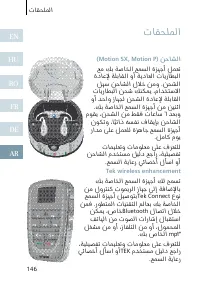
تﺎﻘﺤﻠﻤﻟا 146 EN HU RO FR DE AR (Motion SX, Motion P) ﻦﺣﺎﺸﻟا ﻊﻣ ﻚﺑ ﺔﺻﺎﺨﻟا ﻊﻤﺴﻟا ةﺰﻬﺟأ ﻞﻤﻌﺗ ةدﺎﻋﻹ ﺔﻠﺑﺎﻘﻟا وأ ﺔﻳدﺎﻌﻟا تﺎﻳرﺎﻄﺒﻟا ﻞﻬﺳ ﻦﺣﺎﺸﻟا لﻼﺧ ﻦﻣو .ﻦﺤﺸﻟا تﺎﻳرﺎﻄﺒﻟا ﻦﺤﺷ ﻚﻨﻜﻤﻳ ،ماﺪﺨﺘﺳﻻا وأ ﺪﺣاو زﺎﻬﺠﻟ ﻦﺤﺸﻟا ةدﺎﻋﻹ ﺔﻠﺑﺎﻘﻟا .ﻚﺑ ﺔﺻﺎﺨﻟا ﻊﻤﺴﻟا ةﺰﻬﺟأ ﻦﻣ ﻦﻴﻨﺛا مﻮﻘﻳ ،ﻦﺤﺸﻟا ﻦﻣ ﻂﻘﻓ تﺎﻋﺎﺳ ٦ ﺪﻌﺑو نﻮﻜﺗو ،ﺎًﻴﺗاذ ﻪﺴﻔﻧ فﺎ...
Page 147 - ة ي ا ن ع ل ا و
147 ﺔ ﻳ ﺎ ﻨ ﻌ ﻟ ا و ﺔ ﻧ ﺎ ﻴ ﺼ ﻟ ا ﻦﻤﻀﺗو ﺔﻳﺎﻐﻠﻟ ﺔﺳﺎﺴﺣ ةﺰﻬﺟأ ﻚﺑ ﺔﺻﺎﺨﻟا ﻊﻤﺴﻟا ةﺰﻬﺟأ نإ ﻞﻀﻓأ ﻰﻠﻋ لﻮﺼﺤﻟا ﺎﻬﻌﻣ ﺪﻴﺠﻟا ﻞﻣﺎﻌﺘﻟاو ﺔﺤﻴﺤﺼﻟا ﺔﻳﺎﻨﻌﻟا .ﺎﻬﻨﻣ ءادأ ىﻮﺘﺴﻣ ﺐﻨﺠﺗو ﻒﻠﺘﻠﻟ ﺎﻬﺿﺮﻌﺗ ﻊﻨﻤﻟ مﺎﻈﺘﻧﺎﺑ ﻊﻤﺴﻟا ةﺰﻬﺟأ ﻒﻴﻈﻨﺘﺑ ﻢﻗ .ﺔﻴﺤﺻ ﻞﻛﺎﺸﻣ ثوﺪﺣ راﺬﻧﻹا .ءﺎﻤﻟا ﻲﻓ ﻊﻤﺴﻟا ةﺰﻬﺟأ ﻊﻀﺗ ﻻ ﺪﻨﻋ فﺎﺟو ﻢﻋﺎﻧ ﻲﻗرو ﻞﻳﺪﻨﻤﺑ ﻊﻤﺴﻟا ةﺰﻬﺟأ...
Page 150 - ف ئ ا ظ و ل ا
ﻒﺋﺎﻇﻮﻟا 150 EN HU RO FR DE AR ﻒﺋﺎﻇﻮﻟا ﻞﻴﻌﻔﺗ ﻚﺑ صﺎﺨﻟا ﻊﻤﺴﻟا ﺔﻳﺎﻋر ﻲﺋﺎﺼﺧأ ﻊﻴﻄﺘﺴﻳ .ﺔﻴﻟﺎﺘﻟا e٢e wireless .لوﺮﺘﻨﻛ تﻮﻤﻳﺮﻟا زﺎﻬﺟ ماﺪﺨﺘﺳﺎﺑ ﺢﻤﺴﻳ ■ ﺮﻴﻴﻐﺘﻟ ﺖﻗﻮﻟا ﺲﻔﻧ ﻲﻓ ﻊﻤﺴﻟا يزﺎﻬﺟ ﺎﻴﺋﺎﻘﻠﺗ ﻂﺒﻀﻳ ■ .ﺞﻣﺎﻧﺮﺒﻟا وأ تﻮﺼﻟا ىﻮﺘﺴﻣ ﻞﺜﻣ ،زﺎﻬﺠﻟا تاداﺪﻋإ (e٢e wireless) ﺔﻴﻜﻠﺳﻼﻟا ﺔﻔﻴﻇﻮﻟا ءادأ ﺮﺛﺄﺘﻳ ﺪﻗ ﻦﻣ ثﺪﺤﻳ يﺬﻟﺎﻛ ﻲﺴﻴﻃﺎﻨﻐﻣوﺮ...
Page 151 - ت و ص ل ا
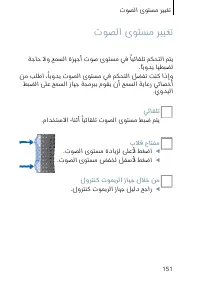
151 ت ﻮ ﺼ ﻟ ا ى ﻮ ﺘ ﺴ ﻣ ﺮ ﻴ ﻴ ﻐ ﺗ ﺔﺟﺎﺣ ﻻو ﻊﻤﺴﻟا ةﺰﻬﺟأ تﻮﺻ ىﻮﺘﺴﻣ ﻲﻓ ًﺎﻴﺋﺎﻘﻠﺗ ﻢﻜﺤﺘﻟا ﻢﺘﻳ .ًﺎﻳوﺪﻳ ﺎﻬﻄﺒﻀﻟ ﻦﻣ ﺐﻠﻃا ،ًﺎﻳوﺪﻳ تﻮﺼﻟا ىﻮﺘﺴﻣ ﻲﻓ ﻢﻜﺤﺘﻟا ﻞﻀﻔﺗ ﺖﻨﻛ اذإو ﻂﺒﻀﻟا ﻰﻠﻋ ﻊﻤﺴﻟا زﺎﻬﺟ ﺔﺠﻣﺮﺒﺑ مﻮﻘﻳ نأ ﻊﻤﺴﻟا ﺔﻳﺎﻋر ﻲﺋﺎﺼﺧأ .يوﺪﻴﻟا ﻲﺋﺎﻘﻠﺗ .ماﺪﺨﺘﺳﻻا ءﺎﻨﺛأ ًﺎﻴﺋﺎﻘﻠﺗ تﻮﺼﻟا ىﻮﺘﺴﻣ ﻂﺒﺿ ﻢﺘﻳ بﻼﻗ حﺎﺘﻔﻣ .تﻮﺼﻟا ىﻮﺘﺴﻣ ةدﺎﻳﺰﻟ ﻰ...
Page 152 - ع م س ل ا
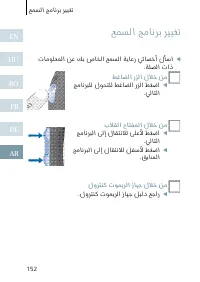
ﻊﻤﺴﻟا ﺞﻣﺎﻧﺮﺑ ﺮﻴﻴﻐﺗ 152 EN HU RO FR DE AR تﺎﻣﻮﻠﻌﻤﻟا ﻦﻋ ﻚﺑ صﺎﺨﻟا ﻊﻤﺴﻟا ﺔﻳﺎﻋر ﻲﺋﺎﺼﺧأ لﺄﺳا .ﺔﻠﺼﻟا تاذ ﻂﻏﺎﻀﻟا رﺰﻟا لﻼﺧ ﻦﻣ ﺞﻣﺎﻧﺮﺒﻠﻟ لﻮﺤﺘﻠﻟ ﻂﻏﺎﻀﻟا رﺰﻟا ﻂﻐﺿا .ﻲﻟﺎﺘﻟا بﻼﻘﻟا حﺎﺘﻔﻤﻟا لﻼﺧ ﻦﻣ ﺞﻣﺎﻧﺮﺒﻟا ﻰﻟإ لﺎﻘﺘﻧﻼﻟ ﻰﻠﻋﻷ ﻂﻐﺿا .ﻲﻟﺎﺘﻟا ﺞﻣﺎﻧﺮﺒﻟا ﻰﻟإ لﺎﻘﺘﻧﻼﻟ ﻞﻔﺳﻷ ﻂﻐﺿا .ﻖﺑﺎﺴﻟا لوﺮﺘﻨﻛ تﻮﻤﻳﺮﻟا زﺎﻬﺟ لﻼﺧ ﻦﻣ ...
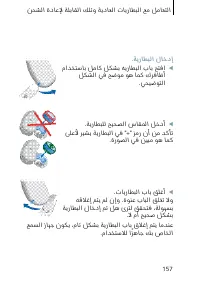
Page 156 - ةيراطبلا ةلازإ
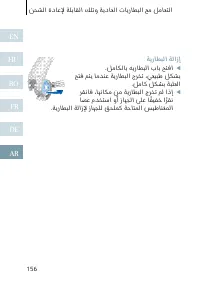
156 EN HU RO FR DE AR ﻦ ﺤ ﺸ ﻟ ا ة د ﺎ ﻋ ﻹ ﺔ ﻠ ﺑ ﺎ ﻘ ﻟ ا ﻚ ﻠ ﺗ و ﺔ ﻳ د ﺎ ﻌ ﻟ ا ت ﺎ ﻳ ر ﺎ ﻄ ﺒ ﻟ ا ﻊ ﻣ ﻞ ﻣ ﺎ ﻌ ﺘ ﻟ ا ﺔﻳرﺎﻄﺒﻟا ﺔﻟازإ .ﻞﻣﺎﻜﻟﺎﺑ ﻪﻳرﺎﻄﺒﻟا بﺎﺑ ﺢﺘﻓا ﺢﺘﻓ ﻢﺘﻳ ﺎﻣﺪﻨﻋ ﺔﻳرﺎﻄﺒﻟا جﺮﺨﺗ ،ﻲﻌﻴﺒﻃ ﻞﻜﺸﺑ .ﻞﻣﺎﻛ ﻞﻜﺸﺑ ﺔﺒﻠﻌﻟا ﺮﻘﻧﺎﻓ ،ﺎﻬﻧﺎﻜﻣ ﻦﻣ ﺔﻳرﺎﻄﺒﻟا جﺮﺨﺗ ﻢﻟ اذإ ﺎﺼﻋ مﺪﺨﺘﺳا وأ زﺎﻬﺠﻟا ﻰﻠﻋ ﺎًﻔﻴﻔﺧ اًﺮﻘﻧ .ﺔ...
Page 158 - ةيراطبلا نحش ىوتسم ضافخنا رشؤم
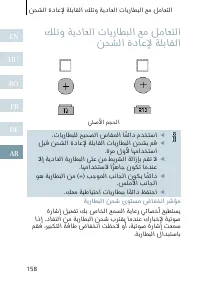
ﻦﺤﺸﻟا ةدﺎﻋﻹ ﺔﻠﺑﺎﻘﻟا ﻚﻠﺗو ﺔﻳدﺎﻌﻟا تﺎﻳرﺎﻄﺒﻟا ﻊﻣ ﻞﻣﺎﻌﺘﻟا 158 EN HU RO FR DE AR ﻲﻠﺻﻷا ﻢﺠﺤﻟا .تﺎﻳرﺎﻄﺒﻠﻟ ﺢﻴﺤﺼﻟا سﺎﻘﻤﻟا ﺎًﻤﺋاد مﺪﺨﺘﺳا ﻞﺒﻗ ﻦﺤﺸﻟا ةدﺎﻋﻹ ﺔﻠﺑﺎﻘﻟا تﺎﻳرﺎﻄﺒﻟا ﻦﺤﺸﺑ ﻢﻗ .ةﺮﻣ لوﻷ ﺎﻬﻣاﺪﺨﺘﺳا ﻻإ ﺔﻳدﺎﻌﻟا ﺔﻳرﺎﻄﺒﻟا ﻰﻠﻋ ﻦﻣ ﻂﻳﺮﺸﻟا ﺔﻟازﺈﺑ ﻢﻘﺗ ﻻ .ﺎﻬﻣاﺪﺨﺘﺳﻻ اًﺰﻫﺎﺟ نﻮﻜﺗ ﺎﻣﺪﻨﻋ ﻮﻫ ﺔﻳرﺎﻄﺒﻟا ﻦﻣ (+) ﺐﺟﻮﻤﻟ...
Page 160 - هيبنتلا
160 EN HU RO FR DE AR ﺔ ﻣ ﻼ ﺴ ﻟ ا ﻦ ﻋ ﺔ ﻣ ﺎ ﻋ ت ﺎ ﻈ ﺣ ﻼ ﻣ ﻊﺿﺮﻟا ﺐﺳﺎﻨﺗ ﺔﺻﺎﺧ ﻊﻤﺳ ةﺰﻬﺟأ Siemens ﺔﻛﺮﺷ مﺪﻘﺗ .رﺎﻐﺼﻟا لﺎﻔﻃﻷاو ﺔﻳﺎﻋر ﻲﺋﺎﺼﺧأ ﻦﻣ تﺎﻣﻮﻠﻌﻤﻟا ﻦﻣ ا ًﺪﻳﺰﻣ ﺐﻠﻃا .ﻊﻤﺴﻟا ﻪﻴﺒﻨﺘﻟا ﺔﺒﻘﻟ ﻢﻴﻠﺴﻟا ﺮﻴﻏ ماﺪﺨﺘﺳﻻا ﺐﺒﺴﺑ ﺔﺑﺎﺻإ ثوﺪﺣ ﺮﻄﺧ .LifeTip .LifeTip ﺔﺒﻘﻟا ﻊﻣ LifeTube بﻮﺒﻧﻷا ءاﺪﺗرﺎﺑ ًﺎﻤﺋاد ﻢﻗ ﺊﻳﺎﻬﻤﺑ ًﺎﻣ...
Page 161 - ة م لا س ل ا
ﺔﻣﻼﺴﻟا ﻦﻋ ﺔﻣﺎﻋ تﺎﻈﺣﻼﻣ 161 راﺬﻧﻹا ﺔﺑﻮﻃﺮﻟاو ةﺪﻳﺪﺸﻟا ةراﺮﺤﻠﻟ ﺔﺳﺎﺴﺣ ﻊﻤﺴﻟا ةﺰﻬﺟأ (٠٫١T ﻦﻣ ﺮﺒﻛأ) ﺔﻳﻮﻘﻟا ﺔﻴﺴﻴﻃﺎﻨﻐﻤﻟا تﻻﺎﺠﻤﻟاو ﺔﻴﻟﺎﻌﻟا .ﻲﻜﻴﻧﺎﻜﻴﻤﻟا دﺎﻬﺟﻹاو ﺲﻛإ ﺔﻌﺷأو ﺔﺑﻮﻃﺮﻟا وأ ةﺪﻳﺪﺸﻟا ةراﺮﺤﻠﻟ ﻊﻤﺴﻟا زﺎﻬﺟ ضﺮﻌﺗ ﻻ .ﺔﻴﻟﺎﻌﻟا .ةﺮﺷﺎﺒﻤﻟا ﺲﻤﺸﻟا ﺔﻌﺷأ ﻲﻓ ﻪﻛﺮﺘﺗ ﻻ وأ جﺎﻴﻛﺎﻣ ﻞﻤﻋ ﺪﻨﻋ وأ مﺎﻤﺤﻟا ﻲﻓ ﻪﺴﺒﻠﺑ ﻢﻘﺗ ﻻ وأ...
Page 163 - LifeTube بوبنأب يرايتخا
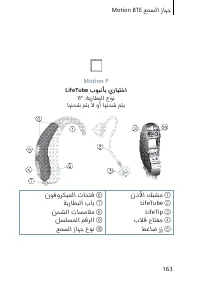
163 Motion BTE ﻊ ﻤ ﺴ ﻟ ا ز ﺎ ﻬ ﺟ Motion P LifeTube بﻮﺒﻧﺄﺑ يرﺎﻴﺘﺧا ١٣ :ﺔﻳرﺎﻄﺒﻟا عﻮﻧ ﺎﻬﻨﺤﺷ ﻢﺘﻳ ﻻ وأ ﺎﻬﻨﺤﺷ ﻢﺘﻳ نذﻷا ﻚﺒﺸﻣ ① LifeTube ② LifeTip ③ بﻼﻗ حﺎﺘﻔﻣ ④ ﻂﻏﺎﺿ رز ⑤ نﻮﻓوﺮﻜﻴﻤﻟا تﺎﺤﺘﻓ ⑥ ﺔﻳرﺎﻄﺒﻟا بﺎﺑ ⑦ ﻦﺤﺸﻟا تﺎﺴﻣﻼﻣ ⑧ ﻞﺴﻠﺴﻤﻟا ﻢﻗﺮﻟا ⑨ ﻊﻤﺴﻟا زﺎﻬﺟ عﻮﻧ ⑩
Page 165 - Motion BTE
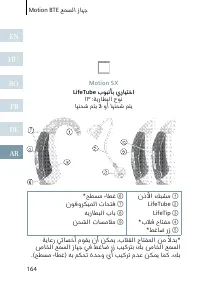
Motion BTE ﻊﻤﺴﻟا زﺎﻬﺟ 165 Motion S LifeTube بﻮﺒﻧﺄﺑ يرﺎﻴﺘﺧا ٣١٢ :ﺔﻳرﺎﻄﺒﻟا عﻮﻧ ﺎﻬﻨﺤﺷ ةدﺎﻋا ﻢﺘﻳ ﻻ نذﻷا ﻚﺒﺸﻣ ① LifeTube ② LifeTip ③ *بﻼﻗ حﺎﺘﻔﻣ ④ *ﻂﻏﺎﺿ رز ⑤ *ﺢﻄﺴﻣ ءﺎﻄﻏ ⑥ نﻮﻓوﺮﻜﻴﻤﻟا تﺎﺤﺘﻓ ⑦ ﻪﻳرﺎﻄﺒﻟا بﺎﺑ ⑧ ﺔﻳﺎﻋر ﻲﺋﺎﺼﺧأ مﻮﻘﻳ نأ ﻦﻜﻤﻳ ،بﻼﻘﻟا حﺎﺘﻔﻤﻟا ﻦﻣ ًﻻﺪﺑ* صﺎﺨﻟا ﻊﻤﺴﻟا زﺎﻬﺟ ﻲﻓ ﻂﻏﺎﺿ رز ﺐﻴﻛﺮﺘﺑ ﻚﺑ صﺎﺨﻟا ﻊﻤﺴﻟا ....
Page 166 - تايوتلمحا
166 تﺎﻳﻮﺘﺤﻤﻟا EN HU RO FR DE AR ﺕﺎﻳﻮﺘﶈﺍ ١٤٢ ﻚﺑ صﺎﺨﻟا ﻊﻤﺴﻟا زﺎﻬﺟ ﺔﺌﻴﻬﺗ ١٤٣ زﺎﻬﺠﻟا ﻦﻣ ﺺﻠﺨﺘﻟا تﺎﻣﻮﻠﻌﻣ ١٤٤ تﻼﻜﺸﻤﻟا لﻮﻠﺣ تادﺎﺷرإ ١٤٦ تﺎﻘﺤﻠﻤﻟا ١٤٧ ﺔﻳﺎﻨﻌﻟاو ﺔﻧﺎﻴﺼﻟا ١٥٠ ﻒﺋﺎﻇﻮﻟا ١٥١ تﻮﺼﻟا ىﻮﺘﺴﻣ ﺮﻴﻴﻐﺗ ١٥٢ ﻊﻤﺴﻟا ﺞﻣﺎﻧﺮﺑ ﺮﻴﻴﻐﺗ ١٥٤ ﻚﺑ صﺎﺨﻟا ﻊﻤﺴﻟا زﺎﻬﺟ فﺎﻘﻳإو ﻞﻴﻐﺸﺗ ١٥٥ ﻚﺑ صﺎﺨﻟا ﻊﻤﺴﻟا زﺎﻬﺟ جاﺮﺧإو لﺎﺧدإ ﺔﻠﺑﺎﻘﻟا ﻚﻠﺗ...



















 Siemens HF35M630/01
User Manual
Siemens HF35M630/01
User Manual
 Siemens 1015N-2MFM-1A
Manual
Siemens 1015N-2MFM-1A
Manual
 Siemens 108
User Manual
Siemens 108
User Manual
 Siemens 11
User Manual
Siemens 11
User Manual
 Siemens 1168
User Manual
Siemens 1168
User Manual
 Siemens 120 Series
User Manual
Siemens 120 Series
User Manual
 Siemens 125-1957
User Manual
Siemens 125-1957
User Manual
 Siemens 125-3584T
User Manual
Siemens 125-3584T
User Manual
 Siemens 125-5033
User Manual
Siemens 125-5033
User Manual
 Siemens 140
User Manual
Siemens 140
User Manual
 Siemens 175V
User Manual
Siemens 175V
User Manual
 Siemens 18inc Freezer Tower with Dispenser
User Manual
Siemens 18inc Freezer Tower with Dispenser
User Manual
 Siemens 18inc Wine Tower
User Manual
Siemens 18inc Wine Tower
User Manual
 Siemens 1G03QB 630G
User Manual
Siemens 1G03QB 630G
User Manual
 Siemens 2 D SP
User Manual
Siemens 2 D SP
User Manual
 Siemens 2000
User Manual
Siemens 2000
User Manual
 Siemens 2010 Tango
User Manual
Siemens 2010 Tango
User Manual