Page 2 - © 2020 Seagate Technology LLC. All rights reserved.; Document Revision History; Revision
© 2020 Seagate Technology LLC. All rights reserved. Publication number: 100870481, Rev. A July 2020Seagate, Seagate Technology and the Spiral logo are registered trademarks of Seagate Technology LLC in the United States and/or other countries. SkyHawk and SeaTools are either trade-marks or registere...
Page 3 - Contents
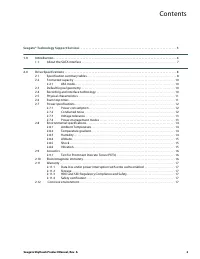
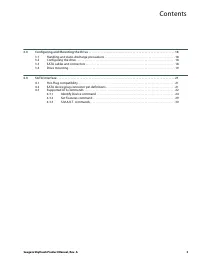
Seagate SkyHawk Product Manual, Rev. A 2 Contents Seagate® Technology Support Services . . . . . . . . . . . . . . . . . . . . . . . . . . . . . . . . . . . . . . . . . . . . . . . . . . . . . . . . . . . . . . . 5 1.0 Introduction . . . . . . . . . . . . . . . . . . . . . . . . . . . . . . . . . . ...
Page 5 - Figures; Figure 1
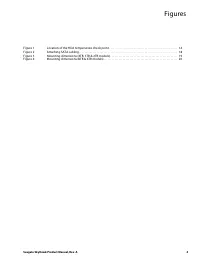
Seagate SkyHawk Product Manual, Rev. A 4 Figures Figure 1 Location of the HDA temperature check point . . . . . . . . . . . . . . . . . . . . . . . . . . . . . . . . . . . . . . . . . . . . . . . . . . 14 Figure 2 Attaching SATA cabling . . . . . . . . . . . . . . . . . . . . . . . . . . . . . . . ....
Page 6 - Seagate® Technology Support Services
Seagate SkyHawk Product Manual, Rev. A 5 For Seagate Product Support, visit: https://www.seagate.com/support For Seagate Compliance, Safety, and Disposal, visit: https://www.seagate.com/support For Firmware Download and Tools Download for Secure Erase, visit: https://www.seagate.com/support/download...
Page 8 - Introduction; About the SATA interface; configuration options.
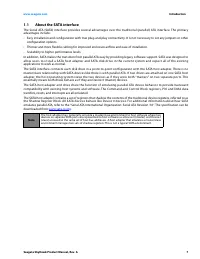
Seagate SkyHawk Product Manual, Rev. A 7 www.seagate.com Introduction 1.1 About the SATA interface The Serial ATA (SATA) inter face provides several advantages over the traditional (parallel) ATA inter face. The primar yadvantages include: • Easy installation and configuration with true plug-and-pla...
Page 9 - Drive Specifications; the drive; Specification summary tables; The specifications listed in; Standard models
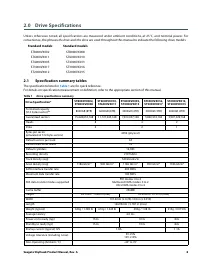
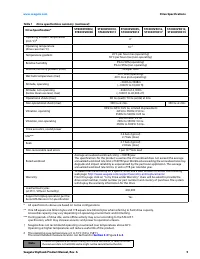
Seagate SkyHawk Product Manual, Rev. A 8 2.0 Drive Specifications Unless other wise noted, all specifications are measured under ambient conditions, at 25°C, and nominal power. Forconvenience, the phrases the drive and this drive are used throughout this manual to indicate the following drive models...
Page 11 - Drive Specifications; Formatted capacity; Default logical geometry
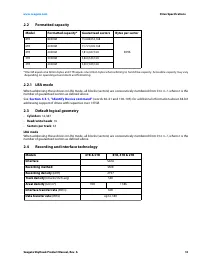
Seagate SkyHawk Product Manual, Rev. A 10 www.seagate.com Drive Specifications 2.2 Formatted capacity *One GB equals one billion bytes and 1TB equals one trillion bytes when referring to hard drive capacity. Accessible capacity may vary depending on operating environment and formatting. 2.2.1 LBA mo...
Page 12 - Physical characteristics; Height; TB models
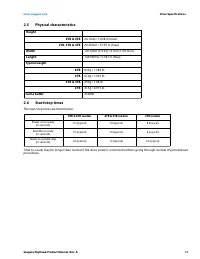
Seagate SkyHawk Product Manual, Rev. A 11 www.seagate.com Drive Specifications 2.5 Physical characteristics 2.6 Start/stop times The start/stop times are listed below. Time-to-ready may be longer than normal if the drive power is removed without going through normal OS powerdownprocedures. Height 8T...
Page 13 - Power specifications; Note
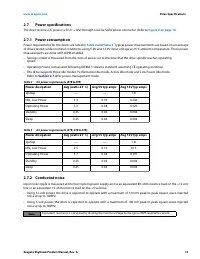
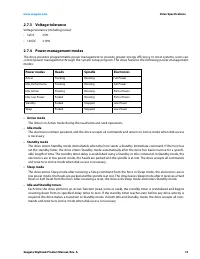
Seagate SkyHawk Product Manual, Rev. A 12 www.seagate.com Drive Specifications 2.7 Power specifications The drive receives DC power (+5V or +12V ) through a native SATA power connector. Refer to Figure 2 on page 18 . 2.7.1 Power consumption Power requirements for the drives are listed in Table 2 and...
Page 15 - Environmental specifications; for base plate; Relative humidity; Operating
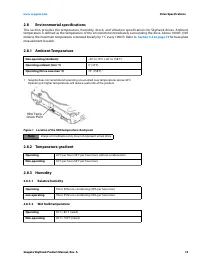
Seagate SkyHawk Product Manual, Rev. A 14 www.seagate.com Drive Specifications 2.8 Environmental specifications This section provides the temperature, humidity, shock, and vibration specifications for SkyHawk drives. Ambienttemperature is defined as the temperature of the environment immediately sur...
Page 16 - Operating shock
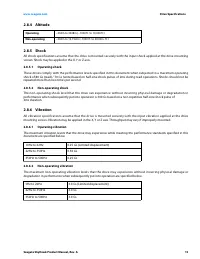
Seagate SkyHawk Product Manual, Rev. A 15 www.seagate.com Drive Specifications 2.8.4 Altitude 2.8.5 Shock All shock specifications assume that the drive is mounted securely with the input shock applied at the drive mountingscrews. Shock may be applied in the X, Y or Z axis. 2.8.5.1 Operating shock T...
Page 17 - Acoustics; Seek; Test
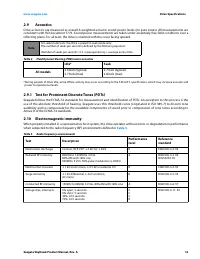
Seagate SkyHawk Product Manual, Rev. A 16 www.seagate.com Drive Specifications 2.9 Acoustics Drive acoustics are measured as overall A-weighted acoustic sound power levels (no pure tones). All measurements areconsistent with ISO document 7779. Sound power measurements are taken under essentially fre...
Page 18 - Warranty; For the latest regulatory and compliance information see:; Corrosive environment
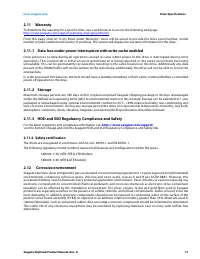
Seagate SkyHawk Product Manual, Rev. A 17 www.seagate.com Drive Specifications 2.11 Warranty To determine the warranty for a specific drive, use a web browser to access the following web page: http://www.seagate.com/support/warranty-and-replacements/ From this page, click on “Is my Drive under Warra...
Page 19 - Configuring and Mounting the Drive; Handling and static-discharge precautions; Caution; Configuring the drive; Table 6; Attaching SATA cabling
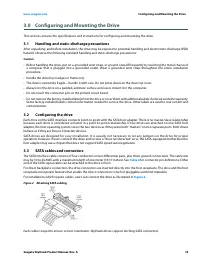
Seagate SkyHawk Product Manual, Rev. A 18 www.seagate.com Configuring and Mounting the Drive 3.0 Configuring and Mounting the Drive This section contains the specifications and instructions for configuring and mounting the drive. 3.1 Handling and static-discharge precautions After unpacking, and bef...
Page 20 - Drive mounting
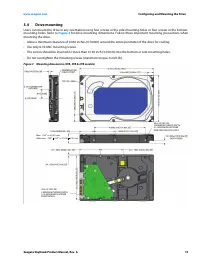
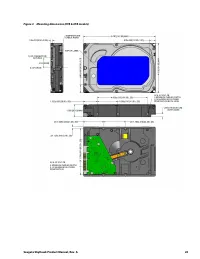
Seagate SkyHawk Product Manual, Rev. A 19 www.seagate.com Configuring and Mounting the Drive 3.4 Drive mounting Users can mount the drive in any orientation using four screws in the side-mounting holes or four screws in the bottom-mounting holes. Refer to Figure 3 for drive mounting dimensions. Foll...
Page 22 - Notes
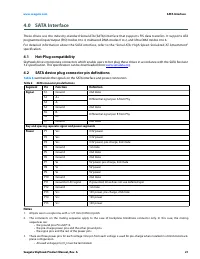
Seagate SkyHawk Product Manual, Rev. A 21 www.seagate.com SATA Interface 4.0 SATA Interface These drives use the industr y-standard Serial ATA (SATA) inter face that suppor ts FIS data transfers. It suppor ts ATAprogrammed input/output (PIO) modes 0 to 4; multiword DMA modes 0 to 2, and Ultra DMA mo...
Page 23 - Supported ATA commands; Command name
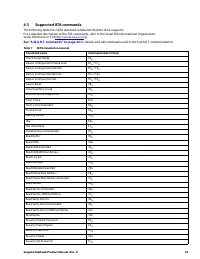
Seagate SkyHawk Product Manual, Rev. A 22 4.3 Supported ATA commands The following table lists SATA standard commands that the drive supports.For a detailed description of the ATA commands, refer to the Serial ATA International Organization:Serial ATA Revision 3.0 ( http://www.sata-io.org ). See “S....
Page 24 - SATA Interface
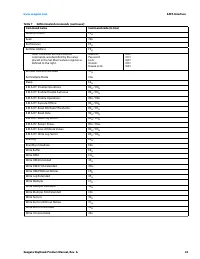
Seagate SkyHawk Product Manual, Rev. A 23 www.seagate.com SATA Interface Security Unlock F2 H Seek 70 H Set Features EF H Set Max Address F9 H Note: Individual Set Max Address commands are identified by the value placed in the Set Max Features register as defined to the right. Address:Password:Lock:...
Page 25 - Word
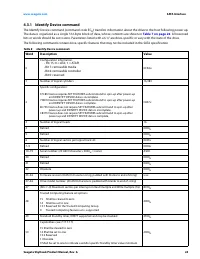
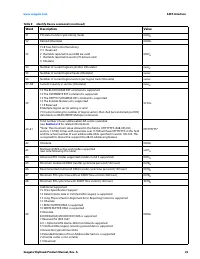
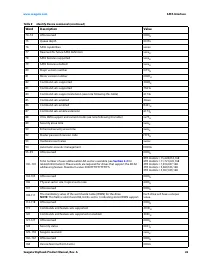
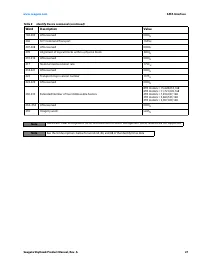
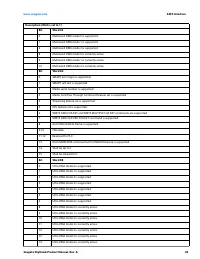
Seagate SkyHawk Product Manual, Rev. A 24 www.seagate.com SATA Interface 4.3.1 Identify Device command The Identify Device command (command code EC H ) transfers information about the drive to the host following power up. The data is organized as a single 512-byte block of data, whose contents are s...
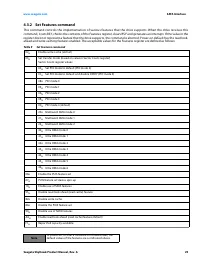
Page 31 - Code in features register
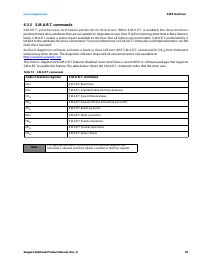
Seagate SkyHawk Product Manual, Rev. A 30 www.seagate.com SATA Interface 4.3.3 S.M.A.R.T. commands S .M .A .R .T. prov id e s n e a r- te r m f a il u re p re d i c t i o n fo r d is k d r i ve s. W h e n S . M . A . R . T. i s e n a b l e d, t h e d r i ve m o n i t o r spredetermined drive attribu...
Page 32 - Seagate Technology LLC
Seagate Technology LLC AMERICAS Seagate Technology LLC 47488 Kato Road, Fremont, California 94538, United States, 510-661-1000 Publication Number: 100870481 , Rev. A July 2020