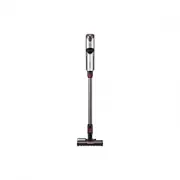
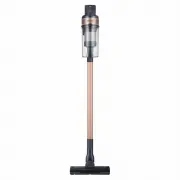
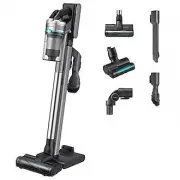
Page 2 - Contents; PREPARATION; Product Specification
2 English Contents PREPARATION Safety information 3 INSTALLATION Name of the parts 13 Accessories 14 Installing the wall mount 15 Assembling the wall mount 15 Installing the wall mount 15 OPERATION Using the vacuum cleaner 16 Charging the vacuum cleaner 16 Using the handle 17 Using the accessories 1...
Page 3 - retain it for your reference.; Safety information
3 English P REP ARA TION • Before operating the appliance, please read this manual thoroughly and retain it for your reference. • Because the following operating instructions cover various models, the characteristics of your vacuum cleaner may differ slightly from those described in this manual. Cau...
Page 4 - General
4 English P REP ARA TION General • Read all instructions carefully. Before switching the vacuum on, make sure that the voltage of your electricity supply is the same as that indicated on the rating plate on the bottom of the battery charger. • WARNING : Do not use the vacuum cleaner on a wet rug or ...
Page 5 - • The plug must be removed from the socket outlet before cleaning or
5 English P REP ARA TION • The plug must be removed from the socket outlet before cleaning or performing maintenance on the vacuum. • The use of an extension cord is not recommended.• If your vacuum cleaner is not operating correctly, switch off the power supply and consult an authorized Samsung ser...
Page 6 - • Do not attempt to open the battery charger. Repairs should be only
6 English P REP ARA TION • Do not charge a non-rechargeable battery.• Do not unplug by pulling on the cord. To unplug, grasp the plug, not the cord. • Do not mutilate or incinerate batteries as they will explode at high temperatures. • Do not attempt to open the battery charger. Repairs should be on...
Page 7 - Installation
7 English P REP ARA TION Installation • If you have a problem with installing the wall mount (battery charger), contact a Samsung service center. • Do not install the wall mount (battery charger) near water, in an area with excessive moisture, or near window, etc. • Do not install the wall mount (ba...
Page 8 - Operation
8 English P REP ARA TION • Do not use a damaged power plug, power cord, or loose power outlet. – Otherwise, electric shock or fire may occur. • If the power cord is damaged, have a Samsung authorized service center replace the power cord with a new power cord. – Otherwise, electric shock or fire may...
Page 9 - CAUTION
9 English P REP ARA TION • This product is intended for household use only. Do not use this product for heavy duty cleaning, commercial cleaning, industrial cleaning, or cleaning outdoors, especially on stone or cement. Do not use to pick up chalk powder in and around billiard tables or in hospital ...
Page 11 - Maintenance
11 English P REP ARA TION • Use both hands to clean with the vacuum. If you clean with one hand, you can damage your wrist or drop the vacuum and cause an injury or damage the vacuum. • When assembling the vacuum, be careful not to catch your fingers or hands in the movement fold of the handle. • Do...
Page 12 - – Otherwise, product damage such as plastic breakage, deformation,
12 English P REP ARA TION • When cleaning the washable parts, do not use alkaline detergent, acid, industrial detergent, air freshener, acetic acid, etc. – Otherwise, product damage such as plastic breakage, deformation, discoloration, printing deterioration, etc. may occur. Washable Parts Dustbin, ...
Page 13 - Name of the parts
13 English INSTALLA TION Name of the parts INSTALLATION 01 Pipe 02 Dustbin 03 Power indicator 04 Power( ) button 05 Outlet filter 06 Handle 07 Cleaning mode button 08 Battery level indicator 09 Battery release button 10 Flex Handle button 11 Battery release lock button 12 Dustbin release button 01 0...
Page 14 - Accessories
14 English INSTALLA TION Accessories Accessories may differ depending on the models. Pipe Dual Action Brush Extension Crevice Tool Combination Tool Mini Motorized Tool Deep Clean Brush Flexible Tool Wall mount (Holder / Screws / Screw anchors) Battery charger / Power cord Battery User manual ❇ ❇ The...
Page 15 - Assembling the wall mount; Installing the wall mount
15 English INSTALLA TION Installing the wall mount CAUTION • Install the wall mount on a hard concrete wall. – If it is installed on a wood or plaster wall, the product may fall. Assembling the wall mount 1 2 01 02 3 01 02 4 5 6 • To re-assemble the wall mount, perform Step ❷ and then Step ❶ above. ...
Page 16 - Using the vacuum cleaner; Charging the vacuum cleaner; Charging with the wall mount
16 English OPERA TION Using the vacuum cleaner CAUTION • Before ejecting the battery, the product must be turned off. (If the battery is forcibly ejected while the vacuum is operating, the vacuum can malfunction.) • Be careful not to drop the battery. If you do, you can injure yourself or damage the...
Page 17 - Ejecting the battery; Re-inserting the battery; Using the handle; Using the cleaning mode button
17 English OPERA TION 01 01 03 02 Ejecting the battery Grip the handle, and then press the battery release button 01 . While pressing the battery release lock button 02 , eject the battery 03 . Click Re-inserting the battery Push the battery in as shown in the illustration until you hear a click. Us...
Page 18 - Using the Flex Handle; Using the accessories; Dual Action Brush
18 English OPERA TION Using the Flex Handle • Press the Flex Handle button to release the Flex Handle. The Flex Handle will now move up and down as you clean. • The movement of the Flex Handle will protect your wrist or arm as it helps you to maneuver the vacuum and clean more comfortably. • To lock...
Page 19 - Mini Motorized Tool; Combination Tool
19 English OPERA TION Mini Motorized Tool Use to clean bedding. 02 01 Combination Tool Use to remove dust from curtains, furniture, sofas, etc. 02 01 Extension Crevice Tool Use to remove dust in grooves of window frames, chinks, corners, etc. Flexible Tool Use to clean ceilings and upper or rear par...
Page 20 - Maintaining the vacuum cleaner; When to empty the dustbin
20 English MAINTENANCE Maintaining the vacuum cleaner CAUTION • Before cleaning the vacuum cleaner, turn it off.• When the dustbin or sponge filter is filled with dust, the vacuum cleaner may stop. You should empty and clean the dustbin before it becomes completely full. When to empty the dustbin Em...
Page 21 - NOTE
21 English MAINTENANCE 3 Empty the dustbin. Pull the lever on the dustbin to remove any tangled dust, and then push the lever back in all the way until you hear it click. 4 After cleaning the dustbin, dry it in the shade. NOTE • If the lever is not pushed in all the way, suction force may decrease. ...
Page 22 - Cleaning the sponge filter; Cleaning the outlet filter
22 English MAINTENANCE Cleaning the sponge filter 1 Open the filter holder. 2 Remove the filter. 3 Shake the filter over garbage can. 4 Wash the filter and dry in the shade. 5 Place in the filter holder. Make sure the filter is dry. 6 Close the filter holder. Cleaning the outlet filter To maintain t...
Page 23 - Cleaning the accessories; Storing the vacuum cleaner; Wall mount
23 English MAINTENANCE Cleaning the accessories Dual Action Brush 1 2 3 4 Click • The cleaning method for the Dual Action Brush and the Deep Clean Brush is the same. • When the rotating brush is disassembled, the Dual Action Brush's EzClean function automatically removes tangled foreign matter or ha...
Page 24 - Battery usage; Notes and cautions
24 English APPENDIX Battery usage NOTE • If your vacuum cleaner does not work after you charge the battery, change the battery. If it still does not work with the new battery, contact a Samsung service center. • When you purchase a battery in a Samsung service center, check for the genuine Samsung l...
Page 27 - Troubleshooting
27 English APPENDIX Troubleshooting Before calling for service, review the problems and solutions below. If none of the suggested solutions resolve your problem, please visit our website at www.samsung.com or call Samsung Customer Care at 1-800-SAMSUNG (726-7864). Note that you will be charged for a...