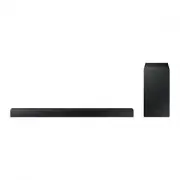
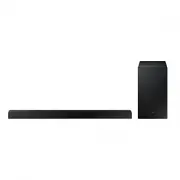
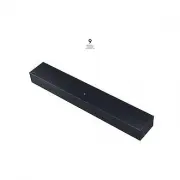
Page 2 - SAFETY INFORMATION; SAFETY WARNINGS; CAUTION
2 GETTING STARTED SAFETY INFORMATION SAFETY WARNINGS TO REDUCE THE RISK OF ELECTRIC SHOCK, DO NOT REMOVE THE COVER (OR BACK). NO USER-SERVICEABLE PARTS ARE INSIDE. REFER SERVICING TO QUALIFIED SERVICE PERSONNEL. CAUTION RISK OF ELECTRIC SHOCK. DO NOT OPEN. This symbol indicates that high voltage is ...
Page 3 - ENG; PRECAUTIONS
ENG 3 GETTING STARTED PRECAUTIONS 99.1mm 99.1mm 68.6 mm 99.1mm Ensure that the AC power supply in your house complies with the power requirements listed on the identification sticker located on the back of your product. Install your product horizontally, on a suitable base (furniture), with enough s...
Page 4 - CONTENTS; GETTING STARTED
4 GETTING STARTED CONTENTS 2 GETTING STARTED 2 Safety Information 5 What’s Included 6 DESCRIPTIONS 6 Front / Right Side Panel 7 Bottom Panel 8 Remote Control 11 INSTALLATION 11 Installing the Soundbar 11 Installing the Wall Mount15 Detaching the Soundbar from the Wall 16 CONNECTIONS 16 Connecting to...
Page 5 - WHAT’S INCLUDED; BEFORE READING THE USER’S MANUAL; Icons used in this manual
ENG 5 GETTING STARTED WHAT’S INCLUDED BEFORE READING THE USER’S MANUAL Note the following terms before reading the user manual. + Icons used in this manual Icon Term Definition Caution Indicates a situation where a function does not operate or settings may be cancelled. Note Indicates tips or instru...
Page 6 - FRONT / RIGHT SIDE PANEL; Right Side of the Soundbar
6 DESCRIPTIONS FRONT / RIGHT SIDE PANEL 1 / (Volume) Button Controls the volume level. The numeric value of the volume level appears in the front panel display. 2 (Source) Button Selects the D.IN, AUX, BT, TV, or USB input. ● While the unit is powered on, pressing the button for more than 3 seconds ...
Page 7 - BOTTOM PANEL; SUBWOOFER
ENG 7 DESCRIPTIONS BOTTOM PANEL DIGITAL AUDIO IN (OPTICAL) USB (5V 0.5A) AUX IN SUBWOOFER DC 24V DIGITAL AUDIO IN (OPTICAL) USB (5V 0.5A) AUX IN DIGITAL AUDIO IN (OPTICAL) USB (5V 0.5A) SUBWOOFER DC 24V DIGITAL AUDIO IN (OPTICAL) SUBWOOFER DC 24V DC 24V (Power Supply In) Connect the DC power adaptor...
Page 8 - REMOTE CONTROL
8 DESCRIPTIONS REMOTE CONTROL Repeat Press to set the Repeat function during music playback from a storage device. OFF - REPEAT : Cancells Repeat Playback. TRACK - REPEAT : Plays a track repeatedly. ALL - REPEAT : Plays all tracks repeatedly. RANDOM - REPEAT : Plays tracks in random order. (A track ...
Page 10 - Controlling the Soundbar using Your TV Remote Control; INSTALLING THE BATTERY IN THE REMOTE CONTROL
10 DESCRIPTIONS + Controlling the Soundbar using Your TV Remote Control 1. Press and hold the SOUND button for more than 5 seconds while the Soundbar is turned on. 2. "ON - TV REMOTE" appears on the Soundbar's display. 3. In the TV's menu, set the TV speaker to external speaker. ● All button...
Page 11 - INSTALLING THE SOUNDBAR; INSTALLING THE WALL MOUNT; Installation Precautions
ENG 11 INSTALLATION INSTALLING THE SOUNDBAR INSTALLING THE WALL MOUNT + Installation Precautions ● Install on a vertical wall only. ● For the installation, avoid a location with high temperature or humidity, or a wall that cannot sustain the weight of the set. ● Check the strength of the wall. If th...
Page 15 - DETACHING THE SOUNDBAR FROM THE WALL
ENG 15 INSTALLATION DETACHING THE SOUNDBAR FROM THE WALL 1. To separate the Soundbar from the wall mount, push it in the direction of the arrow, and then pull it away from the wall as shown. ● Do not hang onto the installed unit and avoid striking or dropping the unit. ● Secure the unit firmly to th...
Page 16 - CONNECTING TO A TV; CONNECTING TO A TV USING A DIGITAL OPTICAL CABLE; Auto Power Link
16 CONNECTIONS ● Do not connect the power cord of this product or your TV to a wall outlet until all connections between components are complete. ● Before moving or installing this product, be sure to turn off the power and disconnect the power cord. CONNECTING TO A TV ● Important: Before you begin,...
Page 17 - TV SOUNDCONNECT
ENG 17 CONNECTIONS TV SOUNDCONNECT You can enjoy TV sound through your Soundbar when it is connected to a Samsung TV that supports the TV SoundConnect function. Connect 1. Turn on the TV and Soundbar. 2. Press the button on the main unit’s right side or the SOURCE button on the remote control to sel...
Page 18 - Using the Bluetooth POWER On function; CONNECTING TO EXTERNAL DEVICES; OPTICAL OR ANALOGUE AUDIO CABLE; AUX Cable
18 CONNECTIONS + Using the Bluetooth POWER On function The Bluetooth POWER On function is available after you have successfully connected the Soundbar to a Bluetooth compatible TV using TV SoundConnect. When the Bluetooth POWER On function is ON, turning the connected TV on or off will turn the Soun...
Page 19 - USB; Before you connect a storage device
ENG 19 CONNECTIONS USB You can play music files located on storage devices through the Soundbar. DIGITAL AUDIO IN (OPTICAL) USB (5V 0.5A) AUX IN SUBWOOFER DC 24V DIGITAL AUDIO IN (OPTICAL) USB (5V 0.5A) AUX IN Display Micro USB to USB adapter Cable (not supplied) USB port 1. Connect a Micro USB to U...
Page 21 - INPUT MODE; AUTO POWER DOWN FUNCTION
ENG 21 FUNCTIONS INPUT MODE Press the button on the main unit’s right side or the SOURCE button on the remote control to select the mode you want. Right Side of the Soundbar Input mode Display Optical Digital input D.IN AUX input AUX BLUETOOTH mode BT TV SoundConnect TV USB mode USB AUTO POWER DOWN ...
Page 22 - BLUETOOTH; TO CONNECT THE SOUNDBAR TO A BLUETOOTH DEVICE
22 FUNCTIONS BLUETOOTH You can connect a Bluetooth device to the Soundbar and enjoy music with stereo sound, all without wires! TO CONNECT THE SOUNDBAR TO A BLUETOOTH DEVICE Check if the Bluetooth device supports the Bluetooth compliant stereo headset function. Bluetooth device Connect 1. Press the ...
Page 23 - TO DISCONNECT THE BLUETOOTH DEVICE FROM A
ENG 23 FUNCTIONS ● If asked for a PIN code when connecting a Bluetooth device, enter <0000>. ● Only one Bluetooth device can be paired at a time. ● The Bluetooth connection will be terminated when you turn the Soundbar off. ● The Soundbar may not perform Bluetooth search or connection correctl...
Page 24 - More About Bluetooth
24 FUNCTIONS ● In Bluetooth connection mode, the Bluetooth connection will be lost if the distance between the Soundbar and the Bluetooth device exceeds 10 meters. ● The Soundbar automatically turns off after 5 minutes in the Ready state. + More About Bluetooth Bluetooth is a technology that enables...
Page 25 - USING THE SAMSUNG AUDIO REMOTE APP; Installing the Samsung Audio Remote App; Launching the Samsung Audio Remote App
ENG 25 FUNCTIONS USING THE SAMSUNG AUDIO REMOTE APP + Installing the Samsung Audio Remote App To control the Soundbar with your smart device and the Samsung Audio Remote app, download the Samsung Audio Remote app from the Google Play store. Market search : Samsung Audio Remote + Launching the Samsun...
Page 26 - SOFTWARE UPDATE; UPDATING PROCEDURE
26 FUNCTIONS SOFTWARE UPDATE DIGITAL AUDIO IN (OPTICAL) USB (5V 0.5A) AUX IN SUBWOOFER DC 24V DIGITAL AUDIO IN (OPTICAL) USB (5V 0.5A) AUX IN Micro USB to USB adapter Cable (not supplied) Storage Device Samsung may offer updates for the Soundbar's system firmware in the future.If an update is offere...
Page 27 - IF UPDATE IS NOT DISPLAYED
ENG 27 FUNCTIONS IF UPDATE IS NOT DISPLAYED 1. Turn off the Soundbar, connect the storage device that contains update files to the Soundbar’s USB port. 2. Disconnect the power cord, reconnect it, and then turn on the Soundbar. ● Insert a storage device containing the firmware update into the USB por...
Page 28 - TROUBLESHOOTING
28 TROUBLESHOOTING TROUBLESHOOTING Before requesting service, please check the following. The unit will not turn on. • Is the power cord plugged into the outlet? ¼ Connect the power plug to the outlet. A function does not work when the button is pressed. • Is there static electricity in the air? ¼ D...
Page 29 - SPECIFICATIONS
ENG 29 APPENDIX SPECIFICATIONS GENERAL USB 5V / 0.5A Weight Main Unit 1.5 kg Subwoofer (PS-WM10) 2.8 kg Dimensions (W x H x D) Main Unit 907.5 x 53.5 x 70.5 mm Subwoofer (PS-WM10) 155.0 x 300.0 x 285.0 mm Operating Temperature Range +5°C to +35°C Operating Humidity Range 10 % to 75 % AMPLIFIER Rated...
Page 30 - LICENCES
30 APPENDIX LICENCES Manufactured under license from Dolby Laboratories. Dolby, Dolby Audio, Pro Logic, and the double-D symbol are trademarks of Dolby Laboratories. For DTS patents, see http://patents.dts.com. Manufactured under license from DTS Licensing Limited. DTS, the Symbol, DTS in combinatio...