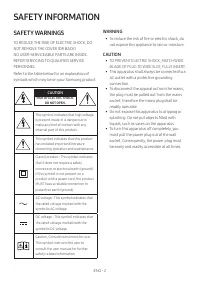
Page 2 - SAFETY INFORMATION; SAFETY WARNINGS; WARNING; CAUTION
ENG - 2 SAFETY INFORMATION SAFETY WARNINGS TO REDUCE THE RISK OF ELECTRIC SHOCK, DO NOT REMOVE THE COVER (OR BACK). NO USER-SERVICEABLE PARTS ARE INSIDE. REFER SERVICING TO QUALIFIED SERVICE PERSONNEL.Refer to the table below for an explanation of symbols which may be on your Samsung product. CAUTIO...
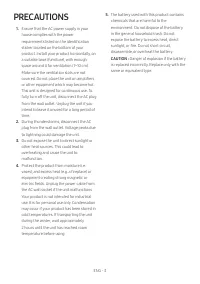
Page 3 - PRECAUTIONS
ENG - 3 PRECAUTIONS 1. Ensure that the AC power supply in your house complies with the power requirements listed on the identification sticker located on the bottom of your product. Install your product horizontally, on a suitable base (furniture), with enough space around it for ventilation (7~10 c...
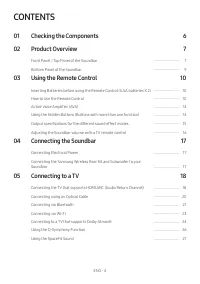
Page 4 - CONTENTS; Checking the Components; Connecting the Soundbar
ENG - 4 CONTENTS 01 Checking the Components 6 02 Product Overview 7 Front Panel / Top Panel of the Soundbar ------------------------- 7 Bottom Panel of the Soundbar ------------------------- 9 03 Using the Remote Control 10 Inserting Batteries before using the Remote Control (AAA batteries X 2) ----...
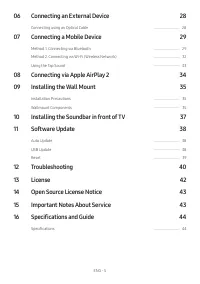
Page 5 - Specifications and Guide
ENG - 5 06 Connecting an External Device 28 Connecting using an Optical Cable ------------------------- 28 07 Connecting a Mobile Device 29 Method 1. Connecting via Bluetooth ------------------------- 29 Method 2. Connecting via Wi-Fi (Wireless Network) ------------------------- 32 Using the Tap Sou...
Page 6 - 1 CHECKING THE COMPONENTS
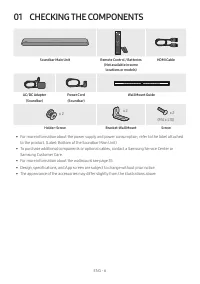
ENG - 6 01 CHECKING THE COMPONENTS SOUND MODE WOOFER TONE CONTROL CH LEVEL Soundbar Main Unit Remote Control / Batteries (Not available in some locations or models) HDMI Cable A TYPE : 450mm AC/DC Adapter (Soundbar) Power Cord (Soundbar) Wall Mount Guide x 2 x 2 (M4 x L10) x 2 Holder-Screw Bracket-W...
Page 7 - 2 PRODUCT OVERVIEW; Front Panel / Top Panel of the Soundbar
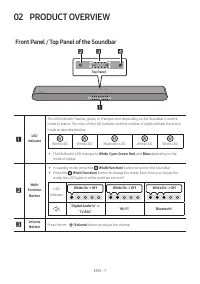
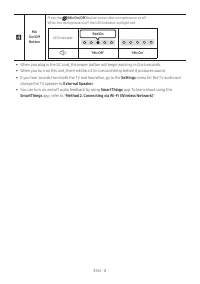
ENG - 7 02 PRODUCT OVERVIEW Front Panel / Top Panel of the Soundbar Top Panel LED indicator The LED Indicator flashes, glows, or changes color depending on the Soundbar's current mode or status. The color of the LED indicator and the number of lights indicate the active mode as described below. W Wh...
Page 9 - Bottom Panel of the Soundbar
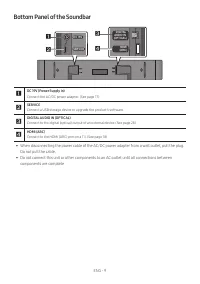
ENG - 9 Bottom Panel of the Soundbar SERVICE DC 19V DIGITAL AUDIO IN (OPTICAL) HDMI (ARC) DIGITAL AUDIO IN (OPTICAL) HDMI (ARC) SERVICE DC 19V DIGITAL AUDIO IN (OPTICAL) HDMI (ARC) SERVICE DC 19V DC 19V (Power Supply In) Connect the AC/DC power adapter. (See page 17) SERVICE Connect a USB storage de...
Page 10 - 3 USING THE REMOTE CONTROL; How to Use the Remote Control
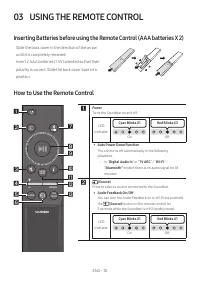
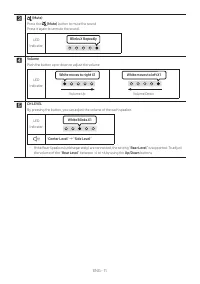
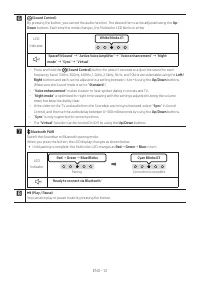
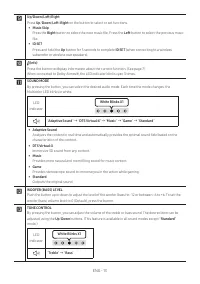
ENG - 10 03 USING THE REMOTE CONTROL Inserting Batteries before using the Remote Control (AAA batteries X 2) Slide the back cover in the direction of the arrow until it is completely removed. Insert 2 AAA batteries (1.5V) oriented so that their polarity is correct. Slide the back cover back into pos...
Page 14 - Using the Hidden Buttons (Buttons with more than one function)
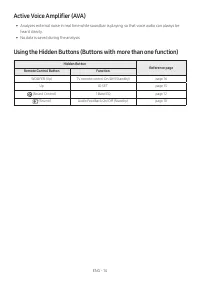
ENG - 14 Active Voice Amplifier (AVA) • Analyzes external noise in real time while soundbar is playing, so that voice audio can always be heard clearly. • No data is saved during the analysis. Using the Hidden Buttons (Buttons with more than one function) Hidden Button Reference page Remote Control ...
Page 16 - Adjusting the Soundbar volume with a TV remote control
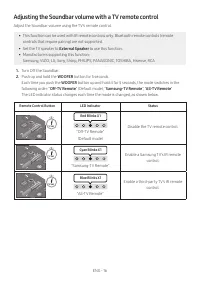
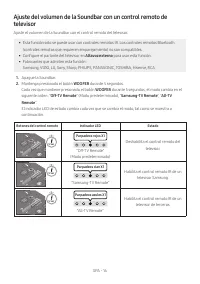
ENG - 16 Adjusting the Soundbar volume with a TV remote control Adjust the Soundbar volume using the TV’s remote control. • This function can be used with IR remote controls only. Bluetooth remote controls (remote controls that require pairing) are not supported. • Set the TV speaker to External Spe...
Page 17 - 4 CONNECTING THE SOUNDBAR; Connecting Electrical Power; Connecting the Samsung Wireless Rear Kit and Subwoofer to your
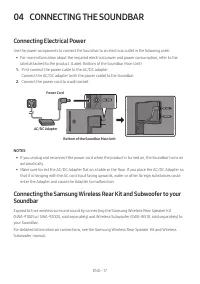
ENG - 17 04 CONNECTING THE SOUNDBAR Connecting Electrical Power Use the power components to connect the Soundbar to an electrical outlet in the following order: • For more information about the required electrical power and power consumption, refer to the label attached to the product. (Label: Botto...
Page 18 - 5 CONNECTING TO A TV; Connecting the TV that supports HDMI ARC (Audio Return Channel)
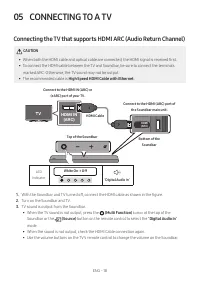
ENG - 18 05 CONNECTING TO A TV Connecting the TV that supports HDMI ARC (Audio Return Channel) CAUTION • When both the HDMI cable and optical cable are connected, the HDMI signal is received first. • To connect the HDMI cable between the TV and Soundbar, be sure to connect the terminals marked ARC. ...
Page 20 - Connecting using an Optical Cable; Pre-connection Checklist
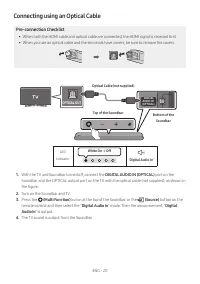
ENG - 20 Connecting using an Optical Cable Pre-connection Checklist • When both the HDMI cable and optical cable are connected, the HDMI signal is received first. • When you use an optical cable and the terminals have covers, be sure to remove the covers. LED Indicator White On -> Off “ Digital A...
Page 21 - Connecting via Bluetooth; The initial connection
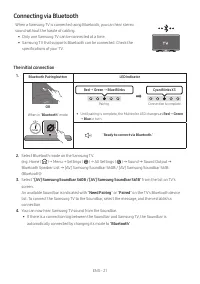
ENG - 21 Connecting via Bluetooth When a Samsung TV is connected using Bluetooth, you can hear stereo sound without the hassle of cabling. • Only one Samsung TV can be connected at a time. • Samsung TV that supports Bluetooth can be connected. Check the specifications of your TV. The initial connect...
Page 22 - If the device fails to connect; Disconnecting the Soundbar from the Samsung TV; Notes on Bluetooth connection
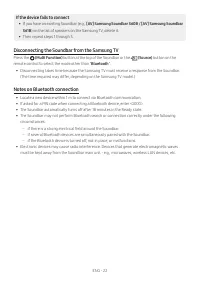
ENG - 22 If the device fails to connect • If you have an existing Soundbar (e.g., [AV] Samsung Soundbar S60B / [AV] Samsung Soundbar S61B ) on the list of speakers on the Samsung TV, delete it. • Then repeat steps 1 through 3. Disconnecting the Soundbar from the Samsung TV Press the (Multi Function)...
Page 24 - Connecting to a TV that supports Dolby Atmos®
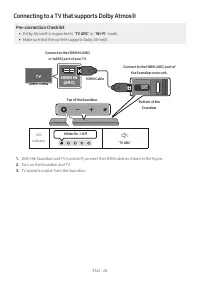
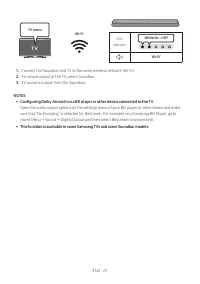
ENG - 24 Connecting to a TV that supports Dolby Atmos® Pre-connection Checklist • Dolby Atmos® is supported in " TV ARC " or " Wi-Fi " mode. • Make sure that the content supports Dolby Atmos®. HDMI IN (ARC) DIGITAL AUDIO IN (OPTICAL) HDMI (ARC) Connect to the HDMI IN (ARC) or (eARC) ...
Page 26 - Using the Q-Symphony Function
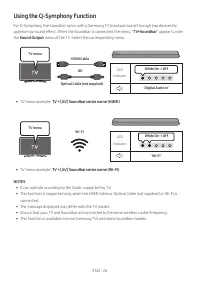
ENG - 26 Using the Q-Symphony Function For Q-Symphony, the Soundbar syncs with a Samsung TV to output sound through two devices for optimum surround effect. When the Soundbar is connected, the menu, “ TV+Soundbar ” appears under the Sound Output menu of the TV. Select the corresponding menu. LED Ind...
Page 27 - Using the SpaceFit Sound; Method 1. Connecting via Soundbar
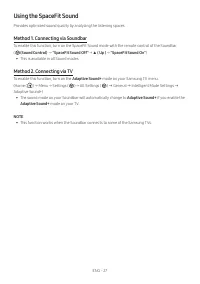
ENG - 27 Using the SpaceFit Sound Provides optimized sound quality by analyzing the listening spaces. Method 1. Connecting via Soundbar To enable this function, turn on the SpaceFit Sound mode with the remote control of the Soundbar.( (Sound Control) → "SpaceFit Sound Off" → ▲ ( Up ) → "...
Page 28 - 6 CONNECTING AN EXTERNAL DEVICE
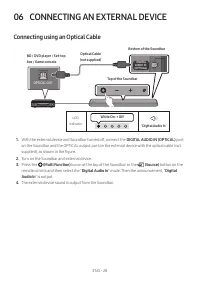
ENG - 28 06 CONNECTING AN EXTERNAL DEVICE Connecting using an Optical Cable LED Indicator White On -> Off “ Digital Audio In ” - AUDIO - R L OPTICAL OUT DIGITAL AUDIO IN (OPTICAL) HDMI (ARC) Bottom of the Soundbar Optical Cable (not supplied) Top of the Soundbar BD / DVD player / Set-top box / Ga...
Page 29 - 7 CONNECTING A MOBILE DEVICE; Method 1. Connecting via Bluetooth
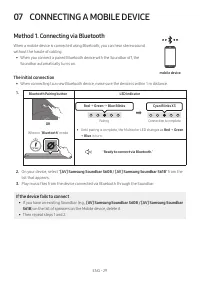
ENG - 29 07 CONNECTING A MOBILE DEVICE Method 1. Connecting via Bluetooth When a mobile device is connected using Bluetooth, you can hear stereo sound without the hassle of cabling. • When you connect a paired Bluetooth device with the Soundbar off, the Soundbar automatically turns on. The initial c...
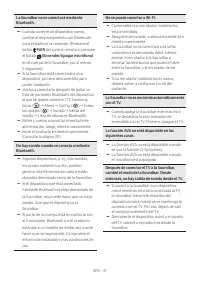
Page 31 - Disconnecting the Bluetooth device from a Soundbar; Disconnecting the Soundbar from the Bluetooth device
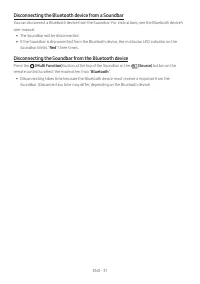
ENG - 31 Disconnecting the Bluetooth device from a Soundbar You can disconnect a Bluetooth device from the Soundbar. For instructions, see the Bluetooth device’s user manual. • The Soundbar will be disconnected. • If the Soundbar is disconnected from the Bluetooth device, the multicolor LED indicato...
Page 33 - Using the Tap Sound; Enable the Tap Sound function
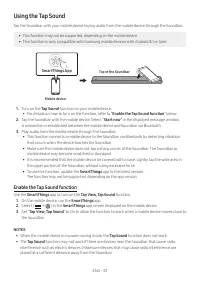
ENG - 33 Using the Tap Sound Tap the Soundbar with your mobile device to play audio from the mobile device through the Soundbar. • This function may not be supported, depending on the mobile device. • This function is only compatible with Samsung mobile devices with Android 8.1 or later. Mobile devi...
Page 34 - 8 CONNECTING VIA APPLE AIRPLAY 2
ENG - 34 08 CONNECTING VIA APPLE AIRPLAY 2 • This feature may not be available in some countries. • This Samsung Soundbar supports AirPlay 2 and requires iOS 11.4 or later. With AirPlay 2, you can stream music, podcasts, and other audio from your Apple devices to the Samsung Soundbar. • Make sure th...
Page 35 - Installation Precautions; Wallmount Components
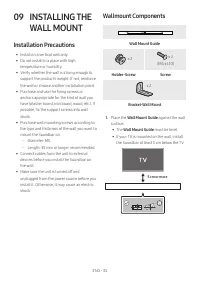
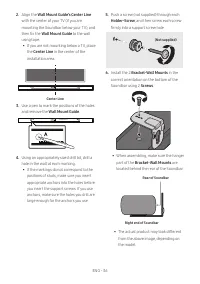
ENG - 35 09 INSTALLING THE WALL MOUNT Installation Precautions • Install on a vertical wall only. • Do not install in a place with high temperature or humidity. • Verify whether the wall is strong enough to support the product’s weight. If not, reinforce the wall or choose another installation point...
Page 37 - 0 INSTALLING THE
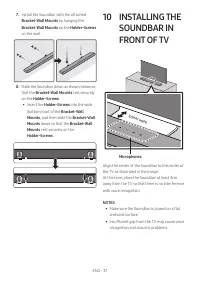
ENG - 37 7. Install the Soundbar with the attached Bracket-Wall Mounts by hanging the Bracket-Wall Mounts on the Holder-Screws on the wall. 8. Slide the Soundbar down as shown below so that the Bracket-Wall Mounts rest securely on the Holder-Screws . • Insert the Holder-Screws into the wide (bottom)...
Page 38 - UPDATE; Auto Update
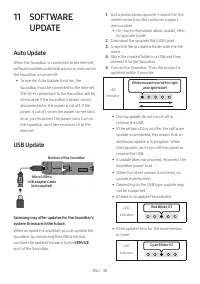
ENG - 38 11 SOFTWARE UPDATE Auto Update When the Soundbar is connected to the Internet, software updates automatically occur even when the Soundbar is turned off. • To use the Auto Update function, the Soundbar must be connected to the Internet. The Wi-Fi connection to the Soundbar will be terminate...
Page 39 - Reset
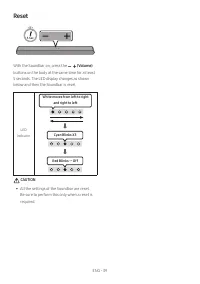
ENG - 39 Reset 5 Sec With the Soundbar on, press the (Volume) buttons on the body at the same time for at least 5 seconds. The LED display changes as shown below and then the Soundbar is reset. LED Indicator Cyan Blinks X3 Red Blinks → Off White moves from left to right and right to left CAUTION • A...
Page 40 - 2 TROUBLESHOOTING
ENG - 40 12 TROUBLESHOOTING Before seeking assistance, check the following. Soundbar does not turn on. ; Check whether the power cord of the Soundbar is correctly inserted into the outlet. Soundbar works erratically. ; After removing the power cord, insert it again. ; Power cycle the external device...
Page 43 - 4 OPEN SOURCE
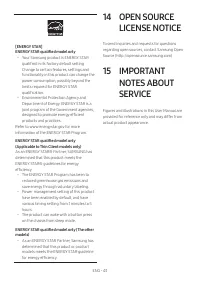
ENG - 43 [ENERGY STAR] ENERGY STAR qualified model only – Your Samsung product is ENERGY STAR qualified in its factory default setting. Change to certain features, settings and functionality in this product can change the power consumption, possibly beyond the limits required for ENERGY STAR qualifi...
Page 44 - 6 SPECIFICATIONS AND GUIDE
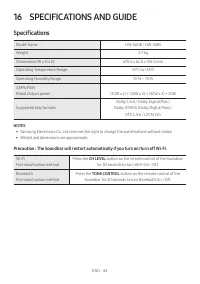
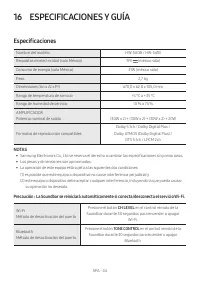
ENG - 44 16 SPECIFICATIONS AND GUIDE Specifications Model Name HW-S60B / HW-S61B Weight 2.7 kg Dimensions (W x H x D) 670.0 x 62.0 x 105.0 mm Operating Temperature Range +5°C to +35°C Operating Humidity Range 10 % ~ 75 % AMPLIFIER Rated Output power (30W x 2) + (30W x 2) + (30W x 2) + 20W Supported ...
Page 45 - INFORMACIÓN DE SEGURIDAD; ADVERTENCIAS DE SEGURIDAD; ADVERTENCIA
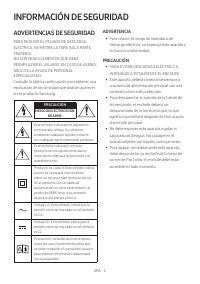
SPA - 2 INFORMACIÓN DE SEGURIDAD ADVERTENCIAS DE SEGURIDAD PARA REDUCIR EL PELIGRO DE DESCARGA ELÉCTRICA, NO RETIRE LA TAPA (NI LA PARTE TRASERA). NO CONTIENE ELEMENTOS QUE DEBA REEMPLAZAR EL USUARIO. EN CASO DE AVERÍA, SOLICITE LA AYUDA DE PERSONAL ESPECIALIZADO.Consulte la tabla a continuación par...
Page 46 - PRECAUCIONES
SPA - 3 PRECAUCIONES 1. Asegúrese de que la fuente de alimentación de CA de su hogar cumpla con los requisitos mencionados en la etiqueta de identificación ubicada en la parte inferior del producto. Instale el producto horizontalmente, sobre una base adecuada (mueble), con espacio suficiente a su al...
Page 47 - ÍNDICE; Verificación de los componentes
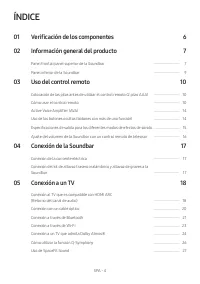
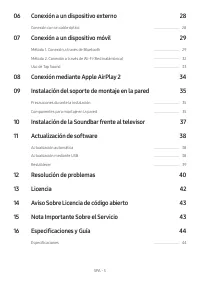
SPA - 4 ÍNDICE 01 Verificación de los componentes 6 02 Información general del producto 7 Panel frontal/panel superior de la Soundbar ------------------------- 7 Panel inferior de la Soundbar ------------------------- 9 03 Uso del control remoto 10 Colocación de las pilas antes de utilizar el contro...
Page 49 - 1 VERIFICACIÓN DE LOS COMPONENTES
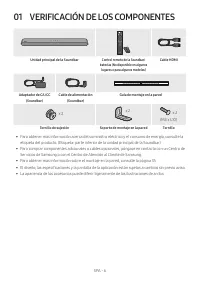
SPA - 6 01 VERIFICACIÓN DE LOS COMPONENTES SOUND MODE WOOFER TONE CONTROL CH LEVEL Unidad principal de la Soundbar Control remoto de la Soundbar/ baterías (No disponible en algunos lugares o para algunos modelos) Cable HDMI A TYPE : 450mm Adaptador de CA/CC (Soundbar) Cable de alimentación (Soundbar...
Page 50 - 2 INFORMACIÓN GENERAL DEL PRODUCTO; Panel frontal/panel superior de la Soundbar
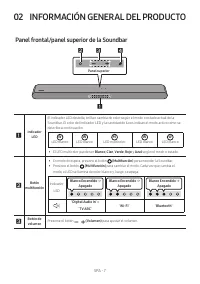
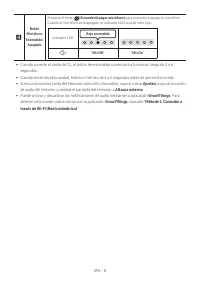
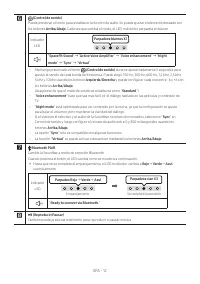
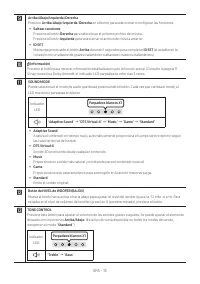
SPA - 7 02 INFORMACIÓN GENERAL DEL PRODUCTO Panel frontal/panel superior de la Soundbar Panel superior Indicador LED El indicador LED destella, brilla o cambia de color según el modo o estado actual de la Soundbar. El color del indicador LED y la cantidad de luces indican el modo activo como se desc...
Page 52 - Panel inferior de la Soundbar
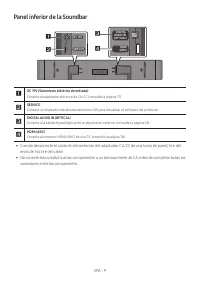
SPA - 9 Panel inferior de la Soundbar SERVICE DC 19V DIGITAL AUDIO IN (OPTICAL) HDMI (ARC) DIGITAL AUDIO IN (OPTICAL) HDMI (ARC) SERVICE DC 19V DIGITAL AUDIO IN (OPTICAL) HDMI (ARC) SERVICE DC 19V DC 19V (Suministro eléctrico de entrada) Conecte el adaptador eléctrico de CA/CC (consulte la página 17...
Page 53 - 3 USO DEL CONTROL REMOTO; Cómo usar el control remoto
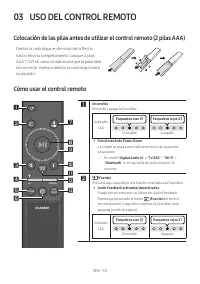
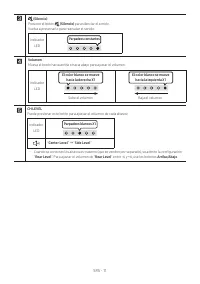
SPA - 10 03 USO DEL CONTROL REMOTO Colocación de las pilas antes de utilizar el control remoto (2 pilas AAA) Deslice la contratapa en dirección de la flecha hasta retirarla completamente. Coloque 2 pilas AAA (1.5V) tal como se indica para que la polaridad sea correcta. Vuelva a deslizar la contratap...
Page 57 - Uso de los botones ocultos (botones con más de una función)
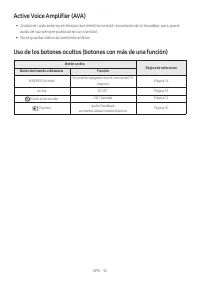
SPA - 14 Active Voice Amplifier (AVA) • Analiza el ruido externo en tiempo real mientras se está reproduciendo la Soundbar, para que el audio de voz siempre pueda oírse con claridad. • No se guardan datos durante este análisis. Uso de los botones ocultos (botones con más de una función) Botón oculto...
Page 58 - sonido
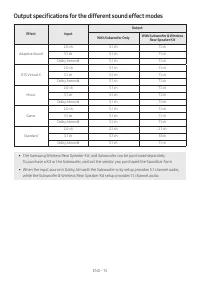
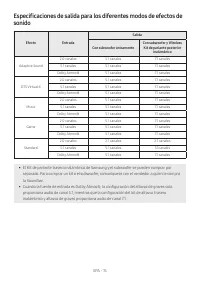
SPA - 15 Especificaciones de salida para los diferentes modos de efectos de sonido Efecto Entrada Salida Con subwoofer únicamente Con subwoofer y Wireless Kit de parlante posterior inalámbrico Adaptive Sound 2.0 canales 5.1 canales 7.1 canales 5.1 canales 5.1 canales 7.1 canales Dolby Atmos® 5.1 can...
Page 60 - 4 CONEXIÓN DE LA SOUNDBAR; Conexión de la corriente eléctrica; la Soundbar
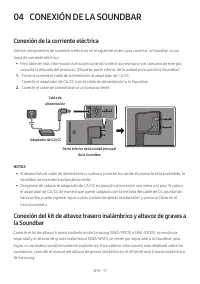
SPA - 17 04 CONEXIÓN DE LA SOUNDBAR Conexión de la corriente eléctrica Use los componentes de suministro eléctrico en el siguiente orden para conectar la Soundbar a una toma de corriente eléctrica: • Para obtener más información acerca del suministro eléctrico necesario y el consumo de energía, cons...
Page 61 - CONEXIÓN A UN TV; Conexión al TV que es compatible con HDMI ARC (Retorno del canal
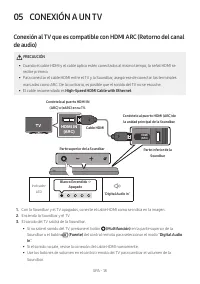
SPA - 18 05 CONEXIÓN A UN TV Conexión al TV que es compatible con HDMI ARC (Retorno del canal de audio) PRECAUCIÓN • Cuando el cable HDMI y el cable óptico estén conectados al mismo tiempo, la señal HDMI se recibe primero. • Para conectar el cable HDMI entre el TV y la Soundbar, asegúrese de conecta...
Page 63 - Conexión con un cable óptico; Lista de verificación previa a la conexión
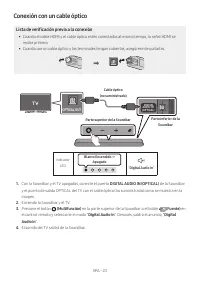
SPA - 20 Conexión con un cable óptico Lista de verificación previa a la conexión • Cuando el cable HDMI y el cable óptico estén conectados al mismo tiempo, la señal HDMI se recibe primero. • Cuando use un cable óptico y las terminales tengan cubiertas, asegúrese de quitarlas. Indicador LED Blanco En...
Page 64 - Conexión a través de Bluetooth; La conexión inicial
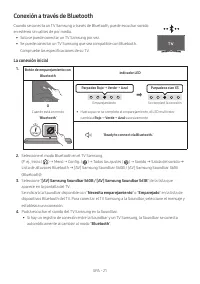
SPA - 21 Conexión a través de Bluetooth Cuando se conecta un TV Samsung a través de Bluetooth, puede escuchar sonido en estéreo sin cables de por medio. • Solo se puede conectar un TV Samsung por vez. • Se puede conectar un TV Samsung que sea compatible con Bluetooth. Compruebe las especificaciones ...
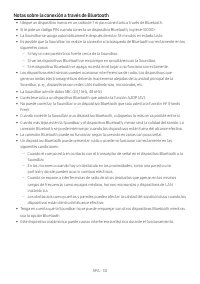
Page 65 - Si el dispositivo no se puede conectar; Desconexión de la Soundbar del TV Samsung; Notas sobre la conexión a través de Bluetooth
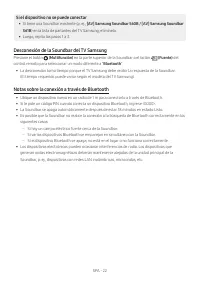
SPA - 22 Si el dispositivo no se puede conectar • Si tiene una Soundbar existente (p. ej., [AV] Samsung Soundbar S60B / [AV] Samsung Soundbar S61B ) en la lista de parlantes del TV Samsung, elimínela. • Luego, repita los pasos 1 a 3. Desconexión de la Soundbar del TV Samsung Presione el botón ( Mult...
Page 66 - Conexión a través de Wi-Fi
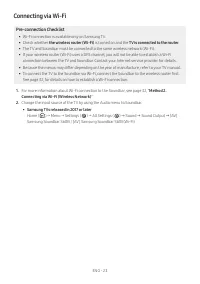
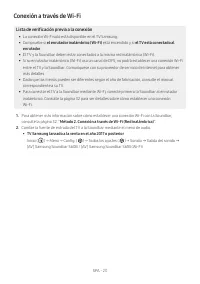
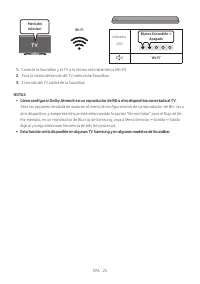
SPA - 23 Conexión a través de Wi-Fi Lista de verificación previa a la conexión • La conexión Wi-Fi solo está disponible en el TV Samsung. • Compruebe si el enrutador inalámbrico (Wi-Fi) está encendido y si el TV está conectado al enrutador . • El TV y la Soundbar deben estar conectados a la misma re...
Page 67 - Conexión a un TV que admita Dolby Atmos®
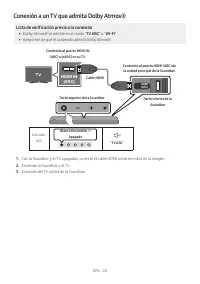
SPA - 24 Conexión a un TV que admita Dolby Atmos® Lista de verificación previa a la conexión • Dolby Atmos® se admite en el modo " TV ARC " o " Wi-Fi ". • Asegúrese de que el contenido admita Dolby Atmos®. HDMI IN (ARC) DIGITAL AUDIO IN (OPTICAL) HDMI (ARC) Conéctelo al puerto HDMI I...
Page 69 - Cómo utilizar la función Q-Symphony
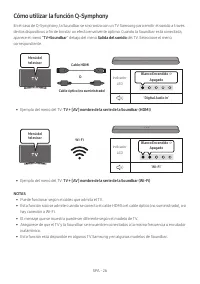
SPA - 26 Cómo utilizar la función Q-Symphony En el caso de Q-Symphony, la Soundbar se sincroniza con un TV Samsung para emitir el sonido a través de dos dispositivos a fin de brindar un efecto envolvente óptimo. Cuando la Soundbar está conectada, aparece el menú “ TV+Soundbar ” debajo del menú Salid...
Page 70 - Uso de SpaceFit Sound; Método 1. Establecer la conexión mediante la Soundbar
SPA - 27 Uso de SpaceFit Sound Brinda una calidad de sonido optimizada mediante el análisis de los espacios de escucha. Método 1. Establecer la conexión mediante la Soundbar Para habilitar esta función, active el modo SpaceFit Sound con el control remoto de la Soundbar.( (Control de sonido) → "S...
Page 71 - 6 CONEXIÓN A UN DISPOSITIVO EXTERNO
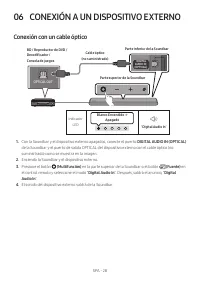
SPA - 28 06 CONEXIÓN A UN DISPOSITIVO EXTERNO Conexión con un cable óptico Indicador LED Blanco Encendido -> Apagado “ Digital Audio In ” - AUDIO - R L OPTICAL OUT DIGITAL AUDIO IN (OPTICAL) HDMI (ARC) Parte inferior de la Soundbar Cable óptico (no suministrado) Parte superior de la Soundbar BD /...
Page 72 - 7 CONEXIÓN A UN DISPOSITIVO MÓVIL; Método 1. Conexión a través de Bluetooth
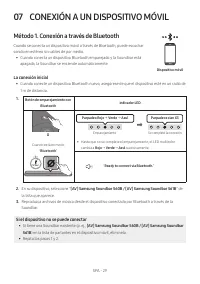
SPA - 29 07 CONEXIÓN A UN DISPOSITIVO MÓVIL Método 1. Conexión a través de Bluetooth Cuando se conecta un dispositivo móvil a través de Bluetooth, puede escuchar sonido en estéreo sin cables de por medio. • Cuando conecta un dispositivo Bluetooth emparejado y la Soundbar está apagada, la Soundbar se...
Page 74 - Desconexión del dispositivo Bluetooth de la Soundbar; Desconexión de la Soundbar del dispositivo Bluetooth
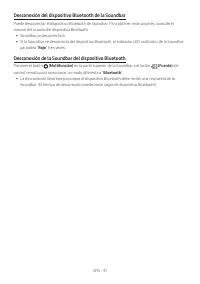
SPA - 31 Desconexión del dispositivo Bluetooth de la Soundbar Puede desconectar el dispositivo Bluetooth de Soundbar. Para obtener instrucciones, consulte el manual del usuario del dispositivo Bluetooth. • Soundbar se desconectará. • Si la Soundbar se desconecta del dispositivo Bluetooth, el indicad...
Page 76 - Uso de Tap Sound; Active la función Tap Sound
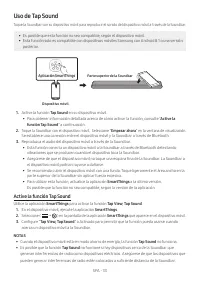
SPA - 33 Uso de Tap Sound Toque la Soundbar con su dispositivo móvil para reproducir el sonido del dispositivo móvil a través de la Soundbar. • Es posible que esta función no sea compatible, según el dispositivo móvil. • Esta función solo es compatible con dispositivos móviles Samsung con Android 8....
Page 77 - 8 CONEXIÓN MEDIANTE APPLE AIRPLAY 2
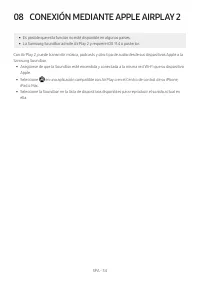
SPA - 34 08 CONEXIÓN MEDIANTE APPLE AIRPLAY 2 • Es posible que esta función no esté disponible en algunos países. • La Samsung Soundbar admite AirPlay 2 y requiere iOS 11.4 o posterior. Con AirPlay 2, puede transmitir música, podcasts y otro tipo de audio desde sus dispositivos Apple a la Samsung So...
Page 78 - Precauciones durante la; Componentes para montaje en
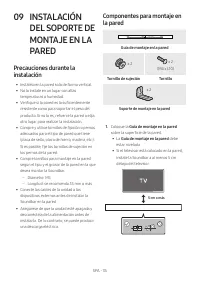
SPA - 35 09 INSTALACIÓN DEL SOPORTE DE MONTAJE EN LA PARED Precauciones durante la instalación • Instálelo en la pared solo de forma vertical. • No lo instale en un lugar con altas temperaturas o humedad. • Verifique si la pared es lo suficientemente resistente como para soportar el peso del product...
Page 80 - 0 INSTALACIÓN DE
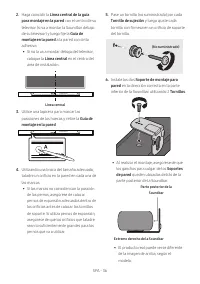
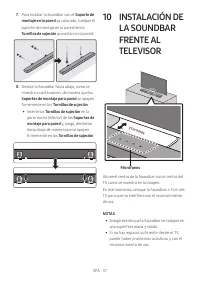
SPA - 37 7. Para instalar la Soundbar con el Soporte de montaje en la pared ya colocado, cuelgue el soporte de montaje en la pared de los Tornillos de sujeción que están en la pared. 8. Deslice la Soundbar hacia abajo, como se muestra a continuación, de manera que los Soportes de montaje para pared ...
Page 81 - Actualización automática
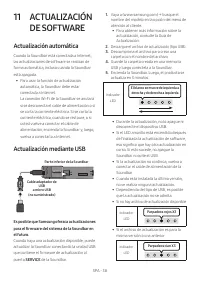
SPA - 38 11 ACTUALIZACIÓN DE SOFTWARE Actualización automática Cuando la Soundbar está conectada a Internet, las actualizaciones de software se realizan de forma automática, incluso cuando la Soundbar está apagada. • Para usar la función de actualización automática, la Soundbar debe estar conectada ...
Page 82 - Restablecer
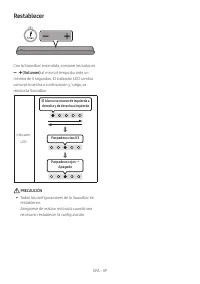
SPA - 39 Restablecer 5 Sec Con la Soundbar encendida, presione los botones (Volumen) al mismo tiempo durante un mínimo de 5 segundos. El indicador LED cambia como se muestra a continuación y, luego, se reinicia la Soundbar. Indicador LED Parpadeos cian X3 Parpadeos rojos → Apagado El blanco se mueve...
Page 83 - 2 RESOLUCIÓN DE PROBLEMAS
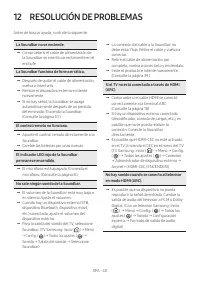
SPA - 40 La Soundbar no se enciende. ; Compruebe si el cable de alimentación de la Soundbar se insertó correctamente en el enchufe. La Soundbar funciona de forma errática. ; Después de quitar el cable de alimentación, vuelva a insertarlo. ; Reinicie el dispositivo externo e intente nuevamente. ; Si ...
Page 87 - 6 ESPECIFICACIONES Y GUÍA; Especificaciones
SPA - 44 16 ESPECIFICACIONES Y GUÍA Especificaciones Nombre del modelo HW-S60B / HW-S61B Requisitos de electricidad (solo México) 19V (méxico sólo) Consumo de energía (solo México) 31W (méxico sólo) Peso 2,7 kg Dimensiones (An x Al x Pr) 670,0 x 62,0 x 105,0 mm Rango de temperatura de servicio +5 °C...







 Samsung HW-S50A User Manual
 Samsung HW-S50B User Manual
 Samsung HW-S60B User Manual
 Samsung HW-S60T User Manual
 Samsung HW-S61A User Manual
 Samsung HW-S61B User Manual
 Samsung HW-S800B User Manual