Page 2 - Features of your Air to water heat pump; High Performance at Low Temperature
02_ Features For easy future reference, write the model and serial number down. You will find your model number on the bottom right side of the air conditioner. Model # Serial # Features of your Air to water heat pump • Running Costs-Reduction of Up to 33.3% Samsung EHS, known for its world class ef...
Page 3 - Contents
Contents _03 ENGLISH Contents SAFETY PRECAUTIONS 04 04 SAFETY PRECAUTIONS CHECKING THE FUNCTION OF BUTTONS AND INDICATORS 08 08 SPACE OPERATION MODE 09 DHW OPERATION MODE 10 TEMPERATURE ADJUSTMENT 11 HOT KEY 12 SCHEDULE13 STATUS INDICATOR 14 OPTIONAL FUNCTION INDICATOR OPERATING BASIC FUNCTION 15 15...
Page 4 - 4_Safety precautions; Safety precautions; Important safety symbols and precautions:; WARNING; CAUTION; FOR INSTALLATION; FOR INSTALLATION
04_Safety precautions Safety precautions Before using your new air conditioner, please read this manual thoroughly to ensure that you know how to safely and efficiently operate the extensive features and functions of your new appliance.Because the following operating instructions cover various model...
Page 5 - FOR POWER SUPPLY
Safety precautions _05 ENGLISH FOR POWER SUPPLY WARNING Remove all foreign substances such as dust or water from the power plug terminals and contact points using a dry cloth on a regular basis. • Unplug the power plug and clean it with a dry cloth.• Failing to do so may result in electric shock or ...
Page 6 - 6_Safety precautions; FOR USING; FOR CLEANING
06_Safety precautions Safety precautions FOR USING WARNING Do not place an object near the outdoor unit that allows children to climb onto the machine. • This may result in children seriously injuring themselves. Do not use this air conditioner for long periods of time in badly ventilated locations ...
Page 7 - Overview; CONTROL PANEL
Overview _07 ENGLISH Overview CONTROL PANEL Display panel Up /Down button DHW hot key Outing hot key Power(Space mode)Power(DHW mode)Mode button (Space mode)Mode button (DHW mode)Set buttonView buttonDaily schedule setting buttonWeekly schedule setting button Cancel/Delete button Silent buttonSc...
Page 8 - 8_ Checking the function; Checking the function of buttons and indicators; SPACE OPERATION MODE
08_ Checking the function Checking the function of buttons and indicators SPACE OPERATION MODE Mode Button Display Function Operationmode Space heating & cooling Operation It can supply heating and cooling to the space when the Power (Space mode) button is on. Results: The heat pump will run in ...
Page 9 - Checking the function; DHW OPERATION MODE
Checking the function _09 ENGLISH DHW OPERATION MODE Mode Button Display Function Operationmode Water heating Operation It can supply warm water to the DHW tank when the Power (DHW mode) button is pressed. Results: Heat pump will be turned on with the domestic water heating mode. DHW mode Economic E...
Page 10 - 0_ Checking the function; TEMPERATURE ADJUSTMENT
10_ Checking the function Checking the function of buttons and indicators TEMPERATURE ADJUSTMENT Mode Button Display Function Operationmode Temperature Adjust To push up and down, modulate the water (Air) temperature. Supply water temperature to the load Domestic water temperature Room temperature O...
Page 11 - HOT KEY
Checking the function _11 ENGLISH HOT KEY Mode Button Display Function Hot key Up To adjust set point temperature, press arrows up or down. Results: The temperature can be set ranges from 5°C to 55°C and be adjusted by 0.5°C increments. Down DHW When the DHW hot key is enabled, both booster heater i...
Page 12 - 2_ Checking the function; SCHEDULE
12_ Checking the function Checking the function of buttons and indicators SCHEDULE Mode Button Display Function Schedule The system operates according to a certain schedule which is pre-defined by users or installers. These schedule setting button is used to program the controller.
Page 13 - STATUS INDICATOR
Checking the function _13 ENGLISH STATUS INDICATOR Mode Status Display Function Status Compressor On This icon indicates that the compressor in the outdoor unit is running. Back-up heater On This icons indicate that the backup heater of the unit is operating, when there is a high demand for heating ...
Page 14 - 4_ Checking the function; OPTIONAL FUNCTION INDICATOR
14_ Checking the function Checking the function of buttons and indicators OPTIONAL FUNCTION INDICATOR Mode Button Display Function Optional function Child Lock The remote controller buttons can be locked to prevent children from changing the settings or from pressing the buttons by accident. Thermos...
Page 15 - Operating basic function; AVAILABLE MODE
Operating basic function _15 ENGLISH Operating basic function AVAILABLE MODE Samsung air to water heat pump system’s operation modes are listed as below.Heating mode and cooling mode are not available at the same time. Heating Water law Cooling + DHW DHW Outing (heating) Cooling Heating + DHW Water ...
Page 16 - 6_ Operating basic function; SPACE HEATING OPERATION
16_ Operating basic function Operating basic function SPACE HEATING OPERATION In this mode, heating function will be activated as required by target water temperature. Target water temperature is determined in 2 ways as described below. • Change set value manually.• Use mode of “Water Law” (Auto mod...
Page 17 - SPACE COOLING OPERATION
Operating basic function _17 ENGLISH SPACE COOLING OPERATION In this mode, heating function will be activated as required by target water temperature. Target water temperature is determined in 2 ways as described below. • Change set value manually. 1. Press Power (Space mode) button to turn on the h...
Page 18 - 8_ Operating basic function; WATER LAW
18_ Operating basic function Operating basic function WATER LAW In this mode, heating function will be activated as required by target water temperature. Target water temperature is determined in 2 ways as described below. • Change set value manually.• Use mode of “Water Law” (Auto mode). 1. Press P...
Page 19 - DOMESTIC WATER HEATING OPERATION
Operating basic function _19 ENGLISH DOMESTIC WATER HEATING OPERATION In this mode, domestic water heating will be activated as required by the water temperature set point. • The set point can be set manually. 1. Press Power (DHW mode) button to turn on DHW tank. The priority between heating/cooling...
Page 20 - 0_ Operating basic function; TARGET ROOM AIR TEMPERATURE OPERATION
20_ Operating basic function Operating basic function TARGET ROOM AIR TEMPERATURE OPERATION In this mode, heating and cooling function will be activated as required by target indoor air temperature. If the indoor’s temperature couldn’t be satisfied, change the water law shift value. If the thermosta...
Page 21 - Operating hot key function; URGENT DHW MODE; To cancel the DHW mode
Operating hot key function _21 ENGLISH Operating hot key function URGENT DHW MODE If you want to enjoy a leisurely bath or need a lot of warm water urgently, select the DHW hot key. When this mode is enabled, it is assured that the full capacity of the heat pump is only delivered for domestic water ...
Page 22 - 2_ Operating hot key function; OUTING MODE; To cancel the outing mode
22_ Operating hot key function Operating hot key function OUTING MODE If you want to take a vacation, you can use the Outing hot key. When this mode is enabled, it is assured that the heat pump maintains your house at a lower temperature to save energy cost. 1. Press Outing Hot key. The heat pump de...
Page 23 - Operating advanced function; SETTING THE TIME
Operating advanced function _23 ENGLISH Operating advanced function SETTING THE TIME Your monobloc unit contains a clock used to start and stop the unit automatically at a given time. You must set the time when you purchase the monobloc unit or reset this system. 1. Push the Set button for 3 seconds...
Page 24 - 4_ Operating advanced function
24_ Operating advanced function Operating advanced function SETTING THE 7-DAY(WEEKLY) SCHEDULE Set the schedules for ON/OFF timer to be repeated each week. Maximum 7 schedules may be set for each day. • When using room thermostat, it is impossible to reserve.• If weekly schedule reserved 7 items is ...
Page 26 - 6_ Operating advanced function
26_ Operating advanced function Operating advanced function SETTING THE 7-DAY(WEEKLY) SCHEDULE Deleting the 7-day (Weekly) schedule 1. Select the schedule from Reservation View Mode. 2. Push the Cancel/Delete button for 3 seconds. 3. The LCD pictures changes to the reservation mode after delete the ...
Page 27 - SETTING THE DAILY SCHEDULE
Operating advanced function _27 ENGLISH SETTING THE DAILY SCHEDULE Set the daily schedule to reserve On / Off timer of DHW (Eco/Std/Power) and Silent mode. At most 15 schedules may be set for day. • If the field setting is for no use DHW and use other manufacturer tank, it is impossible to reserve “...
Page 28 - 8_ Operating advanced function
28_ Operating advanced function On Reservation Off Reservation Operating advanced function SETTING THE DAILY SCHEDULE 4. Set the hour by pressing the Up or Down button. The ‘hour’ indicator will blink. Set the hour and press Set button to save the setting. 5. Set the minute by pressing the Up ...
Page 29 - Deleting the daily schedule; Operating the daily schedule
Operating advanced function _29 ENGLISH Deleting the daily schedule 1. Select the schedule from Reservation View Mode. 2. Push the Cancel/Delete button for 3 seconds. 3. The LCD pictures change to the reservation mode after deleting the schedule. Operating the daily schedule 1. Operate automatically...
Page 30 - 0_ Operating advanced function; FIELD SETTING MODE; Setting the Field Setting Value of wired remote controller
30_ Operating advanced function Operating advanced function FIELD SETTING MODE Setting the Field Setting Value of wired remote controller Field setting mode is to adjust specific functions in accordance with customer’s demands.Field setting mode is easy-to-access and programmable by the wired remote...
Page 32 - 2_ Operating advanced function
32_ Operating advanced function Operating advanced function FIELD SETTING MODE • Code 30 : User’s options for domestic hot water(DHW) tank heating 3011 : Application of DHW tank in user’s system 302 : Heat pump variables for tank temp. control and combination with booster heater 303 : Booster...
Page 34 - 4_ Operating advanced function; Remote Controller Setting Range : Code 10; Space Cooling; Space Heating; DHW Heating
34_ Operating advanced function Operating advanced function FIELD SETTING MODE Remote Controller Setting Range : Code 10 Space Cooling • Target water outlet temperature : Upper limit(#1011, Default 25ºC, Range : 18 ~ 25ºC), Lower limit(#1012, Default 16ºC, Range : 5 ~ 18ºC) - With this default FS...
Page 35 - Water Law for Heating
Operating advanced function _35 ENGLISH Water Law & Room Thermostat : Code 20 Field Setting Value Main Menu & Code Sub Menu Function Description Sub Code Default Min Max Step Unit Water Law Code 20 Outdoor Temp for Water Law (Heating) Point 11 -10 -20 5 1 ˚C Point 12 15 10 20...
Page 36 - 6_ Operating advanced function; Water Law for Cooling
36_ Operating advanced function Operating advanced function FIELD SETTING MODE Water Law for Cooling • Outdoor air temperature range : Lower limit (#2051, Default 30˚C, Range : 25 ~ 35˚C), Upper limit (#2052, Default 40˚C, Range : 35 ~ 45˚C) - With this default settings, the water outlet tempera...
Page 37 - DHW Heating : Code 30
Operating advanced function _37 ENGLISH DHW Heating : Code 30 T(C) T U > T HP MAX T HP MAX T HP OFF T HP ON T U #3021 #3022 #3023 T(C) T U < T HP MAX T HP MAX T U =T HP OFF T HP ON #3021 #3023 Tu : User set temp.T(C) : Temp. (Celcius) 1 t 0 1 0 1 0 Space heating request DHW request DHW oper...
Page 38 - 8_ Operating advanced function; DHW Application
38_ Operating advanced function DHW Application The FSV #3011 in the wired remote controller should be set to “1(Yes)” to use DHW function. Heat Pump Variables for Controlling DHW Tank • Maximum DHW tank temperature with R410A(refrigerant) heat pump operation : FSV #3021, Default 50˚C, Range : 45 ~ ...
Page 40 - 0_ Operating advanced function; Booster Heater Variables for Controlling DHW Tank; Disinfection Function
40_ Operating advanced function Booster Heater Variables for Controlling DHW Tank • The FSV #3031 should be set to “1(On)”(Default) to use booster heater as an additional heat source for DHW tank. • Booster heater startup delay timer : In case of DHW request, this timer will delay the operation of b...
Page 42 - 2_ Operating advanced function; Space Heating : Code 40; Heat Pump Variables for Space Heating
42_ Operating advanced function Operating advanced function FIELD SETTING MODE Space Heating : Code 40 Ta #4012 #3034 Tu Ts DHW by Booster Heater Only Heat Pump Variables for Space Heating • FSV #4011 for DHW priority is set to “0(DHW)”(Default) as a default. Space heating gets a priority by sett...
Page 43 - Backup Heater Variables for Space Heating; External Backup Boiler for Space Heating (Field Option)
Operating advanced function _43 ENGLISH Backup Heater Variables for Space Heating • The FSV #4021 should be set to “1(On)” to use 2-stage electric backup heater in hydro unit as an additional heat source. • To compensate the lowered heat pump heating performance under very cold weather conditions, t...
Page 44 - 4_ Operating advanced function; Outing Mode (Hot Key of Wired Remote Controller)
44_ Operating advanced function Operating advanced function FIELD SETTING MODE Others : Code 50 Outing Mode (Hot Key of Wired Remote Controller) • All the target temperatures – space heating and cooling, water law, DHW, Room temperature – are set to the values defined in the above table under the...
Page 45 - Peak Power Control
Operating advanced function _45 ENGLISH Peak Power Control • If users make contracts with local electric power company for limiting the amount of power consumption when a surge in power usage, users can set FSV of “Forced off”. • According to FSV (#5041), Default is Non-usage. And According to FSV (...
Page 46 - Appendix; TEMPERATURE TABLE; Available operation range; DIP SWITCH SETTING
46_ Appendix Appendix TEMPERATURE TABLE Available operation range Mode Target temperature Display Setting range Current display Setting method Control method Set View Default Available Cooling Leaving water O O 16~25˚C • Min : 5~18˚C• Max : 18~25˚C -50~94˚C Up/Down - Heating Leaving water O O 25~55˚...
Page 47 - MAINTAINING THE UNIT; Maintenance activities
Appendix _47 ENGLISH MAINTAINING THE UNIT Maintenance activities • In order to ensure optimal availability of the unit, a number of checks and inspections on the unit and the field wiring have to be carried out at regular intervals, preferably yearly. This maintenance should be carried out by SAMSUN...
Page 48 - TROUBLESHOOTING TIPS
48_ Appendix Appendix TROUBLESHOOTING TIPS If the unit has some problem to work properly, error codes will be displayed on the wired remote controller. The following table describes the explanation of the error codes. Display Explanation EVA Inlet temp sensor SHORT or OPEN EVA Outlet temp sensor SHO...
Page 49 - Communication
Appendix _49 ENGLISH Communication Display Explanation Abnormal communication B/W Wired remote controller & Hydro Unit Communication tracking error B/W Wired remote controller & Hydro Unit FRAM Read/Write Error(Wired remote controller data error) E654 • Wrong data transmit B/W micom & IC...
Page 51 - ERROR CODES
Appendix _51 ENGLISH ERROR CODES If the unit has some problems and does not work normally, error code is shown on the OUTDOOR UNIT main PBA or LCD of the wired remote controller. Display Explanation Error Source 101 Hydro Unit / OUTDOOR UNIT wire connection error Hydro Unit, OUTDOOR UNIT 162 EEPROM ...
Page 53 - Memo
Page 54 - QUESTIONS OR COMMENTS?
AEEE Yönetmeliğine Uygundur This product is RoHS compliant COUNTRY CALL OR VISIT US ONLINE AT AUSTRIA 0810 - SAMSUNG (7267864, € 0.07/min) www.samsung.com BELGIUM 02-201-24-18 www.samsung.com/be (Dutch) www.samsung.com/be_fr (French) BOSNIA 051 133 1999 www.samsung.com BULGARIA 07001 33 11 , share c...
Page 55 - Air to Water Heat Pump; User manual; imagine; EN ES FR IT PT DE
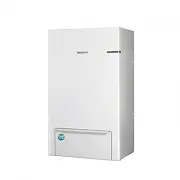
Air to Water Heat Pump -Split Hydro Unit User manual imagine the possibilities Thank you for purchasing this Samsung product. Split Hydro UnitAEN080YDEHAAEN160YDEHAAEN160YDGHA DB68-03238A- 09 EN ES FR IT PT DE


 Samsung AM022TNVDKH/TK
User Manual
Samsung AM022TNVDKH/TK
User Manual
 Samsung AQ07S8GE
User Manual
Samsung AQ07S8GE
User Manual
 Samsung AQ09FAX
User Manual
Samsung AQ09FAX
User Manual
 Samsung AQ09JWAX
User Manual
Samsung AQ09JWAX
User Manual
 Samsung AQ12FAN
User Manual
Samsung AQ12FAN
User Manual
 Samsung AQ12JWAN
User Manual
Samsung AQ12JWAN
User Manual
 Samsung AQ18FENSER
User Manual
Samsung AQ18FENSER
User Manual
 Samsung AR09TXHYBWKN/AR09TXHYBWKX
User Manual
Samsung AR09TXHYBWKN/AR09TXHYBWKX
User Manual
 Samsung AVMGH052EA4
User Manual
Samsung AVMGH052EA4
User Manual
 Samsung AVMKH026EA4
User Manual
Samsung AVMKH026EA4
User Manual
 Samsung AW05B0LA/AW0519
User Manual
Samsung AW05B0LA/AW0519
User Manual
 Samsung AW07A0SE/AW07A1SE
User Manual
Samsung AW07A0SE/AW07A1SE
User Manual
 Samsung AW126JB/127JB
User Manual
Samsung AW126JB/127JB
User Manual
 Samsung AW-1407B
User Manual
Samsung AW-1407B
User Manual
 Samsung AWH126JE
User Manual
Samsung AWH126JE
User Manual
 Samsung F-AR09BXGYCWK1
User Manual
Samsung F-AR09BXGYCWK1
User Manual
 Samsung F-AR09FSSSCWK1
User Manual
Samsung F-AR09FSSSCWK1
User Manual
 Samsung F-AR12BXGYCWK1
User Manual
Samsung F-AR12BXGYCWK1
User Manual
 Samsung F-AR12FSSSCWK1
User Manual
Samsung F-AR12FSSSCWK1
User Manual