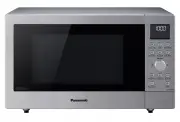
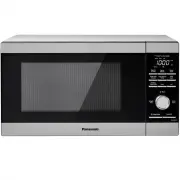
Panasonic NN-CS89LBQPQ - Manuals
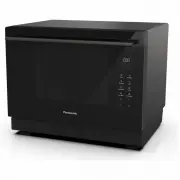
User Manual Panasonic NN-CS89LBQPQ
Summary
- 3 - Table of Contents Before Operation Important Safety Instructions .............................................................................................................................. 5-7Installation and General Instructions ................................................................
- 4 - Table of Contents (continued) Cooking Guide Microwave Recipe Techniques ....................................................................................................................... 70-72Breakfast Basics ...................................................................................
- 5 - Important Safety Instructions Precautions to be taken when using Microwave Ovens for Heating FoodstuffsINSPECTION FOR DAMAGE: A microwave oven should only be used if an inspection confirms all of the following conditions: 1. The door fits squarely, securely and opens and closes smoothly. 2. Th...
- 6 - Important Safety Instructions (continued) Important Instructions WARNING—To reduce the risk of burns, electric shock, fire, injury to persons or excessive microwave energy: 1. Read all instructions before using the microwave oven. 2. Some products such as whole eggs and sealed containers - (fo...
- 7 - Important Safety Instructions (continued) General Use 1. In order to maintain high quality, do not operate the oven when empty. The microwave energy will reflect continuously throughout the oven if no food or water is present to absorb energy. This can lead to damage to the microwave oven incl...
- 8 - Placement of the Oven 1. The oven must be placed on a flat, stable surface, more than 85 cm above the floor. For correct operation, the oven must have sufficient air flow. Allow 15 cm of space on the top of the oven, 10 cm at back. If one side of the oven is 5 cm at one side, the other side or...
- 10 - Microwaves and How They Work (continued) It is important to use the correct container when cooking in a microwave oven. The following will help you make the right selection. How to Test a Container for Safe Microwave Oven Use TO TEST A CONTAINER FOR SAFE MICROWAVE OVEN USE: Fill a 1-cup glass...
- 11 - Oven Accessories Metal Tray 1. The metal tray is for cooking on convection , grill or steam mode only. Do not use on microwave or combination with microwave modes. 2. For 2 level convection cooking, the metal tray can be used as the lower level and the wire shelf can be used as the upper leve...
- 13 - Parts of Your Oven 1 Door handle Pull the door handle downwards to open. When you open the oven door during cooking, the cooking is stopped temporarily without clearing the programmed settings. The cooking is resumed as soon as the door is closed and Start/Set is touched. 2 Oven window 3 Door...
- 15 - Control Panel 1 Display Window 2 Steam (pages 28-30) 3 Convection (pages 26-27) 4 Micro Power (page 24) 5 Grill (pages 25) 6 Combination (pages 31-34) 7 Timer/Clock (page 23, 35-36) 8 Auto Cook (pages 40-56) 9 Auto Steam (pages 58-60) 10 Up/Down Selection (page 22) Select the time, weight or ...
- 16 - Display Window Preheating (Convection) System Cleaning Child Lock Setting Wire Shelf Accessory Placement Metal Tray Grill Tray Convection Steam Grill Microwave Auto Sensor Program Auto Cook Program Temperature Display Number/Character Weight Display More/Less Display Multistage Display Junior...
- 17 - Cooking Modes The diagrams shown below are examples of the accessories. It may vary depending on recipe/dish used. Cooking modes Uses Accessories to use Containers Microwave • Defrosting • Reheating • Melting : butter, chocolate, cheese. • Cooking fish, vegetables, fruits, eggs. • Preparing :...
- 20 - Cookware and Utensil Chart Microwave Grill Convection Steam Combination Combi 1 (Steam + Microwave) Combi 2, 3, 4, 5 (Steam+ Convection) Aluminium foil for shielding yes yes yes for shielding yes Ceramic Plate yes yes yes yes yes yes Browning Dish yes no no no no no Brown paper bags no no no ...
- 22 - Up/Down Selection Select the time, weight or auto menu by tapping . The time, weight or auto menu number appears in the display window. The time/weight can be adjusted quickly by holding key. • Time Setting: To set cooking time or clock. Use the key for the Add Time Function. (see page 37) • ...
- 24 - Microwave Cooking and Defrosting Taps Display Power Example of use Max time 1 tap 1000 W Max Boil water. Cook fresh fruits, vegetables, preserved fruit and candies. 30 minutes 2 taps 800 W Medium High Cook fish and seafood, meat, poultry, eggs and cakes. 1 h 30 minutes 3 taps 270 W Defrost De...
- 25 - Grilling Taps Power Level Example of use 1 tap Grill 1 (high) Garlic Bread, Toast 2 taps Grill 2 (medium) Seafood 3 taps Grill 3 (low) Slice meat or poultry pieces Place food on wire shelf on the upper or middle shelf position in the oven. Place a glass dish on the base of the oven to catch f...
- 26 - Convection Cooking This key offers a choice of convection temperatures 30-230 °C in 10 °C increments. For quick selection of the most commonly used cooking temperatures, the temperatures start at 150 °C and count up to 230 °C then 30 °C. The oven can not preheat at 30-60 °C. Touch Start/Set t...
- 28 - Steam Cooking The oven can be programmed as a steamer to cook vegetables, fish, chicken and rice. There are 2 different steam settings available. Tap Steam until the power you require appears in the display window. Select the cooking time by tapping . Maximum cooking time is 30 minutes. Touch...
- 30 - Steam Shot As required during operation, hold steam for 2 seconds and 1 minute will be added. If you want to add 2 or 3 minutes, tap Steam once or twice within 3 seconds after step 2. The remaining time displayed includes steam shot time. This feature allows you to add steam during cooking (u...
- 31 - Combination Cooking with Steam Steam can be used to cook foods simultaneously with microwave, grill or convection mode. This can often reduce traditional oven cooking times and keep the food moist. Select the cooking time by tapping . Maximum cooking time is 30 minutes. Touch Start/Set. The t...
- 33 - Combination Cooking without Steam Select the cooking time by tapping . Touch Start/Set. The time counts down in the display. Touch if preheating. (only for Combi 7-9) There are 4 combinations settings without steam. Combination cooking is ideal for many foods. The Micro Power cooks them quick...
- 35 - Using the Timer This feature allows you to program the oven as a kitchen timer. It can be also used to program a standing time after cooking is completed or to program a delay start. 1. Delay Start Cooking By using the Timer, you are able to program Delay Start cooking. Touch Timer/Clock once...
- 36 - Using the Timer (continued) Touch Timer/Clock once. Set the time by tapping . (1 hour and 30 minutes). Touch Start/Set. The time counts down in the display. 3. Kitchen Timer INGREDIENT CONVERSION CHART ¼ cup 60 ml ¼ teaspoon 1 ml 1/3 cup 85 ml ½ teaspoon 2 ml ½ cup 125 ml 1 teaspoon 5 ml ²/3 ...
- 37 - Using the Add Time Function This feature allows you to add cooking time at the end of previous cooking. After cooking, tap to select Add Time function. Maximum cooking time: Touch Start/Set. Time will be added. The time in the display window will count down. Micro Power 1000 W 30 minutes Stea...
- 40 - Sensor Reheat Program This unique feature ‘the Genius’ built in sensor allows you to simply reheat a chilled meal . It is not necessary to select the power level, weight or cooking time. The built-in sensor measures the humidity of the food and calculates the Micro Power level together with a...
- 42 - Turbo Defrost Touch Start/Set. The display reminds you which cooking modes are in use. Remember to turn or shield the food during defrosting. With this feature you can defrost frozen food according to the weight. The weight is programmed in grams. The weight starts from the minimum weight for...
- 43 - Defrosting Tips and Techniques Preparation for Freezing The quality of the cooked foods comes from the foods before freezing, freezing ways and defrosting tips and times. So it is important to purchase fresh and high quality foods. And freeze them immediately. Thick cling film, package, freez...
- 44 - Auto Beverage Programs Touch Start/Set. The display reminds you which cooking modes are in use. Remember to stir the beverage before and after heating. Select the weight of the food by tapping . Select desired menu by tapping . Tap Auto Cook key once. Touch to confirm the program. Program Wei...
- 45 - Re-Bake Bread Programs Program Weight * Accessories Instructions 5. Baguette/ Crusty Rolls 100 g - 500 g To re-bake baguettes and crusty rolls. This program is suitable for reheating, browning and crisping prepurchased baguettes and rolls from room temperature. Ensure height of baguette/rolls...
- 46 - Auto Cook Programs Touch Start/Set. The display reminds you which accessory to use and which cooking modes are in use. Select the weight of the food by tapping . The weight will count up in 10 g steps except No.17 and No.18. Select desired menu by tapping . (refer to pages 46-50) Tap Auto Coo...
- 49 - Junior Menu Programs The Junior Menu offers a range of programs catering for babies, toddlers and older children - great for time saving and convenience. For operation refer to top of page 46. Program Weight * Accessories Instructions 17. Mug Cake 1 (200 g ) or 2 (400 g ) For cooking one or t...
- 51 - Tip for Auto Weight Programs Note The auto weight programs are designed to take the guesswork out of cooking or reheating your food. They must only be used for the foods described. 1. Only cook foods within the weight ranges described (pages 42-50). 2. Only use the accessories as indicated on...
- 52 - Auto Sensor Programs A variety of food may be cooked without having to enter the cooking time, weight or the power level. Tap Auto Cook key once Touch Start/Set. More / Less Control Preferences for degree of cooking vary for each individual. After having used Auto Sensor Programs a few times,...
- 54 - Healthy Grill Programs Touch Start/Set. The display reminds you which cooking modes are in use. Remember to turn or shield the food during defrosting. Select the weight of the food by tapping . The weight will count up in 10 g steps. Select desired menu by tapping . Tap Auto Cook key once. To...
- 55 - Cleaning Programs Select F1 (Drain Water) by tapping . Tap Auto Cook key once. F1. Drain Water Water is pumped through the system to clean the pipes. The water is drained into the drip tray. Touch Start/Set. Empty the drip tray after the program has finished. Add 100 ml of water to the water ...
- 57 - Cleaning the Water Tank Clean with a soft sponge in water. Remove the water tank and clean the compartment where the water tank is inserted. Open the water supply cap, remove the lid and pipe cap and clean. Pipe cap Ensure it faces downwards If the pipe cap is difficult to remove, wiggle from...
- 58 - Auto Steam Programs This feature allows you to steam some of your favourite foods by setting the weight only. The oven determines the steam level and the cooking time automatically. Select the category and set the weight of the food. The weight is programmed in grams. For quick selection, the...
- 61 - Defrosting Chart Preparation for Freezing: 1. Heavy-duty plastic wraps, bags and freezer wrap are suitable. 2. Freeze meats, poultry and fish in packages with only 1 or 2 layers of food. To aid in separating layers, place two pieces of wax paper between them. 3. REMOVE ALL AIR and seal secure...
- 62 - Reheating Charts The times given in the charts below are a guideline only, and will vary depending on STARTING temperature, dish size and quantity. Pastry or bread items reheated by microwave will be soft not crisp. Food Weight / Quantity Power Level Time to Select (approx) Instructions /Guid...
- 63 - Cooking Charts Food Weight/ Quantity Power Level Time to Select (approx.) Instructions Meat Lamb joint 450 g 180 °C Medium: 25 mins per 450 g plus 15 mins Preheat oven. Place joint on metal tray in lower shelf position. Once cooked allow the joint to stand for 10 minutes - this will make the ...
- 64 - ALL THESE THINGS ARE NORMAL: The oven causes interference with my TV. Some radio, TV, Wi-Fi, cordless telephone, baby monitor, blue tooth or other wireless equipment interference might occur when you cook with the microwave oven. This interference is similar to the interference caused by smal...
- 65 - Before Requesting Service PROBLEM POSSIBLE CAUSE REMEDY Oven will not turn on. The oven is not plugged in securely. Remove plug from outlet, wait 10 seconds and re-insert. Circuit Breaker or fuse is tripped or blown. Contact the specified service center. There is a problem with the outlet. Pl...
- 66 - Turn the oven off and remove the power plug from the wall socket before cleaning. Notes: 1. When using the Grill, Combination, Convection mode, some foods may inevitably splatter grease on to the oven walls. If the oven is not cleaned, occasionally it may start to "smoke" during use. ...
- 67 - Technical Specifications Power Supply: 230 - 240 V, 50 Hz Power Consumption*: Microwave 4.2 A, 960 W Heater (Grill) 5.7 A, 1350 W Heater (Convection) 5.8 A, 1380 W Heater (Steam) 5.6 A, 1330 W Combination 8.1 A, 1960 W Power Requirement (Maximum) : 8.1 A, 1960 W Output*: Microwave 1000 W Heat...
Techniques for PreparationCovering Covering food minimizes the microwave cooking time.Because microwave cooking is done with time and not direct heat, the rate of evaporation cannot be easily controlled. However, this can be corrected by using different materials to cover dishes. Plastic wrap is the...
Menu Planning for Microwave Cooking How to Keep Everything Hot at The Same Time Plan your meals so that the food will not all need last minute cooking or attention at the same time. The special features of microwave cookery make it easy to serve meals with everything piping hot. Cooking of some food...
BACON Serves: 1 to 2 Ingredients: 2 rashers bacon Method: 1. Place rashers between two sheets of paper towel on a dinner plate. 2. Cook on 1000 W for 1½ to 2 minutes. BACON AND EGG IN A CUP Serves: 1 Ingredients: 2 rashers bacon 1 × 60 g egg 1 tablespoon grated cheddar cheese Method: 1. Place bacon ...
PEA AND HAM SOUP Serves: 6 Ingredients: 2½ cups green split peas 850 g smoked ham hock 1 medium onion, chopped 1 tablespoon fresh thyme leaves1 bay leaf 6 cups chicken stock ½ cup frozen peas Method: 1. Wash split peas and place in a 2-litre bowl with 1-litre of water. Cover and allow soaking for 8 ...
Directions for Cooking Fish and Shellfish by Micro Power Clean fish before starting the recipe. Arrange fish in a single layer, do not overlap edges. Prawns and scallops should be placed in a single layer. To Cook by Time: Cover dish with plastic wrap. Cook on the power level and for the minimum tim...
Directions for Cooking Whole Poultry by Microwave CookingSeason as desired, but salt after cooking. Browning sauce (e. g . soy, Worcestershire) mixed with equal parts of butter will enhance the appearance. Poultry may be stuffed or unstuffed. Tie legs together with cotton string. Place on microwave ...
Directions for Cooking Tender Cuts of Meat by Microwave For best results, select roasts that are uniform in shape.Place meat on a microwave suitable rack in a rectangular dish. Beef rib roast should be placed cutside down. Other bone-in roasts should be placed fat-side down. Boneless roasts should b...
Directions for Cooking Vegetables by Microwave Fresh Vegetables Place vegetables in a casserole dish. Add 2 to 3 tablespoon of water per 500 g of vegetables. Add salt to water or add after cooking. Do not place salt directly on vegetables. Cover dish with glass lid or plastic wrap.Cook on 1000 W acc...
Cooking Fresh Vegetables by Micro Power Vegetables should be covered and cooked on 1000 W for best results. Weights given are trimmed weights. VEGETABLE QUANTITY COOKING PROCEDURE APPROX. COOKING TIME (in minutes) on 800 W Asparagus 250 g Covered dish with ¼ cup water 3 to 4 Beans (finely sliced) 25...
Directions for Cooking Rice and Other Grains by Microwave Follow directions in chart on page 122 for recommended dish size, amounts of water and cooking time. Add grain to cold water. Add salt and butter according to package directions. Cook on 1000 W for time recommended in chart. Allow to stand co...
CELEBRATION CAKE Serves: 8 Ingredients: 200 g butter or margarine 200 g dark muscovado sugar 4 eggs, beaten 200 g plain flour 50 g ground almonds 100 ml sherry 75 g candied peel 75 g glace cherries, roughly chopped 250 g currants 250 g raisins 100 g pecan nuts, broken into pieces finely grated zest ...
CHRISTMAS PUDDING Serves: 6 to 8 Ingredients: 1 cooking apple, peeled and grated 1 carrot, peeled and grated 1 orange, juice and grated rind 400 g mixed dried fruit 45 ml brandy 15 ml black treacle 50 g self-raising flour pinch of salt 15 ml cocoa 5 ml mixed spice 3 ml nutmeg 100 g shredded suet 150...
Panasonic Microwaves Manuals
-
Panasonic NE-1054F
User Manual
-
Panasonic NE-1054F
Manual
-
Panasonic NN-CD58JSQPQ
User Manual
-
Panasonic NN-CD87KS
User Manual
-
Panasonic NN-CD87KS
Manual
-
Panasonic NN-CD87KSQPQ
User Manual
-
Panasonic NNCD997S
User Manual
-
Panasonic NNCF770M
User Manual
-
Panasonic NN-CF770M
User Manual
-
Panasonic NN-CF874BQPQ
User Manual
-
Panasonic NN-CS894SQPQ
User Manual
-
Panasonic NN-CT56MBQPQ
User Manual
-
Panasonic NNDS592B
User Manual
-
Panasonic NN-DS596BQPQ
User Manual
-
Panasonic NN-DS59NBQPQ
User Manual
-
Panasonic NNGD682S
User Manual
-
Panasonic NN-GM230
User Manual
-
Panasonic NN-GM231W
User Manual
-
Panasonic NN-GM342W
User Manual
-
Panasonic NN-GM342WZPE
User Manual